

Preface
Here’s the diagram first.
In this post, we’ll learn how to parse most multimedia file formats with one set of code and turn them into a common model — a normalized metadata key-value space.
Contents
Structure diagram 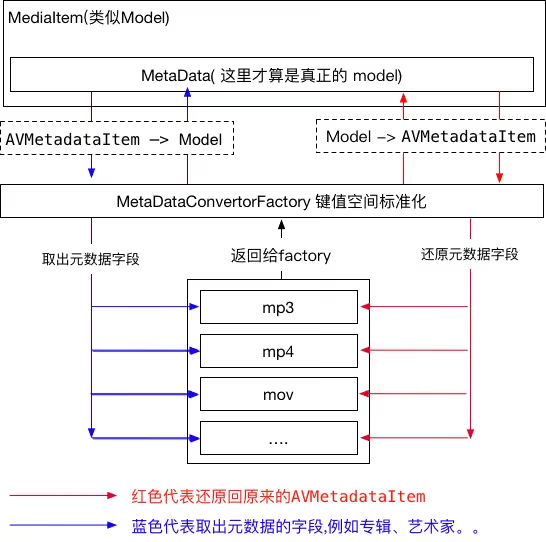
The class code
- MediaItem (a directly exposed interface)
- MetaData (the metadata model)
- Genre (genre)
- AVMetadataItem+Additions
- MetadataDefines
- MetadataKit
- Converters (a folder containing the following:)
- MetadataConverter (a Protocol that stores/reads
AVMetadataItem) - MetadataConverterFactory
- DefaultMetadataConverter
- ArtworkMetadataConverter
- CommentMetadataConverter
- TrackMetadataConverter
- DiscMetadataConverter
- GenreMetadataConverter
- MetadataConverter (a Protocol that stores/reads
MediaItem
This class mainly exposes a direct interface to the outside world. You can call and use it with code like this:
1
2
3
4
5
6
7
8
__weak typeof(self) weakSelf = self;
MediaItem *item = [[MediaItem alloc] initWithURL:self.url];
[item prepareWithCompletionHandler:^(BOOL complete) {
    __strong typeof(weakSelf) strongSelf = weakSelf;
    [strongSelf refreshDataByItem:item];
    NSLog(@"%@",[item modelDescription]);
}];
The implementation part
1
2
3
4
5
6
7
8
9
10
11
12
13
14
15
16
17
18
19
#import <Foundation/Foundation.h>
#import <AVFoundation/AVFoundation.h>
#import "MetaData.h"
typedef void(^CompletionHandler)(BOOL complete);
@interface MediaItem : NSObject
@property (strong, readonly) NSString *filename;
@property (strong, readonly) NSString *filetype;
@property (strong, readonly) MetaData *metadata;
@property (readonly, getter = isEditable) BOOL editable;
- (id)initWithURL:(NSURL *)url;
/**
 After this method completes, the metadata is available if it succeeds.

 @param handler callback block
 */
- (void)prepareWithCompletionHandler:(CompletionHandler)handler;
- (void)saveWithCompletionHandler:(CompletionHandler)handler;
@end
@end
For the .m file, please refer to the source code — there’s a lot of it, so I won’t go into detail here.
Used when the block completes. Here are the media formats currently supported for reading metadata:
- m4a
- mov
- mp4
- mp3
Note: mp3 files are not editable, so they can’t be modified, such as changing the artist name. If you need to edit them, try other professional software.
I tried the demo on macOS and editing files works fine, but on iOS I couldn’t save changes for other formats either. If you find a solution, feel free to leave a comment or email me. Thank you very much.
MetaData
1
2
3
4
5
6
7
8
9
10
11
12
13
14
15
16
17
18
19
20
21
22
23
#import <Foundation/Foundation.h>
#import <AVFoundation/AVFoundation.h>
@class Genre; //风格  eg: 蓝调、 古典 ....
@interface MetaData : NSObject
@property (copy) NSString *name;
@property (copy) NSString *artist;
@property (copy) NSString *albumArtist;
@property (copy) NSString *album;
@property (copy) NSString *grouping;
@property (copy) NSString *composer;
@property (copy) NSString *comments;
@property (strong) UIImage *artwork;
@property (strong) Genre *genre;
@property NSString *year;
@property id bpm;
@property NSNumber *trackNumber;
@property NSNumber *trackCount;
@property NSNumber *discNumber;
@property NSNumber *discCount;
- (void)addMetadataItem:(AVMetadataItem *)item withKey:(id)key;
- (NSArray *)metadataItems;
@end
Looking at the code above, you’ve probably guessed it — this is exactly the real model we need, e.g. the model parsed out of an mp3 file.
There’s a lot here, and some values may be missing, so please do your own checking.
MetadataConverter
This protocol exists to support unified parsing of all multimedia files. For example, mp3 and mp4 are different file formats — although they share many of the same keys, their data structures are definitely different. This requires a unified protocol: for instance, given a URL, return a model. To deal with uneven key-value layouts, this protocol was created.
1
2
3
4
5
6
7
8
9
10
11
12
13
14
15
16
17
18
19
@protocol zh <NSObject>
@optional
/**
 Converts AVMetadataItem to a Model for UI display

 @param item AVMetadataItem
 @return model
 */
- (id)displayValueFromMetadataItem:(AVMetadataItem *)item;
/**
 Maps AVMetadataItem to a common field

 @param value the value of a key extracted from the media metadata
 @param item AVMetadataItem
 @return AVMetadataItem
 */
- (AVMetadataItem *)metadataItemFromDisplayValue:(id)value
                                withMetadataItem:(AVMetadataItem *)item;
@end
MetadataConverterFactory
This class is used to uniformly output models that conform to the MetadataConverter protocol and to find the appropriate converter for the corresponding format.
1
2
3
4
5
6
7
8
9
10
11
12
13
14
15
16
17
18
19
20
21
22
23
@interface MetadataConverterFactory : DefaultMetadataConverter
- (id <MetadataConverter>)converterForKey:(NSString *)key;
@end

@implementation MetadataConverterFactory
- (id <MetadataConverter>)converterForKey:(NSString *)key{
    id <MetadataConverter> converter = nil;
    if ([key isEqualToString:MetadataKeyArtwork]) {
        converter = [[ArtworkMetadataConverter alloc] init];
    } else if ([key isEqualToString:MetadataKeyTrackNumber]) {
        converter = [[TrackMetadataConverter alloc] init];
    } else if ([key isEqualToString:MetadataKeyDiscNumber]) {
        converter = [[DiscMetadataConverter alloc] init];
    } else if ([key isEqualToString:MetadataKeyComments]) {
        converter = [[CommentMetadataConverter alloc] init];
    } else if ([key isEqualToString:MetadataKeyGenre]) {
        converter = [[GenreMetadataConverter alloc] init];
    } else {
        converter = [[DefaultMetadataConverter alloc] init];
    }
    return converter;
}
@end
DefaultMetadataConverter
A simple implementation of the MetadataConverter protocol.
1
2
3
4
5
6
7
8
9
10
11
12
13
14
15
16
17
@interface DefaultMetadataConverter : NSObject <MetadataConverter>

@end

@implementation DefaultMetadataConverter

- (id)displayValueFromMetadataItem:(AVMetadataItem *)item {
    return item.value;
}

- (AVMetadataItem *)metadataItemFromDisplayValue:(id)value
                                withMetadataItem:(AVMetadataItem *)item {
    AVMutableMetadataItem *metadataItem = [item mutableCopy];
    metadataItem.value = value;
    return metadataItem;
}
ArtworkMetadataConverter
Implements the MetadataConverter protocol to extract the album artwork.
I’ll skip the .h file here and only show the .m (the .h has nothing in it — you can refer to the demo).
1
2
3
4
5
6
7
8
9
10
11
12
13
14
15
16
17
18
19
20
21
22
23
24
25
26
@implementation ArtworkMetadataConverter
- (id)displayValueFromMetadataItem:(AVMetadataItem *)item {
    UIImage *image = nil;  //下面是核心代码取出图片
    if ([item.value isKindOfClass:[NSData class]]) {                        // 1
        image = [[UIImage alloc] initWithData:item.dataValue];
    }
    else if ([item.value isKindOfClass:[NSDictionary class]]) {             // 2
        NSDictionary *dict = (NSDictionary *)item.value;
        image = [[UIImage alloc] initWithData:dict[@"data"]];
    }
    return image;
}

- (AVMetadataItem *)metadataItemFromDisplayValue:(id)value
                                withMetadataItem:(AVMetadataItem *)item {

    AVMutableMetadataItem *metadataItem = [item mutableCopy];

    UIImage *image = (UIImage *)value;
    metadataItem.value = UIImagePNGRepresentation(image);                          // 3

    return metadataItem;
}

@end
For mp3 (ID3v2 format), the way images are extracted may differ. At 1, we determine which format it is; at 3, we convert the UIImage to NSData and put it back.
One thing to note is the type of the returned AVMetadataItem. Since AV Foundation can’t write ID3 metadata, AVMutableMetadataItem is used here to store the artwork.
AVMutableMetadataItem is a subclass of AVMetadataItem.
CommentMetadataConverter
1
2
3
4
5
6
7
8
9
10
11
12
13
14
15
16
17
18
19
20
21
22
23
24
25
@implementation CommentMetadataConverter

- (id)displayValueFromMetadataItem:(AVMetadataItem *)item {

    NSString *value = nil;
    if ([item.value isKindOfClass:[NSString class]]) {                      // 1
        value = item.stringValue;
    }
    else if ([item.value isKindOfClass:[NSDictionary class]]) {             // 2
        NSDictionary *dict = (NSDictionary *) item.value;
        if ([dict[@"identifier"] isEqualToString:@""]) {
            value = dict[@"text"];
        }
    }
    return value;
}

- (AVMetadataItem *)metadataItemFromDisplayValue:(id)value
                                withMetadataItem:(AVMetadataItem *)item {

    AVMutableMetadataItem *metadataItem = [item mutableCopy];               // 3
    metadataItem.value = value;
    return metadataItem;
}
@end
- The value of
MPEG-4andQuickTimemedia is anNSString. - Comments in
MP3are stored in anNSDictionarythat defines anID3 COMM frame(orCOMif you’re dealing withID3V2.2); all kinds of values are kept in this frame. e.g. iTune stores audio normalization and gapless playback settings in this frame, which means you may receive multipleCOMM frameswhen requestingID3metadata. The specificCOMM framecontaining the actual comment text is stored in a frame with an empty string identifier. Once you find the entry you need, you retrieve the comment by requesting thetextkey.
TrackMetadataConverter
Track: usually contains information such as the number position of a song within the whole record (e.g. the 4th song out of 12, 4/12).
1
2
3
4
5
6
7
8
9
10
11
12
13
14
15
16
17
18
19
20
21
22
23
24
25
26
27
28
29
30
31
32
33
34
35
36
37
38
39
40
41
42
43
44
45
46
47
48
49
50
51
52
53
54
55
56
57
58
@implementation TrackMetadataConverter
- (id)displayValueFromMetadataItem:(AVMetadataItem *)item {

    NSNumber *number = nil;
    NSNumber *count = nil;

    if ([item.value isKindOfClass:[NSString class]]) {                      // 1
        NSArray *components =
        [item.stringValue componentsSeparatedByString:@"/"];
        if (components.count > 0) {
            number = @([components[0] integerValue]);
        }
        if (components.count > 1) {
            count = @([components[1] integerValue]);
        }
    }
    else if ([item.value isKindOfClass:[NSData class]]) {                   // 2
        NSData *data = item.dataValue;
        if (data.length == 8) {
            uint16_t *values = (uint16_t *) [data bytes];
            if (values[1] > 0) {
                number = @(CFSwapInt16BigToHost(values[1]));                // 3
            }
            if (values[2] > 0) {
                count = @(CFSwapInt16BigToHost(values[2]));                 // 4
            }
        }
    }

    NSMutableDictionary *dict = [NSMutableDictionary dictionary];           // 5
    [dict setObject:number ?: [NSNull null] forKey:MetadataKeyTrackNumber];
    [dict setObject:count ?: [NSNull null] forKey:MetadataKeyTrackCount];

    return dict;
}
- (AVMetadataItem *)metadataItemFromDisplayValue:(id)value
                                withMetadataItem:(AVMetadataItem *)item {
    AVMutableMetadataItem *metadataItem = [item mutableCopy];

    NSDictionary *trackData = (NSDictionary *)value;
    NSNumber *trackNumber = trackData[MetadataKeyTrackNumber];
    NSNumber *trackCount = trackData[MetadataKeyTrackCount];

    uint16_t values[4] = {0};                                                // 6

    if (trackNumber && ![trackNumber isKindOfClass:[NSNull class]]) {
        values[1] = CFSwapInt16HostToBig([trackNumber unsignedIntValue]);   // 7
    }

    if (trackCount && ![trackCount isKindOfClass:[NSNull class]]) {
        values[2] = CFSwapInt16HostToBig([trackCount unsignedIntValue]);    // 8
    }
    size_t length = sizeof(values);
    metadataItem.value = [NSData dataWithBytes:values length:length];       // 9

    return metadataItem;
}
@end
- As mentioned, the
mp3format identifies a song’s position in the whole record with a string inxx/xxformat, so we split it with/. - The track info of an iTunes
M4Afile is stored in anNSDatathat contains three 16-bitbig endiannumbers. If you print the NSData directly in the console, you’ll see<00000008 000a0000>, which is the hexadecimal representation of an array of four 16-bitbig endiannumbers. The 2nd and 3rd elements of the array hold the track number and track count respectively. - If the track number != 0, get the value and use the
CFSwapInt16BigToHost()function to perform theendianconversion, converting it tolittle endianand packing it into anNSNumber. - Likewise, if the track count is non-zero, get the value, perform the
endianconversion on the bytes, and pack it into anNSNumber. - (The reverse direction is explained below.)
- Reverse the steps: use three
uint16_tvalues to hold the track number and count. - If the track number is valid, convert the bytes to
big endianformat and store them at position 2 of the array. - If the track count is valid, convert the bytes to
big endianformat and store them at position 3 of the array. - Pack them into an
NSDataand set it as the value of the metadata item.
DiscMetadataConverter
The disc count info is used to indicate which CD in a set a song belongs to; it’s usually 1/1 (typically one CD holds one album).
It’s very similar to the track logic above. 4/10 means the 4th disc out of 10. Since discs are outdated, you’ll rarely see anyone walking around with a Walkman these days.
But the logic still exists. Look at the code for the logic — it’s basically identical to the track logic.
GenreMetadataConverter
The standard genres used by digital audio originally came from MP3. The ID3 spec defines 80 default genre types plus another 46 WinAmp extensions, for a total of 126 genres. However, these aren’t part of any formal format. Because of MP3’s clear dominance, iTunes didn’t reinvent the wheel — it basically follows the ID3 genre classification, with a small change. iTunes genre numbers are 1 larger than the corresponding ID3 identifiers.
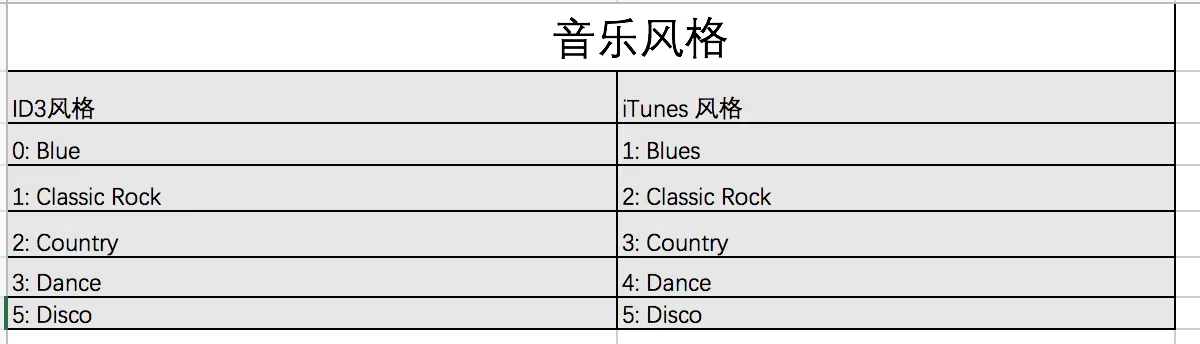
Although iTunes uses the predefined genres from the ID3 set, it defines its own genre sets for TV, movies, and audiobooks. Apple’s Genre IDs Appendix
The example code already includes these genres, so I won’t elaborate further — please refer to the demo.
Saving Metadata
AVAsset is an immutable type. We can’t modify an AVAsset directly; instead, we use the AVAssetExportSession class to export a new copy of the asset along with the metadata changes.
Using AVAssetExportSession
1
2
3
4
5
6
7
8
9
10
11
12
13
14
15
16
17
18
19
20
21
22
23
24
25
26
27
28
29
30
31
32
33
34
35
36
37
38
39
40
41
- (void)saveWithCompletionHandler:(CompletionHandler)handler {

    NSString *presetName = AVAssetExportPresetPassthrough;                  // 1
    AVAssetExportSession *session =
    [[AVAssetExportSession alloc] initWithAsset:self.asset
                                     presetName:presetName];

    NSURL *outputURL = [self tempURL];                                      // 2
    session.outputURL = outputURL;
    session.outputFileType = self.filetype;
    session.metadata = [self.metadata metadataItems];                       // 3

    [session exportAsynchronouslyWithCompletionHandler:^{
        AVAssetExportSessionStatus status = session.status;
        BOOL success = (status == AVAssetExportSessionStatusCompleted);
        if (success) {                                                      // 4
            NSURL *sourceURL = self.url;
            NSFileManager *manager = [NSFileManager defaultManager];
            [manager removeItemAtURL:sourceURL error:nil];
            [manager moveItemAtURL:outputURL toURL:sourceURL error:nil];
            [self reset];                                                   // 5
        }

        if (handler) {
            dispatch_async(dispatch_get_main_queue(), ^{
                handler(success);
            });
        }
        NSLog(@"sessionError:%@",session.error);
    }];
}

- (NSURL *)tempURL {
    // Get the Caches directory path
    NSString *cachesDir = [NSSearchPathForDirectoriesInDomains(NSCachesDirectory, NSUserDomainMask, YES) firstObject];
    NSString *tempDir = cachesDir;
    NSString *ext = [[self.url lastPathComponent] pathExtension];
    NSString *tempName = [NSString stringWithFormat:@"temp.%@", ext];
    NSString *tempPath = [tempDir stringByAppendingPathComponent:tempName];
    return [NSURL fileURLWithPath:tempPath];
}
Note: **The
AVAssetExportPresetPassthroughpreset does allow modifying existing metadata inMPEG-4andQuickTimecontainers, but it cannot add new metadata — the only way to add metadata is to use a transcoding preset. Additionally, it can’t modifyID3(mp3) tags. The framework doesn’t support writing MP3 data.**
Summary
Through implementing the code and parsing multimedia metadata with AVAsset, we’ve also become familiar with the structure of multimedia files and the artwork feature of ID3 (MP3) format files. This improves development efficiency in later work. Finally, here’s the demo code — please feel free to give me your feedback.