
Preface
This article starts with a broad introduction and gradually narrows down to detailed specifics — in other words, it moves from coarse-grained to fine-grained. If you have any questions along the way, let’s pool our wisdom and I’d appreciate your corrections.
Main Content
- Introduction to AR Technology
- How ARKit Works and Its Workflow
- Simple ARKit Code Implementation
- Overview of All ARKit Framework APIs
- ARSCNView Introduction
- ARSession Introduction
- ARCamera Introduction
- Capturing Planes with ARKit
- AR Code Demo Implementation
Introduction to AR Technology
AR Technology at a Glance
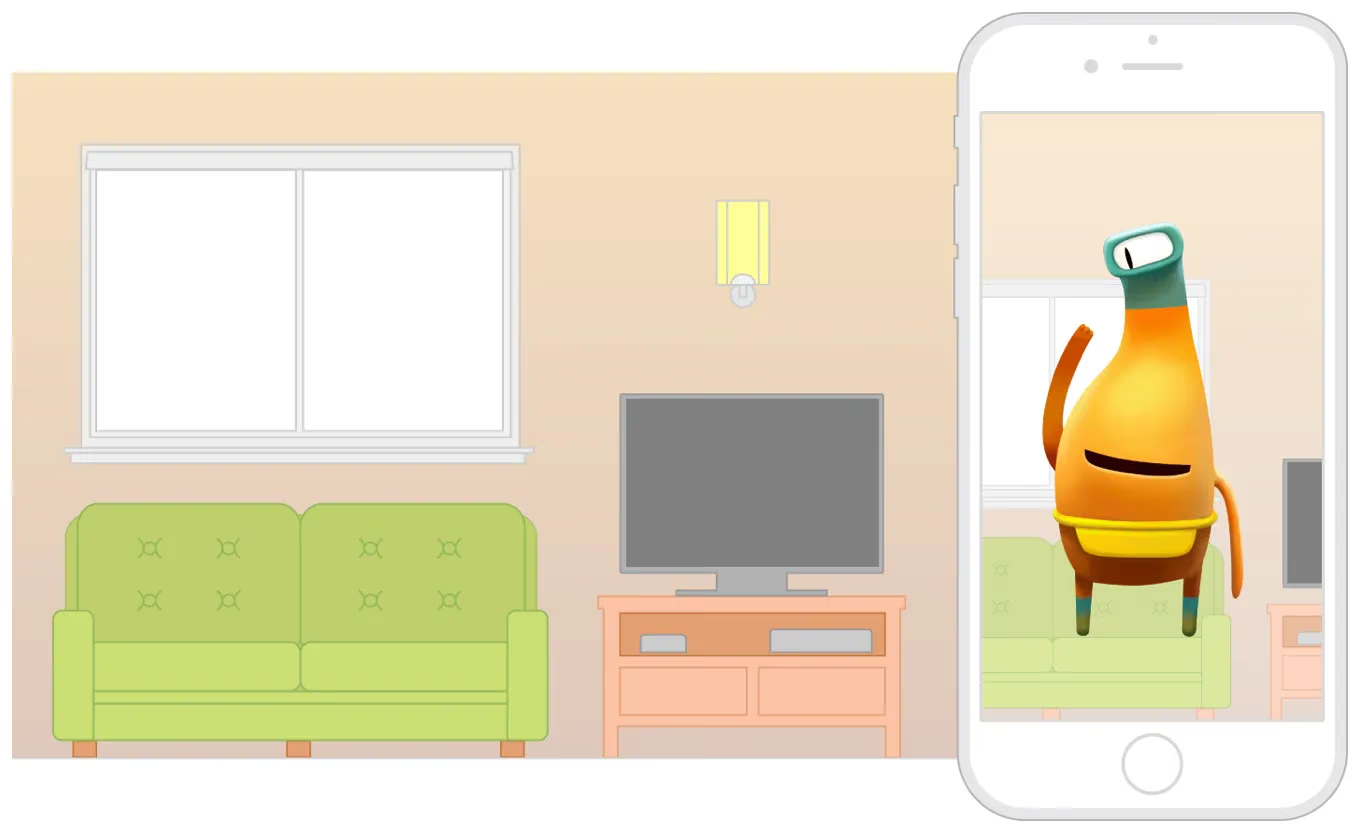
- Augmented Reality (AR) is a technology that computes the position and angle of a camera’s image in real time and overlays corresponding images, videos, and 3D models. The goal of this technology is to superimpose the virtual world onto the real world on the screen and enable interaction.
- The technical elements needed to implement an AR scene:
- Multimedia capture of real-world images: e.g., a camera
- 3D modeling: three-dimensional models
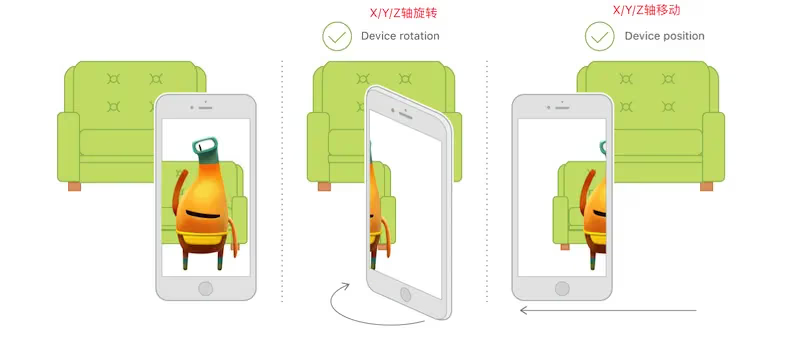
- Sensor tracking: mainly tracks the six-axis changes of moving objects in the real world. The six axes are X, Y, and Z displacement and rotation. The three displacement axes determine an object’s orientation and size, while the three rotation axes determine the region in which the object is displayed.
- Coordinate recognition and transformation: a 3D model isn’t displayed in the real-world image as a plain frame coordinate point, but as a three-dimensional matrix coordinate.
- AR can also support some interaction with virtual objects (optional)

ARKit Overview and Features
- The
ARKitframework provides two AR technologies:- Augmented reality based on 3D scenes (
SceneKit) - Augmented reality based on 2D scenes (
SpriktKit)
Generally, the mainstream approach is 3D-based.
ARkitis compatible with theSceneKitandSpriktKitframeworks (Apple’s game engines). - Augmented reality based on 3D scenes (
- Why does displaying AR effects depend on Apple’s game engine frameworks — the 3D engine
SceneKitand the 2D engineSpriktKit? Because only a game engine can load object models.Although the view in
ARKit(ARSCNView) inherits fromSCNView, andSCNViewinherits fromUIView, theARKitframework itself currently only contains camera tracking and cannot directly load object models, so it has to rely on a game engine to load ARKit content. (I think Apple is fully leveraging and consolidating its existing resources while promoting its own frameworks — killing two birds with one stone.) Also, so far I haven’t seen anyARKitsupport forUnity3DorCocoas2D.
How iOS 11 Supports ARKit
Although iOS 11 introduced ARKit, not all iOS 11 systems support it.
- Requires CPU A9 or later (iPhone 6s and later, plus iPhone SE)
Development environment
- Xcode version: Xcode 9 or later
- System: iOS 11 or later
- iOS device: A9 processor or later (iPhone 6s and later)
- macOS: 10.12.4 or later
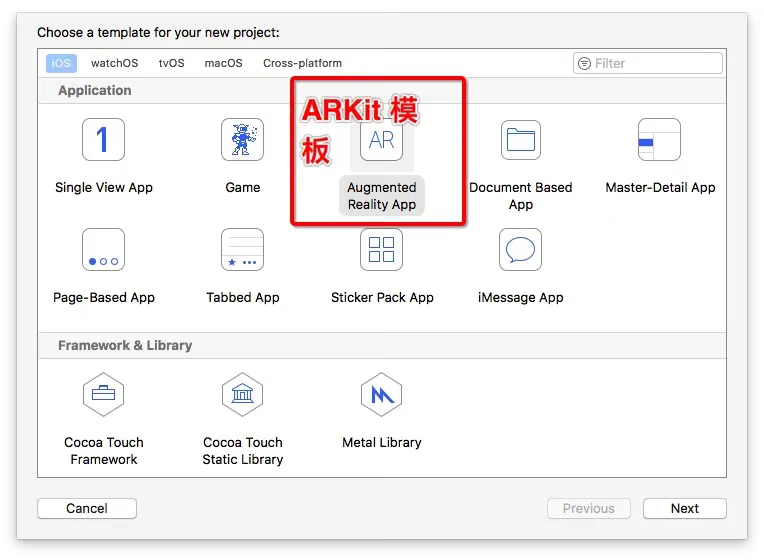
Xcode’s Built-in Template (Mostly Unused)
Demo
1
2
3
4
5
6
7
8
9
10
11
12
13
14
15
16
17
18
19
20
21
22
23
24
25
26
27
28
29
30
31
32
33
34
35
36
37
38
39
40
41
42
43
44
45
46
47
48
49
50
51
52
53
54
55
56
57
58
59
60
61
62
63
64
65
66
67
68
69
70
71
72
73
74
75
76
77
78
79
@interface ViewController () <ARSCNViewDelegate>
//AR view: displays the 3D interface
@property (nonatomic, strong) IBOutlet ARSCNView *sceneView;

@end


@implementation ViewController

- (void)viewDidLoad {
    [super viewDidLoad];

    //Scene delegate
    self.sceneView.delegate = self;

    // Display frame rate
    self.sceneView.showsStatistics = YES;

    // Create a scene
    SCNScene *scene = [SCNScene sceneNamed:@"art.scnassets/ship.scn"];

    // Set the scene to the view
    self.sceneView.scene = scene;
}

- (void)viewWillAppear:(BOOL)animated {
    [super viewWillAppear:animated];

    // World coordinate system configuration
    ARWorldTrackingSessionConfiguration *configuration = [ARWorldTrackingSessionConfiguration new];

    // Run the 3D scene session
    [self.sceneView.session runWithConfiguration:configuration];
}

- (void)viewWillDisappear:(BOOL)animated {
    [super viewWillDisappear:animated];

    // Pause
    [self.sceneView.session pause];
}

- (void)didReceiveMemoryWarning {
    [super didReceiveMemoryWarning];
    // Release any cached data, images, etc that aren't in use.
}

#pragma mark - ARSCNViewDelegate


// Create a node for the current anchor (think of a node as a UIView)
/*
// Override to create and configure nodes for anchors added to the view's session.
- (SCNNode *)renderer:(id<SCNSceneRenderer>)renderer nodeForAnchor:(ARAnchor *)anchor {
    SCNNode *node = [SCNNode new];

    // Add geometry to the node...

    return node;
}
*/

//Session error
- (void)session:(ARSession *)session didFailWithError:(NSError *)error {
    // Present an error message to the user

}

//Interrupted, similar to audio playback being interrupted, e.g., foreground/background switching, phone calls, Siri
- (void)sessionWasInterrupted:(ARSession *)session {
    // Inform the user that the session has been interrupted, for example, by presenting an overlay

}

//Session ended
- (void)sessionInterruptionEnded:(ARSession *)session {
    // Reset tracking and/or remove existing anchors if consistent tracking is required

}
How ARKit Works and Its Workflow
Main Content
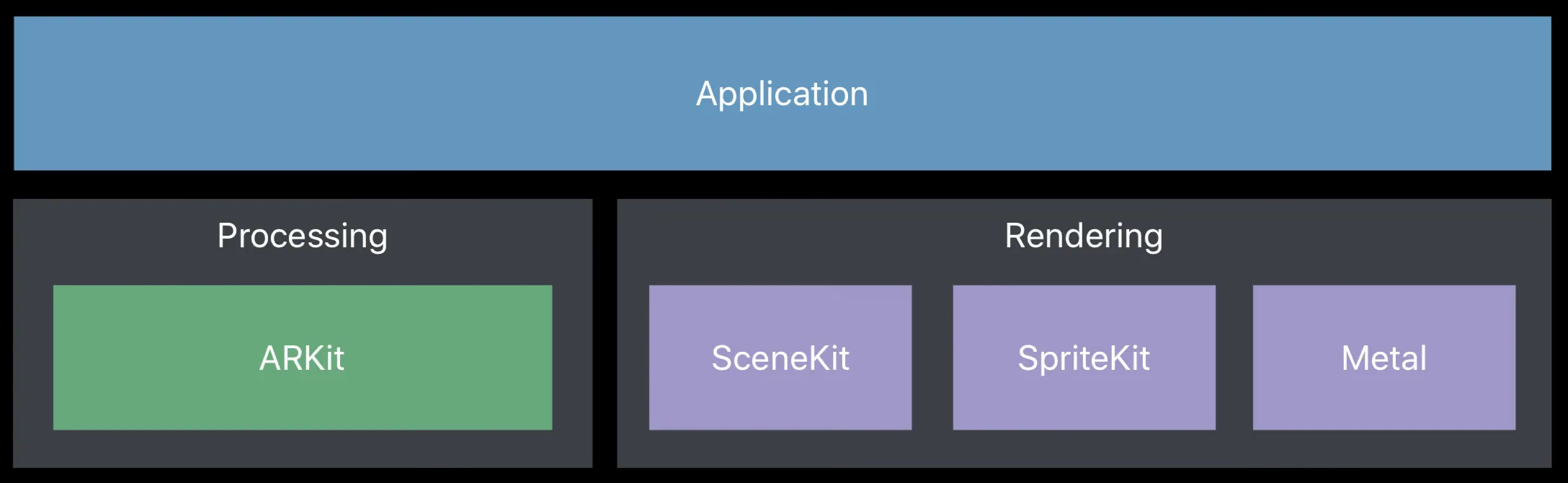
ARKit is not a framework that runs standalone; it must work together with SceneKit. Without SceneKit, ARKit is no different from an ordinary camera.
The tricky part: the matrix transformation of 3D coordinates (3D X/Y/Z, 4x4 coordinates)
Below is a diagram of all of ARKit’s .h header files (derived subclasses not listed).
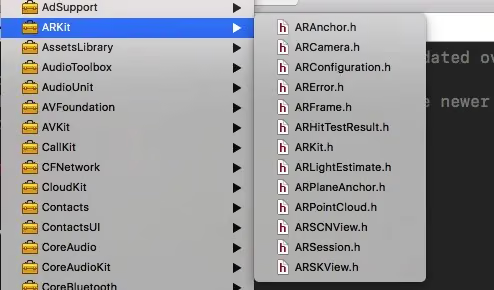
- Core classes in the ARKit framework:
ARScnViewARSessionARCameraARKitdemo example implementation:- Detect planes and add objects
- AR — augmented reality — means displaying a virtual 3D model in the real-world image captured by the camera. This process can be divided into two steps:
- The camera captures the real-world image (implemented by ARKit)
- Display the virtual 3D model in the image (implemented by SceneKit)
- The relationship between the
ARKitandSceneKitframeworks
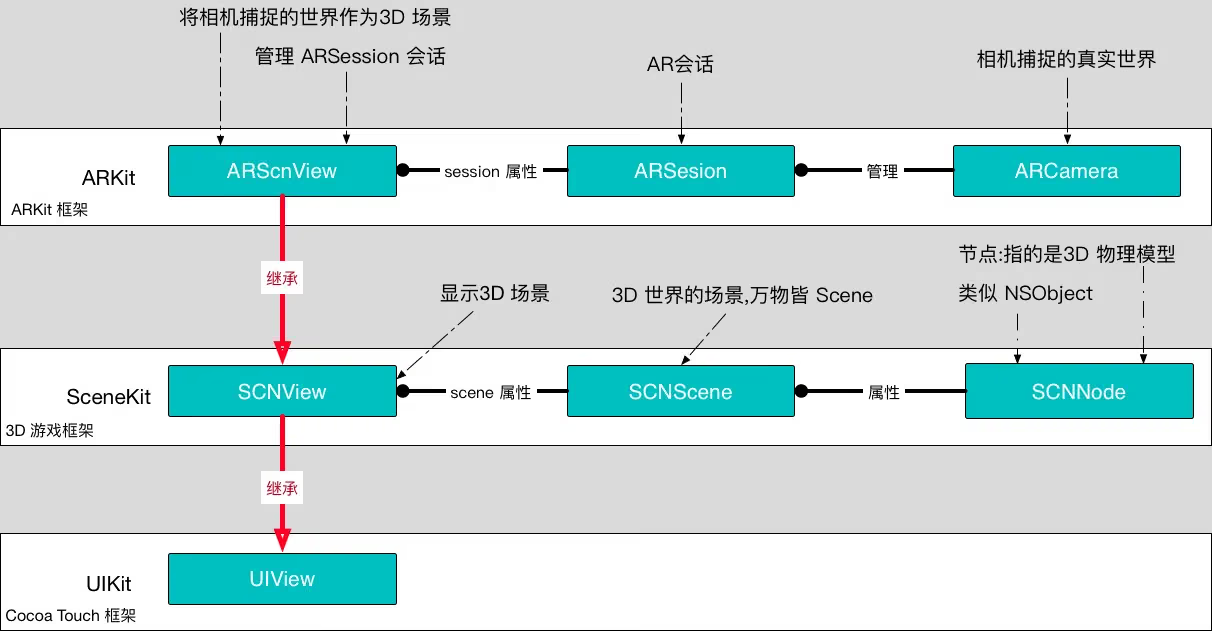
ARSCNView–>SCNView(SceneKit.framework)–>UIView(UIKit.framework)- ARSCNView is a view container that manages an
ARSession. - In a complete AR experience,
ARKitis only responsible for transforming the real-world view into a 3D scene. This process mainly consists of two stages:- ARCamera is responsible for capturing the camera’s view.
- ARSession is responsible for building the 3D scene.
In a complete AR experience, displaying virtual objects in the 3D scene is done by the
SceneKitframework.Every virtual object is a node (SCNNode), every node makes up a scene (SCNScene), and countless scenes form the 3D world.
Think of it as UIViewController’s
[view addSubview:xxxView];
How ARKit Works
The Relationship Between ARSCNView and ARSession
Before that, let’s first understand the naming and meaning of Session and Context.
Session, literally translated: session
Context, literally translated: context
In the iOS frameworks, classes with a session or context suffix generally don’t do the work themselves. Their role is usually twofold:
- Managing other classes and helping them build communication bridges — the benefit is decoupling
- Taking charge of helping us manage memory in complex environments
The difference between Session and Context
- A session involves hardware (generally dealing with hardware), e.g., camera capture
ARSession, audioAVAudioSession, network-relatedNSURLSession, etc. - A context generally doesn’t involve hardware, e.g.,
CGGraphicContext,EAGLContextdrawing contexts, and the Context in custom transitions — not going to enumerate them all.
Back to the main topic. As mentioned above, to make
ARSCNView and ARCamera work together in coordination (ARSCNView and ARCamera have no direct relationship with each other)
- ARSCNView —–> ARCamera or
- ARSCNView <—– ARCamera
ARSCNViewhas anARFrame(a property/member variable), andARFramecontainsARCamera(a property/member variable)
we need a communication bridge to schedule and coordinate the process from image capture to visual rendering. This bridge is ARSession.
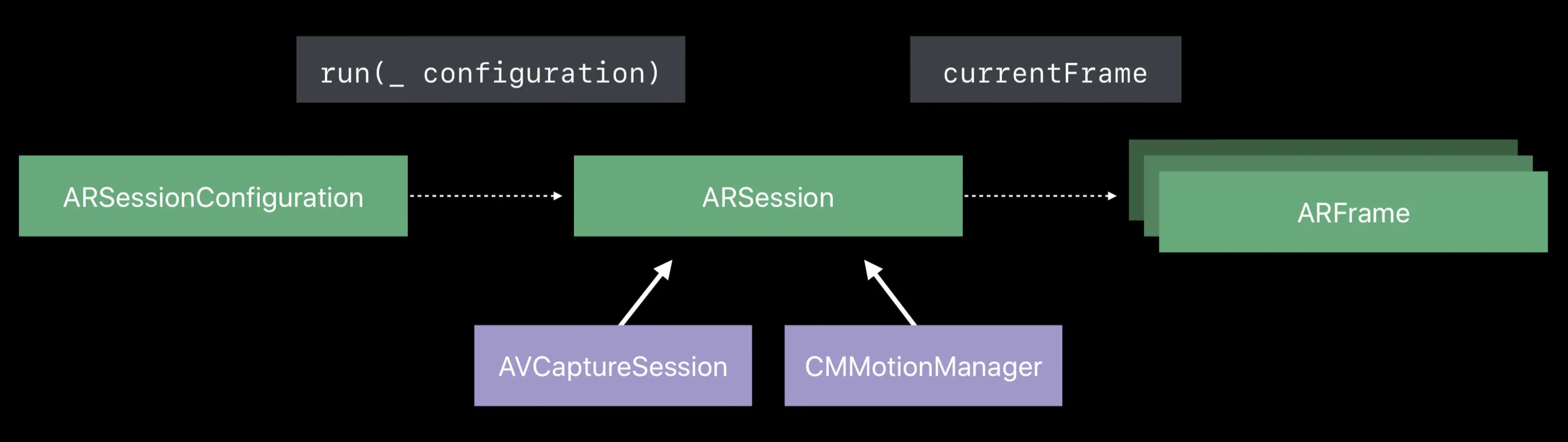
To run an ARSession, you must specify a “session tracking configuration” object, ARConfiguration. ARConfiguration’s main purpose is to track the camera’s position in the 3D world and capture feature scenes — such as detecting planes. This class plays a big role.
ARConfigurationis a parent class. To achieve better AR effects, Apple recommends using its subclassARWorldTrackingConfiguration(this class only supports devices with theA9chip or later).
Note: The former ARWorldTrackingSessionConfiguration is now deprecated.
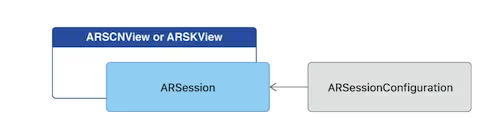
ARFrame and ARWorldTrackingConfiguration
There are two participants in the bridge ARSession builds:
- ARFrame
- ARWorldTrackingConfiguration
ARWorldTrackingConfiguration (3D world tracking configuration) is responsible for tracking the device’s orientation, position, and detecting what the camera captures.
Internally, it implements a large set of algorithms and invokes the necessary sensors on the iPhone to detect the phone’s movement, rotation, and translation (six-axis position/orientation changes).
When ARWorldTrackingConfiguration computes the camera’s position in the 3D world, it hands this position data to ARSession for management. The class corresponding to the camera’s position data is ARFrame.
ARSessionhas a property calledcurrentFrame, which is an instance ofARFrame.
ARCamera is only responsible for capturing images; it doesn’t participate in data processing. It’s one part of the 3D scene. Every 3D Scene has a Camera, and this Camera determines the field of view in which we see objects.
Here’s the relationship among the three:
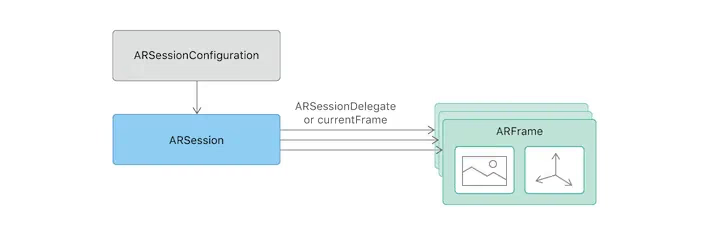
ARFramecontains theCVPixelBufferRef(capturedImage) andARCamerawe need — that is, the raw data of the image we need.
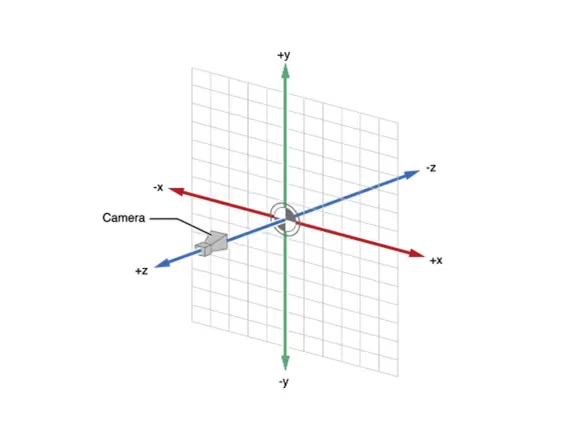
ARCamera’s position in the 3D world
ARKit Workflow
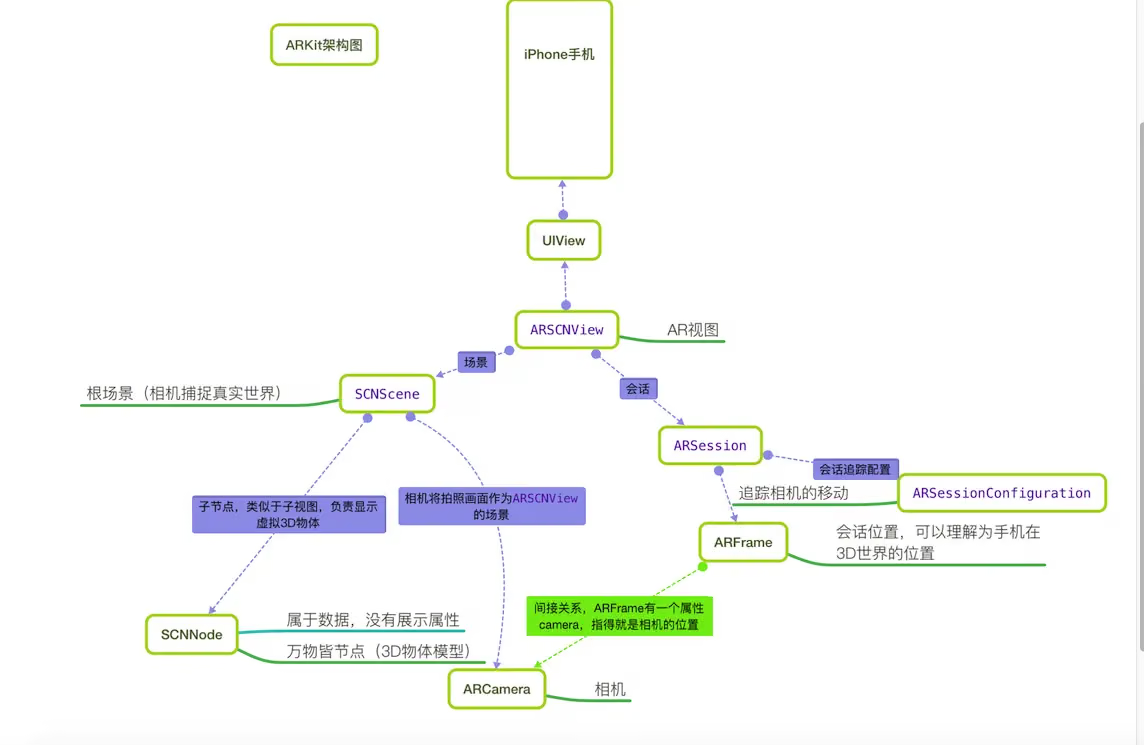 Image source: 坤小
ARSCNViewloads the sceneSCNScene.SCNScenestarts the cameraARCamera, which begins capturing the scene.- After
ARCameracaptures the scene,ARSCNViewstarts passing the scene data toARSession. ARSessiontracks the scene viaARConfiguration(or its subclass) and returns anARFrame.- Add a child node (3D object model) to the
ARSCNView’s scene.
ARConfigurationtracks the camera’s position for the purpose of computing the 3D object model’s real matrix position relative to the camera when adding the 3D object model.
Note: In the 3D coordinate system:
- The world coordinate system corresponds to a UIView’s
Frame. - The local coordinate system corresponds to a UIView’s
bounds.
Coordinate system transformation is one of the harder parts of ARKit.
Simple ARKit Code Implementation
1
2
3
4
5
6
7
8
9
10
11
12
13
14
- (void)touchesBegan:(NSSet<UITouch *> *)touches withEvent:(UIEvent *)event{
    //1. Use the scene to load the scn file

    SCNScene *scene = [SCNScene sceneNamed:@"Models.scnassets/vase/vase.scn"];
    SCNNode *plantNode = scene.rootNode.childNodes[0];

    //2. Adjust the position and add the node to the current screen
    plantNode.position = SCNVector3Make(0, -1, -1);


    //3. Add the airplane node to the current screen
    [self.arSceneView.scene.rootNode addChildNode:plantNode];

}
One more thing to add here:
Let’s set aside the relationships among
ARSCNView,UIViewController, andUIViewfor now.
Let’s only talk about the relationships among ARSCNView, scene, and node.
ARSCNView is a view that inherits from UIView.
ARSCNView has a property (member variable) called scene, which is like the VC.
scene has rootNode, just as a VC has self.view.
Think of scene as the VC.
Think of rootNode as self.view.
We know that self.view can add subviews via:
1
[self.view addSubview:xxx];
So node has the corresponding method:
1
[scene.rootNode addChildNode:xxxNode];
Note: Every scene has one and only one root node; all other nodes are children of the root node.
Overview of All ARKit Framework APIs
Let’s use the same diagram above. Here we aim to dissect all the APIs so everyone understands what ARKit contains.
ARAnchor
ARAnchor represents an object’s position and orientation in 3D space. (ARAnchor is commonly known as a 3D anchor, similar to CALayer’s Anchor in the UIKit framework.)
1
2
3
4
5
6
7
8
9
10
11
@interface ARAnchor : NSObject <NSCopying>

//Unique identifier of the anchor
@property (nonatomic, readonly) NSUUID *identifier;

//The anchor's rotation/transform matrix, defining the anchor's rotation, position, and scale. A 4x4 matrix.
@property (nonatomic, readonly) matrix_float4x4 transform;

//Initializer — generally we don't need to call it. When adding a 3D object, ARKit notifies us of the object's anchor via its delegate
- (instancetype)initWithTransform:(matrix_float4x4)transform;
ARFramealso represents an object’s position and orientation, butARFrametypically denotes the AR camera’s position and orientation, the timestamp of camera tracking, and the captured camera image frame (CVPixelBufferRef).
ARError
ARError is an error description class, e.g., unsupported device, session interruption when running in the background, etc.
1
2
3
4
5
6
7
8
9
10
11
12
13
14
15
16
17
18
FOUNDATION_EXTERN NSString *const ARErrorDomain;

typedef NS_ERROR_ENUM(ARErrorDomain, ARErrorCode) {
    /** Unsupported session configuration. */
    ARErrorCodeUnsupportedConfiguration   = 100,

    /** A sensor required to run the session is not available. */
    ARErrorCodeSensorUnavailable          = 101,

    /** A sensor failed to provide the required input. */
    ARErrorCodeSensorFailed               = 102,

    /** App does not have permission to use the camera. The user may change this in settings. */
    ARErrorCodeCameraUnauthorized         = 103,

    /** World tracking has encountered a fatal error. */
    ARErrorCodeWorldTrackingFailed        = 200,
};
ARFrame
ARFrame mainly tracks the current state, e.g., image frame, timestamp, position, orientation, and other parameters.
1
2
3
4
5
6
7
8
9
10
11
12
13
14
15
16
17
18
19
20
21
22
23
24
25
26
27
28
29
30
31
@interface ARFrame : NSObject <NSCopying>

//Timestamp
@property (nonatomic, readonly) NSTimeInterval timestamp;

//Image frame
@property (nonatomic, readonly) CVPixelBufferRef capturedImage;

//Camera (indicates which camera this ARFrame belongs to — the iPhone 7 Plus has two cameras)
@property (nonatomic, copy, readonly) ARCamera *camera;

//Returns the anchor data captured by the current camera (when a 3D virtual model is added to ARKit, the anchor is the model's position in AR)
@property (nonatomic, copy, readonly) NSArray<ARAnchor *> *anchors;

//Lighting, referring to light intensity, generally 0–2000, default 1000
@property (nonatomic, strong, nullable, readonly) ARLightEstimate *lightEstimate;

//Feature points (should be for detecting planes or faces — Apple has built-in face recognition). Only available with world tracking configuration
@property (nonatomic, strong, nullable, readonly) ARPointCloud *rawFeaturePoints;

//Searches for a 3D model based on a 2D coordinate point. This method is typically used when we tap a point on the phone screen to capture the 3D model at that point. Why does it return an array? Easy to understand: the phone screen is a rectangle — a 2D space — while the camera captures a rectangular frustum projected outward from this 2D space. Tapping a point on the screen is like shooting a ray from the edge of this frustum, and there may be multiple 3D object models along that ray.
point:2D坐标点(手机屏幕某一点)
ARHitTestResultType:捕捉类型  点还是面
(NSArray<ARHitTestResult *> *):追踪结果数组

- (NSArray<ARHitTestResult *> *)hitTest:(CGPoint)point types:(ARHitTestResultType)types;

//Coordinate transform of the camera's window (can be used to adapt to camera rotation in portrait/landscape)
-(CGAffineTransform)displayTransformWithViewportSize:(CGSize)viewportSize orientation:(UIInterfaceOrientation)orientation;

@end
Here’s a tip: how do you write a class if you don’t want to provide an init: method?
We all know that every class in Objective-C inherits from NSObject, and NSObject has methods like init: and dealloc:.
1
2
3
4
5
@interface ARAnchor (Unavailable)

- (instancetype)init NS_UNAVAILABLE;
+ (instancetype)new NS_UNAVAILABLE;
@end
The trick used here is to write a Category, override the method, and mark it with
NS_UNAVAILABLE.
ARHitTestResult
ARHitTestResult is the result of a tap callback. This class is mainly used for interaction between the real world and virtual objects in the 3D scene in AR technology. For example, moving or dragging 3D virtual objects in the camera — you can use this class to get the results captured by ARKit.
1
2
3
4
5
6
7
8
9
10
11
12
13
14
15
16
17
18
19
20
21
22
23
24
25
26
27
28
29
30
31
typedef NS_OPTIONS(NSUInteger, ARHitTestResultType) {
    //Point
    ARHitTestResultTypeFeaturePoint              = (1 << 0),
	//Horizontal plane, y is 0.
    ARHitTestResultTypeEstimatedHorizontalPlane  = (1 << 1),

    //Existing plane
    ARHitTestResultTypeExistingPlane             = (1 << 3),

    //Existing anchor and plane
    ARHitTestResultTypeExistingPlaneUsingExtent  = (1 << 4),
} NS_SWIFT_NAME(ARHitTestResult.ResultType);

@interface ARHitTestResult : NSObject

//Capture type
@property (nonatomic, readonly) ARHitTestResultType type;

//Distance between the 3D virtual object and the camera (in meters)
@property (nonatomic, readonly) CGFloat distance;

//Local coordinate matrix (world coordinates are relative to the camera as the scene origin, while each 3D object has its own scene, and local coordinates are relative to that scene). Similar to the difference between frame and bounds
@property (nonatomic, readonly) matrix_float4x4 localTransform;

//World coordinate matrix
@property (nonatomic, readonly) matrix_float4x4 worldTransform;

//Anchor (a 3D virtual object has a position in the virtual world, given by SCNVector3: a 3D vector in SceneKit), while the anchor is the object's position in the AR real scene — a 4x4 matrix
@property (nonatomic, strong, nullable, readonly) ARAnchor *anchor;

@end
Here’s what you need to understand:
matrix_float4x4 worldTransform: the world coordinate system, with the camera as the scene’s origin (0,0,0,0) — i.e., radiating outward from the camera as the center, the 3D object’s position is referenced to this origin. This is equivalent to a 2D UIView’s frame (absolute coordinates).
matrix_float4x4 localTransform: the local coordinate system, referenced to a node as the parent, equivalent to the coordinates relative to this parent scene.
matrix_float4x4: For the 4x4 matrix, see here
ARLightEstimate
ARLightEstimate
1
2
3
4
5
6
7
8
9
10
@interface ARLightEstimate : NSObject

//Ambient light intensity, range 0–2000, default 1000
@property (nonatomic, readonly) CGFloat ambientIntensity;

//Ambient color temperature
@property (nonatomic, readonly) CGFloat ambientColorTemperature;

@end
ARPlaneAnchor
ARPlaneAnchor is a subclass derived from ARAnchor — a plane anchor. ARKit can automatically recognize flat surfaces and add an anchor to the scene. Of course, to actually see the plane effect in the real world, we need to render an anchor ourselves using SCNNode.
An anchor is just a position.
1
2
3
4
5
6
7
8
9
10
11
12
@interface ARPlaneAnchor : ARAnchor

//Plane type — currently only one: the horizontal plane
@property (nonatomic, readonly) ARPlaneAnchorAlignment alignment;

//3-axis vector struct, the center point of the plane  x/y/z
@property (nonatomic, readonly) vector_float3 center;

//3-axis vector struct, the size of the plane (width and height)  x/y/z
@property (nonatomic, readonly) vector_float3 extent;

@end
ARPointCloud
ARPointCloud is point-cloud rendering.
1
2
3
4
5
6
7
8
9
@interface ARPointCloud : NSObject <NSCopying>

//Point count
@property (nonatomic, readonly) NSUInteger count;

//The collection of each point's position (a struct with * means an array of structs)
@property (nonatomic, readonly) const vector_float3 *points;

@end
ARConfiguration
ARConfiguration is the session tracking configuration.
1
2
3
4
5
6
7
8
9
10
11
12
13
14
15
16
17
18
19
20
21
22
23
24
25
26
27
28
29
30
31
32
33
34
35
36
//Tracking alignment
typedef NS_ENUM(NSInteger, ARWorldAlignment) {
    /* Camera position vector (0, -1, 0) /
    ARWorldAlignmentGravity,
    /* Camera position and orientation. vector (0, -1, 0)    heading: (0, 0, -1) */
    ARWorldAlignmentGravityAndHeading,
    /* Camera orientation. */
    ARWorldAlignmentCamera
} ;

typedef NS_OPTIONS(NSUInteger, ARPlaneDetection) {
    ARPlaneDetectionNone        = 0,
    ARPlaneDetectionHorizontal  = (1 << 0), //探测平面是水平横向
} ;


@interface ARConfiguration : NSObject <NSCopying>

//Whether the current device supports it — generally devices below the A9 chip don't
@property(class, nonatomic, readonly) BOOL isSupported;

//World coordinate alignment
@property (nonatomic, readwrite) ARWorldAlignment worldAlignment;

//Whether to enable adaptive lighting, default is YES
@property (nonatomic, readwrite, getter=isLightEstimationEnabled) BOOL lightEstimationEnabled;

@end

//World session tracking configuration. Apple recommends using this class. It has only one property, which helps us track planes captured by the camera
@interface ARWorldTrackingSessionConfiguration : ARConfiguration

//Detection type
@property (nonatomic, readwrite) ARPlaneDetection planeDetection;

@end
The configuration’s subclass: ARWorldTrackingSessionConfiguration, in the same API file.
ARSKView
ARSKView is the 2D AR view. This basically doesn’t need much explanation — it’s the same as ARSCNView, so I won’t repeat the introduction.
ARSCNView — Key Introduction
1
2
3
4
5
6
7
8
9
10
11
12
13
14
15
16
17
18
19
20
21
22
23
24
25
26
27
28
@interface ARSCNView : SCNView

//Delegate
@property (nonatomic, weak, nullable) id<ARSCNViewDelegate> delegate;

//AR session
@property (nonatomic, strong) ARSession *session;

//Scene
@property(nonatomic, strong) SCNScene *scene;

//Whether to automatically adapt lighting
@property(nonatomic) BOOL automaticallyUpdatesLighting;

//Returns the anchor for the corresponding node. A node is a 3D virtual object whose coordinates are in the virtual scene, while the ARAnchor is the real-world coordinate in ARKit
- (nullable ARAnchor *)anchorForNode:(SCNNode *)node;

//Returns the node for the corresponding anchor
- (nullable SCNNode *)nodeForAnchor:(ARAnchor *)anchor;

/**


 */
- (NSArray<ARHitTestResult *> *)hitTest:(CGPoint)point types:(ARHitTestResultType)types;

@end
Searching for 3D models based on 2D coordinate points. This method is typically used when we tap a point on the phone screen and want to capture the 3D model at that point. Why does it return an array? Easy to understand: the phone screen is a rectangle — a two-dimensional space — while the camera captures a rectangular frustum projected outward from this 2D space. Tapping a point on the screen can be understood as shooting a ray from the edge of this frustum, and there may be multiple 3D object models along that ray. point: the 2D coordinate point (a point on the phone screen). ARHitTestResultType: the capture type — point or plane. (NSArray<ARHitTestResult *> *): the array of tracking results — see the ARHitTestResult class introduction in this chapter. The results in the array are sorted from near to far.
Delegate methods
1
2
3
4
5
6
7
8
9
10
11
12
13
14
15
16
17
18
19
20
21
//The delegate internally implements SCNSceneRendererDelegate (the SceneKit delegate) and ARSessionObserver (ARSession observation, KVO mechanism)
#pragma mark - ARSCNViewDelegate
@protocol ARSCNViewDelegate <SCNSceneRendererDelegate, ARSessionObserver>
@optional

//The anchor for a custom node
- (nullable SCNNode *)renderer:(id <SCNSceneRenderer>)renderer nodeForAnchor:(ARAnchor *)anchor;

//Called when a node is added. Through this delegate method, we can learn the anchor (AR real-world coordinate) where a virtual object is added to the AR scene
- (void)renderer:(id <SCNSceneRenderer>)renderer didAddNode:(SCNNode *)node forAnchor:(ARAnchor *)anchor;

//The node is about to be updated
- (void)renderer:(id <SCNSceneRenderer>)renderer willUpdateNode:(SCNNode *)node forAnchor:(ARAnchor *)anchor;

//The node has been updated
- (void)renderer:(id <SCNSceneRenderer>)renderer didUpdateNode:(SCNNode *)node forAnchor:(ARAnchor *)anchor;

//Remove node
- (void)renderer:(id <SCNSceneRenderer>)renderer didRemoveNode:(SCNNode *)node forAnchor:(ARAnchor *)anchor;

@end
ARSession — Key Introduction
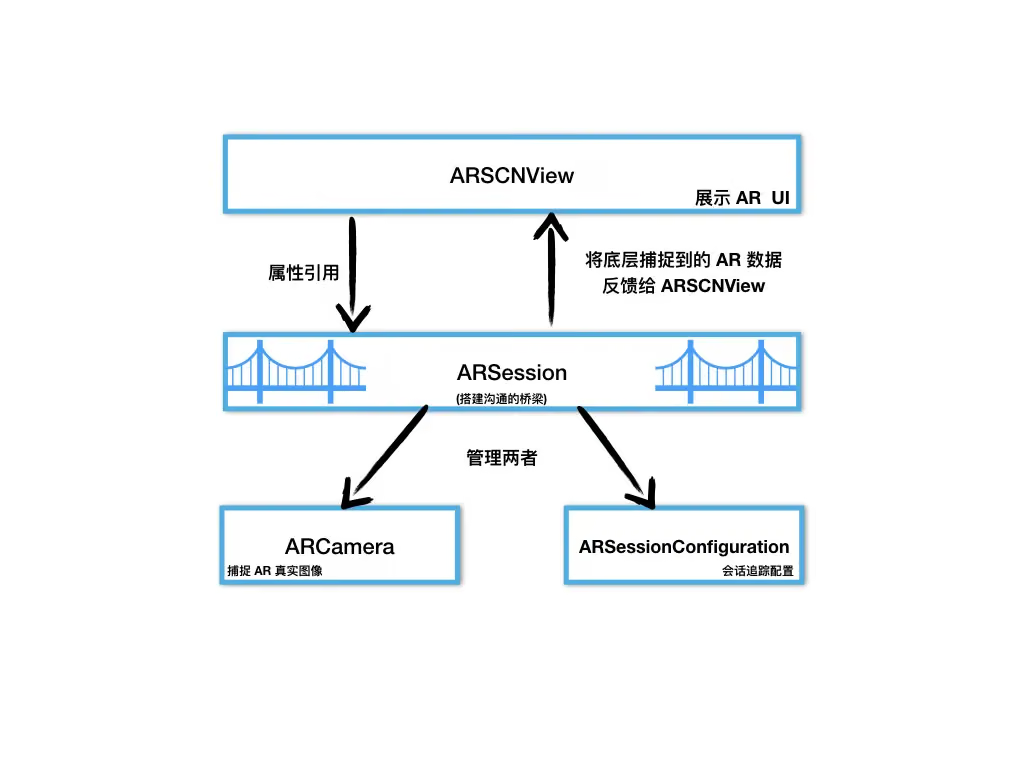
ARSession is a bridge connecting the low level and the AR view. All the methods in ARSCNView are provided by ARSession.
ARSession mainly has two ways to obtain camera position data:
- push: notify the user by implementing the Session’s delegate method
session:didUpdateFrame: - pull: the user can actively fetch the
ARSession’scurrentFrameproperty.
1
2
3
4
5
6
7
8
9
10
11
12
13
14
15
16
17
18
19
20
21
22
23
24
25
26
27
28
29
30
31
@interface ARSession : NSObject

//Delegate
@property (nonatomic, weak) id <ARSessionDelegate> delegate;

//Specifies the queue on which the delegate is called (the main queue has no delay; background queues do). Defaults to the main queue if not specified
@property (nonatomic, strong, nullable) dispatch_queue_t delegateQueue;

//The camera's current position (computed by the session tracking configuration)
@property (nonatomic, copy, nullable, readonly) ARFrame *currentFrame;

//Session configuration
@property (nonatomic, copy, nullable, readonly) ARConfiguration *configuration;

//Run the session (this line of code is the key to starting AR)
- (void)runWithConfiguration:(ARConfiguration *)configuration NS_SWIFT_UNAVAILABLE("Use run(_:options:) instead");

//Run the session, but with an extra parameter ARSessionRunOptions: it defines the behavior when the session disconnects and reconnects.
- (void)runWithConfiguration:(ARConfiguration *)configuration options:(ARSessionRunOptions)options NS_SWIFT_NAME(run(_:options:));

//Pause the session
- (void)pause;

//Add an anchor
- (void)addAnchor:(ARAnchor *)anchor NS_SWIFT_NAME(add(anchor:));

//Remove an anchor
- (void)removeAnchor:(ARAnchor *)anchor NS_SWIFT_NAME(remove(anchor:));

@end
Running a session, runWithConfiguration:options: — options is an
ARSessionRunOptionsenum.
This method defines the behavior when the session disconnects and reconnects.
1
2
3
4
5
6
7
typedef NS_OPTIONS(NSUInteger, ARSessionRunOptions) {
	 //Reset tracking
    ARSessionRunOptionResetTracking           = (1 << 0),

    //Remove existing anchors
    ARSessionRunOptionRemoveExistingAnchors   = (1 << 1)
};
Now let’s look at ARSession’s delegate.
ARSession has two kinds:
- KVO observer: ARSessionObserver
- delegate: ARSessionDelegate
Even I find this design odd.
ARSessionObserver looks like this:
1
2
3
4
5
6
7
8
9
10
11
12
13
14
15
16
17
18
19
20
@protocol ARSessionObserver <NSObject>

@optional

//Session failed
- (void)session:(ARSession *)session didFailWithError:(NSError *)error;

//The camera's tracking state changed
- (void)session:(ARSession *)session cameraDidChangeTrackingState:(ARCamera *)camera;

//Session unexpectedly interrupted (after starting ARSession, moving the app to the background can cause the session to be interrupted)
- (void)sessionWasInterrupted:(ARSession *)session;

//Session resumed after interruption (briefly going to the background and returning to the app resumes automatically)
- (void)sessionInterruptionEnded:(ARSession *)session;

//Session output an audio data `CMSampleBufferRef`
- (void)session:(ARSession *)session didOutputAudioSampleBuffer:(CMSampleBufferRef)audioSampleBuffer;

@end
ARSessionDelegate looks like this:
1
2
3
4
5
6
7
8
9
10
11
12
13
相机位置发生改变 就是相机的位置有变动
- (void)session:(ARSession *)session didUpdateFrame:(ARFrame *)frame;

// Anchors added
- (void)session:(ARSession *)session didAddAnchors:(NSArray<ARAnchor*>*)anchors;

//Update anchors
- (void)session:(ARSession *)session didUpdateAnchors:(NSArray<ARAnchor*>*)anchors;

//Remove anchors
- (void)session:(ARSession *)session didRemoveAnchors:(NSArray<ARAnchor*>*)anchors;

@end
That’s all for ARSession.
ARCamera — Key Introduction
ARCamera is a camera — the hub connecting the virtual scene and the real scene.
In ARKit, it’s the camera that captures real-world images; in SceneKit, it’s the camera in the 3D virtual world.
In games — typically first-person 3D games — the hero is a 3D camera. The picture we see on our computer screen is exactly what this camera captures.
Generally, we don’t need to create an ARCamera instance ourselves, because every time an ARSCNView is initialized, it creates an ARCamera instance for us by default. This camera is also the position of the camera lens and the origin of the 3D world (0,0,0).
As for ARCamera’s API, we usually don’t need to care — ARKit configures it by default.
1
2
3
4
5
6
7
8
9
10
11
12
13
14
15
16
17
18
19
20
21
22
23
24
25
26
27
28
29
30
31
32
33
34
@interface ARCamera : NSObject <NSCopying>

//4x4 matrix representing the camera's position, similar to an anchor
@property (nonatomic, readonly) matrix_float4x4 transform;

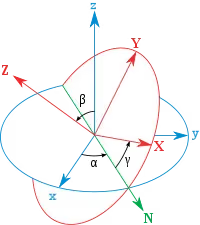
//The vector Euler angles of the camera's orientation (rotation), for x/y/z respectively
@property (nonatomic, readonly) vector_float3 eulerAngles;

//Camera tracking state (the enum values are introduced below)
@property (nonatomic, readonly) ARTrackingState trackingState NS_REFINED_FOR_SWIFT;

//Tracking reason
@property (nonatomic, readonly) ARTrackingStateReason trackingStateReason NS_REFINED_FOR_SWIFT;

//Camera intrinsics, a 3x3 matrix
@property (nonatomic, readonly) matrix_float3x3 intrinsics;

//Camera resolution
@property (nonatomic, readonly) CGSize imageResolution;

//Projection matrix
@property (nonatomic, readonly) matrix_float4x4 projectionMatrix;


//Create camera using x, y, z position
- (CGPoint)projectPoint:(vector_float3)point orientation:(UIInterfaceOrientation)orientation viewportSize:(CGSize)viewportSize;

//Create the camera projection matrix — near plane distance, far plane distance
- (matrix_float4x4)projectionMatrixForOrientation:(UIInterfaceOrientation)orientation viewportSize:(CGSize)viewportSize zNear:(CGFloat)zNear zFar:(CGFloat)zFar;

//Create the camera projection matrix
- (matrix_float4x4)viewMatrixForOrientation:(UIInterfaceOrientation)orientation;

@end
The near and far plane distances mentioned above — see the diagram:
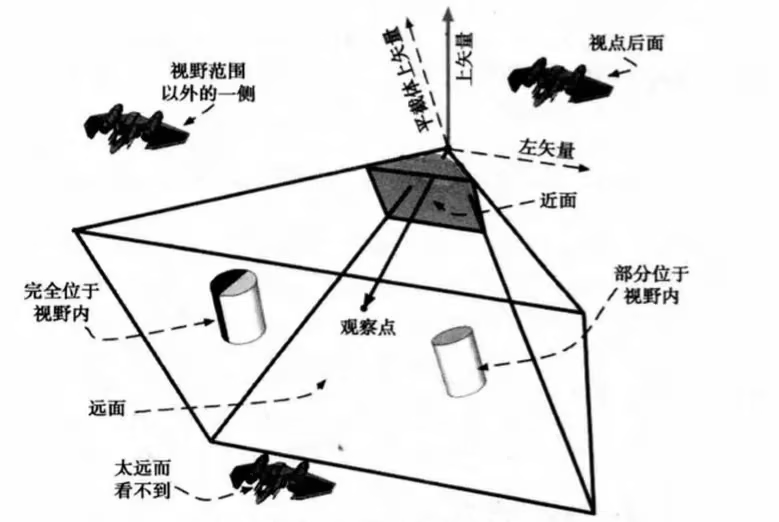
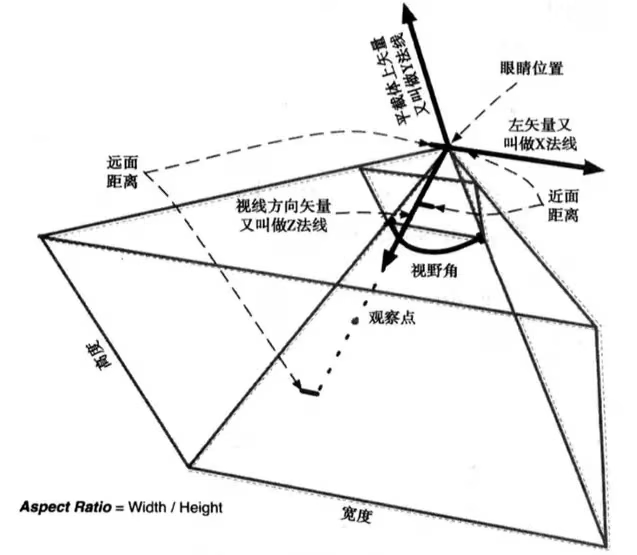
1
2
3
4
5
6
7
8
9
10
11
12
13
14
15
16
17
18
19
20
21
22
23
24
25
26
//Camera tracking state enum
typedef NS_ENUM(NSInteger, ARTrackingState) {
	 /* Not available */
    ARTrackingStateNotAvailable,

    /* Limited */
    ARTrackingStateLimited,

    /* Normal. */
    ARTrackingStateNormal,
};

//Tracking reason
typedef NS_ENUM(NSInteger, ARTrackingStateReason) {
    /* None. */
    ARTrackingStateReasonNone,

    //Initializing
    ARTrackingStateReasonInitializing,

    /* Excessive motion. */
    ARTrackingStateReasonExcessiveMotion,

    /** Insufficient features. */
    ARTrackingStateReasonInsufficientFeatures,
}
One thing involved here is called
eulerAngles— Euler angles
Capturing Planes with ARKit

Let me show the core code.
Called when a node is added (after plane detection mode is enabled, if ARKit detects a plane, it automatically adds a plane node).
1
2
3
4
5
6
7
8
9
10
11
12
13
14
15
16
17
18
19
20
21
22
23
24
25
26
27
28
29
30
31
32
33
34
35
36
37
38
39
40
41
#pragma mark -
#pragma mark - ARSCNViewDelegate 代理

- (void)renderer:(id <SCNSceneRenderer>)renderer didAddNode:(SCNNode *)node forAnchor:(ARAnchor *)anchor{
    if ([anchor isMemberOfClass:[ARPlaneAnchor class]]) {
        NSLog(@"捕捉到平地");
        //Add a 3D plane model. ARKit only has detection capability; an anchor is a spatial position. To see this space more clearly, we need to add a 3D plane model to render it
        //1. Get the detected plane anchor
        ARPlaneAnchor *planeAnchor = (ARPlaneAnchor *)anchor;
        //2. Create a 3D object model (the plane detected by the system is an irregularly sized rectangle; here we turn it into a rectangle and scale the plane)
        //Create a box — parameters: width, height, length, chamfer radius
        SCNBox *plane = [SCNBox boxWithWidth:planeAnchor.extent.x * 0.3 height:0 length:planeAnchor.extent.x * 0.3 chamferRadius:0];
        //3. Render the 3D model with a material — the default model is white
        plane.firstMaterial.diffuse.contents = [UIColor cyanColor];

        //4. Create a node based on the 3D object model
        SCNNode *planeNode = [SCNNode nodeWithGeometry:plane];
        //5. Set the node's position to the anchor and center of the detected plane. In SceneKit, a node's position is a vector coordinate SCNVector3Make based on the 3D coordinate system
        planeNode.position = SCNVector3Make(planeAnchor.center.x, 0, planeAnchor.center.z);

        [node addChildNode:planeNode];

        //6. When a plane is detected, add a 3D model onto the plane 2 seconds later

        dispatch_after(dispatch_time(DISPATCH_TIME_NOW, (int64_t)(2 * NSEC_PER_SEC)), dispatch_get_main_queue(), ^{
            //1. Create a vase scene
            SCNScene *scene = [SCNScene sceneNamed:@"Models.scnassets/vase/vase.scn"];
            //2. Get the vase node (a scene can have multiple nodes; here, the vase node is simply the first child node of the scene)
            //Every scene has one and only one root node; all other nodes are children of the root node
            SCNNode *vaseNode = scene.rootNode.childNodes[0];

            //4. Set the vase node's position to the detected plane's position; if not set, it defaults to the origin, i.e., the camera position
            vaseNode.position = SCNVector3Make(planeAnchor.center.x, 0, planeAnchor.center.z);

            //5. Add the vase node to the current screen
            //!!!Important: the vase node is added to the node captured by the delegate, not to the AR view's root node, because the detected plane anchor is in a local coordinate system, not the world coordinate system
            [node addChildNode:vaseNode];
        });
    }
}
AR Code Demo Implementation
References