
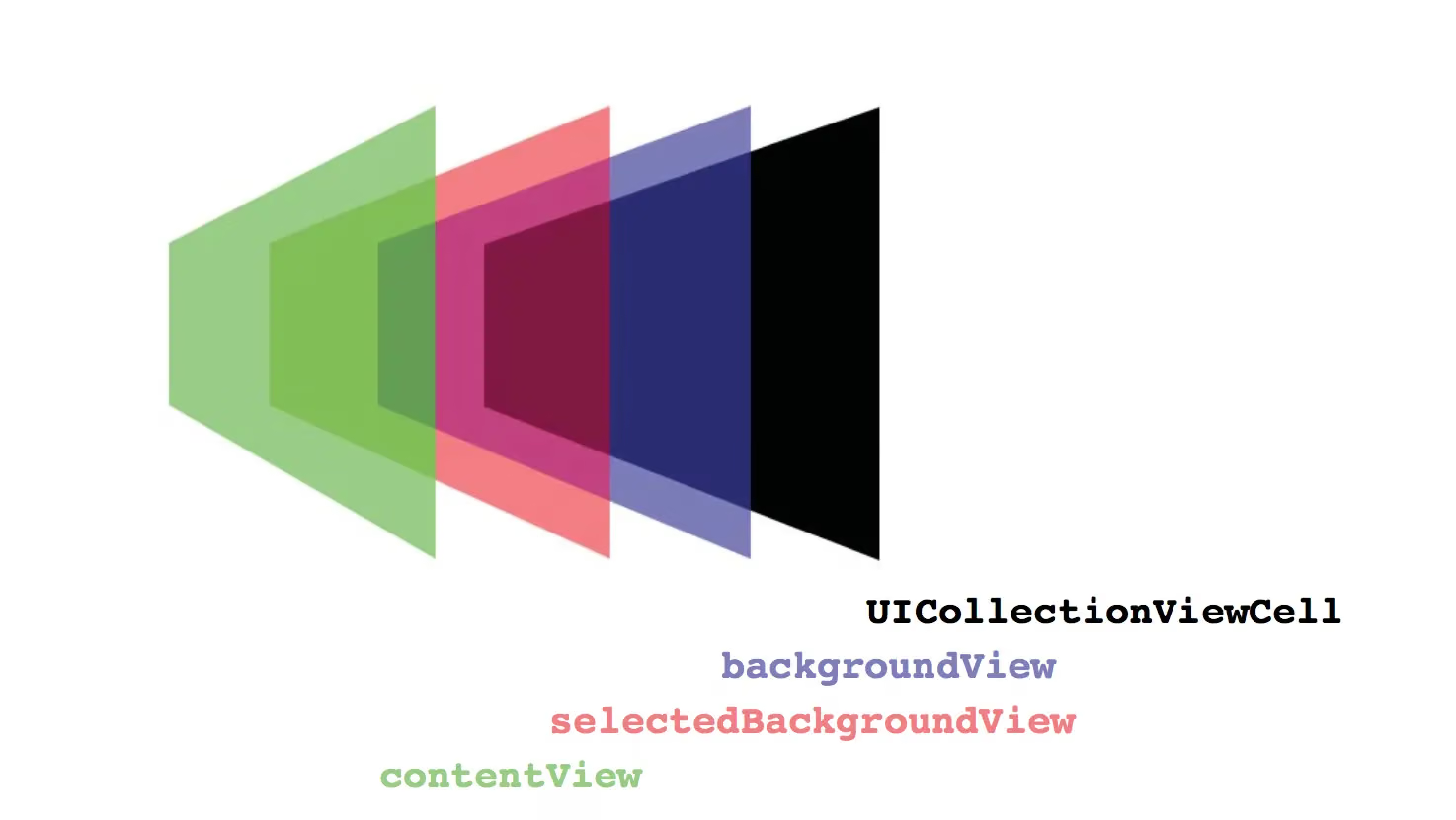
Preface
I haven’t updated my blog for over a month — I’ve been way too busy. This post is about how to correctly add KVO observation to a UICollectionViewCell.
Opening
Since I’m currently developing a short video SDK aimed mostly at beginner developers, in order to let beginners understand the SDK’s code and usage at the lowest cost, we have to write code in the way that’s easiest for beginners to understand — for example, the most basic MVC pattern and the most straightforward Objective-C (honestly, I’m sick of OC, this super-long, painful-to-look-at programming language — I’ve long wanted to give Swift a try). So both the technical choices and the code style are tailored to the lowest comprehension level of beginners. But sometimes you inevitably have to compromise between beginner-friendliness and advanced implementation of features. Recently I ran into a problem in development:
The PM has a requirement: within one screen, freely switch the recording view across multiple cells, and allow tapping to cancel at will. In addition, for a recorded video: if the cell is not selected, show the cover image; if it’s selected, continue previewing; a cell that has no recorded video and is not previewing should show an add button.
Doesn’t that requirement make you dizzy just listening to it? Here’s a screenshot of my finished implementation.
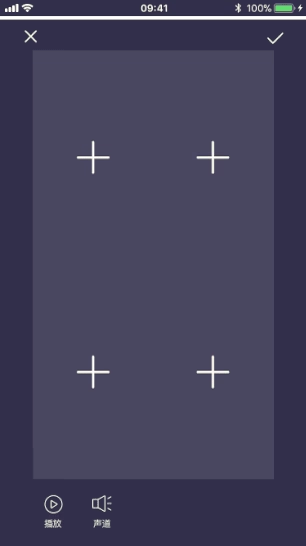
- Extract the cover image for a finished recording
- The one being previewed is always ready to record
- Freely switch cells without affecting the recording view
- A cell with no recording in progress and no recorded video file shows an add button
At first glance it looks like pure UI with no technical depth, right?
OK, let’s do something with some technical depth.
Problem 1
If you use the traditional MVC pattern where the Cell displays data, shouldn’t the model hold a record instance object to tell it when to start and when to stop? Of course, if you have a better approach, I won’t say more — I actually know it too.
Problem 2
Extracting the cover image is easy: just have the cell store the URL of the finished recording, then call the reload: method of UICollectionView each time.
Problem 3
The way we implement the recording view is placing it on a subview of the cell. If the view that’s currently recording gets reloaded, it would instantly disappear. Even if you grind through implementing start recording, pause recording, resume recording, stop recording… I think that approach would be full of problems and hidden risks. Don’t even think about it — we can’t play it that way.
Problem 4
The problem of cell selection and deselection. Have you noticed that if the view on the currently recording cell is selected, there’s a red border indicating it’s currently in focus? Then what about when recording finishes? Don’t you need to reload the cell again to tell it who’s selected and who’s deselected? If the tapped cell is the same one, you also need a toggle operation. If it’s currently previewing, selecting it again means stopping the preview and showing the plus button or cover image. As you think it through, you realize this thing is a state machine. You must carefully design the model so that its parameters are rich enough to control each cell’s current state: selected, deselected, previewing, not previewing, recording, not recording, recorded, stopped recording… The more I thought, the more complicated it got, so I put together a state machine table:
| Cell Status | Current cell display | Other cells display | Tap current | Tap other selected |
|---|---|---|---|---|
| No preview | Show plus/cover image | Show plus/or cover | Start preview | Switch preview view |
| Previewing | Preview video | Show plus/or cover | Show plus/or cover | Switch preview view |
| Recording | Preview video/play video | (Show plus or play video)/(Show plus or preview video) | No action (locked) | No action (locked) |
This isn’t the important part — just get the general idea, no need to read it carefully.
It’s not that I’m over-complicating things — the PM’s requirements are just that complex. I had to enumerate all the states completely, then simplify, and simplify again. An SDK that even beginner developers can understand is a good SDK.
There are actually many other problems, but I won’t list them all. OK, now let’s solve the problems one by one.
Actually, looking at all the above, the root cause is that implementing this kind of freely-switchable recording interaction doesn’t fit the traditional MVC approach. It’s more like an MVVM thing, so I thought of the essence of MVVM: use data to drive the view.
Aren’t the 4 main problems above just about the model’s state changing and needing to notify the cell to update? So we use the model’s state to control things.
Note: if you go with the MVVM approach, stop calling the collection view’s reload: method
There are currently two mainstream ways to implement MVVM:
- RAC
- KVO
Clearly RAC is too big for our demo, so let’s do it with KVO. (Code abridged.)
Step 1: Define the model
1
2
3
4
5
6
7
8
9
10
11
12
13
14
15
16
17
18
19
20
21
22
23
24
25
26
27
28
29
30
31
32
33
34
35
36
37
38
39
40
41
42
43
44
45
46
47
48
49
typedef void (^CompletionHandler)(UIImage * image); //取出 Image 给 Cell 显示的回调

typedef NS_ENUM(NSUInteger,KSYMultiCanvasModelStatus){
    KSYMultiCanvasModelStatusNOPreview = 0,//无预览状态
    KSYMultiCanvasModelStatusINPreview = 1,//正在预览状态
    KSYMultiCanvasModelStatusRecording = 2 //正在录制状态
};

@interface KSYCanvasModel : NSObject
@property (nonatomic, strong) NSURL  *videoURL; //存放录制完视频 URL
@property (nonatomic, assign) BOOL   isSelected;//是否是选中
@property (nonatomic, assign) KSYMultiCanvasModelStatus modelStatus; //重要!!!:模型状态用它控制 cell 显示
- (void)gengrateImageBySize:(CGSize)size
          completionHandler:(CompletionHandler)handler;

@end

@interface KSYCanvasModel ()

@property(nonatomic, strong)AVAssetImageGenerator *imageGenerator;
@end

@implementation KSYCanvasModel

- (void)gengrateImageBySize:(CGSize)size
          completionHandler:(CompletionHandler)handler{
    if (self.videoURL == nil) { handler(nil); }

    AVURLAsset *asset = [AVURLAsset assetWithURL:self.videoURL];
    self.imageGenerator = nil;
    self.imageGenerator = [AVAssetImageGenerator assetImageGeneratorWithAsset:asset];
    self.imageGenerator.maximumSize = size;

    NSError *error=nil;
    CMTime time= kCMTimeZero;//CMTime是表示电影时间信息的结构体,第一个参数表示是视频第几秒,第二个参数表示每秒帧数.(如果要活的某一秒的第几帧可以使用CMTimeMake方法)
    CMTime actualTime;
    CGImageRef cgImage= [self.imageGenerator copyCGImageAtTime:time actualTime:&actualTime error:&error];
    if(error){
        NSLog(@"截取视频缩略图时发生错误,错误信息:%@",error.localizedDescription);
        handler(nil);
        return;
    }
    CMTimeShow(actualTime);
    UIImage *image = [UIImage imageWithCGImage:cgImage];//转化为UIImage
    CGImageRelease(cgImage);
    handler(image);
}
@end
OK, that’s roughly the model. The .m file mainly extracts the cover image from the video.
Step 2: Define the cell
1
2
3
4
5
6
7
8
9
10
11
12
13
14
15
16
17
18
19
20
21
22
23
24
25
26
27
28
29
30
31
32
33
34
35
36
37
38
39
40
41
42
43
44
45
46
47
48
49
50
51
52
53
54
55
56
57
58
59
60
61
62
63
64
65
66
67
68
69
70
71
72
73
74
75
76
77
78
79
80
81
82
83
84
#import <UIKit/UIKit.h>
#import "KSYCanvasModel.h"

static const NSString *KSYModelKVOStatusContext;
static NSString *KSYKeyPathForModelStatus = @"modelStatus";
static NSString *KSYKeyPathForIsSelected = @"isSelected";

@interface KSYCanvasCell : UICollectionViewCell
@property (weak, nonatomic) IBOutlet UIView *canvasImageView;
@property (weak, nonatomic) IBOutlet UIImageView *addImageView;
@property (weak, nonatomic) IBOutlet UIImageView *boundsView;

@property (nonatomic, strong) KSYCanvasModel *model;

//注册和移除观察接口
- (void)addObserver:(NSObject *)observer
         forKeyPath:(NSString *)keyPath
            options:(NSKeyValueObservingOptions)options
            context:(void *)context;
- (void)removeObserver:(NSObject *)observer
            forKeyPath:(NSString *)keyPath
               context:(void *)context;

@end

@interface KSYCanvasCell()
// 使用 ObservableKeys 保存 keyPath 观察状态,避免重复注册和重复移除(重复移除会导致 crash)
@property (nonatomic, strong) NSMutableSet *observableKeySets;
@end

@implementation KSYCanvasCell

- (void)awakeFromNib {
    [super awakeFromNib];

    //千万别把 KOV 监听写在这里
}

//.,,此处省略了不太相关的代码

- (void)addObserver:(NSObject *)observer
         forKeyPath:(NSString *)keyPath
            options:(NSKeyValueObservingOptions)options
            context:(void *)context{
    if ([self.observableKeySets containsObject:keyPath]) { return; }

    if (self.observableKeySets == nil) {
        self.observableKeySets = [NSMutableSet set];
    }

    [self.observableKeySets addObject:keyPath];

    [self.model addObserver:observer
                 forKeyPath:keyPath
                    options:options
                    context:context];
}

- (void)removeObserver:(NSObject *)observer
            forKeyPath:(NSString *)keyPath
               context:(void *)context{
    if (![self.observableKeySets containsObject:keyPath]) { return; }

    [self.model removeObserver:observer
                    forKeyPath:keyPath
                       context:context];
    [self.observableKeySets removeObject:keyPath];
}

- (void)observeValueForKeyPath:(NSString *)keyPath
                      ofObject:(id)object
                        change:(NSDictionary<NSKeyValueChangeKey,id> *)change
                       context:(void *)context{
    if ([KSYKeyPathForModelStatus isEqualToString:keyPath]) {
        KSYMultiCanvasModelStatus modelStatus = [[change objectForKey:NSKeyValueChangeNewKey] integerValue];
        NSLog(@"当前状态:%zd",modelStatus);
		 //拿到模型状态然后做适当的处理
    } else if([KSYKeyPathForIsSelected isEqualToString:keyPath]){
        //处理是否显示边框
    }
}

@end
Here you need to override the following two methods in the .h file, because you need to get the cell in the ViewController and call them:
addObserver:forKeyPath:options:context:— this is a system method that needs to be overridden and exposed as an interfaceremoveObserver:forKeyPath:context:— this is a system method that needs to be overridden and exposed as an interface
Here we define a context object used to identify this observation in the cell, plus the two properties to observe (at the top of KSYCanvasCell.h):
1
2
3
4
static const NSString *KSYModelKVOStatusContext;
static NSString *KSYKeyPathForModelStatus = @"modelStatus";
static NSString *KSYKeyPathForIsSelected = @"isSelected";
Note: To prevent the cell from registering repeatedly and crashing on reuse, we use
NSMutableSetso that the model’s observers are registered only once
1
2
3
4
@interface KSYCanvasCell()
// 使用 ObservableKeys 保存 keyPath 观察状态,避免重复注册和重复移除(重复移除会导致 crash)
@property (nonatomic, strong) NSMutableSet *observableKeySets;
@end
Do a check when adding:
1
2
3
4
5
6
7
8
9
10
11
12
13
14
- (void)addObserver:(NSObject *)observer
         forKeyPath:(NSString *)keyPath
            options:(NSKeyValueObservingOptions)options
            context:(void *)context{
    if ([self.observableKeySets containsObject:keyPath]) { return; }

    if (self.observableKeySets == nil) {
        self.observableKeySets = [NSMutableSet set];
    }

    [self.observableKeySets addObject:keyPath];

    ...
}
And do a check when removing:
1
2
3
4
5
6
7
8
9
10
- (void)removeObserver:(NSObject *)observer
            forKeyPath:(NSString *)keyPath
               context:(void *)context{
    if (![self.observableKeySets containsObject:keyPath]) { return; }

    [self.model removeObserver:observer
                    forKeyPath:keyPath
                       context:context];
    [self.observableKeySets removeObject:keyPath];
}
OK, that’s roughly the idea for the cell.
Step 3: In the ViewController, register/remove observers at the appropriate places, and also handle adding/removing the observers properly within the view controller’s lifecycle
Here we need to implement the UICollectionViewDelegate protocol methods to add and remove observers on the cells.
1
2
3
4
5
6
7
8
9
10
11
12
13
14
15
16
17
18
19
20
21
22
23
24
- (void)collectionView:(UICollectionView *)collectionView willDisplayCell:(UICollectionViewCell *)cell forItemAtIndexPath:(NSIndexPath *)indexPath{
    KSYCanvasCell *canvasCell = (KSYCanvasCell *)cell;
    [canvasCell addObserver:canvasCell
                 forKeyPath:KSYKeyPathForModelStatus
                    options:NSKeyValueObservingOptionNew
                    context:&KSYModelKVOStatusContext];
    [canvasCell addObserver:canvasCell
                 forKeyPath:KSYKeyPathForIsSelected
                    options:NSKeyValueObservingOptionNew
                    context:&KSYModelKVOStatusContext];

}

- (void)collectionView:(UICollectionView *)collectionView didEndDisplayingCell:(UICollectionViewCell *)cell forItemAtIndexPath:(NSIndexPath *)indexPath{
    KSYCanvasCell *canvasCell = (KSYCanvasCell *)cell;
    //状态变化
    [canvasCell removeObserver:canvasCell
                    forKeyPath:KSYKeyPathForModelStatus
                       context:&KSYModelKVOStatusContext];
    //选中变化
    [canvasCell removeObserver:canvasCell
                    forKeyPath:KSYKeyPathForIsSelected
                       context:&KSYModelKVOStatusContext];
}
You might ask why write it here.
Let me tell you about a pitfall I hit.
If you register observers in the method below, the consequences are unthinkable — because cells are reused, and re-registering KVO each time creates a new object.
1
2
3
4
5
6
- (__kindof UICollectionViewCell *)collectionView:(UICollectionView *)collectionView cellForItemAtIndexPath:(NSIndexPath *)indexPath{
    KSYCanvasCell *cell = [collectionView dequeueReusableCellWithReuseIdentifier:[KSYCanvasCell className] forIndexPath:indexPath];
    cell.model = [self.models objectAtIndex:indexPath.row];
    //如果写在这里
    return cell;
}
The implementation principle of KVO is simple: it subclasses the observed object at runtime and overrides the observed property to listen for changes between two values. I won’t belabor KVO’s principles — that’s old hat.
At first I wrote it in the cell’s awakeFromNib:, since all the cell’s controls are laid out there, but trouble came in droves — crashes everywhere.
1
2
3
4
- (void)awakeFromNib {
    [super awakeFromNib];
	 //别写在这里
}
If you don’t believe me, give it a try.
Finally, we modify the model’s state at the appropriate places in the controller, and the cells update in real time.
1
2
3
4
5
6
7
8
9
10
11
12
13
14
15
16

- (void)collectionView:(UICollectionView *)collectionView didSelectItemAtIndexPath:(NSIndexPath *)indexPath{
    //------------处理点击-----------
    KSYCanvasModel *lastModel = [self.models objectAtIndex:self.lastSelectedIndexPath.row];
    KSYCanvasModel *selectedModel = [self.models objectAtIndex:indexPath.row];
    BOOL clickSameCell = (self.lastSelectedIndexPath == indexPath);
    if (clickSameCell) {
        //选择同一个cell
        selectedModel.isSelected = !selectedModel.isSelected;
    } else {
        lastModel.isSelected = NO;
        selectedModel.isSelected = YES;
    }
    selectedModel.modelStatus = KSYMultiCanvasModelStatusRecording; //这就会出发 cell的 KVO 了
}
Finally, don’t forget to add and remove observers in the ViewController’s lifecycle:
1
2
3
4
5
6
7
8
9
10
- (void)viewWillDisappear:(BOOL)animated
{
    [super viewWillDisappear:animated];
    [self.canvasCollectionView.visibleCells enumerateObjectsUsingBlock:^(KSYCanvasCell *cell, NSUInteger idx, BOOL * _Nonnull stop) {
        [cell removeObserver:cell
                  forKeyPath:KSYKeyPathForModelStatus
                     context:&KSYModelKVOStatusContext];
    }];
}
This implementation process solves problems 1, 2, 3, and 4 mentioned above.
This is also the most streamlined implementation. From a beginner developer’s perspective, you need to be at least a little familiar with MVVM by now. It has become standard-issue in iOS.
Summary
Personally, I think this MVVM-leaning development style is pretty good. Although all kinds of MVVM variants are everywhere these days, as long as you remember it, use it, and it solves problems in a simple and straightforward way, it’s a good design pattern. Of course this post only covered a few techniques — please point out anything inadequate.
I won’t write a separate demo — you can refer to our short video demo, the multicanvas target.
End of article