
1
2
3
4
5
6
7
8
9
10
- (UIView *)containerBackgroundView {
    if (!_containerBackgroundView) {
        UIToolbar *toolBar = [[UIToolbar alloc] initWithFrame:CGRectZero];
        toolBar.barStyle = UIBarStyleBlack;
        toolBar.clipsToBounds = YES;
        _containerBackgroundView = toolBar;
    }
    return _containerBackgroundView;
}
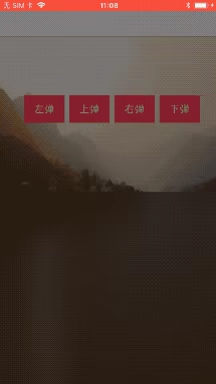
You can also use UIBlurEffect:
1
2
3
4
5
UIBlurEffect *blurEffect = [UIBlurEffect effectWithStyle:UIBlurEffectStyleLight];
UIVisualEffectView *blurView = [[UIVisualEffectView alloc] initWithEffect:blurEffect];
blurView.frame = myView.bounds;
[myView addSubview:blurView];
UIBlurEffectStyle
UIBlurEffectStyleExtraLight,//Extra brightness (highlight style)
UIBlurEffectStyleLight,//Light style
UIBlurEffectStyleDark//Dark style
UIBlurEffect cannot adjust the blur radius.
If you want to adjust the blur radius,
you can apply a Gaussian blur to the image:
1
2
3
4
5
6
7
8
9
10
11
12
13
-(UIImage *)convertToBlurImage:(UIImage *)image{
    CIFilter *gaussianBlurFilter = [CIFilter filterWithName:@"CIGaussianBlur"];
    [gaussianBlurFilter setDefaults];
    CIImage *inputImage = [CIImage imageWithCGImage:[image CGImage]];
    [gaussianBlurFilter setValue:inputImage forKey:kCIInputImageKey];
    [gaussianBlurFilter setValue:@5 forKey:kCIInputRadiusKey];
    CIImage *outputImage = [gaussianBlurFilter outputImage];
    CIContext *context   = [CIContext contextWithOptions:nil];
    CGImageRef cgimg     = [context createCGImage:outputImage fromRect:[inputImage extent]];  // note, use input image extent if you want it the same size, the output image extent is larger
    UIImage *convertedImage = [UIImage imageWithCGImage:cgimg];
    return convertedImage;
}
The core line is [gaussianBlurFilter setValue:@5 forKey:kCIInputRadiusKey];
I tested 100 and it worked fine too — I never found the maximum value.
Above are several pieces of Gaussian blur related code.
End of article