
Preface
I like to play a piece of background music when a blog post opens, but Markdown itself doesn’t support inserting audio or video. That question prompted this article.
Inserting Music in Markdown
markdown is actually a syntax for converting to html, and internally it also supports writing html tags directly. If you’re not familiar with the various tags, please click w3cschool to see the usage of each API. The tag we need here is iframe, as shown in the code below, where
divis used to control the format; without it, the default is left-alignedframeborderdetermines whether a border is shown around the frame, 1 for yes, 0 for nomarginwidthandmarginheightrepresent the pixel size of the distance from the edgewidthandheightrepresent the length and width of the player barsrcis the playback link, which can be obtained from theGenerate External Link Playerfeature of services such as NetEase Cloud Music, which also gives you the code below and can be modified as you wish; you can also change the audio link to a video link to play videos
Note that audio and video loop automatically by default, and you can modify the link value to change that. In the
srcfield, theautovalue indicates whether to autoplay; when the value is1it autoplays, and0means it doesn’t. In thesrcfield, some links carry aheightorwidthvalue, which indicates the base width and height of the player frame. You can change these values to get the desired player frame size, in which case you don’t need to fill in the externalwidthandheight.
1
2
3
<div align=life>
<iframe frameborder="no" marginwidth="0" marginheight="0" width=400 height=140 src="https://music.163.com/outchain/player?type=2&id=34341360&auto=0&height=66"></iframe>
</div>
API Explanation
Here you can see that we use
1
https://music.163.com/outchain/player?type=2&id=34341360&auto=0&height=66
The id=34341360 in this API is obtained from here:
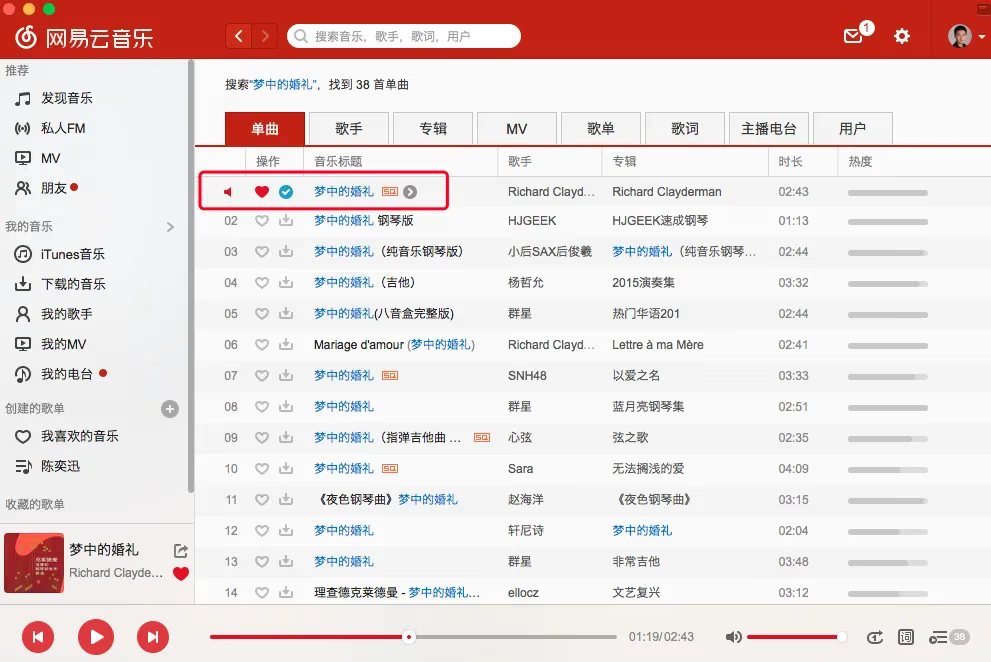
Find Copy Link, then open it in a browser.

The id=34341360 at the end is the id we need, and then you just replace it in the API.
For more tips, refer to an article I wrote before: markdown folding
markdown table
End of article.