
Preface
It’s been a long time since I last wrote about Learning AV Foundation. Let’s get back to business. This post introduces simple video playback.
Before we get into video playback, let’s look at the component model required by AVPlayer.
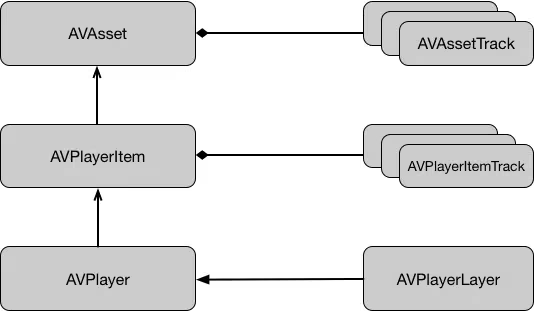
AVPlayer
AVPlayer is a controller object used to play time-based audiovisual media. It supports playing:
- Local media files
- Asynchronously downloaded media files
- Streaming media files using the HTTP Live Streaming protocol
AVPlayer is a component at the logic layer.
(An app can be divided into the following layers)
UI layer
Business logic layer
Persistence + network layer
If you’re playing audio files like MP3 or AAC, there’s no UI to visualize. But if you’re playing a QuickTime movie or an MPEG-4 video, not having a UI becomes really awkward. If you want to play video and need UI, you can use the AVPlayerLayer class.
Note:
AVPlayeronly manages the playback of a single resource. To play multiple items, you can useAVQueuePlayer, a subclass ofAVPlayer, which manages a queue of resources. Use this class whenever you need to play multiple items in sequence or loop over audio/video resources.
AVPlayerLayer
AVPlayerLayer is built on top of Core Animation and is one of the few UI components you can find in AV Foundation. Core Animation is the fundamental framework responsible for graphics rendering and animation on Mac and iOS, mainly used to beautify the platforms and smooth their animations. Core Animation itself has time-based properties, and because it’s based on OpenGL, it performs very well.
AVPlayerLayer extends CALayer from Core Animation and displays video content on screen through the framework. As we know, layers don’t respond to events.
To create an AVPlayerLayer, you instantiate an AVPlayer object. AVPlayerLayer has a videoGravity property that sets one of three fill modes used to stretch and scale the video. Below, a 16:9 video placed in a 4:3 rectangle is used to illustrate the different gravity values.
As shown below:
AVLayerVideoGravityResizeAspect maintains the aspect ratio 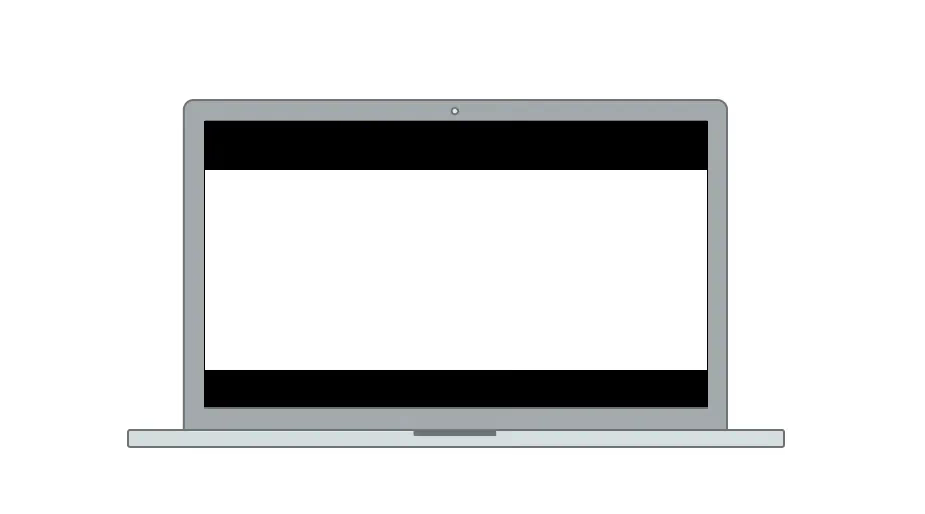
AVLayerVideoGravityResizeAspectFill fills the frame 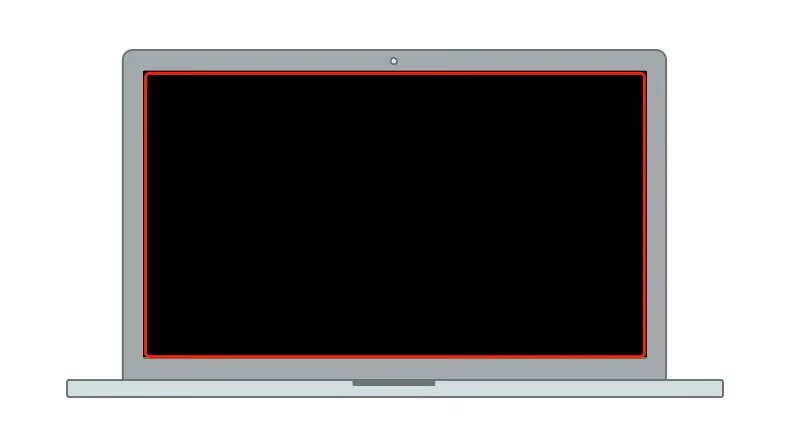
AVLayerVideoGravityResize stretches
AVPlayerItem
We need AVPlayer to play an AVAsset. As we learned earlier, AVAsset’s metadata contains things like creation date, metadata, and duration. But it has no way to access a specific position in the media.
This is because the AVAsset model only contains static information about the media resource — immutable attributes that describe static information about the object. That means you can’t implement playback using only an AVAsset object. To play, we need to use AVPlayerItem
You can think of AVPlayerItem as a dynamic AVAsset model, AVPlayerItem has the seekToTime: method and a presentationSize: property. An AVPlayerItem is composed of one or more media tracks.
AVPlayerItem contains the AVPlayerItemTrack track property.
Playback Example
1
2
3
4
5
6
7
8
9
10
11
12
13
- (void)viewDidLoad {
	self.localURL = [[NSBundle mainBundle] URLForResource:@"hubblecast" withExtension:@"m4v"];

    AVAsset *asset = [AVAsset assetWithURL:self.localURL];

    AVPlayerItem *item = [AVPlayerItem playerItemWithAsset:asset];

    AVPlayer *player = [AVPlayer playerWithPlayerItem:item];

    AVPlayerLayer *layer = [AVPlayerLayer playerLayerWithPlayer:player];

    [self.view.layer addSublayer:layer];
}
This AVPlayerItem has no delegate to tell us whether playback has started, so the usual approach is to use KVO to observe one of its properties — AVPlayerItemStatus.
1
2
3
4
5
typedef NS_ENUM(NSInteger, AVPlayerItemStatus) {
	AVPlayerItemStatusUnknown,
	AVPlayerItemStatusReadyToPlay,
	AVPlayerItemStatusFailed
};
When its status becomes AVPlayerItemStatusReadyToPlay, it means the content has loaded and is ready to play.
CMTime
Use CMTime for all kinds of audio/video time operations. It’s a struct in the CoreMedia framework, designed specifically for precise time. The NSTimeInterval we used before has precision problems (as Apple officially states).
1
2
3
4
5
6
7
typedef struct
{
	CMTimeValue	value;		//分子
	CMTimeScale	timescale; //分母
	CMTimeFlags	flags;		//标记是否失效 eg. kCMTimeFlags_Valid, kCMTimeFlags_PositiveInfinity
	CMTimeEpoch	epoch;
} CMTime;
The key parts of this struct are value (a 64-bit integer) and timescale (a 32-bit integer).
It represents time as a fraction, for example:
0.5 seconds
1
2
3
4
CMTime halfSecond = CMTimeMake(1, 2); //0.5秒
CMTime fiveSecond = CMTimeMake(5, 1); //5秒
CMTime oneSample = CMTimeMake(1, 44100); //一个抽样的样本
CMTime zeroTime = kCMTimeZero;
Building Your Own Player
First, you need to wrap a player.
1
2
3
4
5
6
7
8
#import <UIKit/UIKit.h>
#import "TransportProtocol.h"
@class AVPlayer;
@interface PlayerView : UIView
@property (nonatomic, readonly) id <TransportProtocol>  transport;
- (id)initWithPlayer:(AVPlayer *)player;
@end
The .m file implementation
1
2
3
4
5
6
7
8
9
10
11
12
13
14
15
16
17
18
19
20
21
22
23
24
25
26
27
28
29
30
31
32
33
34
35
36
#import "PlayerView.h"
#import <AVFoundation/AVFoundation.h>
#import "THOverlayView.h"
@interface PlayerView ()

@property (nonatomic, strong) THOverlayView *overlayView;

@end

@implementation PlayerView
+ (Class)layerClass{
    return [AVPlayerLayer class];
}

- (id)initWithPlayer:(AVPlayer *)player{
    self = [super initWithFrame:CGRectZero];
    if (self) {
        self.backgroundColor = [UIColor blackColor];
        self.autoresizingMask = UIViewAutoresizingFlexibleWidth | UIViewAutoresizingFlexibleHeight;
        [(AVPlayerLayer *)[self layer] setPlayer:player];
        [[NSBundle mainBundle] loadNibNamed:@"THOverlayView" owner:self options:nil];
        [self addSubview:self.overlayView];
    }
    return self;
}

- (void)layoutSubviews{
    [super layoutSubviews];
    self.overlayView.frame = self.bounds;
}

- (id <TransportProtocol>)transport{
    return self.overlayView;
}

@end
transport integrates the player’s view, tap handling, view delegate, etc., all together.
1
2
3
4
5
6
7
8
9
10
11
12
13
14
15
16
17
18
19
20
21
22
23
24
25
26
@protocol TransportDelegate <NSObject>
- (void)play;
- (void)pause;
- (void)stop;

- (void)scrubbingDidStart;
- (void)scrubbedToTime:(NSTimeInterval)time;
- (void)scrubbingDidEnd;

- (void)jumpedToTime:(NSTimeInterval)time;

@optional
- (void)subtitleSelected:(NSString *)subtitle;

@end

@protocol TransportProtocol <NSObject>

@property (weak, nonatomic) id <TransportDelegate> delegate;

- (void)setTitle:(NSString *)title;
- (void)setCurrentTime:(NSTimeInterval)time duration:(NSTimeInterval)duration;
- (void)setScrubbingTime:(NSTimeInterval)time;
- (void)playbackComplete;
- (void)setSubtitles:(NSArray *)subtitles;
@end
The THOverlayView file is the top-level view with the play button and other controls.
1
2
3
4
5
6
#import <Foundation/Foundation.h>
#import <UIKit/UIKit.h>
@interface PlayerController : NSObject
@property (nonatomic, strong, readonly) UIView *view;
- (id)initWithURL:(NSURL *)assetURL;
@end
Here’s the player’s implementation file.
1
2
3
4
5
6
7
8
9
10
11
12
13
14
15
16
17
18
19
20
21
22
23
24
25
26
27
28
29
30
31
32
33
34
35
36
37
38
39
40
41
42
43
44
45
46
47
48
49
50
51
52
53
54
55
56
57
58
59
60
61
62
63
64
65
66
67
68
69
70
71
72
73
74
75
76
77
78
79
80
81
82
83
84
85
86
87
88
89
90
91
92
93
94
95
96
97
98
99
100
101
102
103
104
105
106
107
108
109
110
111
112
113
114
115
116
117
118
119
120
121
122
123
124
125
126
127
128
129
130
131
132
133
134
135
136
137
138
139
140
141
142
143
144
145
146
147
148
149
150
151
152
153
154
155
156
157
158
159
160
161
162
163
164
165
166
167
168
169
170
171
172
173
174
175
176
177
178
179
180
181
182
183
184
185
186
187
188
189
190
191
192
193
194
195
196
197
198
199
200
201
202
203
204
205
206
207
208
209
210
211
212
213
214
215
216
217
218
219
220
221
222
223
224
225
226
227
228
229
230
231
232
233
234
235
236
237
238
239
240
241
242
243
244
245
246
247
248
249
250
251
252
253
254
255
256
257
258
259
260
261
262
263
264
265
266
267
268
269
270
271
272
273
274
275
276
277
278
279
280
281
282
283
284
285
286
287
288
289
290
291
292
293
294
295
296
297
298
299
#import "PlayerController.h"
#import <AVFoundation/AVFoundation.h>
#import "TransportProtocol.h"
#import "PlayerView.h"
#import "AVAsset+Additions.h"
#import "UIAlertView+Additions.h"
#import "THThumbnail.h"

// AVPlayerItem's status property
#define STATUS_KEYPATH @"status"

// Refresh interval for timed observations of AVPlayer
#define REFRESH_INTERVAL 0.5f

// Define this constant for the key-value observation context.
static const NSString *PlayerItemStatusContext;

@interface PlayerController () <TransportDelegate>

@property (nonatomic, strong) AVAsset               *asset;
@property (nonatomic, strong) AVPlayerItem          *playerItem;
@property (nonatomic, strong) AVPlayer              *player;
@property (nonatomic, strong) PlayerView            *playerView;
@property (nonatomic, weak) id <TransportProtocol>  transport;
@property (nonatomic, strong) id                    timeObserver;
@property (nonatomic, strong) id                    itemEndObserver;
@property (nonatomic, assign) float                 lastPlaybackRate;
@property (strong, nonatomic) AVAssetImageGenerator *imageGenerator;
@end

@implementation PlayerController

#pragma mark - Setup

- (id)initWithURL:(NSURL *)assetURL {
    self = [super init];
    if (self) {
        _asset = [AVAsset assetWithURL:assetURL];                           // 1
        [self prepareToPlay];
    }
    return self;
}

- (void)prepareToPlay {
    NSArray *keys = @[
                      @"tracks",
                      @"duration",
                      @"commonMetadata",
                      @"availableMediaCharacteristicsWithMediaSelectionOptions"
                      ];
    self.playerItem = [AVPlayerItem playerItemWithAsset:self.asset          // 2
                           automaticallyLoadedAssetKeys:keys];

    [self.playerItem addObserver:self                                       // 3
                      forKeyPath:STATUS_KEYPATH
                         options:0
                         context:&PlayerItemStatusContext];

    self.player = [AVPlayer playerWithPlayerItem:self.playerItem];          // 4

    self.playerView = [[PlayerView alloc] initWithPlayer:self.player];    // 5
    self.transport = self.playerView.transport;
    self.transport.delegate = self;
}

- (void)observeValueForKeyPath:(NSString *)keyPath
                      ofObject:(id)object
                        change:(NSDictionary *)change
                       context:(void *)context {

    if (context == &PlayerItemStatusContext) {

        dispatch_async(dispatch_get_main_queue(), ^{                        // 1

            [self.playerItem removeObserver:self forKeyPath:STATUS_KEYPATH];

            if (self.playerItem.status == AVPlayerItemStatusReadyToPlay) {

                // Set up time observers.                                   // 2
                [self addPlayerItemTimeObserver];
                [self addItemEndObserverForPlayerItem];

                CMTime duration = self.playerItem.duration;

                // Synchronize the time display                             // 3
                [self.transport setCurrentTime:CMTimeGetSeconds(kCMTimeZero)
                                      duration:CMTimeGetSeconds(duration)];

                // Set the video title.
                [self.transport setTitle:self.asset.title];                 // 4

                [self.player play];                                         // 5

                [self loadMediaOptions];
                [self generateThumbnails];

            } else {
                [UIAlertView showAlertWithTitle:@"Error"
                                        message:@"Failed to load video"];
            }
        });
    }
}

- (void)loadMediaOptions {
    NSString *mc = AVMediaCharacteristicLegible;                            // 1
    AVMediaSelectionGroup *group =
    [self.asset mediaSelectionGroupForMediaCharacteristic:mc];          // 2
    if (group) {
        NSMutableArray *subtitles = [NSMutableArray array];                 // 3
        for (AVMediaSelectionOption *option in group.options) {
            [subtitles addObject:option.displayName];
        }
        [self.transport setSubtitles:subtitles];                            // 4
    } else {
        [self.transport setSubtitles:nil];
    }
}

- (void)subtitleSelected:(NSString *)subtitle {
    NSString *mc = AVMediaCharacteristicLegible;
    AVMediaSelectionGroup *group =
    [self.asset mediaSelectionGroupForMediaCharacteristic:mc];          // 1
    BOOL selected = NO;
    for (AVMediaSelectionOption *option in group.options) {
        if ([option.displayName isEqualToString:subtitle]) {
            [self.playerItem selectMediaOption:option                       // 2
                         inMediaSelectionGroup:group];
            selected = YES;
        }
    }
    if (!selected) {
        [self.playerItem selectMediaOption:nil                              // 3
                     inMediaSelectionGroup:group];
    }
}


#pragma mark - Time Observers

- (void)addPlayerItemTimeObserver {

    // Create 0.5 second refresh interval - REFRESH_INTERVAL == 0.5
    CMTime interval =
    CMTimeMakeWithSeconds(REFRESH_INTERVAL, NSEC_PER_SEC);              // 1

    // Main dispatch queue
    dispatch_queue_t queue = dispatch_get_main_queue();                     // 2

    // Create callback block for time observer
    __weak PlayerController *weakSelf = self;                             // 3
    void (^callback)(CMTime time) = ^(CMTime time) {
        NSTimeInterval currentTime = CMTimeGetSeconds(time);
        NSTimeInterval duration = CMTimeGetSeconds(weakSelf.playerItem.duration);
        [weakSelf.transport setCurrentTime:currentTime duration:duration];  // 4
    };

    // Add observer and store pointer for future use
    self.timeObserver =                                                     // 5
    [self.player addPeriodicTimeObserverForInterval:interval
                                              queue:queue
                                         usingBlock:callback];
}

- (void)addItemEndObserverForPlayerItem {

    NSString *name = AVPlayerItemDidPlayToEndTimeNotification;

    NSOperationQueue *queue = [NSOperationQueue mainQueue];

    __weak PlayerController *weakSelf = self;                             // 1
    void (^callback)(NSNotification *note) = ^(NSNotification *notification) {
        [weakSelf.player seekToTime:kCMTimeZero                             // 2
                  completionHandler:^(BOOL finished) {
                      [weakSelf.transport playbackComplete];                          // 3
                  }];
    };

    self.itemEndObserver =                                                  // 4
    [[NSNotificationCenter defaultCenter] addObserverForName:name
                                                      object:self.playerItem
                                                       queue:queue
                                                  usingBlock:callback];
}

#pragma mark - THTransportDelegate Methods

- (void)play {
    [self.player play];
}

- (void)pause {
    self.lastPlaybackRate = self.player.rate;
    [self.player pause];
}

- (void)stop {
    [self.player setRate:0.0f];
    [self.transport playbackComplete];
}

- (void)jumpedToTime:(NSTimeInterval)time {
    [self.player seekToTime:CMTimeMakeWithSeconds(time, NSEC_PER_SEC)];
}

- (void)scrubbingDidStart {                                                 // 1
    self.lastPlaybackRate = self.player.rate;
    [self.player pause];
    [self.player removeTimeObserver:self.timeObserver];
    self.timeObserver = nil;
}

- (void)scrubbedToTime:(NSTimeInterval)time {                               // 2
    [self.playerItem cancelPendingSeeks];
    [self.player seekToTime:CMTimeMakeWithSeconds(time, NSEC_PER_SEC) toleranceBefore:kCMTimeZero toleranceAfter:kCMTimeZero];
}

- (void)scrubbingDidEnd {                                                   // 3
    [self addPlayerItemTimeObserver];
    if (self.lastPlaybackRate > 0.0f) {
        [self.player play];
    }
}


#pragma mark - Thumbnail Generation

- (void)generateThumbnails {

    self.imageGenerator =                                                   // 1
    [AVAssetImageGenerator assetImageGeneratorWithAsset:self.asset];

    // Generate the @2x equivalent
    self.imageGenerator.maximumSize = CGSizeMake(200.0f, 0.0f);             // 2

    CMTime duration = self.asset.duration;

    NSMutableArray *times = [NSMutableArray array];                         // 3
    CMTimeValue increment = duration.value / 20;
    CMTimeValue currentValue = 2.0 * duration.timescale;
    while (currentValue <= duration.value) {
        CMTime time = CMTimeMake(currentValue, duration.timescale);
        [times addObject:[NSValue valueWithCMTime:time]];
        currentValue += increment;
    }

    __block NSUInteger imageCount = times.count;                            // 4
    __block NSMutableArray *images = [NSMutableArray array];

    AVAssetImageGeneratorCompletionHandler handler;                         // 5

    handler = ^(CMTime requestedTime,
                CGImageRef imageRef,
                CMTime actualTime,
                AVAssetImageGeneratorResult result,
                NSError *error) {

        if (result == AVAssetImageGeneratorSucceeded) {                     // 6
            UIImage *image = [UIImage imageWithCGImage:imageRef];
            id thumbnail =
            [THThumbnail thumbnailWithImage:image time:actualTime];
            [images addObject:thumbnail];
        } else {
            NSLog(@"Error: %@", [error localizedDescription]);
        }

        // If the decremented image count is at 0, we're all done.
        if (--imageCount == 0) {                                            // 7
            dispatch_async(dispatch_get_main_queue(), ^{
                NSString *name = THThumbnailsGeneratedNotification;
                NSNotificationCenter *nc = [NSNotificationCenter defaultCenter];
                [nc postNotificationName:name object:images];
            });
        }
    };

    [self.imageGenerator generateCGImagesAsynchronouslyForTimes:times       // 8
                                              completionHandler:handler];
}


#pragma mark - Housekeeping

- (UIView *)view {
    return self.playerView;
}

- (void)dealloc {
    if (self.itemEndObserver) {                                             // 5
        NSNotificationCenter *nc = [NSNotificationCenter defaultCenter];
        [nc removeObserver:self.itemEndObserver
                      name:AVPlayerItemDidPlayToEndTimeNotification
                    object:self.player.currentItem];
        self.itemEndObserver = nil;
    }
}

@end
Now let me explain how to observe time to get playback-time callbacks.
Observing Time
While the player is playing, we can’t tell where in the media it currently is. To solve this, AVPlayerItem provides two methods for observing playback, along with their specific usage APIs.
Periodic Observation
1
2
3
- (id)addPeriodicTimeObserverForInterval:(CMTime)interval
                                   queue:(nullable dispatch_queue_t)queue
                              usingBlock:(void (^)(CMTime time))block;
This is mainly used to move the player’s seek position and update the time display as time changes, by observing playback time changes via AVPlayer’s addPeriodicTimeObserverForInterval:queue:usingBlock:.
interval— the time interval of the observation period, aCMTimequeue— the serial dispatch queue on which the notifications are sent; we usually put the callback on the main thread. (Note: it can’t be a concurrent queue.)block— the time callback invoked at the specified interval.
Below is sample code.
1
2
3
4
5
6
7
8
9
10
11
12
13
14
15
16
17
18
19
20
21
22
23
- (void)addPlayerItemTimeObserver {

    // Create 0.5 second refresh interval - REFRESH_INTERVAL == 0.5
    CMTime interval =
    CMTimeMakeWithSeconds(REFRESH_INTERVAL, NSEC_PER_SEC);              // 1

    // Main dispatch queue
    dispatch_queue_t queue = dispatch_get_main_queue();                     // 2

    // Create callback block for time observer
    __weak PlayerController *weakSelf = self;                             // 3
    void (^callback)(CMTime time) = ^(CMTime time) {
        NSTimeInterval currentTime = CMTimeGetSeconds(time);
        NSTimeInterval duration = CMTimeGetSeconds(weakSelf.playerItem.duration);
        [weakSelf.transport setCurrentTime:currentTime duration:duration];  // 4
    };

    // Add observer and store pointer for future use
    self.timeObserver =                                                     // 5
    [self.player addPeriodicTimeObserverForInterval:interval
                                              queue:queue
                                         usingBlock:callback];
}
Boundary Observation
What is boundary observation? It’s when a callback fires at certain time positions as the player plays.
1
2
3
- (id)addBoundaryTimeObserverForTimes:(NSArray<NSValue *> *)times
                                queue:(nullable dispatch_queue_t)queue
                           usingBlock:(void (^)(void))block;
times— anNSArrayofCMTimevalues that defines an array of time points. e.g., time points like 25%, 50%, 75%.queue— the serial dispatch queue on which the notifications are sent; we usually put the callback on the main thread. (Note: it can’t be a concurrent queue.)block— the time callback invoked at the specified interval.
Displaying Subtitles
There are two classes in AVPlayerLayer for handling subtitles.
- AVMediaSelectionGroup
- AVMediaSelectionOption
AVMediaSelectionOption is used to represent the alternate media displays of an AVAsset. In earlier posts I mentioned that media metadata can contain audio tracks, video tracks, subtitle tracks, alternate camera angles, and more.
To find subtitles, we need to use the availableMediaCharacteristicsWithMediaSelectionOptions property of AVAsset.
1
@property (nonatomic, readonly) NSArray<AVMediaCharacteristic> *availableMediaCharacteristicsWithMediaSelectionOptions NS_AVAILABLE(10_8, 5_0);
This property returns an array of strings that represent the media characteristics of the available options stored in the asset. In fact, the array’s string values look like this:
- AVMediaCharacteristicVisual — video
- AVMediaCharacteristicAudible — audio
- AVMediaCharacteristicLegible — subtitles or closed captions
1
2
3

- (nullable AVMediaSelectionGroup *)mediaSelectionGroupForMediaCharacteristic:(AVMediaCharacteristic)mediaCharacteristic NS_AVAILABLE(10_8, 5_0);
After requesting the available media characteristic data, call the mediaSelectionGroupForMediaCharacteristic: method of AVAsset, passing the specific media characteristic of the options you want to retrieve. This method returns an AVMediaSelectionGroup, which acts as a container for one or more mutually exclusive AVMediaSelectionGroup instances.
1
2
3
4
5
6
7
8
9
10
11
12
13
14
- (void)loadMediaOptions {
    NSString *mc = AVMediaCharacteristicLegible;                            // 1
    AVMediaSelectionGroup *group =
        [self.asset mediaSelectionGroupForMediaCharacteristic:mc];          // 2
    if (group) {
        NSMutableArray *subtitles = [NSMutableArray array];                 // 3
        for (AVMediaSelectionOption *option in group.options) {
            [subtitles addObject:option.displayName];
        }
        [self.transport setSubtitles:subtitles];                            // 4
    } else {
        [self.transport setSubtitles:nil];
    }
}
AirPlay
AirPlay is something most iOS developers are familiar with. It’s used to wirelessly play streaming audio/video content on Apple TV, or to play audio-only content on various third-party audio systems (such as CarPlay built into cars). If you have an Apple TV or one of those audio systems, you’ll find this feature really practical. In fact, integrating this feature into our apps is quite easy.
AVPlayer has a property called allowsExternalPlayback that enables or disables AirPlay playback. Its default value is YES, which means without any extra coding, a player app automatically supports AirPlay.
1
@property (nonatomic) BOOL allowsExternalPlayback NS_AVAILABLE(10_11, 6_0);
However, a dedicated framework API for AirPlay only appeared in iOS 11. Before that, we used MPVolumeView from the Media Player framework.
Sample code:
1
2
3
4
	MPVolumeView *volumeView = [[MPVolumeView alloc] init];
    volumeView.showsVolumeSlider = NO;
    [volumeView sizeToFit];
    [transportView addSubview:volumeView];
The route selection button is only shown when AirPlay is available and a Wi-Fi network is enabled. If either of these conditions isn’t met, MPVolumeView automatically hides the button.
Summary
This chapter covered how to use AVPlayer and AVPlayerItem, observing playback progress callbacks, extracting subtitles, and more.