
Preface
This post carries a strong personal tone. If you find it uncomfortable to read, please close it as soon as possible. This article is only for my personal learning notes. You’re welcome to repost or share it within the scope of the license, but please respect the copyright and keep the original link. Thank you for your understanding and cooperation. If you find this site helpful, you can subscribe via RSS. Thanks for your support!
Here’s the background knowledge used in this post:
- GMT (Greenwich Mean Time): The standard time of Greenwich, UK. This is the time derived from the observations of the Royal Observatory in Greenwich, England — the local time of that place, which was historically treated as the world’s standard time.
- UT (Universal Time): The time calculated based on the atomic clock.
- UTC (Coordinated Universal Time): The position of the sun changes with the Earth’s rotation. People used to believe the Earth’s rotation rate was constant, but in 1960 this belief was overturned — the Earth’s rotation rate was found to be slowing down, while the rate at which time moves forward remains constant. So UTC was no longer considered accurate enough for describing time precisely. We need to keep looking for a value that advances at a uniform rate. Looking up at the sky is how we seek answers on a macroscopic scale, while the advancement of science and technology has given us deeper understanding at the microscopic level. So some clever people built atomic clocks based on the physical properties of microscopic particles — atoms — and used them to measure the passage of time. An atomic clock only gains or loses 1 second in 5 billion years, far more precise than GMT. The time reflected by such an atomic clock is what we now use as UTC (Coordinated Universal Time).
Excerpted from: Time Handling in iOS
Scenario Description
During recent development, a QA colleague filed a bug: after the phone’s date and time are modified, the page time display becomes abnormal. This is a very classic problem — namely time handling in iOS.
How We Think About Time
Time is linear — at any given moment, there is only one absolute time value on this planet. The differences in timezone or culture just mean that we in the same space-time express or understand the same time differently. For example, 20:00 in Beijing and 21:00 in Tokyo are actually the same absolute time value.
Think of it as using a standard point as the reference. Then, through timezone adjustments, the date display for every country around the world is achieved.
Several Ways iOS Gets the Time
1. NSDate
Code implementation
1
2
3
4
5
- (void)timeIntervalSinceReferenceDate {
    NSDate *date = [NSDate date];
    NSLog(@"date = %lf", date.timeIntervalSinceReferenceDate);
}
An NSDate object encapsulates a single point in time, independent of any particular calendar system or timezone. Date objects are immutable and represent an invariant time interval relative to an absolute reference date (2001-01-01 00:00:00 UTC), which is based on UTC.
NSDate output:
1
2020-12-06 12:28:55.795929+0800 ZGTimeDemo[12177:134289] date = 628921735.795845
Let’s calculate: 628921735.795845/365/86400 = 19.942977. This year is 2020, which is exactly 19 years after 2001.
If we print NSDate directly,
1
2
NSDate *date = [NSDate date];
NSLog(@"%@",date);
it outputs
1
2020-12-06 06:51:04 +0000
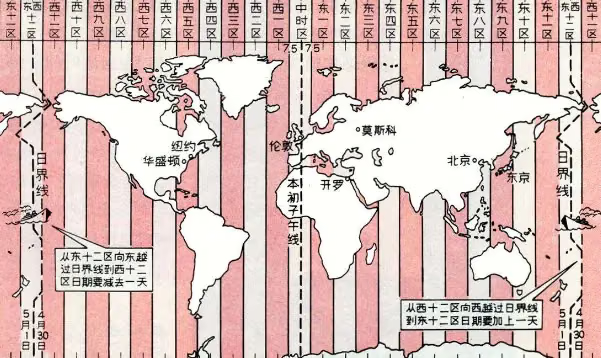
As you can see, NSDate outputs the absolute UTC time, while Beijing time is in the UTC+8 timezone. Add 8 hours to the above output and it’s exactly my current time. So normally UTC + timezone is the real date and time. For how to add/subtract timezones, refer to the figure below.
Note: NSDate is controlled by the phone’s system time. When you modify the time display on your phone, NSDate’s output of the current time changes accordingly. When building apps, once you understand this, you know NSDate is unreliable, because users may modify its value.
2. The function CFAbsoluteTimeGetCurrent()
Official documentation: Absolute time is measured in seconds relative to the absolute reference date (00:00 on January 1, 2001 GMT). Positive values represent dates after the reference date, and negative values represent dates before it. For example, an absolute time of -32940326 is equivalent to December 16, 1999, 17:54:34. Repeated calls to this function are not guaranteed to return monotonically increasing results. The system time may decrease due to synchronization with external time references or due to an explicit user change to the clock.
CFAbsoluteTimeGetCurrent()’s concept is very similar to NSDate, except the reference point is: the absolute time value at 00:00:00, January 1, 2001, based on GMT.
Note: CFAbsoluteTimeGetCurrent() also changes along with the current device’s system time and may be modified by the user.
3. gettimeofday()
1
int gettimeofday(struct timeval * __restrict, void * __restrict);
This function gets the UNIX time.
1
2
3
4
struct timeval now;
struct timezone tz;
gettimeofday(&now, &tz);
NSLog(@"gettimeofday: %ld", now.tv_sec);
1
gettimeofday: 1607238723
So what is UNIX time?
Unix time uses UTC 1970-01-01 00:00:00 as the reference, and represents the number of seconds the current time is offset from the reference point. The value returned by the API above is 1607238723, meaning 1,607,238,723 seconds have passed between the current time and UTC 1970-01-01 00:00:00.
Unix time is also a time standard we use frequently. On a Mac terminal, you can use the following command to convert it to a readable time:
1
date -r 1607238723
Output
1
2020年12月 6日 星期日 15时12分03秒 CST
Note: gettimeofday(), NSDate, and CFAbsoluteTimeGetCurrent are all affected by the current device’s system time. They simply differ in their reference time base. When communicating with the server, we generally use Unix time.
5. mach_absolute_time()
There happens to be such a value on our iPhones — the CPU’s clock cycles (ticks). This tick value can be used to describe time, and mach_absolute_time() returns the number of ticks the CPU has been running. This tick count can be converted into seconds or nanoseconds through certain transformations, linking it directly to time. However, this tick count restarts from zero after every device reboot, and it also stops counting when the iPhone locks its screen and goes to sleep.
Note: mach_absolute_time() is not affected by the system time; it’s only affected by device reboots and sleep behavior.
6. CACurrentMediaTime()
CACurrentMediaTime() is simply the result of converting the CPU tick count of mach_absolute_time() above into seconds. Consider the code:
1
2
double mediaTime = CACurrentMediaTime();
NSLog(@"CACurrentMediaTime: %f", mediaTime);
1
2020-12-06 15:34:59.808799+0800 ZGTimeDemo[19731:281283] CACurrentMediaTime: 17789.582767
The return value is how many seconds the device has been running since boot (device sleep time isn’t counted).
This API is equivalent to the following code:
1
NSTimeInterval systemUptime = [[NSProcessInfo processInfo] systemUptime];
Note: CACurrentMediaTime() is also not affected by the system time; it’s only affected by device reboots and sleep behavior.
7. sysctl()
The iOS system also records the time of the last device reboot. It can be obtained through the following API call:
1
2
3
4
5
6
7
8
9
10
11
12
13
14
15
16
17
#include <sys/sysctl.h>
- (long)bootTime
{
#define MIB_SIZE 2
    int mib[MIB_SIZE];
    size_t size;
    struct timeval  boottime;

    mib[0] = CTL_KERN;
    mib[1] = KERN_BOOTTIME;
    size = sizeof(boottime);
    if (sysctl(mib, MIB_SIZE, &boottime, &size, NULL, 0) != -1)
    {
        return boottime.tv_sec;
    }
    return 0;
}
The returned value is the Unix time of the last device reboot.
Note: the value returned by this API is also affected by the system time. If the user modifies the time, the value changes accordingly.
Time Synchronization Between Client and Server
Generally, when we make a request, we include the local time in the common parameters. Some sensitive interfaces may hit abnormal cases where the user changes the system time. To prevent users from going offline, modifying the system time, and thereby affecting the client-side logic, we usually do the following:
- Get the server’s time at a certain moment
A; - Record the local time
Bwhen timeAwas obtained; - When a time is needed, get the current local time
C, and useC-Bas the time intervalD. ThenA+Dis the current server time.
To accurately keep the client time in sync with the server time, the critical issue is that B and C must not be affected by the system time. To solve this, we rely on the iOS API — system uptime.
First: we rely on the server to provide an accurate timestamp. Each sync records the server timestamp obtained as B. We use the uptime difference to solve the time calibration problem.
The way to get how long the system has been running:
1
2
3
4
5
6
7
8
9
10
11
12
13
14
15
16
17
//get system uptime since last boot
- (NSTimeInterval)uptime
{
    struct timeval boottime;
    int mib[2] = {CTL_KERN, KERN_BOOTTIME};
    size_t size = sizeof(boottime);
    struct timeval now;
    struct timezone tz;
    gettimeofday(&now, &tz);
    double uptime = -1;
    if (sysctl(mib, 2, &boottime, &size, NULL, 0) != -1 && boottime.tv_sec != 0)
    {
        uptime = now.tv_sec - boottime.tv_sec;
        uptime += (double)(now.tv_usec - boottime.tv_usec) / 1000000.0;
    }
    return uptime;
}
Note: this function returns seconds. The Unix time returned by the server may need to be multiplied by 1000 (1s = 1000ms).
Both gettimeofday() and sysctl() are affected by the system time, but subtracting one from the other gives a result that’s independent of the system time. This way, user modifications of the time can be avoided. Of course, if the user powers off and turns the phone back on later, the time we obtain will lag behind the server time. In real-world scenarios, a client time slower than the server time usually has a smaller impact; what we generally worry about is the client time being ahead of the server time.
The following code can also achieve the same result without being affected by modifications — local_absolute_n_clock() returns seconds.
1
2
3
4
5
6
7
8
9
10
11
12
13
14
15
16
17
18
19
20
21
22
namespace
{
    mach_timebase_info_data_t init_mach_timebase_info()
    {
        mach_timebase_info_data_t info;
        mach_timebase_info(&info);
        return info;
    }
}

int64_t CTimestamp::local_absolute_n_clock()
{
    static mach_timebase_info_data_t sTimebaseInfo = init_mach_timebase_info();
    int64_t t = mach_absolute_time();
    return t * sTimebaseInfo.numer / sTimebaseInfo.denom;
}
CTimestamp::CTimestamp()
{
    m_base_tm = time(0)*(1000*1000*1000);
    m_base_clock = local_absolute_n_clock();
}
Summary
The key difficulty in solving the problem in this post is how to get the local time; here we use the difference calculation based on system uptime. I haven’t tested the time consumed by logic such as sleep or going into the background. But I think that to build a good utility class, you should try to calculate the time consumed in the background; it can also be obtained accurately through the system uptime difference calculation.
The focus of this post: the ABCD time-sync algorithm mainly relies on the server-provided time as the reference point. Another difficulty is how to get the system uptime and do the difference calculation to solve the inaccuracy caused by the user modifying the system time. I didn’t write the hardcore code into a utility class — you can implement it yourself since it’s fairly simple, so I won’t write a demo. This is also my first post after switching to Jekyll. If this post helps you, feel free to bookmark it.
References:
iOS关于时间的处理
Solving Time Synchronization Between Client and Server