
DFS Background
During development, you inevitably encounter features like uploading folders. However, folder uploads come with a few situations:
1
2
3
1. What if a folder contains N levels of nested subfolders
2. How to filter out non-empty folders
3. How to handle the case where the root-level folder has no files but its directory still needs to be created
For example 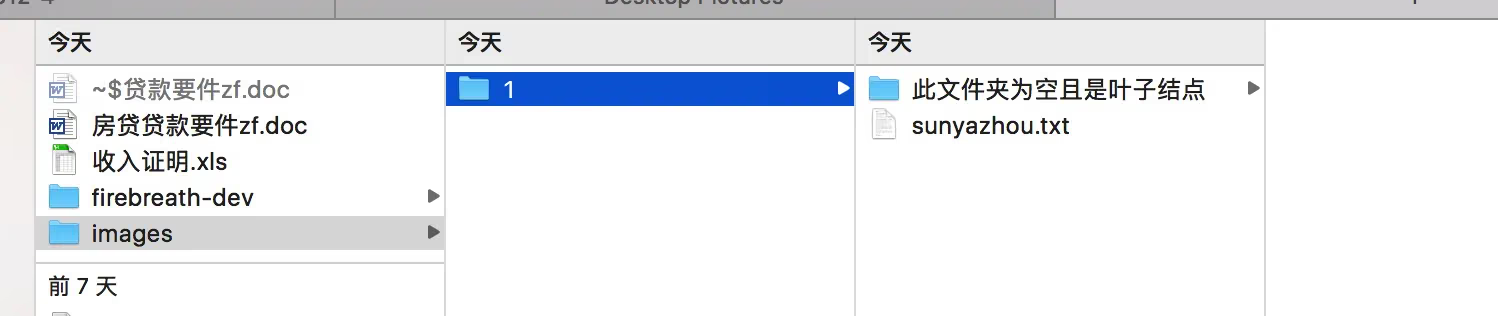
For a folder like this where this folder is empty and is a leaf node, we run the upload logic (just send an HTTP request to create the dir) — what we want is to filter out this path and run the upload logic to create the deepest directory, so that next time we encounter its parent directory /1/, we don’t need to create it again.
There’s another case:
eg: ~/Downloads/A/B/C/ contains a 1.txt The path is: ~/Downloads/A/B/C/1.txt
Normally, if you do breadth-first upload, Downloads, A, B, and C each require 4 separate HTTP requests. With depth-first, you only need to send one upload request for ~/Downloads/A/B/C//A/B/C/1.txt, because servers generally handle fault tolerance — they check whether the parent directory exists and create it if not.
Algorithm
Don’t be afraid, it’s very simple. Normally we handle this kind of problem with a recursive algorithm we write ourselves. I’m not great at algorithms and couldn’t come up with a good recursion, so I ended up finding Apple’s built-in recursive method.
1
2
3
4
5
6
7
8
9
10
11
12
13
14
15
16
17
// Set up a click event — here I use the macOS file selection panel for testing
- (IBAction)dfsAction:(NSButton *)sender
{
    NSOpenPanel *panelPath = [NSOpenPanel openPanel];
    [panelPath setCanChooseFiles:YES];
    [panelPath setCanChooseDirectories:YES];
    [panelPath setTitle:@"上传文件选择"];
    [panelPath setCanCreateDirectories:YES];
    [panelPath setPrompt:@"上传"];
    [panelPath setMessage:@"这就是message"];
    panelPath.allowsMultipleSelection = YES;
    [panelPath beginSheetModalForWindow:self.window completionHandler:^(NSInteger result) {
        if (result == NSFileHandlingPanelOKButton) {
            [self dfsUrls:panelPath.URLs];
        }
    }];
}
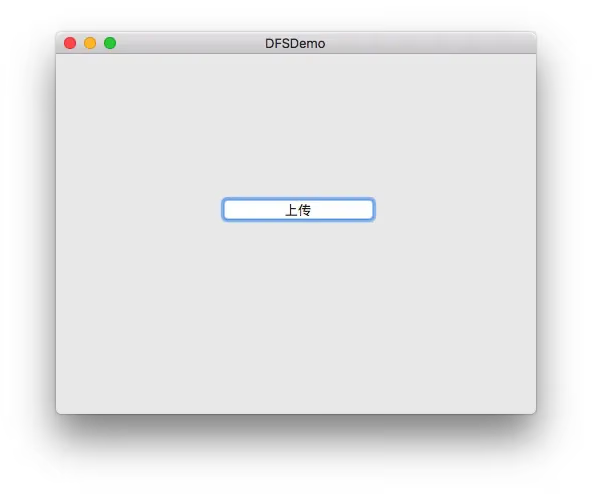
Then:
1
2
3
4
5
6
7
8
9
10
11
12
13
14
15
16
17
18
19
20
21
22
23
24
25
26
27
28
29
30
31
32
33
34
35
36
37
38
39
40
41
42
43
44
45
46
47
48
49
50
51
52
53
54
55
56
57
58
59
60
61
62
63
64
65
66
67
68
/**
 Directory of the selected folder

 @param urls all selected directory/file URLs
 */
- (void)dfsUrls:(NSArray *)urls
{
	// Spawn a thread to handle these time-consuming tasks asynchronously
	dispatch_async(dispatch_get_global_queue(DISPATCH_QUEUE_PRIORITY_DEFAULT, 0), ^{
        NSLog(@"所有URLs%@",urls);
        if (urls.count == 0) { return; }

        NSTimeInterval currentTime = [[NSDate date] timeIntervalSince1970];
        // Depth-first traversal
        NSFileManager *fileManager = [NSFileManager defaultManager];
        NSMutableArray *urlDirFiles = [[NSMutableArray alloc] initWithCapacity:0];
        NSArray *keys = [NSArray arrayWithObjects:NSURLIsDirectoryKey,NSURLParentDirectoryURLKey, nil];
        NSUInteger *total = 0;
        for (NSURL *localUrl in urls) {
            NSDirectoryEnumerator *enumerator = [self enumeratorPathByFileManager:fileManager atURL:localUrl propertiesForKeys:keys options:0];

            // The elements contained here are: ignore parent path nodes that have child files
            // eg: /A/1/2/ (this needs to be removed)   /A/1/2/sun.txt (keep this file)
            for (NSURL *url in enumerator) {
                total++;
                NSError *error;
                NSNumber *isDirectory = nil;
                if (![url getResourceValue:&isDirectory forKey:NSURLIsDirectoryKey error:&error]) {
                    // handle error
                }

                // Whether it is a folder
                if ([isDirectory boolValue]) {
                    // Option 1
//                    NSDirectoryEnumerator *dirEnumerator = [self enumeratorPathByFileManager:fileManager atURL:url propertiesForKeys:@[NSURLIsDirectoryKey] options:NSDirectoryEnumerationSkipsSubdirectoryDescendants];
//                    if (dirEnumerator.allObjects.count > 0) {
//                        NSLog(@"文件夹内有文件,忽略此条路径 %@",[url path]);
//                    } else {
//                        [urlDirFiles addObject:[url path]];
//                    }

                    // Option 2
                    NSError *error = nil;
                    NSArray *listOfFiles = [fileManager contentsOfDirectoryAtPath:[url path] error:nil];
                    if (listOfFiles != nil && listOfFiles.count == 0) {
                        [urlDirFiles addObject:[url path]];
                    } else if (error == nil){
                        NSLog(@"文件夹内有文件,忽略此条路径 %@",[url path]);
                    } else {
                        NSLog(@"文件遍历该层出错:%@",error);
                    }
                } else {
                    [urlDirFiles addObject:[url path]];
                }
            }
            NSLog(@"所有可上传文件列表:\n%@",urlDirFiles);
        }
        NSTimeInterval nowTime = [[NSDate date] timeIntervalSince1970];
        NSLog(@"\n文件数量:%zd 遍历总数:%zd\n耗时:%.2f 秒",urlDirFiles.count,total,(nowTime - currentTime));
        total = 0;

        dispatch_async(dispatch_get_main_queue(), ^{
            NSLog(@"scan end");
        });
    });
}
Next is the core code block:
1
2
3
4
5
6
7
8
9
10
11
12
13
14
15
16
17
18
19
- (NSDirectoryEnumerator *)enumeratorPathByFileManager:(NSFileManager *)fileManager
                                                 atURL:(NSURL *)url
                                     propertiesForKeys:(nullable NSArray<NSString *> *)keys
                                               options:(NSDirectoryEnumerationOptions)mask
{
    NSDirectoryEnumerator *enumerator = [fileManager
                                         enumeratorAtURL:url
                                         includingPropertiesForKeys:keys
                                         options:mask
                                         errorHandler:^(NSURL *url, NSError *error) {
                                             // Handle the error.
                                             // Return YES if the enumeration should continue after the error.
                                             NSLog(@"深度遍历出错%@",error);
                                             return YES;
                                         }];
    return enumerator;
}
NSDirectoryEnumerator is a path enumeration iterator.
talk is cheap, show me the result.
Below is the result of scanning my local Downloads directory 
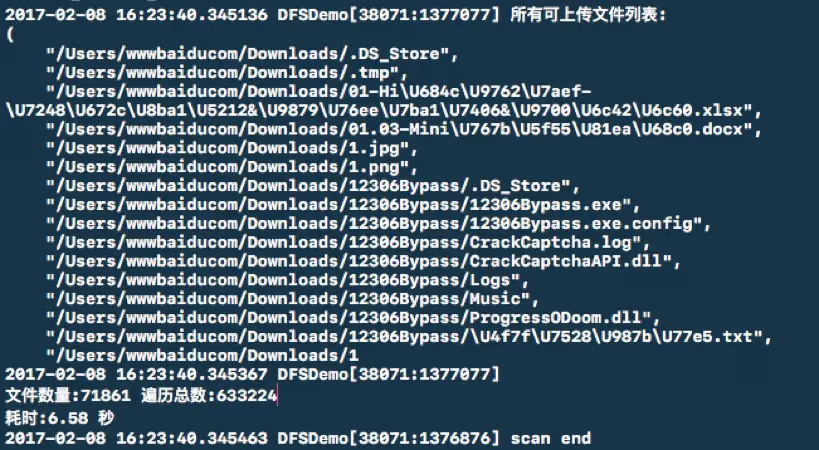
The result is quite fast.
Purely by the numbers, it saves at least 70,000 HTTP requests compared to breadth-first.
I suspect macOS has an index or cache for system directories, so the second scan is faster.
Summary
Overall, the result is decent. If you have a better algorithm to solve this kind of problem, feel free to @ me or send me an email so I can learn too.
You can also check out: Swift Depth First Search