
Getting the internationalized language array via code
Getting the language currently used by the app
1
2
3
    NSArray *langArr1 = [[NSUserDefaults standardUserDefaults] valueForKey:@"AppleLanguages"];
    NSString *language1 = langArr1.firstObject;
    NSLog(@"模拟器语言:%@",language1);
Switching languages: en stands for English, zh-Hans for Simplified Chinese, zh-Hant for Traditional Chinese.
1
2
    NSArray *lans = @[@"en"];
    [[NSUserDefaults standardUserDefaults] setObject:lans forKey:@"AppleLanguages"];
Switching the launch language by modifying the scheme –
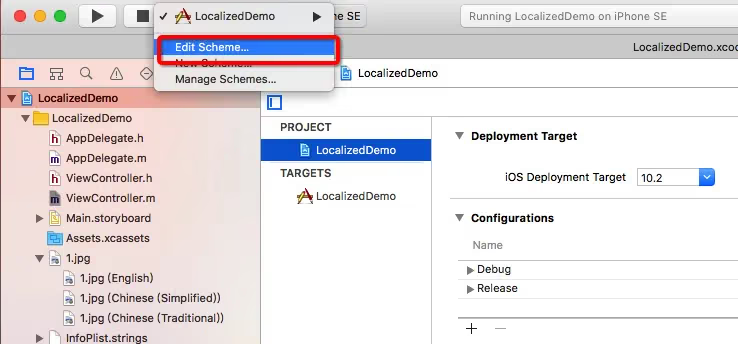
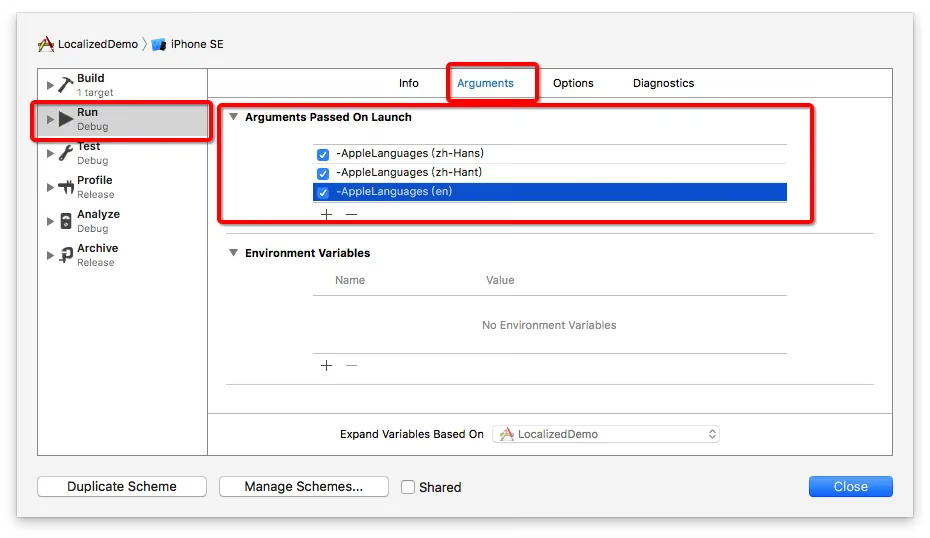
-AppleLanguages (zh-Hans)stands for Simplified Chinese
-AppleLanguages (zh-Hant)stands for Traditional Chinese
-AppleLanguages (en)stands for English
You can figure out the others yourself. Pay attention to the space.
Getting different localized images via code
1
2
3
4
5
6
7
8
9
10
11
12
13
14
15
16
17
18
#import "ViewController.h"

@interface ViewController ()
@property (weak, nonatomic) IBOutlet UIImageView *imageView;

@end

@implementation ViewController

- (void)viewDidLoad {
    [super viewDidLoad];
    //xxx is the localized image name, e.g. xxx.png
    //if the image is xxx.jpg, replace xxx with xxx.jpg
    NSString *imageName = NSLocalizedString(@"xxx", nil);
    self.imageView.image = [UIImage imageNamed:imageName];
}

@end
Here is a demo I wrote.
It mainly covers the following:
- Project name configuration: plist internationalization
- String internationalization
- Custom string internationalization
- Image internationalization
Reference: VV木公子
End of article