
Clang Static Analyzer
The Clang compiler (the compiler Xcode uses) ships with a static analyzer that performs control flow and data flow analysis on your code, catching many issues the compiler itself wouldn’t detect.
You can run the analyzer manually from Xcode via Product → Analyze.
The analyzer can run in two modes: “shallow” and “deep”. The latter is much slower, but it performs cross-method control flow and data flow analysis, so it can find more issues.
Recommendations:
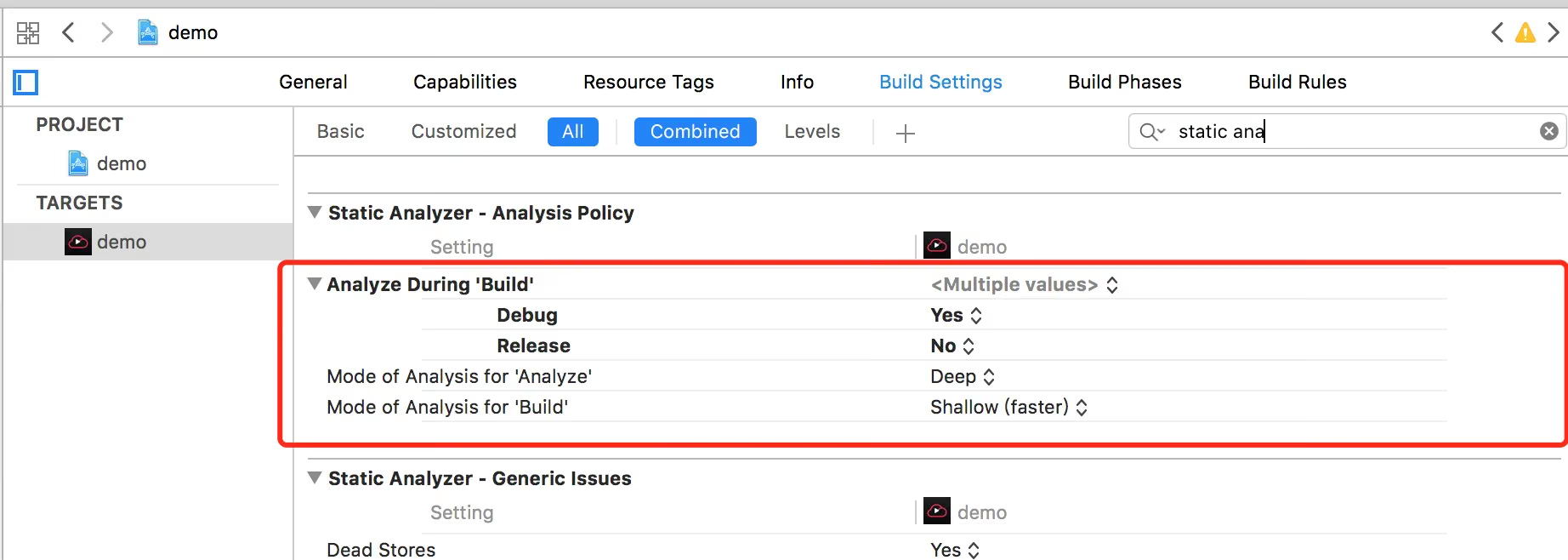
Enable all of the analyzer’s checks (by turning on every option in the “Static Analyzer” section of build settings)
In build settings, enable “Analyze during 'Build'” for the release build configuration. (Seriously, do this — you won’t remember to run the analyzer manually.)
Set “Mode of Analysis for 'Analyze'” in build settings to Deep
Set “Mode of Analysis for 'Build'” in build settings to Shallow (faster)
The End