
Preface
RunLoop is a very fundamental concept in iOS and OSX development. This article starts with the source code of CFRunLoop and introduces the concept of RunLoop and its underlying implementation principles. After that, it explains how Apple uses RunLoop in iOS to implement features such as the autorelease pool, delayed callbacks, touch events, and screen refreshes.
Contents
- The concept of RunLoop
- The relationship between RunLoop and threads
- RunLoop’s public interface
- RunLoop’s Mode
- RunLoop’s internal logic
- RunLoop’s underlying implementation
- Features Apple implements with RunLoop
- AutoreleasePool
- Event response
- Gesture recognition
- UI updates
- Timers
- PerformSelecter
- About GCD
- About network requests
- Practical application examples of RunLoop
- AFNetworking
- AsyncDisplayKit
The Concept of RunLoop
Generally speaking, a thread can only execute one task at a time, and once the task is done, the thread exits. If we need a mechanism that allows a thread to handle events at any time without exiting, the usual code logic looks like this:
1
2
3
4
5
6
7
function loop() {
    initialize();
    do {
        var message = get_next_message();
        process_message(message);
    } while (message != quit);
}
This model is often called the Event Loop. The Event Loop is implemented in many systems and frameworks, such as Node.js event handling, the message loop of Windows programs, and the RunLoop in OSX/iOS. The key to implementing this model is: how to manage events/messages, and how to make the thread sleep when there are no messages to process to avoid resource consumption, while waking it up immediately when a message arrives.
So, RunLoop is actually an object that manages the events and messages it needs to handle and provides an entry function to execute the above Event Loop logic. After the thread executes this function, it stays inside the “receive message -> wait -> process” loop until the loop ends (for example, when a quit message is passed in), and then the function returns.
In OSX/iOS systems, two such objects are provided: NSRunLoop and CFRunLoopRef.
CFRunLoopRef is in the CoreFoundation framework. It provides pure C function APIs, and all these APIs are thread-safe.
NSRunLoop is a wrapper around CFRunLoopRef that provides an object-oriented API, but these APIs are not thread-safe.
The code of CFRunLoopRef is open source. You can download the entire CoreFoundation source code here http://opensource.apple.com/tarballs/CF/ to look at it.
(Update: After Swift was open sourced, Apple also maintains a cross-platform version of CoreFoundation: https://github.com/apple/swift-corelibs-foundation/. The source code of this version may differ slightly from the implementation in the current iOS system, but it’s easier to compile and has already been adapted for Linux/Windows.)
The Relationship Between RunLoop and Threads
First, in iOS development you’ll encounter two thread objects: pthread_t and NSThread. In the past, Apple had a document stating that NSThread was just a wrapper around pthread_t, but that document is no longer valid. Now they might both be directly wrapped from the lowest-level mach thread. Apple doesn’t provide an interface to convert between these two objects, but no matter what, it’s certain that pthread_t and NSThread correspond one-to-one. For example, you can get the main thread via pthread_main_thread_np() or [NSThread mainThread]; you can also get the current thread via pthread_self() or [NSThread currentThread]. CFRunLoop is managed based on pthread.
Apple doesn’t allow creating a RunLoop directly. It only provides two functions to obtain one automatically: CFRunLoopGetMain() and CFRunLoopGetCurrent(). The logic inside these two functions goes roughly like this:
1
2
3
4
5
6
7
8
9
10
11
12
13
14
15
16
17
18
19
20
21
22
23
24
25
26
27
28
29
30
31
32
33
34
35
36
37
38
/// Global dictionary, key is pthread_t, value is CFRunLoopRef
static CFMutableDictionaryRef loopsDic;
/// Lock for accessing loopsDic
static CFSpinLock_t loopsLock;

/// Get the RunLoop corresponding to a pthread.
CFRunLoopRef _CFRunLoopGet(pthread_t thread) {
    OSSpinLockLock(&loopsLock);

    if (!loopsDic) {
        // First entry: initialize the global dict and create a RunLoop for the main thread.
        loopsDic = CFDictionaryCreateMutable();
        CFRunLoopRef mainLoop = _CFRunLoopCreate();
        CFDictionarySetValue(loopsDic, pthread_main_thread_np(), mainLoop);
    }

    /// Get it directly from the dictionary.
    CFRunLoopRef loop = CFDictionaryGetValue(loopsDic, thread));

    if (!loop) {
        /// If not found, create one
        loop = _CFRunLoopCreate();
        CFDictionarySetValue(loopsDic, thread, loop);
        /// Register a callback to destroy the corresponding RunLoop when the thread is destroyed.
        _CFSetTSD(..., thread, loop, __CFFinalizeRunLoop);
    }

    OSSpinLockUnLock(&loopsLock);
    return loop;
}

CFRunLoopRef CFRunLoopGetMain() {
    return _CFRunLoopGet(pthread_main_thread_np());
}

CFRunLoopRef CFRunLoopGetCurrent() {
    return _CFRunLoopGet(pthread_self());
}
From the code above, you can see that threads and RunLoops correspond one-to-one, and their relationship is stored in a global Dictionary. A thread doesn’t have a RunLoop when it’s first created; if you don’t actively get it, it will never exist. The RunLoop is created the first time it’s fetched, and destroyed when the thread ends. You can only get its RunLoop inside a thread (except for the main thread).
RunLoop’s Public Interface
In CoreFoundation, there are 5 classes related to RunLoop:
CFRunLoopRefCFRunLoopModeRefCFRunLoopSourceRefCFRunLoopTimerRefCFRunLoopObserverRef
Among them, the CFRunLoopModeRef class is not exposed publicly; it’s only encapsulated through CFRunLoopRef’s interface. Their relationship is as follows:
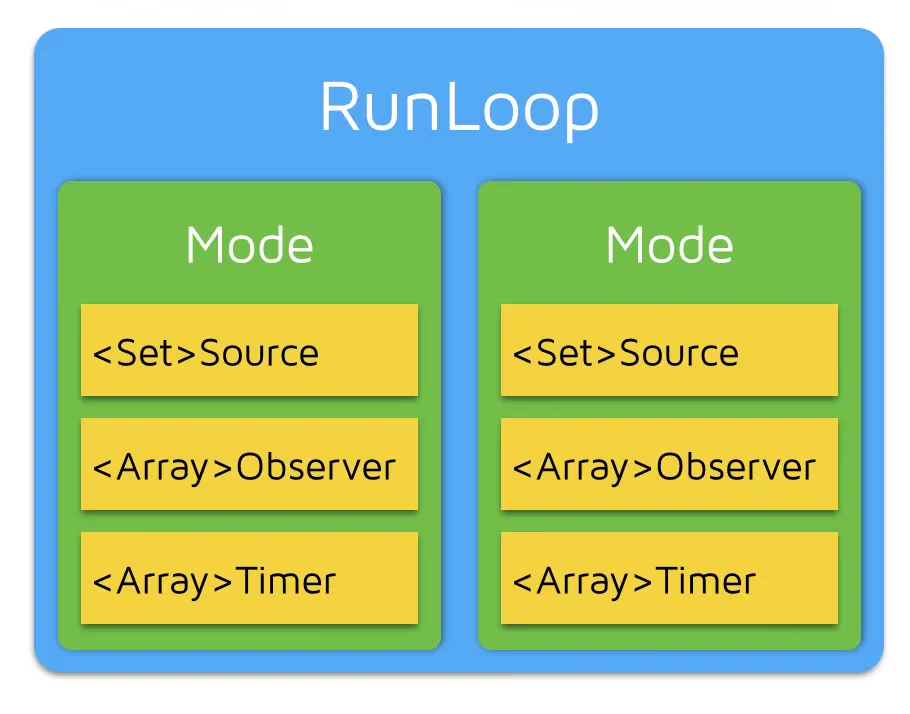
A RunLoop contains several Modes, and each Mode contains several Sources/Timers/Observers. Every time the main function of RunLoop is called, only one of these Modes can be specified, and this Mode is called the CurrentMode. If you need to switch Modes, you can only exit the Loop and then re-enter with a different Mode. The purpose of this is to separate different groups of Sources/Timers/Observers so they don’t affect each other.
CFRunLoopSourceRef is where events are generated. There are two versions of Source: Source0 and Source1.
Source0only contains a callback (a function pointer), and it can’t trigger events by itself. When using it, you need to first callCFRunLoopSourceSignal(source)to mark thisSourceas pending, and then manually callCFRunLoopWakeUp(runloop)to wake up theRunLoopso it can process this event.Source1contains amach_portand a callback (a function pointer), used to send messages between the kernel and other threads. This kind ofSourcecan actively wake up theRunLoop’s thread. More on that below.
CFRunLoopTimerRef is a time-based trigger. It’s toll-free bridged with NSTimer, so they can be used interchangeably. It contains a time interval and a callback (a function pointer). When it’s added to the RunLoop, the RunLoop registers the corresponding time points. When the time arrives, the RunLoop is woken up to execute that callback.
CFRunLoopObserverRef is an observer. Each Observer contains a callback (a function pointer). When the state of the RunLoop changes, the observer receives the change through the callback. Here are the observable time points:
1
2
3
4
5
6
7
8
typedef CF_OPTIONS(CFOptionFlags, CFRunLoopActivity) {
    kCFRunLoopEntry         = (1UL << 0), // 即将进入Loop
    kCFRunLoopBeforeTimers  = (1UL << 1), // 即将处理 Timer
    kCFRunLoopBeforeSources = (1UL << 2), // 即将处理 Source
    kCFRunLoopBeforeWaiting = (1UL << 5), // 即将进入休眠
    kCFRunLoopAfterWaiting  = (1UL << 6), // 刚从休眠中唤醒
    kCFRunLoopExit          = (1UL << 7), // 即将退出Loop
};
The Source/Timer/Observer mentioned above are collectively called __mode item__. An item can be added to multiple modes at the same time. However, adding an item to the same mode repeatedly has no effect. If a mode doesn’t have any item, the RunLoop will exit directly without entering the loop.
RunLoop’s Mode
Here’s roughly what the CFRunLoopMode and CFRunLoop structures look like:
1
2
3
4
5
6
7
8
9
10
11
12
13
14
15
16
struct __CFRunLoopMode {
    CFStringRef _name;            // Mode Name, 例如 @"kCFRunLoopDefaultMode"
    CFMutableSetRef _sources0;    // Set
    CFMutableSetRef _sources1;    // Set
    CFMutableArrayRef _observers; // Array
    CFMutableArrayRef _timers;    // Array
    ...
};

struct __CFRunLoop {
    CFMutableSetRef _commonModes;     // Set
    CFMutableSetRef _commonModeItems; // Set<Source/Observer/Timer>
    CFRunLoopModeRef _currentMode;    // Current Runloop Mode
    CFMutableSetRef _modes;           // Set
    ...
};
There’s a concept here called “CommonModes”: a Mode can mark itself with the “Common” attribute (by adding its ModeName to the “commonModes” of the RunLoop). Whenever the content of the RunLoop changes, the RunLoop automatically synchronizes the Source/Observer/Timer in _commonModeItems to all Modes marked with the “Common” attribute.
Example application scenario: the main thread’s RunLoop has two preset Modes: kCFRunLoopDefaultMode and UITrackingRunLoopMode. Both of these Modes are already marked with the “Common” attribute. DefaultMode is the state the App is normally in, and TrackingRunLoopMode is the state when tracking a ScrollView scroll. When you create a Timer and add it to DefaultMode, the Timer will receive repeated callbacks. But when you scroll a TableView, the RunLoop switches the mode to TrackingRunLoopMode, and then the Timer won’t be called back, nor will it affect the scrolling.
Sometimes you need a Timer to receive callbacks in both Modes. One way is to add this Timer to both Modes separately. Another way is to add the Timer to the top-level RunLoop’s “commonModeItems”. The “commonModeItems” is automatically updated by the RunLoop to all Modes with the “Common” attribute.
The only two Mode management interfaces CFRunLoop exposes publicly are:
1
2
CFRunLoopAddCommonMode(CFRunLoopRef runloop, CFStringRef modeName);
CFRunLoopRunInMode(CFStringRef modeName, ...);
Here are the interfaces Mode exposes for managing mode items:
1
2
3
4
5
6
CFRunLoopAddSource(CFRunLoopRef rl, CFRunLoopSourceRef source, CFStringRef modeName);
CFRunLoopAddObserver(CFRunLoopRef rl, CFRunLoopObserverRef observer, CFStringRef modeName);
CFRunLoopAddTimer(CFRunLoopRef rl, CFRunLoopTimerRef timer, CFStringRef mode);
CFRunLoopRemoveSource(CFRunLoopRef rl, CFRunLoopSourceRef source, CFStringRef modeName);
CFRunLoopRemoveObserver(CFRunLoopRef rl, CFRunLoopObserverRef observer, CFStringRef modeName);
CFRunLoopRemoveTimer(CFRunLoopRef rl, CFRunLoopTimerRef timer, CFStringRef mode);
You can only operate on the internal modes through the mode name. When you pass in a new mode name but there’s no corresponding mode inside the RunLoop, the RunLoop automatically creates the corresponding CFRunLoopModeRef for you. For a RunLoop, its internal modes can only be added, never deleted.
Apple publicly provides two Modes: kCFRunLoopDefaultMode (NSDefaultRunLoopMode) and UITrackingRunLoopMode. You can use these two Mode Names to operate their corresponding Modes.
Apple also provides a string for operating the Common mark: kCFRunLoopCommonModes (NSRunLoopCommonModes). You can use this string to operate Common Items, or to mark a Mode as “Common”. Be careful to distinguish this string from other mode names when using it.
RunLoop’s Internal Logic
According to Apple’s documentation, here’s roughly the internal logic of RunLoop:
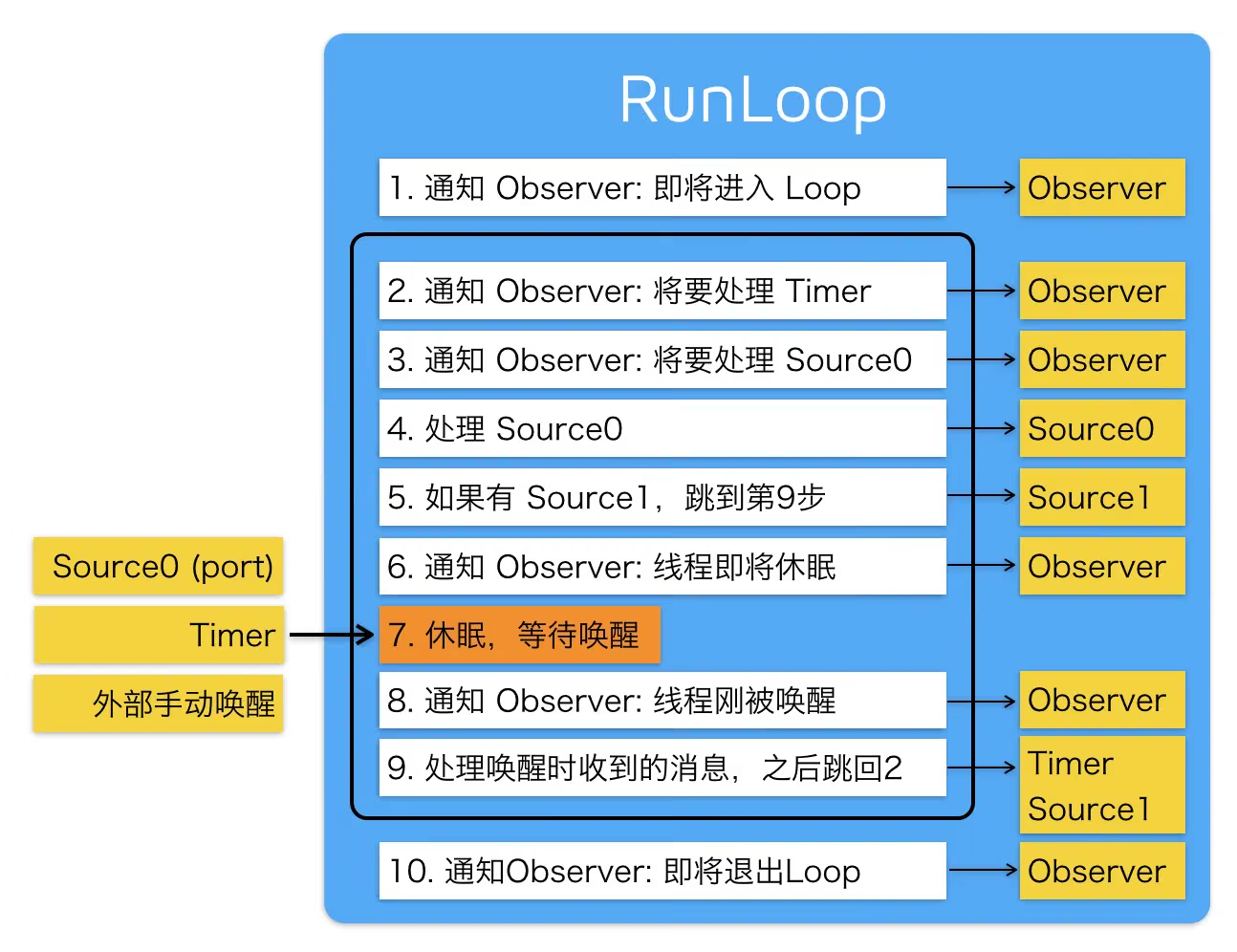
The internal code is below (it’s long, so feel free to skip it; there will be explanations later)
1
2
3
4
5
6
7
8
9
10
11
12
13
14
15
16
17
18
19
20
21
22
23
24
25
26
27
28
29
30
31
32
33
34
35
36
37
38
39
40
41
42
43
44
45
46
47
48
49
50
51
52
53
54
55
56
57
58
59
60
61
62
63
64
65
66
67
68
69
70
71
72
73
74
75
76
77
78
79
80
81
82
83
84
85
86
87
88
89
90
91
92
93
94
95
96
97
98
99
100
101
102
103
104
105
106
107
108
109
110
111
/// Start with the DefaultMode
void CFRunLoopRun(void) {
    CFRunLoopRunSpecific(CFRunLoopGetCurrent(), kCFRunLoopDefaultMode, 1.0e10, false);
}

/// Start with a specified Mode, allowing the RunLoop timeout to be set
int CFRunLoopRunInMode(CFStringRef modeName, CFTimeInterval seconds, Boolean stopAfterHandle) {
    return CFRunLoopRunSpecific(CFRunLoopGetCurrent(), modeName, seconds, returnAfterSourceHandled);
}

/// The implementation of RunLoop
int CFRunLoopRunSpecific(runloop, modeName, seconds, stopAfterHandle) {

    /// First find the corresponding mode based on modeName
    CFRunLoopModeRef currentMode = __CFRunLoopFindMode(runloop, modeName, false);
    /// If there are no source/timer/observer in the mode, return directly.
    if (__CFRunLoopModeIsEmpty(currentMode)) return;

    /// 1. Notify Observers: RunLoop is about to enter the loop.
    __CFRunLoopDoObservers(runloop, currentMode, kCFRunLoopEntry);

    /// Internal function, enter the loop
    __CFRunLoopRun(runloop, currentMode, seconds, returnAfterSourceHandled) {

        Boolean sourceHandledThisLoop = NO;
        int retVal = 0;
        do {

            /// 2. Notify Observers: RunLoop is about to trigger Timer callbacks.
            __CFRunLoopDoObservers(runloop, currentMode, kCFRunLoopBeforeTimers);
            /// 3. Notify Observers: RunLoop is about to trigger Source0 (non-port) callbacks.
            __CFRunLoopDoObservers(runloop, currentMode, kCFRunLoopBeforeSources);
            /// Execute the added blocks
            __CFRunLoopDoBlocks(runloop, currentMode);

            /// 4. RunLoop triggers Source0 (non-port) callbacks.
            sourceHandledThisLoop = __CFRunLoopDoSources0(runloop, currentMode, stopAfterHandle);
            /// Execute the added blocks
            __CFRunLoopDoBlocks(runloop, currentMode);

            /// 5. If a Source1 (port-based) is in the ready state, process this Source1 directly and then jump to message processing.
            if (__Source0DidDispatchPortLastTime) {
                Boolean hasMsg = __CFRunLoopServiceMachPort(dispatchPort, &msg)
                if (hasMsg) goto handle_msg;
            }

            /// Notify Observers: the RunLoop's thread is about to enter sleep.
            if (!sourceHandledThisLoop) {
                __CFRunLoopDoObservers(runloop, currentMode, kCFRunLoopBeforeWaiting);
            }

            /// 7. Call mach_msg to wait for messages on the mach_port. The thread will sleep until it's woken up by one of the following events.
            /// • An event from a port-based Source.
            /// • A Timer has fired
            /// • The RunLoop's own timeout has been reached
            /// • Manually woken up by some other caller
            __CFRunLoopServiceMachPort(waitSet, &msg, sizeof(msg_buffer), &livePort) {
                mach_msg(msg, MACH_RCV_MSG, port); // thread wait for receive msg
            }

            /// 8. Notify Observers: the RunLoop's thread has just been woken up.
            __CFRunLoopDoObservers(runloop, currentMode, kCFRunLoopAfterWaiting);

            /// A message was received; process it.
            handle_msg:

            /// 9.1 If a Timer has fired, trigger that Timer's callback.
            if (msg_is_timer) {
                __CFRunLoopDoTimers(runloop, currentMode, mach_absolute_time())
            }

            /// 9.2 If there's a block dispatched to the main_queue, execute the block.
            else if (msg_is_dispatch) {
                __CFRUNLOOP_IS_SERVICING_THE_MAIN_DISPATCH_QUEUE__(msg);
            }

            /// 9.3 If a Source1 (port-based) has emitted an event, process this event
            else {
                CFRunLoopSourceRef source1 = __CFRunLoopModeFindSourceForMachPort(runloop, currentMode, livePort);
                sourceHandledThisLoop = __CFRunLoopDoSource1(runloop, currentMode, source1, msg);
                if (sourceHandledThisLoop) {
                    mach_msg(reply, MACH_SEND_MSG, reply);
                }
            }

            /// Execute the blocks added to the Loop
            __CFRunLoopDoBlocks(runloop, currentMode);


            if (sourceHandledThisLoop && stopAfterHandle) {
                /// The parameter passed when entering the loop says to return after processing the event.
                retVal = kCFRunLoopRunHandledSource;
            } else if (timeout) {
                /// The timeout marked by the passed parameter has been exceeded
                retVal = kCFRunLoopRunTimedOut;
            } else if (__CFRunLoopIsStopped(runloop)) {
                /// Forcibly stopped by an external caller
                retVal = kCFRunLoopRunStopped;
            } else if (__CFRunLoopModeIsEmpty(runloop, currentMode)) {
                /// There are no more source/timer/observer
                retVal = kCFRunLoopRunFinished;
            }

            /// If there's no timeout, the mode isn't empty, and the loop hasn't been stopped, continue looping.
        } while (retVal == 0);
    }

    /// 10. Notify Observers: RunLoop is about to exit.
    __CFRunLoopDoObservers(rl, currentMode, kCFRunLoopExit);
}
RunLoop’s Underlying Implementation
From the code above, you can see that the core of RunLoop is based on mach port. The function it calls when entering sleep is mach_msg(). To explain this logic, let me briefly introduce the system architecture of OSX/iOS.
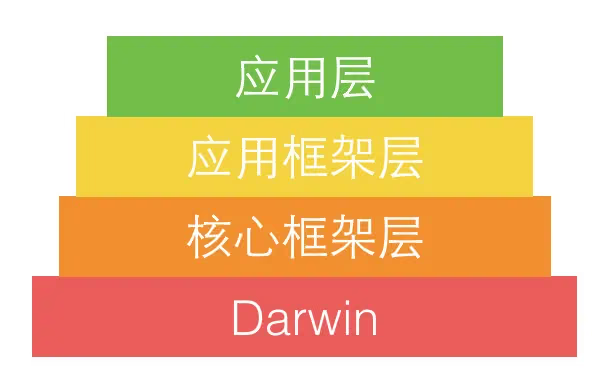
Apple officially divides the entire system into roughly the 4 layers above: The application layer includes the graphical apps that users interact with, such as Spotlight, Aqua, SpringBoard, etc. The application framework layer consists of the frameworks developers work with, such as Cocoa. The core framework layer includes various core frameworks, OpenGL, and other content. Darwin is the core of the operating system, including the system kernel, drivers, Shell, and other content. This layer is open source, and all its source code can be found on opensource.apple.com.
Let’s take a deeper look at the core architecture of Darwin:
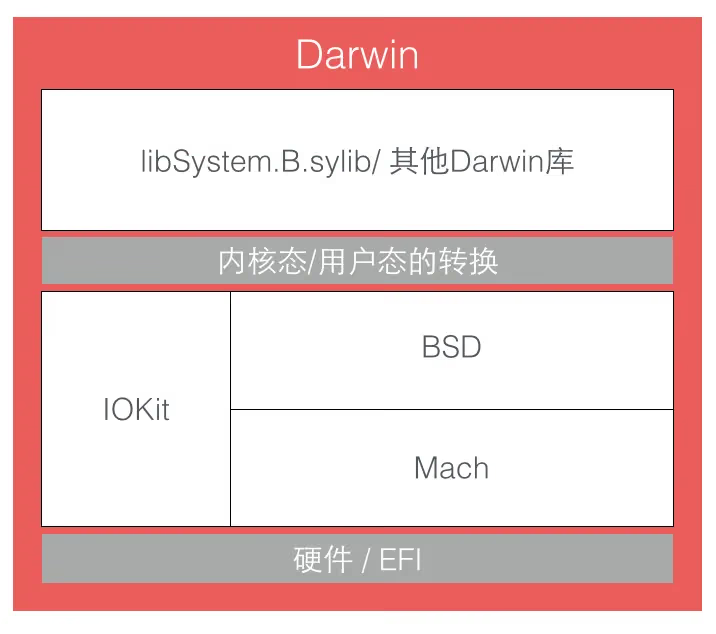
Among them, the three components above the hardware layer — Mach, BSD, and IOKit (plus some content not marked above) — together form the XNU kernel. The inner ring of the XNU kernel is called Mach. As a microkernel, it only provides a very small number of basic services such as processor scheduling and IPC (inter-process communication).
The BSD layer can be seen as an outer ring around the Mach layer, providing features such as process management, file systems, and networking.
The IOKit layer provides an object-oriented (C++) framework for device drivers.
The APIs provided by Mach itself are very limited, and Apple doesn’t encourage using Mach’s APIs, but these APIs are very fundamental. Without them, no other work could be done. In Mach, everything is implemented through its own objects — processes, threads, and virtual memory are all called “objects”. Unlike other architectures, Mach’s objects can’t call each other directly; inter-object communication can only be done through message passing. “Message” is the most fundamental concept in Mach. Messages are passed between two ports (port), and this is the core of Mach’s IPC (inter-process communication).
Mach’s message definition is in the <mach/message.h> header file and is very simple:
1
2
3
4
5
6
7
8
9
10
11
12
13
typedef struct {
  mach_msg_header_t header;
  mach_msg_body_t body;
} mach_msg_base_t;

typedef struct {
  mach_msg_bits_t msgh_bits;
  mach_msg_size_t msgh_size;
  mach_port_t msgh_remote_port;
  mach_port_t msgh_local_port;
  mach_port_name_t msgh_voucher_port;
  mach_msg_id_t msgh_id;
} mach_msg_header_t;
A Mach message is actually a binary data packet (BLOB). Its header defines the current port local_port and the target port remote_port. Sending and receiving messages are done through the same API, and its option marks the direction of message transfer:
1
2
3
4
5
6
7
8
mach_msg_return_t mach_msg(
			mach_msg_header_t *msg,
			mach_msg_option_t option,
			mach_msg_size_t send_size,
			mach_msg_size_t rcv_size,
			mach_port_name_t rcv_name,
			mach_msg_timeout_t timeout,
			mach_port_name_t notify);
To implement message sending and receiving, the mach_msg() function actually calls a Mach trap, i.e. the function mach_msg_trap(). The concept of a trap in Mach is equivalent to a system call. When you call mach_msg_trap() in user space, it triggers the trap mechanism and switches to kernel space; in kernel space, the kernel’s mach_msg() function does the actual work, as shown below:
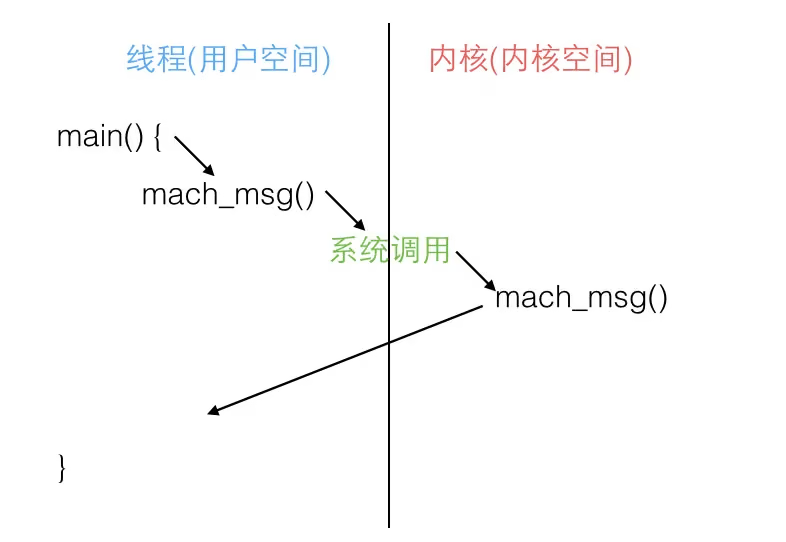
These concepts can be referenced on Wikipedia: System_call, Trap_(computing).
The core of RunLoop is a mach_msg() (see step 7 in the code above). RunLoop calls this function to receive messages. If no one sends a port message, the kernel puts the thread in a waiting state. For example, if you run an iOS App in the simulator and then click pause while the App is idle, you’ll see the main thread’s call stack resting on mach_msg_trap().
For details on how to use mach port to send information, you can read this NSHipster article, or here for the Chinese translation.
For the history of Mach, you can read this interesting article: The Story Behind Mac OS X (3): Avie Tevanian, the Father of Mach.
Features Apple Implements with RunLoop
First, let’s look at the state of the RunLoop after the App starts:
1
2
3
4
5
6
7
8
9
10
11
12
13
14
15
16
17
18
19
20
21
22
23
24
25
26
27
28
29
30
31
32
33
34
35
36
37
38
39
40
41
42
43
44
45
46
47
48
49
50
51
52
53
54
55
56
57
58
59
60
61
62
63
64
65
66
67
68
69
70
71
72
73
74
75
76
77
78
79
80
81
82
83
84
85
86
87
88
89
90
91
92
93
94
95
96
97
98
99
CFRunLoop {
    current mode = kCFRunLoopDefaultMode
    common modes = {
        UITrackingRunLoopMode
        kCFRunLoopDefaultMode
    }

    common mode items = {

        // source0 (manual)
        CFRunLoopSource {order =-1, {
            callout = _UIApplicationHandleEventQueue}}
        CFRunLoopSource {order =-1, {
            callout = PurpleEventSignalCallback }}
        CFRunLoopSource {order = 0, {
            callout = FBSSerialQueueRunLoopSourceHandler}}

        // source1 (mach port)
        CFRunLoopSource {order = 0,  {port = 17923}}
        CFRunLoopSource {order = 0,  {port = 12039}}
        CFRunLoopSource {order = 0,  {port = 16647}}
        CFRunLoopSource {order =-1, {
            callout = PurpleEventCallback}}
        CFRunLoopSource {order = 0, {port = 2407,
            callout = _ZL20notify_port_callbackP12__CFMachPortPvlS1_}}
        CFRunLoopSource {order = 0, {port = 1c03,
            callout = __IOHIDEventSystemClientAvailabilityCallback}}
        CFRunLoopSource {order = 0, {port = 1b03,
            callout = __IOHIDEventSystemClientQueueCallback}}
        CFRunLoopSource {order = 1, {port = 1903,
            callout = __IOMIGMachPortPortCallback}}

        // Ovserver
        CFRunLoopObserver {order = -2147483647, activities = 0x1, // Entry
            callout = _wrapRunLoopWithAutoreleasePoolHandler}
        CFRunLoopObserver {order = 0, activities = 0x20,          // BeforeWaiting
            callout = _UIGestureRecognizerUpdateObserver}
        CFRunLoopObserver {order = 1999000, activities = 0xa0,    // BeforeWaiting | Exit
            callout = _afterCACommitHandler}
        CFRunLoopObserver {order = 2000000, activities = 0xa0,    // BeforeWaiting | Exit
            callout = _ZN2CA11Transaction17observer_callbackEP19__CFRunLoopObservermPv}
        CFRunLoopObserver {order = 2147483647, activities = 0xa0, // BeforeWaiting | Exit
            callout = _wrapRunLoopWithAutoreleasePoolHandler}

        // Timer
        CFRunLoopTimer {firing = No, interval = 3.1536e+09, tolerance = 0,
            next fire date = 453098071 (-4421.76019 @ 96223387169499),
            callout = _ZN2CAL14timer_callbackEP16__CFRunLoopTimerPv (QuartzCore.framework)}
    },

    modes = {
        CFRunLoopMode  {
            sources0 =  { /* same as 'common mode items' */ },
            sources1 =  { /* same as 'common mode items' */ },
            observers = { /* same as 'common mode items' */ },
            timers =    { /* same as 'common mode items' */ },
        },

        CFRunLoopMode  {
            sources0 =  { /* same as 'common mode items' */ },
            sources1 =  { /* same as 'common mode items' */ },
            observers = { /* same as 'common mode items' */ },
            timers =    { /* same as 'common mode items' */ },
        },

        CFRunLoopMode  {
            sources0 = {
                CFRunLoopSource {order = 0, {
                    callout = FBSSerialQueueRunLoopSourceHandler}}
            },
            sources1 = (null),
            observers = {
                CFRunLoopObserver >{activities = 0xa0, order = 2000000,
                    callout = _ZN2CA11Transaction17observer_callbackEP19__CFRunLoopObservermPv}
            )},
            timers = (null),
        },

        CFRunLoopMode  {
            sources0 = {
                CFRunLoopSource {order = -1, {
                    callout = PurpleEventSignalCallback}}
            },
            sources1 = {
                CFRunLoopSource {order = -1, {
                    callout = PurpleEventCallback}}
            },
            observers = (null),
            timers = (null),
        },

        CFRunLoopMode  {
            sources0 = (null),
            sources1 = (null),
            observers = (null),
            timers = (null),
        }
    }
}
As you can see, the system registers 5 Modes by default:
kCFRunLoopDefaultMode: theApp’s defaultMode; the main thread usually runs in thisMode.UITrackingRunLoopMode: the UI trackingMode, used byScrollViewto track touch scrolling, ensuring that scrolling isn’t affected by otherModes.UIInitializationRunLoopMode: the firstModeentered when theAppjust starts; it’s no longer used after startup completes.GSEventReceiveRunLoopMode: the internalModefor receiving system events; you usually don’t need it.kCFRunLoopCommonModes: this is a placeholderModewith no actual effect.
You can see more of Apple’s internal Modes here, but those Modes are hard to encounter in development.
When RunLoop performs a callback, it usually goes through a very long function call (call out). When you set breakpoints in your code for debugging, you can usually see these functions on the call stack. Below is an organized version of these functions. If you see these long function names in the call stack, you can search here to locate the specific call site:
1
2
3
4
5
6
7
8
9
10
11
12
13
14
15
16
17
18
19
20
21
22
23
24
25
26
27
28
29
30
31
32
33
34
35
36
37
38
39
40
41
42
43
{
    /// 1. Notify Observers that RunLoop is about to be entered
    /// Here an Observer creates the AutoreleasePool: _objc_autoreleasePoolPush();
    __CFRUNLOOP_IS_CALLING_OUT_TO_AN_OBSERVER_CALLBACK_FUNCTION__(kCFRunLoopEntry);
    do {

        /// 2. Notify Observers: about to trigger Timer callbacks.
        __CFRUNLOOP_IS_CALLING_OUT_TO_AN_OBSERVER_CALLBACK_FUNCTION__(kCFRunLoopBeforeTimers);
        /// 3. Notify Observers: about to trigger Source (non-port-based, Source0) callbacks.
        __CFRUNLOOP_IS_CALLING_OUT_TO_AN_OBSERVER_CALLBACK_FUNCTION__(kCFRunLoopBeforeSources);
        __CFRUNLOOP_IS_CALLING_OUT_TO_A_BLOCK__(block);

        /// 4. Trigger Source0 (non-port-based) callbacks.
        __CFRUNLOOP_IS_CALLING_OUT_TO_A_SOURCE0_PERFORM_FUNCTION__(source0);
        __CFRUNLOOP_IS_CALLING_OUT_TO_A_BLOCK__(block);

        /// 6. Notify Observers that RunLoop is about to sleep
        /// Here an Observer releases and creates a new AutoreleasePool: _objc_autoreleasePoolPop(); _objc_autoreleasePoolPush();
        __CFRUNLOOP_IS_CALLING_OUT_TO_AN_OBSERVER_CALLBACK_FUNCTION__(kCFRunLoopBeforeWaiting);

        /// 7. sleep to wait msg.
        mach_msg() -> mach_msg_trap();


        /// 8. Notify Observers that the thread has been woken up
        __CFRUNLOOP_IS_CALLING_OUT_TO_AN_OBSERVER_CALLBACK_FUNCTION__(kCFRunLoopAfterWaiting);

        /// 9. If woken up by a Timer, call back the Timer
        __CFRUNLOOP_IS_CALLING_OUT_TO_A_TIMER_CALLBACK_FUNCTION__(timer);

        /// 9. If woken up by dispatch, execute all blocks put into the main queue via methods like dispatch_async
        __CFRUNLOOP_IS_SERVICING_THE_MAIN_DISPATCH_QUEUE__(dispatched_block);

        /// 9. If the Runloop was woken up by an event from Source1 (port-based), process this event
        __CFRUNLOOP_IS_CALLING_OUT_TO_A_SOURCE1_PERFORM_FUNCTION__(source1);

    } while (...);

    /// 10. Notify Observers that RunLoop is about to exit
    /// Here an Observer releases the AutoreleasePool: _objc_autoreleasePoolPop();
    __CFRUNLOOP_IS_CALLING_OUT_TO_AN_OBSERVER_CALLBACK_FUNCTION__(kCFRunLoopExit);
}
AutoreleasePool
After the App starts, Apple registers two Observers on the main thread’s RunLoop, both with the callback _wrapRunLoopWithAutoreleasePoolHandler().
The first Observer monitors the Entry event (about to enter the Loop). Inside its callback, it calls _objc_autoreleasePoolPush() to create an autorelease pool. Its order is -2147483647, the highest priority, ensuring the pool is created before all other callbacks.
The second Observer monitors two events: on BeforeWaiting (about to sleep), it calls _objc_autoreleasePoolPop() and _objc_autoreleasePoolPush() to release the old pool and create a new one; on Exit (about to exit the Loop), it calls _objc_autoreleasePoolPop() to release the autorelease pool. This Observer’s order is 2147483647, the lowest priority, ensuring its pool is released after all other callbacks.
Code executed on the main thread is usually written inside callbacks such as event callbacks and Timer callbacks. These callbacks are wrapped by the AutoreleasePool created by the RunLoop, so memory leaks won’t occur, and developers don’t need to explicitly create a Pool either.
Event Response
Apple registers a Source1 (based on mach port) to receive system events, and its callback function is __IOHIDEventSystemClientQueueCallback().
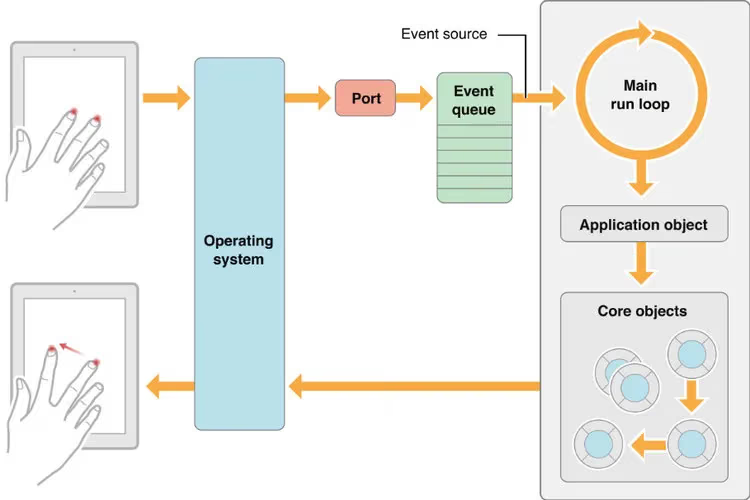
When a hardware event (touch/lock screen/shake, etc.) occurs, IOKit.framework first generates an IOHIDEvent event, which is received by SpringBoard. For details of this process, you can refer to here. SpringBoard only receives a few kinds of Events such as button presses (lock screen/mute, etc.), touches, acceleration, and proximity sensors, and then forwards them to the required App process via mach port. The Source1 Apple registered then triggers the callback and calls _UIApplicationHandleEventQueue() for internal distribution within the app.
_UIApplicationHandleEventQueue() processes IOHIDEvent and wraps it into UIEvent for processing or distribution, including recognizing UIGesture/handling screen rotation/sending to UIWindow. Common events such as UIButton taps and touchesBegin/Move/End/Cancel are all completed in this callback.
Gesture Recognition
When _UIApplicationHandleEventQueue() above recognizes a gesture, it first calls Cancel to interrupt the current touchesBegin/Move/End callback sequence. Then the system marks the corresponding UIGestureRecognizer as pending.
Apple registers an Observer to monitor the BeforeWaiting (the Loop is about to sleep) event. This Observer’s callback is _UIGestureRecognizerUpdateObserver(). Inside it, it gets all the GestureRecognizers that were just marked as pending and executes the GestureRecognizer callbacks.
Whenever there’s a change in UIGestureRecognizer (creation/destruction/state change), this callback handles it accordingly.
UI Updates
When you’re manipulating the UI, such as changing Frames, updating the UIView/CALayer hierarchy, or manually calling the setNeedsLayout/setNeedsDisplay methods of UIView/CALayer, the UIView/CALayer is marked as pending and submitted to a global container.
Apple registers an Observer to listen for the BeforeWaiting (about to sleep) and Exit (about to exit the Loop) events. The callback executes a very long function: _ZN2CA11Transaction17observer_callbackEP19__CFRunLoopObservermPv(). This function iterates over all pending UIView/CAlayers to perform the actual drawing and adjustments, and updates the UI.
Here’s roughly the call stack inside this function:
1
2
3
4
5
6
7
8
9
10
11
12
_ZN2CA11Transaction17observer_callbackEP19__CFRunLoopObservermPv()
    QuartzCore:CA::Transaction::observer_callback:
        CA::Transaction::commit();
            CA::Context::commit_transaction();
                CA::Layer::layout_and_display_if_needed();
                    CA::Layer::layout_if_needed();
                        [CALayer layoutSublayers];
                            [UIView layoutSubviews];
                    CA::Layer::display_if_needed();
                        [CALayer display];
                            [UIView drawRect];
Timers
NSTimer is actually CFRunLoopTimerRef; the two are toll-free bridged. After an NSTimer is registered with the RunLoop, the RunLoop registers events for its repeated time points. For example, the time points 10:00, 10:10, 10:20. To save resources, the RunLoop doesn’t call back this Timer at very precise times. A Timer has a property called Tolerance, which indicates the maximum allowable error after a time point is reached.
If a time point is missed — for example, when a very long task is executed — the callback for that time point is also skipped and won’t be executed late. It’s like waiting for a bus: if I’m busy playing with my phone at 10:10 and miss that bus, I can only wait for the 10:20 one.
CADisplayLink is a timer that matches the screen refresh rate (but its actual implementation is more complex and different from NSTimer; internally it actually operates a Source). If a long task is executed between two screen refreshes, one frame will be skipped (similar to NSTimer), causing a feeling of UI jank. When scrolling a TableView quickly, even a single-frame stutter can be noticed by the user. Facebook’s open-source AsyncDisplayLink was created to solve UI jank, and it also uses RunLoop internally. I’ll write a separate blog post to analyze this later.
PerformSelecter
When you call performSelecter:afterDelay: on NSObject, it internally creates a Timer and adds it to the current thread’s RunLoop. So if the current thread has no RunLoop, this method won’t work.
When you call performSelector:onThread:, it actually creates a Timer and adds it to the corresponding thread. Likewise, if the corresponding thread has no RunLoop, this method also won’t work.
About GCD
Actually, the underlying RunLoop also uses GCD stuff, such as dispatch_async().
NSTimer is driven by XNU kernel’s
mk_timer, not by GCD.
When you call dispatch_async(dispatch_get_main_queue(), block), libDispatch sends a message to the main thread’s RunLoop. The RunLoop is woken up, takes the block from the message, and executes it in the callback __CFRUNLOOP_IS_SERVICING_THE_MAIN_DISPATCH_QUEUE__(). But this logic only applies to dispatching to the main thread; dispatching to other threads is still handled by libDispatch.
About Network Requests
In iOS, the network request interfaces from the bottom up have the following layers:
1
2
3
4
CFSocket
CFNetwork       ->ASIHttpRequest
NSURLConnection ->AFNetworking
NSURLSession    ->AFNetworking2, Alamofire
CFSocketis the lowest-level interface, only responsible forsocketcommunication.CFNetworkis a higher-level wrapper based on interfaces likeCFSocket;ASIHttpRequestworks at this layer.NSURLConnectionis an even higher-level wrapper based onCFNetwork, providing an object-oriented interface;AFNetworkingworks at this layer.NSURLSessionis an interface added iniOS7. On the surface it’s on par withNSURLConnection, but underneath it still uses some ofNSURLConnection’s functionality (such as thecom.apple.NSURLConnectionLoaderthread).AFNetworking2andAlamofirework at this layer.
Below I’ll mainly describe the working process of NSURLConnection.
Usually when using NSURLConnection, you pass in a Delegate. After calling [connection start], this Delegate keeps receiving event callbacks. In fact, inside the start function, it gets the CurrentRunLoop, and adds 4 Source0s (i.e. Sources that need to be triggered manually) to its DefaultMode. CFMultiplexerSource is responsible for various Delegate callbacks, and CFHTTPCookieStorage handles various Cookies.
When the network transfer starts, we can see that NSURLConnection creates two new threads: com.apple.NSURLConnectionLoader and com.apple.CFSocket.private. The CFSocket thread handles the underlying socket connection. The NSURLConnectionLoader thread uses a RunLoop internally to receive events from the underlying socket, and notifies the upper-layer Delegate through the Source0 added earlier.
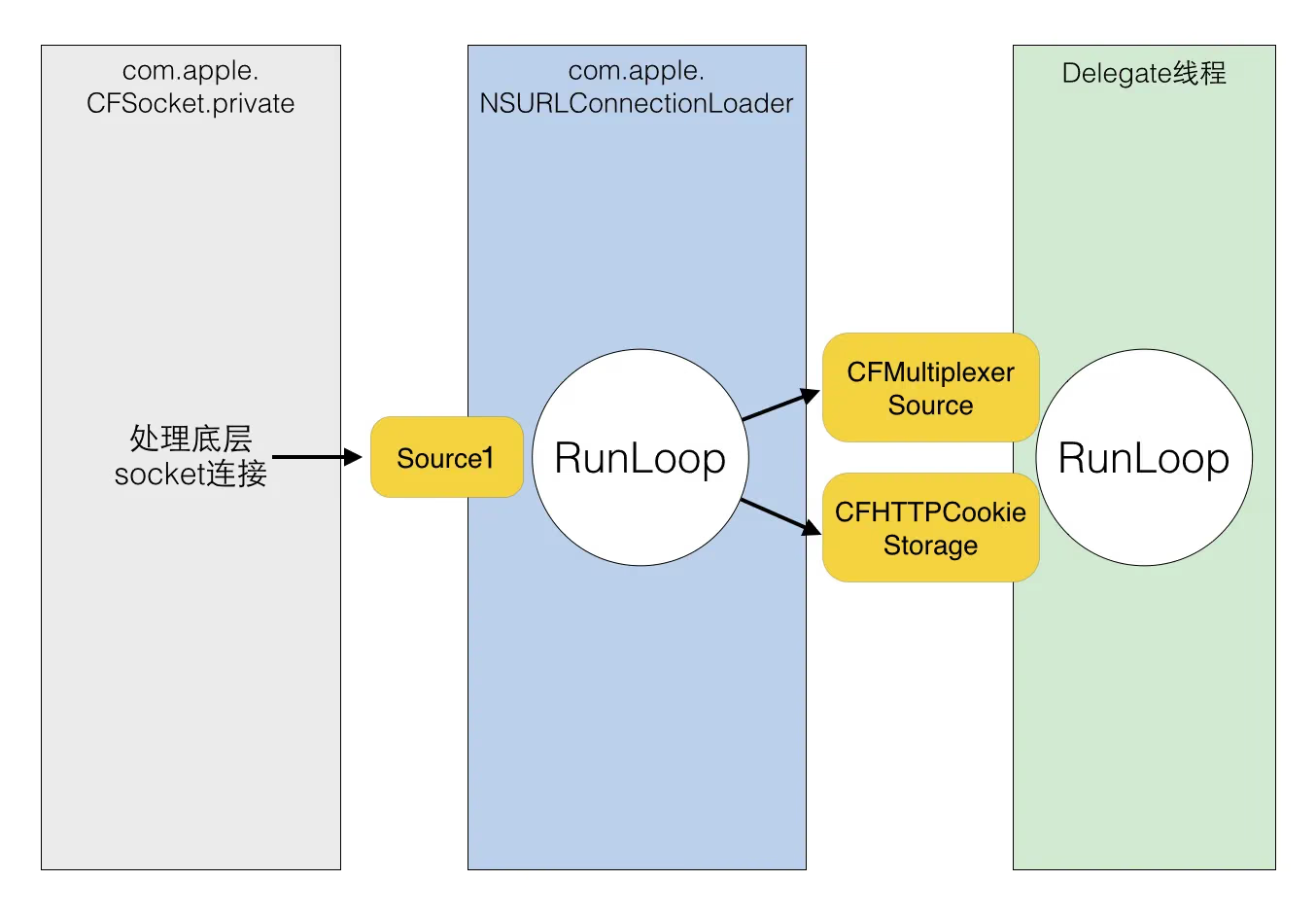
The RunLoop in NSURLConnectionLoader receives notifications from the underlying CFSocket through some Sources based on mach port. After receiving a notification, it sends notifications to Source0s such as CFMultiplexerSource at the appropriate time, and wakes up the Delegate thread’s RunLoop to handle these notifications. CFMultiplexerSource executes the actual callbacks to the Delegate on the Delegate thread’s RunLoop.
Practical Application Examples of RunLoop
AFNetworking
The AFURLConnectionOperation class is built on NSURLConnection and wants to receive Delegate callbacks on a background thread. For this, AFNetworking creates a dedicated thread and starts a RunLoop on it.
1
2
3
4
5
6
7
8
9
10
11
12
13
14
15
16
17
18
+ (void)networkRequestThreadEntryPoint:(id)__unused object {
    @autoreleasepool {
        [[NSThread currentThread] setName:@"AFNetworking"];
        NSRunLoop *runLoop = [NSRunLoop currentRunLoop];
        [runLoop addPort:[NSMachPort port] forMode:NSDefaultRunLoopMode];
        [runLoop run];
    }
}

+ (NSThread *)networkRequestThread {
    static NSThread *_networkRequestThread = nil;
    static dispatch_once_t oncePredicate;
    dispatch_once(&oncePredicate, ^{
        _networkRequestThread = [[NSThread alloc] initWithTarget:self selector:@selector(networkRequestThreadEntryPoint:) object:nil];
        [_networkRequestThread start];
    });
    return _networkRequestThread;
}
Before a RunLoop starts, it must have at least one Timer/Observer/Source inside. So AFNetworking creates a new NSMachPort and adds it before [runLoop run]. Normally, the caller needs to hold this NSMachPort (mach_port) and send messages to the loop through this port from an external thread; but here, the port is only added to keep the RunLoop from exiting, not for actually sending messages.
1
2
3
4
5
6
7
8
9
10
- (void)start {
    [self.lock lock];
    if ([self isCancelled]) {
        [self performSelector:@selector(cancelConnection) onThread:[[self class] networkRequestThread] withObject:nil waitUntilDone:NO modes:[self.runLoopModes allObjects]];
    } else if ([self isReady]) {
        self.state = AFOperationExecutingState;
        [self performSelector:@selector(operationDidStart) onThread:[[self class] networkRequestThread] withObject:nil waitUntilDone:NO modes:[self.runLoopModes allObjects]];
    }
    [self.lock unlock];
}
When this background thread needs to execute a task, AFNetworking throws the task into the background thread’s RunLoop by calling [NSObject performSelector:onThread:..].
AsyncDisplayKit
AsyncDisplayKit is a framework released by Facebook to keep the UI smooth. Here’s roughly how it works:
Once a heavy task appears on the UI thread, the UI stutters. Such tasks are usually divided into 3 categories: layout, drawing, and UI object operations.
Layout usually includes operations such as calculating view sizes, calculating text heights, and recomputing the layout of subviews. Drawing generally includes text drawing (e.g. CoreText), image drawing (e.g. pre-decompression), and element drawing (Quartz), etc. UI object operations usually include creating, setting properties of, and destroying UI objects such as UIView/CALayer.
Among these, the first two categories can be pushed to background threads through various methods, while the last category can only be done on the main thread. Sometimes later operations need to depend on the results of earlier operations (for example, creating a TextView may require pre-computing the text size). What ASDK does is push as many tasks as possible to the background, and delay the ones it can’t (such as view creation and property adjustments) as much as possible.
To do this, ASDK creates an object called ASDisplayNode and wraps UIView/CALayer inside it. It has properties similar to UIView/CALayer, such as frame and backgroundColor. All these properties can be changed on a background thread. Developers can operate the internal UIView/CALayer only through the Node, thus pushing layout and drawing to background threads. But no matter how you operate, these properties always need to be synchronized to the main thread’s UIView/CALayer at some point.
ASDK mimics the pattern of the QuartzCore/UIKit frameworks and implements a similar UI update mechanism: add an Observer to the main thread’s RunLoop, listen for the kCFRunLoopBeforeWaiting and kCFRunLoopExit events, and when the callback is received, iterate over all the pending tasks previously put into the queue and execute them one by one. The specific code can be seen here: _ASAsyncTransactionGroup.
Conclusion
RunLoop needs to be understood deeply
End