
Preface
Recently I ran into a simple but tricky problem in a development requirement. First, look at the requirement
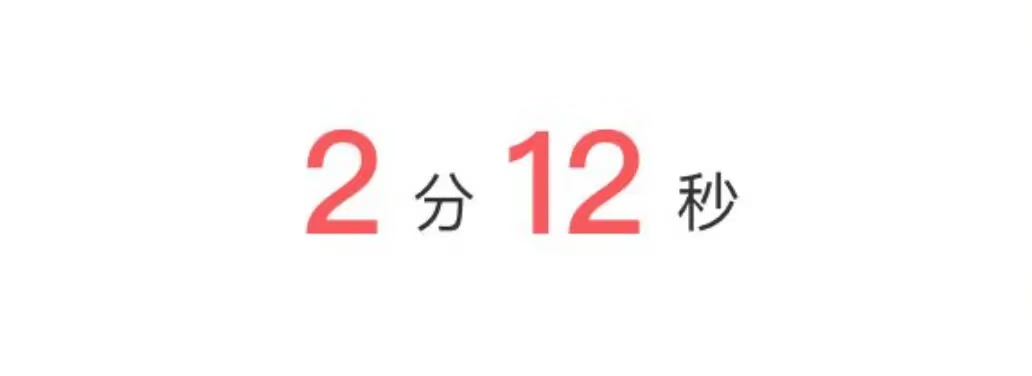
A UILabel displays a string with different sizes and colors. Of course, attributed strings come to mind first, but note: here we need to handle the string after internationalization, which means:
we must append our logic only after internationalization is complete, rather than adding attributed strings right away
For example: 2分14秒 or 2min14secs
That is, we’re given a "2分14秒" string and we need to match a range to modify or replace. With this question in mind, let’s start today’s article.
Implementation Approach
Confucius said: “If I show one corner of a square and a man cannot infer the other three, I won’t teach him again.”
From the Analects, Chapter VII, “Shu Er”
To live up to the Sage’s expectations, I upgraded this problem into 4 levels
- Level 1 The optimal solution, lowest time complexity, highest efficiency
- Level 2 Not the optimal solution, low time complexity, high efficiency
- Level 3 Mediocre across the board
- Level 4 Crude and blunt
I came up with at least two methods
- Match and modify the range in the internationalized string using the calculated time, e.g. the ranges for
minutesandseconds - Use regular expressions to match numbers
- Use predicates to match numbers
- Level 4 is too amateurish — I can’t imagine a developer with several years of experience writing such embarrassing code
Preparation
Dragged a label into the project
1
2
3
4
5
6
7
8
9
10
11
12
13
14
15
16

@interface ViewController ()
@property (weak, nonatomic) IBOutlet UILabel *label;

@end

@implementation ViewController

- (void)viewDidLoad {
    [super viewDidLoad];

 	//Invoke it
    NSAttributedString *resultTime = [self formattedCurrentTime:133];
    self.label.attributedText = resultTime;
}
Solution 1: String range matching
1
2
3
4
5
6
7
8
9
10
11
12
13
14
15
16
17
18
19
20
21
22
23
24
25
26
27
28
/**
 Return the current time format
 @return the assembled string
 */
- (NSAttributedString *)formattedCurrentTime:(NSTimeInterval)timeInterval {

    NSUInteger time = (NSUInteger)timeInterval;
    NSInteger minutes = (time / 60) % 60;
    NSInteger seconds = time % 60;
    NSString *minStr = [NSString stringWithFormat:@" %zd ",minutes];
    NSString *secStr = [NSString stringWithFormat:@" %zd ",seconds];
    //Assume this is our internationalized string
    NSString *localizedFormatString = [NSString stringWithFormat:@"%@分%@秒",minStr,secStr];
    NSMutableAttributedString *attributeStr = [[NSMutableAttributedString alloc] initWithString:localizedFormatString];
    NSRange minRange, secRange;
    if (@available(iOS 9.0, *)) {
        minRange = [localizedFormatString localizedStandardRangeOfString:minStr];
        secRange = [localizedFormatString localizedStandardRangeOfString:secStr];
    } else {
        minRange = [localizedFormatString rangeOfString:minStr];
        secRange = [localizedFormatString rangeOfString:secStr];
    }
    NSDictionary *timeAttrs = @{ NSForegroundColorAttributeName : [UIColor redColor],
                                 NSFontAttributeName : [UIFont systemFontOfSize:40.0f]};
    [attributeStr addAttributes:timeAttrs range:minRange];
    [attributeStr addAttributes:timeAttrs range:secRange];
    return [[NSAttributedString alloc] initWithAttributedString:attributeStr];;
}
Let’s look at the result
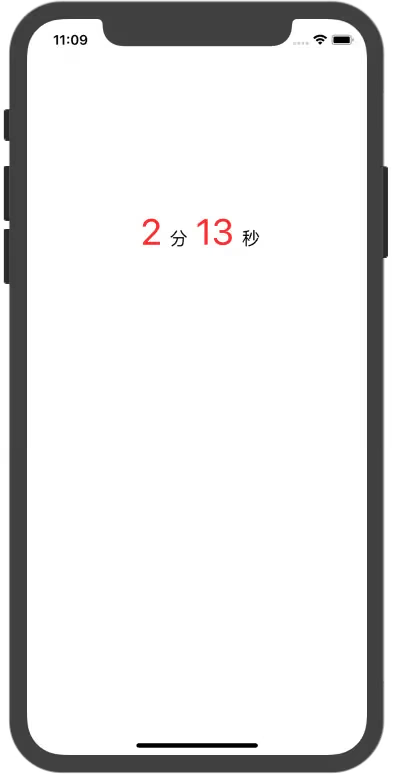
Looks pretty good, right?
But I don’t think this is perfect. This approach, though simple and direct, relies too much on the original ranges of minStr and secStr, computing the range with the API provided after iOS 9
1
2
3
4
5
6
7
if (@available(iOS 9.0, *)) {
    minRange = [localizedFormatString localizedStandardRangeOfString:minStr];
    secRange = [localizedFormatString localizedStandardRangeOfString:secStr];
} else {
    minRange = [localizedFormatString rangeOfString:minStr];
    secRange = [localizedFormatString rangeOfString:secStr];
}
Note: API platform differences
But this implementation has a bug — when it encounters the same string, the matching gets misaligned, as shown in the figure
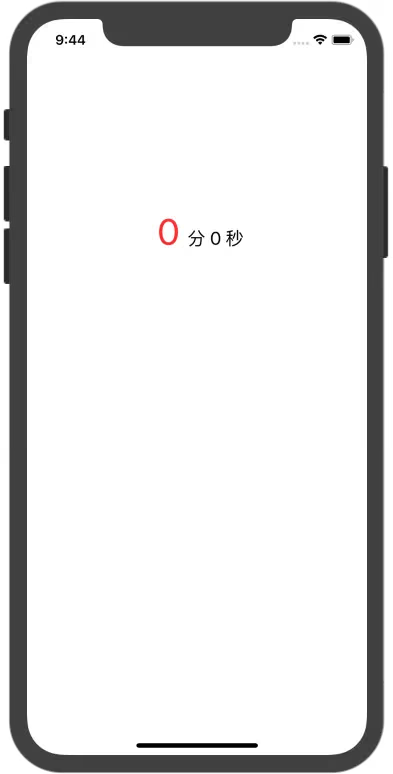
It’s obvious why the error occurs.
The ranges of the string “0” become identical, but to solve just this problem, you could simply judge the range, then cut the string and skip forward by length to keep extracting — that works, but it’s obviously very verbose. And what if one day you run into a string like “0小时0分12秒”? How would you write that?
Would you have to recursively iterate through it and apply attributes range by range?
Such a result is obviously not just verbose — it’s also quite costly to implement, and it hurts code readability a lot (well-written code aside, of course).
So how do we avoid the verbosity?
One approach is to use two different placeholder characters, get the ranges after internationalization is done, then replace the text. It’s a bit crude, but it significantly reduces the time complexity, so it’s worth considering. I won’t write the code — I’m afraid my coworkers would roast me during code review. Keep reading.
Rating: Level 2
So how do we solve this kind of problem without relying on ranges?
Solution 2: Regular expression matching
1
2
3
4
5
6
7
8
9
10
11
12
13
14
15
16
17
18
19
20
21
22
23
24
25
26
27
28
29
30
31
32
33
/**
 Return the current time format
 @return the assembled string
 */
- (NSAttributedString *)formattedCurrentTime:(NSTimeInterval)timeInterval {

    NSUInteger time = (NSUInteger)timeInterval;
    NSInteger minutes = (time / 60) % 60;
    NSInteger seconds = time % 60;
    NSString *minStr = [NSString stringWithFormat:@" %zd ",minutes];
    NSString *secStr = [NSString stringWithFormat:@" %zd ",seconds];
    //Assume this is our internationalized string
    NSString *localizedFormatString = [NSString stringWithFormat:@"%@分%@秒",minStr,secStr];
    NSMutableAttributedString *attributeStr = [[NSMutableAttributedString alloc] initWithString:localizedFormatString];
    NSDictionary *timeAttrs = @{ NSForegroundColorAttributeName : [UIColor redColor],
                                 NSFontAttributeName : [UIFont systemFontOfSize:40.0f]};
    /** Solution 2 **/
    NSError *error = nil;
    NSRegularExpression *reg = [NSRegularExpression regularExpressionWithPattern:@"[0-9]+" options:NSRegularExpressionCaseInsensitive error:&error];
    if (error == nil) {
        NSArray *matches = [reg matchesInString:localizedFormatString options:NSMatchingReportCompletion range:NSMakeRange(0, localizedFormatString.length)];
        for (NSTextCheckingResult *match in matches) {
            for (NSUInteger i = 0; i < match.numberOfRanges; i++) {
                NSRange range = [match rangeAtIndex:i];
                if (range.location != NSNotFound) {
                    [attributeStr addAttributes:timeAttrs range:range];
                }
            }
        }
    }
    return [[NSAttributedString alloc] initWithAttributedString:attributeStr];;
}
Let’s look at the result
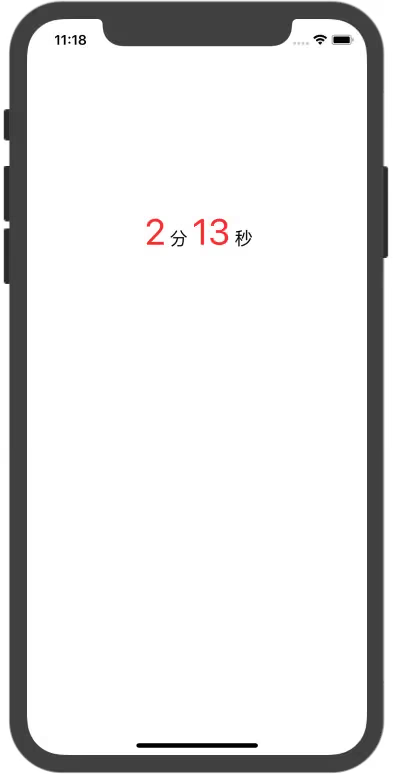
Perfect implementation
The downside of this approach is the higher time complexity — you need to iterate the regex every time. The upside is better extensibility. If one day the PM brings a new requirement like
A1B2C3XXX#话题, this approach will save you from a pitfall.
But the first time I implemented it this way, my coworkers mocked me for being amateurish. It really is amateurish, but it avoids the bug in Solution 1 and is quite precise.
Rating: Level 2
Solution 3: Predicate matching
I haven’t tried this approach. I’d guess it’s faster and simpler than Solutions 1 and 2, but time is tight so I’ll skip it. Looking forward to gentle criticism in the comments!
Solution 4: Crude and blunt
Just use 4 labels. I can already imagine the painful scene of an intern mocking a developer with several years of experience for this face-palming approach. Abandon this low-end approach.
Summary
The solution that ultimately solves the problem is Solution 2: regular expression matching. It’s reliable and a one-time fix.
The main pain point of this article is processing the result returned by the internationalized string after it comes back.
It’s a pity I didn’t achieve a Level 1 solution — I feel I’ve let the Sage down. I hope you all can offer suggestions.
Demo can be found here
Appendix
The code for formatting time
1
2
3
4
5
6
7
8
9
10
11
12
13
14
/**
 Return the time format HH:mm:ss
 @return the assembled string
 */
- (NSString *)formattedCurrentTime {
    NSUInteger time = (NSUInteger)self.recorder.currentTime;
    NSInteger hours = (time / 3600);
    NSInteger minutes = (time / 60) % 60;
    NSInteger seconds = time % 60;

    NSString *format = @"%02i:%02i:%02i";
    return [NSString stringWithFormat:format, hours, minutes, seconds];
}
End of article