
Preface
The holiday is approaching, and I’m worried about not updating articles in time during the National Day holiday. So I’m finishing this one early to keep up my two-articles-a-month output. Today I bring you a breath animation — it’s not particularly well done.
Here’s the image

It’s roughly like this.
Requirements and Implementation Approach
The specific requirements
- The avatar inside breathes — scales up and down, looping infinitely
- Each time it scales up, a background image also scales up and fades out
- Tapping scales the entire background view down
Implementation Approach
First, we need to create a Layer to hold the first infinitely scaling breathing image.
The background also needs a Layer with an animation group for scale-up + opacity fade, and it holds an image that scales up and fades.
Finally, tapping triggers it — just add a one-time scale animation.
The breath animation layer and animation
The breath layer
1
2
3
4
5
6
7
CALayer *layer = [CALayer layer];
layer.position = CGPointMake(kHeartSizeWidth/2.0f, kHeartSizeHeight/2.0f);
layer.bounds = CGRectMake(0, 0, kHeartSizeWidth/2.0f, kHeartSizeHeight/2.0f);
layer.backgroundColor = [UIColor clearColor].CGColor;
layer.contents = (__bridge id _Nullable)([UIImage imageNamed:@"breathImage"].CGImage);
layer.contentsGravity = kCAGravityResizeAspect;
[self.heartView.layer addSublayer:layer];
kHeartSizeHeight and kHeartSizeWidth are constants — set to 100 in the demo
Adding the keyframe animation
1
2
3
4
5
6
7
8
CAKeyframeAnimation *animation = [CAKeyframeAnimation animationWithKeyPath:@"transform.scale"];
animation.values = @[@1.f, @1.4f, @1.f];
animation.keyTimes = @[@0.f, @0.5f, @1.f];
animation.duration = 1; //1000ms
animation.repeatCount = FLT_MAX;
animation.timingFunction = [CAMediaTimingFunction functionWithName:kCAMediaTimingFunctionEaseInEaseOut];
[animation setValue:kBreathAnimationKey forKey:kBreathAnimationName];
[layer addAnimation:animation forKey:kBreathAnimationKey];
The timing function can also be customized, for example:
1
2
3

[CAMediaTimingFunction functionWithControlPoints:0.33 :0 :0.67 :1]
Here I set the duration to 1 second.
The scale-up + fade animation group
Creating a new layer
1
2
3
4
5
6
7
8
9
CALayer *breathLayer = [CALayer layer];
breathLayer.position = layer.position;
breathLayer.bounds = layer.bounds;
breathLayer.backgroundColor = [UIColor clearColor].CGColor;
breathLayer.contents = (__bridge id _Nullable)([UIImage imageNamed:@"breathImage"].CGImage);
breathLayer.contentsGravity = kCAGravityResizeAspect;
[self.heartView.layer insertSublayer:breathLayer below:layer];
//[self.heartView.layer addSublayer:breathLayer];
Here it’s placed behind the breath layer. If you want it in front, just uncomment the line inside and comment out the insertSublayer line.
The animation group contains scale-up and fade
1
2
3
4
5
6
7
8
9
10
11
12
13
14
15
16
17
18
19
20
21
22
23
24
25
//Scale
CAKeyframeAnimation *scaleAnimation = [CAKeyframeAnimation animationWithKeyPath:@"transform.scale"];
scaleAnimation.values = @[@1.f, @2.4f];
scaleAnimation.keyTimes = @[@0.f,@1.f];
scaleAnimation.duration = animation.duration;
scaleAnimation.repeatCount = FLT_MAX;
scaleAnimation.timingFunction = [CAMediaTimingFunction functionWithName:kCAMediaTimingFunctionEaseIn];
//Opacity
CAKeyframeAnimation *opacityAnimation = [CAKeyframeAnimation animation];
opacityAnimation.keyPath = @"opacity";
opacityAnimation.values = @[@1.f, @0.f];
opacityAnimation.duration = 0.4f;
opacityAnimation.keyTimes = @[@0.f, @1.f];
opacityAnimation.repeatCount = FLT_MAX;
opacityAnimation.duration = animation.duration;
opacityAnimation.timingFunction = [CAMediaTimingFunction functionWithName:kCAMediaTimingFunctionEaseIn];

//Animation group
CAAnimationGroup *scaleOpacityGroup = [CAAnimationGroup animation];
scaleOpacityGroup.animations = @[scaleAnimation, opacityAnimation];
scaleOpacityGroup.removedOnCompletion = NO;
scaleOpacityGroup.fillMode = kCAFillModeForwards;
scaleOpacityGroup.duration = animation.duration;
scaleOpacityGroup.repeatCount = FLT_MAX;
[breathLayer addAnimation:scaleOpacityGroup forKey:kBreathScaleName];
The tap scale animation
Same as the first one, except it runs once by default and that’s it.
1
2
3
4
5
6
7
8
9
- (void)shakeAnimation {
    CAKeyframeAnimation *animation = [CAKeyframeAnimation animationWithKeyPath:@"transform.scale"];
    animation.values = @[@1.0f, @0.8f, @1.f];
    animation.keyTimes = @[@0.f,@0.5f, @1.f];
    animation.duration = 0.35f;
    animation.timingFunctions = @[[CAMediaTimingFunction functionWithName:kCAMediaTimingFunctionEaseInEaseOut],[CAMediaTimingFunction functionWithName:kCAMediaTimingFunctionEaseInEaseOut]];
    [self.heartView.layer addAnimation:animation forKey:@""];
}
When the gesture triggers, call it.
Problems Encountered
While developing the animation, I ran into the issue that a breath animation needs to run.
If the duration reaches the middle — for example, with a 1-second duration, at 0.5 seconds it needs to fold back —
then the second animation has just run halfway, and it looks really weird.
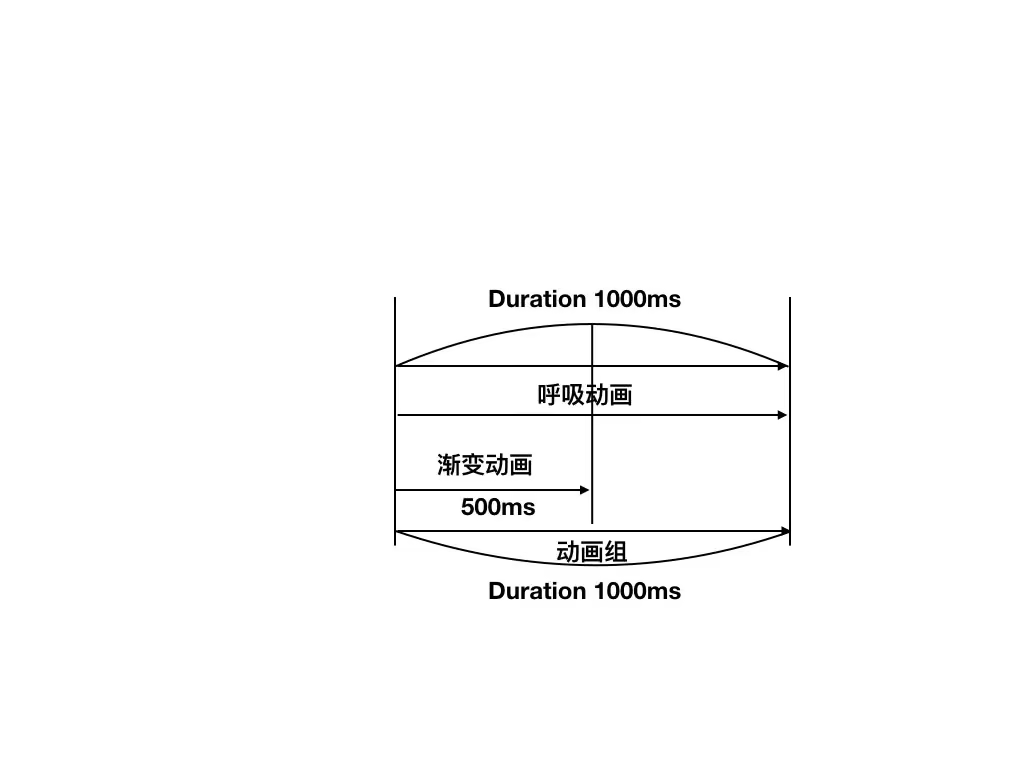
If the fade animation runs for 0.5 seconds, since it repeats, it restarts — which means when the breath folds back, the fade restarts from the beginning too.
How to solve it?
We add the 0.5-second animation into the animation group, and set the group’s duration to match the breath animation. That way, during the remaining 0.5 seconds the fade animation won’t restart.
Summary
I haven’t played with animations for a long time and had basically forgotten everything. From now on I need to practice more, publish more articles and demos, and record more knowledge and techniques.
A blog is like a car — only with regular maintenance can it go further and record more of the good things.
End of article