
Preface
I’ve been studying how Douyin’s short video app implements the vertical top-to-bottom swiping. Today I wrote a demo to make it easier to learn the technique and record the knowledge.

Technical Implementation Principle
- UITableView
It’s actually just a UITableView with its visible display range adjusted. Talk is cheap, show me the code.
I won’t beat around the bush — here’s the code, and it’s very simple to implement.
1
2
3
4

_tableView = [[UITableView alloc] initWithFrame:CGRectMake(0, -SCREEN_HEIGHT, SCREEN_WIDTH, SCREEN_HEIGHT * 5)];
_tableView.contentInset = UIEdgeInsetsMake(SCREEN_HEIGHT, 0, SCREEN_HEIGHT * 3, 0);
- At initialization, the TableView is placed outside the screen.
- contentInset is the inner padding of the displayed content — in order:
top,left,bottom,right. The top inset is exactly one screen height, the bottom inset is the top inset (3 times the screen height) to make swiping easy, and the left/right insets go all the way to the edges. Done.
Let me draw a diagram to demonstrate.
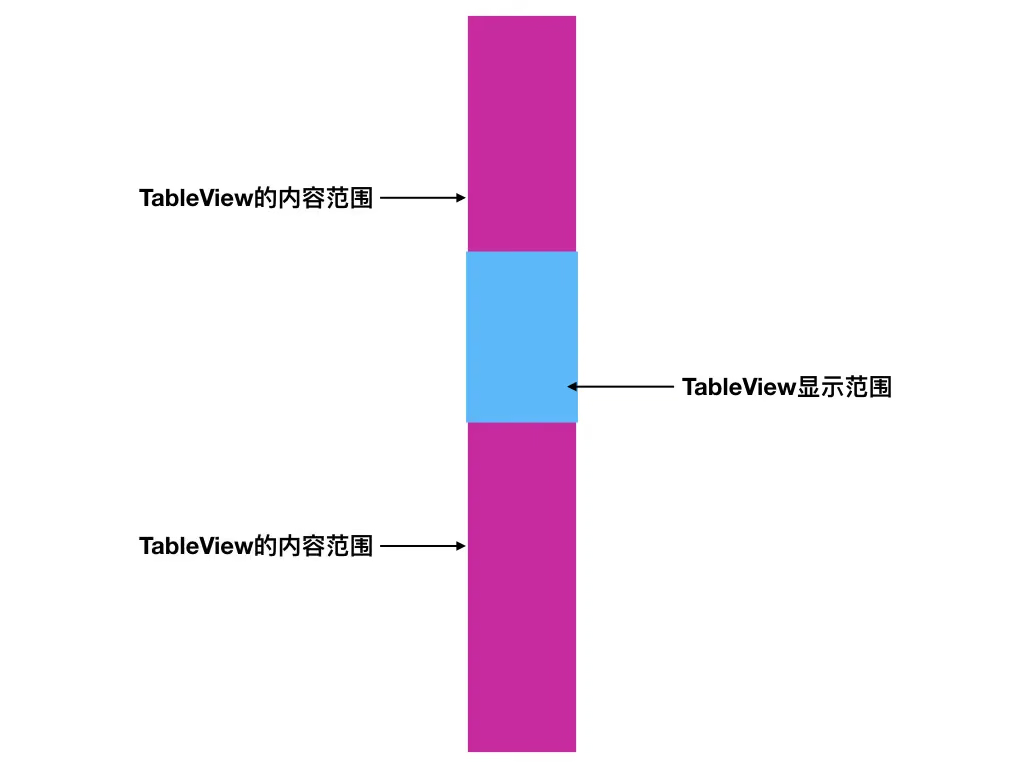
Looking at this image, you may already understand. The core part is controlling the TableView’s top and bottom insets: keep one screen height at the top, and reserve a buffer of about 3 screens at the bottom for swiping down.
Let’s talk about the techniques used
Creating the tableView is simple. If you can’t figure it out, download the demo at the end of the article.
One little trick is how to make vertical swiping land exactly at the corresponding position — fully filling the screen, like enabling pagingEnabled on a UIScrollView.
Implementing the scroll delegate method
First, declare a member variable for the current page index.
1
@property (nonatomic, assign) NSInteger  currentIndex;
Then, when the scroll dragging stops, make a judgment.
1
2
3
4
5
6
7
8
9
10
11
12
13
14
15
16
17
18
19
20
21
22
23
24
25
26
27
#pragma mark -
#pragma mark - ScrollView delegate
- (void)scrollViewDidEndDragging:(UIScrollView *)scrollView willDecelerate:(BOOL)decelerate{
    dispatch_async(dispatch_get_main_queue(), ^{
        CGPoint translatedPoint = [scrollView.panGestureRecognizer translationInView:scrollView];
        //Disable other pan gestures on the UITableView
        scrollView.panGestureRecognizer.enabled = NO;

        if(translatedPoint.y < -50 && self.currentIndex < (kDataSourceCount - 1)) {
            self.currentIndex ++;   //向下滑动索引递增
        }
        if(translatedPoint.y > 50 && self.currentIndex > 0) {
            self.currentIndex --;   //向上滑动索引递减
        }
        [UIView animateWithDuration:0.15
                              delay:0.0
                            options:UIViewAnimationOptionCurveEaseOut animations:^{
                                //Scroll the UITableView to the specified cell
                                [self.tableView scrollToRowAtIndexPath:[NSIndexPath indexPathForRow:self.currentIndex inSection:0] atScrollPosition:UITableViewScrollPositionTop animated:NO];
                            } completion:^(BOOL finished) {
                                //Enable the UITableView to respond to other pan gestures
                                scrollView.panGestureRecognizer.enabled = YES;
                            }];

    });
}
The
50here is actually the maximum trigger range you allow for swiping. Download the demo and play with it to find out.
Based on the swipe range, increment or decrement the current page index, then run a simple UIView animation.
Note: it’s best not to respond to pan gestures while the animation is starting; restore them when the animation ends. This avoids unnecessary problems caused by gesture swiping during the animation.
Why maintain the swiped page index self.currentIndex
Because we want to use KVO to drive the page-change animation.
In the viewDidLoad: method, inside our setupView: method, there’s this piece of code:
1
[self addObserver:self forKeyPath:@"currentIndex" options:NSKeyValueObservingOptionInitial|NSKeyValueObservingOptionNew context:nil];
Yes, we observe our own member variable to do things.
1
2
3
4
5
6
7
8
9
10
11
12
13
//Observe currentIndex changes
-(void)observeValueForKeyPath:(NSString *)keyPath ofObject:(id)object change:(NSDictionary<NSKeyValueChangeKey,id> *)change context:(void *)context {
    if ([keyPath isEqualToString:@"currentIndex"]) {
        //Get the currently displayed cell
        AwemeListCell *cell = [self.tableView cellForRowAtIndexPath:[NSIndexPath indexPathForRow:_currentIndex inSection:0]];
        __weak typeof (cell) wcell = cell;
        __weak typeof (self) wself = self;
        //Use the cell to control related video playback

    } else {
        return [super observeValueForKeyPath:keyPath ofObject:object change:change context:context];
    }
}
This code exists in the demo to control pause/stop or other actions for the playerView on the cell later. We’ll refine it in a future post.
Tapping the status bar to scroll to the top
How do we listen for the status bar event?
Of course we can make the TableView auto-scroll to the top. But how do we intercept this event to reset our page index to 0?
Why reset to 0? Take a look at the image below.

Even though we can auto-scroll the TableView to the top, we can’t intercept the status bar tap event. In the place where this event is handled, we reset the current page index to 0.
Listening for the status bar tap event
Here we override the touchesBegan: method in AppDelegate.
1
2
3
4
5
6
7
8
9
10
11
- (void)touchesBegan:(NSSet<UITouch *> *)touches withEvent:(UIEvent *)event {
    [super touchesBegan:touches withEvent:event];

    //Send a touch notification when the status bar is touched, so the controller receives the tap event
    CGPoint touchLocation = [[[event allTouches] anyObject] locationInView:self.window];
    CGRect statusBarFrame = [UIApplication sharedApplication].statusBarFrame;
    if (CGRectContainsPoint(statusBarFrame, touchLocation)) {
        [[NSNotificationCenter defaultCenter] postNotificationName:StatusBarTouchBeginNotification object:nil];
    }
}
Here we check whether the tap location is within the status bar frame; if so, we post a notification.
In the VC that uses the TableView, register this notification, then reset to 0.
1
2
3
4
5
6
#pragma mark -
#pragma mark - event response, all triggered event responses: buttons, notifications, segmented controls, etc.
- (void)statusBarTouchBegin {
    _currentIndex = 0; //KVO
}
Here we handle it by resetting to 0.
This handling is simple and blunt. If you have a better implementation, feel free to comment at the bottom — thanks a lot.
Summary
That’s a simple implementation of Douyin’s vertical swiping. The demo is below. In the next post, I’ll demonstrate more details — if possible, I’ll eventually put a video on the cell to implement the whole vertical swipe control process: video pause, play, stop, and the rest. Since fully implementing Douyin requires a lot of code, to let everyone learn together, I’ve split each detail into its own section and written separate articles for discussion and learning.
Open-source references