Preface
This article carries strong personal sentiment. If it makes you uncomfortable, please close it as soon as possible. This article is only for personal study records. Reprinting or sharing within the scope of the license is also welcome. Please respect the copyright and keep the original link. Thank you for your understanding and cooperation. If you find this site helpful, you can subscribe via RSS. Thanks for your support!
Let’s Talk About the Problem First
Recently, while adapting to iOS 13 with its Dark Mode, I had to override the following method in UIView, UIViewController, and UIWindow to adapt to this mode
1
2
3
4
| - (void)traitCollectionDidChange:(UITraitCollection *)previousTraitCollection {
[super traitCollectionDidChange:previousTraitCollection];
}
|
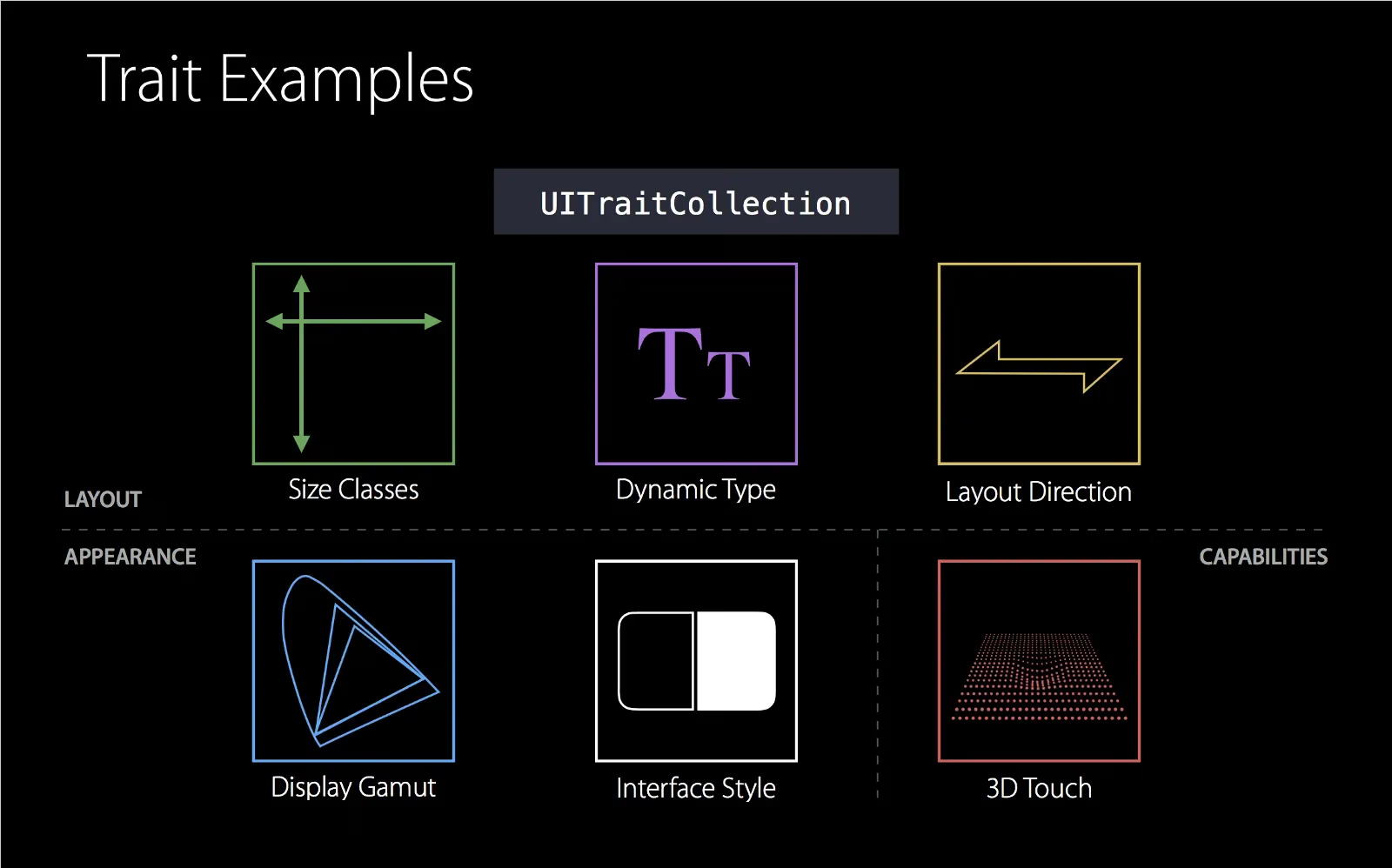
There’s a class called UITraitCollection here that I’d never studied carefully before. Today, let’s study it in detail.
Trait: characteristic, feature
In short, this UIKit class stores device characteristics and related UI configuration. Have you ever wondered how we developers handle it when you modify certain system settings in iOS’s General, such as (see below) contrast and global font size?
These system characteristic changes are stored in UITraitCollection. This is a class we often use in VCs and Views but easily overlook. Below, I’ll briefly record what these characteristics are.
UITraitCollection API Introduction
Configuration for determining whether the current device is iPhone/iPad/tv/carPlay
1
2
| + (UITraitCollection *)traitCollectionWithUserInterfaceIdiom:(UIUserInterfaceIdiom)idiom;
@property (nonatomic, readonly) UIUserInterfaceIdiom userInterfaceIdiom; // unspecified: UIUserInterfaceIdiomUnspecified
|
Configuration for layout direction
1
2
| + (UITraitCollection *)traitCollectionWithLayoutDirection:(UITraitEnvironmentLayoutDirection)layoutDirection API_AVAILABLE(ios(10.0));
@property (nonatomic, readonly) UITraitEnvironmentLayoutDirection layoutDirection API_AVAILABLE(ios(10.0)); // unspecified: UITraitEnvironmentLayoutDirectionUnspecified
|
Configuration for image Scale
1
2
| + (UITraitCollection *)traitCollectionWithDisplayScale:(CGFloat)scale;
@property (nonatomic, readonly) CGFloat displayScale; // unspecified: 0.0
|
Configuration for layout Size Class
1
2
3
4
5
6
| + (UITraitCollection *)traitCollectionWithHorizontalSizeClass:(UIUserInterfaceSizeClass)horizontalSizeClass;
@property (nonatomic, readonly) UIUserInterfaceSizeClass horizontalSizeClass; // unspecified: UIUserInterfaceSizeClassUnspecified
+ (UITraitCollection *)traitCollectionWithVerticalSizeClass:(UIUserInterfaceSizeClass)verticalSizeClass;
@property (nonatomic, readonly) UIUserInterfaceSizeClass verticalSizeClass; // unspecified: UIUserInterfaceSizeClassUnspecified
|
Configuration for whether Force Touch is available
1
2
| + (UITraitCollection *)traitCollectionWithForceTouchCapability:(UIForceTouchCapability)capability API_AVAILABLE(ios(9.0));
@property (nonatomic, readonly) UIForceTouchCapability forceTouchCapability API_AVAILABLE(ios(9.0)); // unspecified: UIForceTouchCapabilityUnknown
|
Configuration for the global font size
1
2
3
| + (UITraitCollection *)traitCollectionWithPreferredContentSizeCategory:(UIContentSizeCategory)preferredContentSizeCategory API_AVAILABLE(ios(10.0));
@property (nonatomic, copy, readonly) UIContentSizeCategory preferredContentSizeCategory API_AVAILABLE(ios(10.0)); // unspecified: UIContentSizeCategoryUnspecified
|
Configuration for the display gamut
1
2
3
4
|
+ (UITraitCollection *)traitCollectionWithDisplayGamut:(UIDisplayGamut)displayGamut API_AVAILABLE(ios(10.0));
@property (nonatomic, readonly) UIDisplayGamut displayGamut API_AVAILABLE(ios(10.0)); // unspecified: UIDisplayGamutUnspecified
|
Configuration for whether high contrast is enabled
1
2
| + (UITraitCollection *)traitCollectionWithAccessibilityContrast:(UIAccessibilityContrast)accessibilityContrast API_AVAILABLE(ios(13.0), tvos(13.0)) API_UNAVAILABLE(watchos);
@property (nonatomic, readonly) UIAccessibilityContrast accessibilityContrast API_AVAILABLE(ios(13.0), tvos(13.0)) API_UNAVAILABLE(watchos); // unspecified: UIAccessibilityContrastUnspecified
|
Configuration for the global legibility weight
1
2
| + (UITraitCollection *)traitCollectionWithLegibilityWeight:(UILegibilityWeight)legibilityWeight API_AVAILABLE(ios(13.0), tvos(13.0), watchos(6.0));
@property (nonatomic, readonly) UILegibilityWeight legibilityWeight API_AVAILABLE(ios(13.0), tvos(13.0), watchos(6.0)); // unspecified: UILegibilityWeightUnspecified
|
Configuration for the user interface style
1
2
| + (UITraitCollection *)traitCollectionWithUserInterfaceStyle:(UIUserInterfaceStyle)userInterfaceStyle API_AVAILABLE(tvos(10.0)) API_AVAILABLE(ios(12.0)) API_UNAVAILABLE(watchos);
@property (nonatomic, readonly) UIUserInterfaceStyle userInterfaceStyle API_AVAILABLE(tvos(10.0)) API_AVAILABLE(ios(12.0)) API_UNAVAILABLE(watchos); // unspecified: UIUserInterfaceStyleUnspecified
|
How to Get the UITraitCollection
UITraitCollection itself is a collection of configurations. Each UIView/UIViewController has its own UITraitCollection object and passes its own UITraitCollection to child UIViews/UIViewControllers as the default value.
- You can get the current view’s UITraitCollection object via the
traitCollection property of UIView/UIViewController
1
2
3
4
| - (void)viewDidLoad {
[super viewDidLoad];
self.traitCollection //拿到当前得
}
|
- You can monitor changes to the traitCollection property by overriding the following method in a subclass
1
2
3
4
| - (void)traitCollectionDidChange:(UITraitCollection *)previousTraitCollection {
[super traitCollectionDidChange:previousTraitCollection];
}
|
- Get the global
UITraitCollection
1
| [UITraitCollection currentTraitCollection];
|
Tips
If you want to update the status bar in a UIViewController, after setting the style you can call
1
| [self setNeedsStatusBarAppearanceUpdate];
|
Summary
Through a simple study of UITraitCollection, I’ve gained a deeper understanding of this class. I hope to keep recording the knowledge I’ve learned in the future.