

Preface
This post carries strong personal opinions; if reading it makes you uncomfortable, please close it right away. This article is only for my personal study notes. You’re welcome to repost or share it within the scope of the license — please respect the copyright and keep the original link. Thank you for your understanding and cooperation. If you find this site helpful, you can subscribe via RSS. Thanks for your support!
In this post, we’ll cover the views & graphics related questions from Alibaba & ByteDance: An Efficient Set of iOS Interview Questions.
Views & Graphics Related
Here’s the main question list:
- How does AutoLayout work, and how is its performance
- Differences between UIView & CALayer
- The event response chain
- When drawrect & layoutsubviews get called
- How UI refreshing works
- Differences between implicit and explicit animations
- What is off-screen rendering
- Differences between imageName & imageWithContentsOfFile
- Will multiple identical images be loaded repeatedly
- When are images decoded, and how to optimize
- How to optimize image rendering
- What happens if the GPU’s refresh rate exceeds the iOS screen’s 60Hz refresh rate, and how to fix it
1. How does AutoLayout work, and how is its performance?
How AutoLayout works
Origin Most people assume Auto Layout is something Apple invented. Actually, no — as early as 1997, Alan Borning, Kim Marriott, Peter Stuckey and others published the paper “Solving Linear Arithmetic Constraints for User Interface Applications” (paper link: http://constraints.cs.washington.edu/solvers/uist97.html), which proposed the Cassowary constraint-solving algorithm implementation for layout problems, and released the code on their Cassowary website http://constraints.cs.washington.edu/cassowary/. Later, more developers wrote Cassowary in various languages — for example, pybee’s Python implementation at https://github.com/pybee/cassowary. Since its release, JavaScript, .NET, JAVA, Smalltalk, and C++ all have corresponding libraries. In 2011, Apple applied this algorithm in its own layout engine, grandly naming it Auto Layout.
The paper’s download link is rather slow, so I downloaded a copy of the Cassowary original paper — feel free to download.
The principle of AutoLayout is using the Cassowary algorithm to abstract layout problems into linear inequalities, decomposed into constraints between multiple positions Since it adds the process of computing view size frames, its performance is definitely not as fast as specifying Frame coordinates directly.
For detailed principles and advanced internals, please refer to teacher Dai Ming’s article: Written by Dai Ming: Deep Analysis of Auto Layout and the new features in each iOS version
How is its performance?
Below is the live performance comparison of automatic layout under iOS12 vs. iOS11 from WWDC2018 High Performance Auto Layout.

The experiments produced the chart conclusions below:
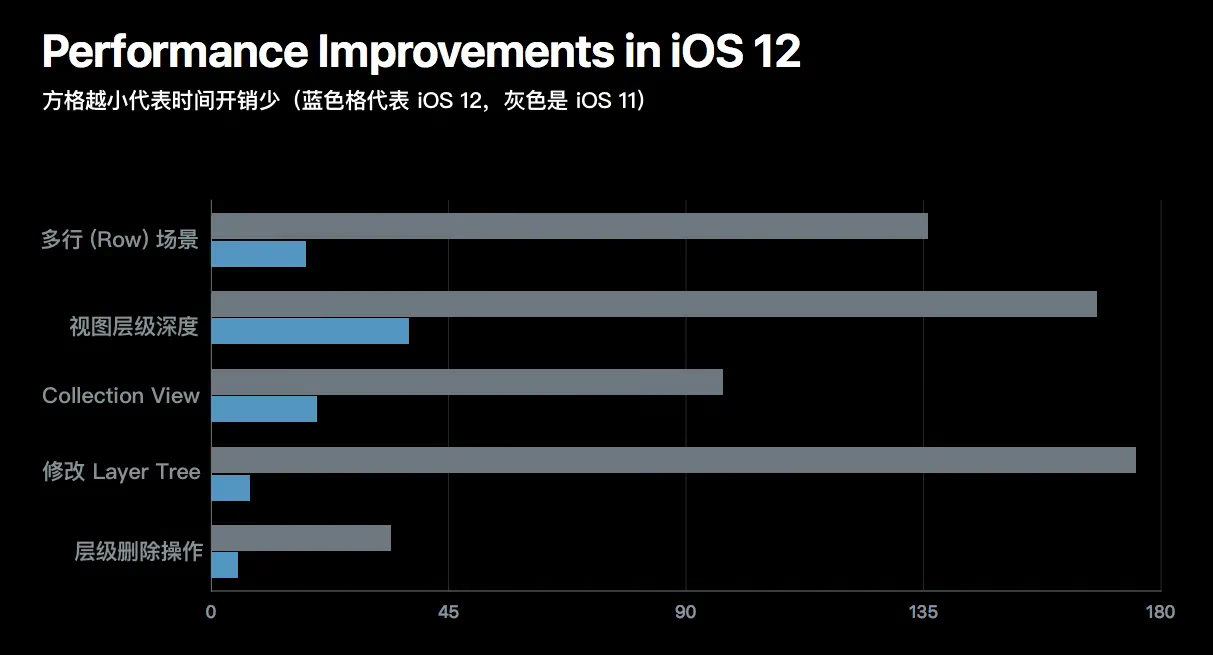
Before iOS12, the impact of view nesting depth on performance grew exponentially; after iOS12’s optimization, the impact grows linearly, consuming little performance.
No matter how it’s optimized, it still can’t be as direct and performant as setting with CGRectFrame.
2. Differences between UIView & CALayer
| Difference | UIView | CALayer |
|---|---|---|
| Parent class | UIView:UIResponder:NSObject | CALayer:NSObject |
| Purpose | Can handle touch events | Doesn’t handle user interaction, doesn’t participate in response event delivery |
| Relationship | Has a CALayer member variable, eg: view.layer | Is a member variable of UIView |
| Division of labor | Handles interaction-layer events and wraps simple settings of various graphics | Renders graphics at a low level, supports animation |
3. The event response chain
I’ve mentioned the following article more than once in earlier posts when discussing runloop. Highly recommended reading — most of my Kuaishou colleagues take this understanding as the standard:
iOS Touch Event: The Whole Shebang
4. When drawrect & layoutsubviews get called
layoutSubviews: (equivalent to the layoutSubviews() function) is called in the following situations:
- init does not trigger layoutSubviews.
- addSubview triggers layoutSubviews.
- Setting a view’s Frame triggers layoutSubviews (triggered when the frame changes).
- Scrolling a UIScrollView triggers layoutSubviews.
- Rotating the screen triggers the layoutSubviews event on the parent UIView.
- Resizing a UIView also triggers the layoutSubviews event on the parent UIView.
- Directly calling setLayoutSubviews.
drawrect: (the drawrect() function) is called in the following situations:
drawrect:is called after the UIViewController’sloadView:andViewDidLoad:methods.- After we call
[UIFont sizeToFit], the system automatically callsdrawRect: - Setting a UIView’s contentMode or Frame immediately triggers the system to call
drawRect: - Directly calling
setNeedsDisplayto set the flag, orsetNeedsDisplayInRect:, triggersdrawRect:
Knowledge expansion: when we manipulate the drawRect method, we’re actually operating on the backingStore region in memory that holds the view, for subsequent graphics rendering operations. If this is unclear, see The rendering process of UIView.
5. How UI refreshing works
I’m not sure whether this question is asking about iOS’s off-screen rendering process, so let me briefly answer that.
iOS’s MainRunloop is a 60fps callback — that is, the screen is drawn once every 16.7ms (milliseconds), during which the following work must be completed:
- Creation of the view’s buffer
- Drawing of the view’s content (if drawRect is overridden)
- Receiving and processing system touch events
The UI graphics we see are actually the result of continuous cooperation between the CPU and GPU. After the rendering process of UIView, our UI continuously receives the events the system gives us.
Because the main thread’s runloop keeps callback-ing, our UI gets the window for refreshing. Whether rendering or handling events, it’s all the result of the runloop working non-stop. In earlier posts we learned that the main thread’s runloop is started by default, because we respond to interaction.
I don’t know whether my answer satisfies this question. If my answer is wrong, please leave a comment below to let me know, and I’ll keep improving.
6. Differences between implicit & explicit animations
Implicit animations always exist; to disable them, you must set a flag. Explicit animations don’t exist; to make one explicit, you have to enable it.
Just observe the result after the animation finishes executing. For example: a simple UIView frame movement — if it moves from point A to point B, and upon completion returns to the original position, that’s an implicit animation.
Core Animation is explicit animation, because it can animate layer properties directly and also override default layer behavior.
7. Differences between imageName & imageWithContentsOfFile
| Difference | UIView | imageWithContentsOfFile |
|---|---|---|
| Difference | Caches the image in memory | No caching |
8. What is off-screen rendering
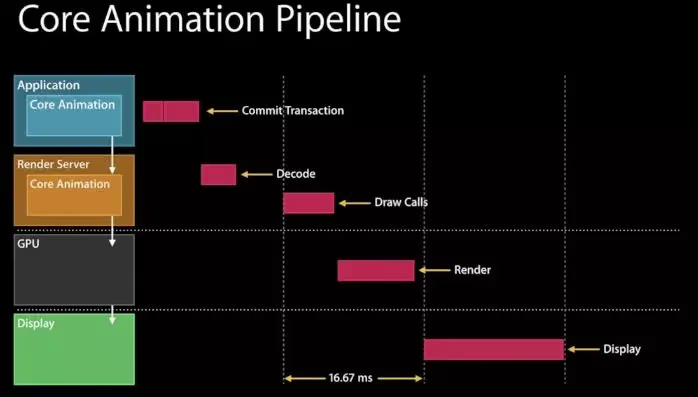
An In-Depth Study of iOS Off-Screen Rendering
9. Will multiple identical images be loaded repeatedly
No — the GPU has a pixel cache mask.
10. When are images decoded, and how to optimize
Decoding happens when loading into memory: from UIImage -> CGImage -> CGImageSourceCreateWithData(data) to create an ImageSource and turn it into a bitmap. All this work is done by Core Animation while the image is loaded into memory, stored in the backingStore, and decoded before being sent to the GPU pipeline for processing.
How to optimize
Manually operate the image encoding APIs yourself —
the CGImageSource family. Based on sensible timing and use of operating system resources, tune out a library with small caching and fast loading.
See the open-source PINRemoteImage or YYWebImage
11. How to optimize image rendering
You can start with shadows and corner radius. Also frame rate, battery, image aliasing, and the like.
iOS Development — View Rendering and Performance Optimization
12. What happens if the GPU’s refresh rate exceeds the iOS screen’s 60Hz refresh rate, and how to fix it
The phenomenon: graphics are sharp and scenes look realistic, but an Arm-chip GPU refreshing above 60Hz is guaranteed to be a huge battery drain. The phone heats up and throttles down; FPS drops — because low power/battery can’t sustain a high GPU refresh rate.
The solution is to use Xcode’s built-in tools to inspect the rendering process and see where it can be optimized.
Summary
I briefly answered some graphics-related questions — most are about iOS off-screen rendering. This area deserves your serious study; a lot of the material takes time to go through.