

Preface
This article is strongly personal in tone. If you find it uncomfortable to read, please close it as soon as possible. This article is only a personal learning record. You are welcome to repost or share it within the scope of the license agreement, but please respect the copyright and keep the original link. Thank you for your understanding and cooperation. If you find this site helpful, you can subscribe via RSS. Thanks for your support!
In the first three parts, we covered memory management. Today we continue with the notification part of Alibaba & ByteDance: A Set of Efficient iOS Interview Questions. The main content includes:
- Implementation principles (structure design, how notifications are stored, the relationship among name & observer & SEL, etc.)
- Is notification posting synchronous or asynchronous?
- Do NSNotificationCenter’s receiving and posting happen on the same thread? How to post asynchronously
- Does NSNotificationQueue post asynchronously or synchronously? Which thread responds
- The relationship between NSNotificationQueue and runloop
- How to guarantee the notification is received on the main thread
- Will it crash if the notification is not removed when the page is destroyed
- What happens when the same notification is added multiple times? What about removing it multiple times
- Can the following approach receive the notification? Why
1
2
3
4
  // Post the notification
  [[NSNotificationCenter defaultCenter] addObserver:self selector:@selector(handleNotification:) name:@"TestNotification" object:@1];
  // Receive the notification
  [NSNotificationCenter.defaultCenter postNotificationName:@"TestNotification" object:nil];
Before explaining these, I strongly recommend carefully reading this article, A Complete Guide to the iOS Notification Mechanism (Classic), to get an overview — then all the questions will be readily solved.
Implementation Principles (Structure Design, How Notifications Are Stored, the Relationship Among name & observer & SEL, etc.)
First, the notification center structure can be roughly divided into the following classes:
NSNotificationThe notification model: name, object, userinfo.NSNotificationCenterThe notification center, responsible for postingNSNotificationNSNotificationQueueThe notification queue, responsible for triggering at certain moments and calling theNSNotificationCentertopostnotifications
Notifications are stored as structs in a doubly-linked list
1
2
3
4
5
6
7
8
9
10
11
12
13
14
15
16
// Root container, held by NSNotificationCenter
typedef struct NCTbl {
  Observation		*wildcard;	/* Linked list that stores notifications with neither name nor object */
  GSIMapTable		nameless;	/* Stores notifications without a name but with an object	*/
  GSIMapTable		named;		/* Stores notifications with a name, whether or not they have an object	*/
    ...
} NCTable;

// Observation: the structure that stores the observer and the response, the basic storage unit
typedef	struct Obs {
  id		observer;	/* Observer: the object that receives notifications	*/
  SEL		selector;	/* Response selector		*/
  struct Obs	*next;		/* Next item in linked list.	*/
  ...
} Observation;
Notifications are stored mainly in key-value form. One key point to emphasize: notifications are stored along two dimensions — name and object — which correspond to the two different parameters we pass when adding a notification.
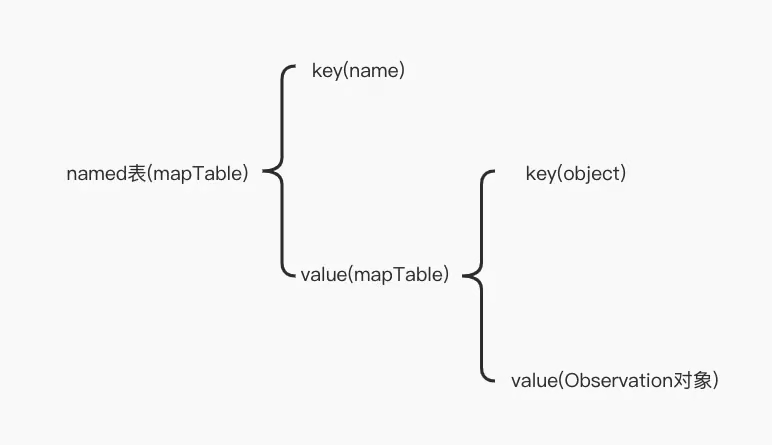
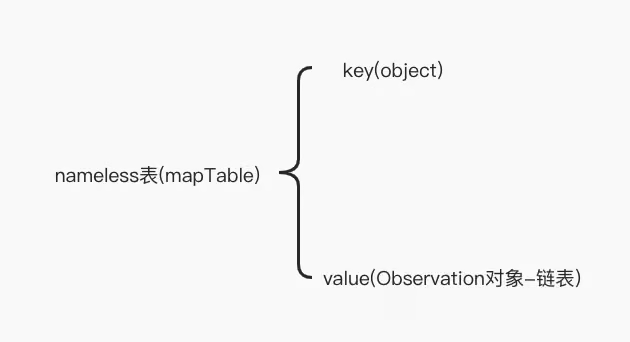
To put it simply, the relationship among name & observer & SEL is: name acts as the key, observer is the observing object, and when the right moment comes, the observer’s SEL is invoked. This is quite simple. If you think my explanation is imprecise, check the article linked at the beginning.
Is Notification Posting Synchronous or Asynchronous?
Synchronous. Because message forwarding is invoked. The “asynchronous” here means not posted in real time but posted at an appropriate moment; no asynchronous thread is spawned.
Do NSNotificationCenter’s Receiving and Posting Happen on the Same Thread? How to Post Asynchronously
Yes. If a notification is posted on an asynchronous thread, the response method is also called on that asynchronous thread.
To post asynchronously, simply spawn an asynchronous thread to post the notification.
Does NSNotificationQueue Post Asynchronously or Synchronously? Which Thread Responds
1
2
3
4
5
6
// The timing for posting notifications
typedef NS_ENUM(NSUInteger, NSPostingStyle) {
    NSPostWhenIdle = 1, // runloop空闲时发送通知
    NSPostASAP = 2, // 尽快发送,这种时机是穿插在每次事件完成期间来做的
    NSPostNow = 3 // 立刻发送或者合并通知完成之后发送
};
| NSPostWhenIdle | NSPostASAP | NSPostNow | |
|---|---|---|---|
| NSPostingStyle | Asynchronous | Asynchronous | Synchronous |
NSNotificationCenter always posts synchronously. The asynchronous posting of NSNotificationQueue introduced here is not truly asynchronous from a thread perspective; it could be called delayed posting, since it leverages runloop timing to trigger.
If a notification is posted on an asynchronous thread, the response runs on the asynchronous thread; if posted on the main thread, the response runs on the main thread.
The Relationship Between NSNotificationQueue and runloop
NSNotificationQueue depends on runloop, because the notification queue needs to call the notification center to post notifications at certain moments during runloop callbacks. You can see this from the enum values below:
1
2
3
4
5
6
// The timing for posting notifications
typedef NS_ENUM(NSUInteger, NSPostingStyle) {
    NSPostWhenIdle = 1, // runloop空闲时发送通知
    NSPostASAP = 2, // 尽快发送,这种时机是穿插在每次事件完成期间来做的
    NSPostNow = 3 // 立刻发送或者合并通知完成之后发送
};
How to Guarantee the Notification Is Received on the Main Thread
If you want to respond to an asynchronous notification on the main thread, you can use the following two approaches:
- Use the system API that lets you specify a queue when accepting notifications
1
- (id <NSObject>)addObserverForName:(nullable NSNotificationName)name object:(nullable id)obj queue:(nullable NSOperationQueue *)queue usingBlock:(void (^)(NSNotification *note))block
- The
NSMachPortapproach: add a machPort to the main thread’s runloop and set its delegate. Other threads can communicate with the main thread through this Port, and the code executed in this port’s delegate callback is guaranteed to run on the main thread. So you can call NSNotificationCenter to post notifications here.
Will It Crash If the Notification Is Not Removed When the Page Is Destroyed?
Before iOS 9.0, it will crash, because the notification center holds observers as unsafe_unretained, so when the observer is deallocated, its pointer isn’t nil — a dangling pointer occurs.
After iOS 9.0, it won’t crash, because the notification center holds observers as weak.
What Happens When the Same Notification Is Added Multiple Times? What About Removing It Multiple Times
Adding the same notification multiple times means that posting the notification once triggers multiple callback invocations. Removing a notification multiple times won’t cause a crash.
Can the Following Approach Receive the Notification? Why
1
2
3
4
// Post the notification
[[NSNotificationCenter defaultCenter] addObserver:self selector:@selector(handleNotification:) name:@"TestNotification" object:@1];
// Receive the notification
[NSNotificationCenter.defaultCenter postNotificationName:@"TestNotification" object:nil];
No.
First, let’s look at the structure the notification center uses to store observers.
1
2
3
4
5
6
7
8
9
10
11
12
13
14
15
// Root container, held by NSNotificationCenter
typedef struct NCTbl {
  Observation  *wildcard;    /* Linked list that stores notifications with neither name nor object */
  GSIMapTable nameless;    /* Stores notifications without a name but with an object    */
  GSIMapTable named;        /* Stores notifications with a name, whether or not they have an object    */
    ...
} NCTable;

// Observation: the structure that stores the observer and the response, the basic storage unit
typedef	struct Obs {
  id observer;    /* Observer: the object that receives notifications    */
  SEL selector;    /* Response selector        */
  struct Obs *next;        /* Next item in linked list.    */
  ...
} Observation;
Here are the concrete data structures of nameless and named:
When adding an observer, we passed in name and object, so the observer’s storage linked list looks like this:
named table: key(name) : value->key(object) : value(Observation)
Therefore, when posting a notification, if you only pass name but not object, the Observation can’t be found, and the observer callback won’t be executed.
Summary
Through today’s review, I’ve gained a fresh understanding of the notification center in iOS. I hope everyone regularly reviews old knowledge to gain new insights. In the next article, we’ll start explaining Runloop & KVO.