
Preface
This post carries strong personal sentiment; if you feel uncomfortable reading it, please close it as soon as possible. This post is only a personal learning record. Reposting or sharing within the license terms is welcome; please respect copyright and keep the original link. Thank you for your understanding and cooperation. If you find this site helpful, you can subscribe via RSS. Thanks for your support!
In the previous posts we covered memory, associated objects, ARC, AutoreleasePool, weak objects, and NSNotificationCenter. Today we’ll talk about Runloop and KVO.
The main questions answered in this chapter are:
Runloop
- How does an app receive touch events?
- Why is only the main thread’s runloop running?
- Why refresh UI only on the main thread?
- The relationship between PerformSelector and runloop
- How to keep a thread alive
KVO
- Implementation principle
- How to manually disable KVO
- Does modifying a property via KVC trigger KVO?
- In which cases does using KVO crash, and how to prevent crashes?
- Pros and cons of KVO
Runloop
As a qualified iOS developer, you must have a deeper understanding of runloop. Let’s answer the related questions below.
1. How does an app receive touch events?
Before answering this question, please read iOS touch event full set carefully.
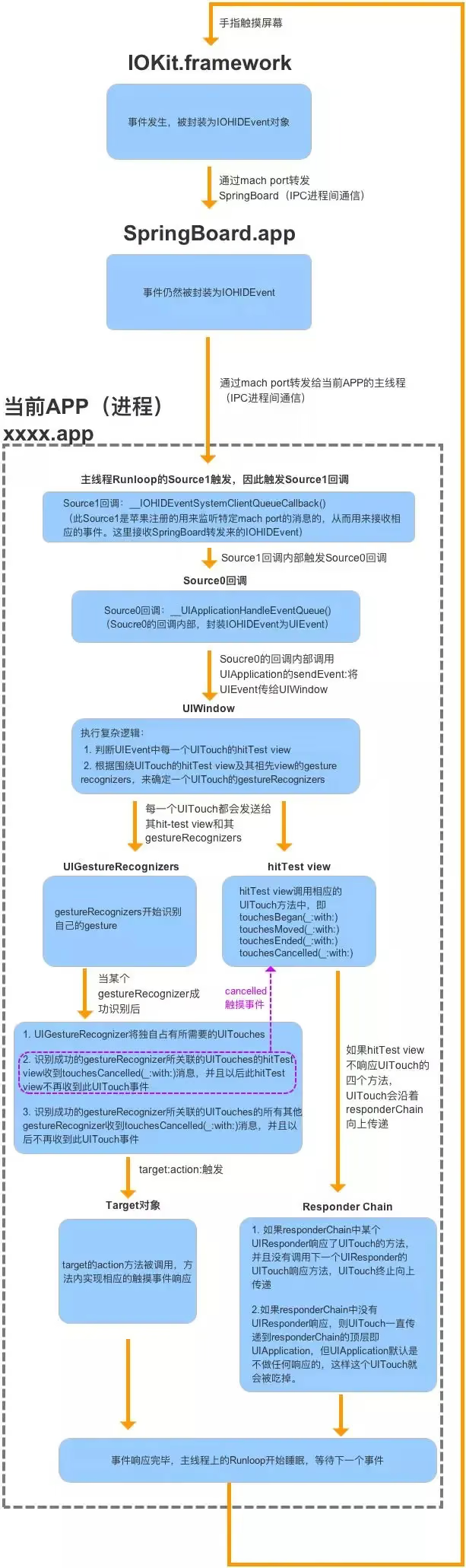
As the figure above shows, the whole flow is: when our app starts, it listens on a machPort by default to receive IOHIDEvent for receiving and processing touch events.
2. Why is only the main thread’s runloop running?
UIApplicationMain is called in the main() function, which creates a main thread for UI processing. To keep the program running and receiving events, a runloop is started on the main thread so that the main thread stays resident.
3. Why refresh UI only on the main thread?
All the UI we use comes from the UIKit base library. Since Objective-C is not a thread-safe language, there are problems with multi-threaded read/write synchronization. Locking would incur a large OS overhead and consume a lot of system resources (memory, time-slice rotation, CPU processing speed…). Combined with the fact that system event reception and processing all happen on the main thread, as mentioned above, if UI were on an async thread there would also be issues with synchronized event processing. So keeping multi-touch gesture and other events on the same thread as the UI is relatively the optimal solution.
On the other hand, screen rendering is 60 fps (60Hz/s), i.e. the frequency is 60 callbacks per second (120Hz/s on iPad Pro). Ideally our runloop will also be called back 60 times (120 times on iPad Pro) per clock cycle. This high-frequency invocation ensures the screen image display stays vertically synced without stuttering. On an async thread, it’s hard to guarantee synchronized updates during this process. Even if it could be guaranteed, compared to the main thread, system resource overhead, thread scheduling, etc. would consume most of the resources, and dedicating a single thread to doing just one thing is not worth it.
4. The relationship between PerformSelector and runloop
When calling performSelector: and related methods on NSObject, a timer is created internally and added to the current thread’s runloop. If the current thread hasn’t started its runloop, the method won’t be called.
The most common issue encountered in development is performSelector: causing delayed release of the object. Pay attention to this during development; you can use a one-shot NSTimer instead.
For details, see Runloop and performSelector.
5. How to keep a thread alive?
To keep a thread alive, just start that thread’s runloop. Note: adding while(true){} inside the method executed by NSThread simulates how a runloop works; combined with GCD’s semaphore, you can process tasks in the {} block.
But be careful: the way you start the runloop must be correct.
Like this:
1
2
3
4
5
6
7
8
9
10
11
12
13
14
15
16
17
18
19
20
21
22
23
24
25
26
27
28
29
30
31
32
33
34
35
36
37
38
39
//Test starting a thread
- (void)memoryTest {
    for (int i = 0; i < 100000; ++i) {
        NSThread *thread = [[NSThread alloc] initWithTarget:self selector:@selector(run) object:nil];
        [thread start];
        [self performSelector:@selector(stopThread) onThread:thread withObject:nil waitUntilDone:YES];
    }
}
//Stop the thread
- (void)stopThread {
    CFRunLoopStop(CFRunLoopGetCurrent());
    NSThread *thread = [NSThread currentThread];
    [thread cancel];
}
//Run the thread's runloop; note the added empty port, otherwise a memory leak occurs
- (void)run {
    @autoreleasepool {
        NSLog(@"current thread = %@", [NSThread currentThread]);
        NSRunLoop *runLoop = [NSRunLoop currentRunLoop];
        if (!self.emptyPort) {
            self.emptyPort = [NSMachPort port];
        }
        [runLoop addPort:self.emptyPort forMode:NSDefaultRunLoopMode];
        [runLoop runMode:NSRunLoopCommonModes beforeDate:[NSDate distantFuture]];
    }
}
//The following code simulates some time-consuming tasks done inside the thread
- (void)printSomething {
    NSLog(@"current thread = %@", [NSThread currentThread]);
    [self performSelector:@selector(printSomething) withObject:nil afterDelay:1];
}
//Simulate manually clicking a button to stop the runloop
- (void)stopButtonDidClicked:(id)sender {
    [self performSelector:@selector(stopRunloop) onThread:self.thread withObject:nil waitUntilDone:YES];
}

- (void)stopRunloop {
    CFRunLoopStop(CFRunLoopGetCurrent());
}
For details, see: In-depth research on Runloop and thread keep-alive in iOS development
KVO
We often use KVO in development. Let’s answer KVO-related questions below.
KVO implementation principle
By deriving a subclass via runtime, the properties that need KVO observation are overridden. NSObject’s observation methods are called before and after the setter of that property, so KVO implements callbacks before and after the property change.
The specific format of the subclass derived by KVO should be: NSKVONotifying_ + class name, e.g. NSKVONotifying_Person.
The following example code is a simulated experiment adding KVO to the name property of the Person class.
1
2
3
4
5
6
7
8
9
10
11
12
13
- (void)setName:(NSString *)name{
    _NSSetObjectValueAndNotify();
}

void _NSSetObjectValueAndNotify {
    [self willChangeValueForKey:@"name"];
    [super setName:name];
    [self didChangeValueForKey:@"name"];
}

- (void)didChangeValueForKey:(NSString *)key{
    [observe observeValueForKeyPath:key ofObject:self change:nil context:nil];
}
So the question is, how do you create a class dynamically?
1
2
3
4
5
6
7
8
9
10
11
12
13
14
15
16
17
18
19
20
//Dynamically create XXCustomClass
Class customClass = objc_allocateClassPair([NSObject class], "XXCustomClass", 0);
//Add an instance variable
class_addIvar(customClass, "age", sizeof(int), 0, "i");
//Dynamically add a method
class_addMethod(customClass, @selector(hahahha), (IMP)hahahha, "V@:");

//The method that needs to be implemented
void hahahha(id self, SEL _cmd)
{
    NSLog(@"hahahha====");
}

- (void)hahahha{

}

//Finally register it into the runtime environment
objc_registerClassPair(customClass);
For the specific principle and a custom KVO implementation, see KVO detailed explanation and underlying implementation.
How to manually disable KVO?
Have the observed object override the following method and return NO to disable KVO:
1
2
3
+ (BOOL)automaticallyNotifiesObserversForKey:(NSString *)key {
	return NO;
}
If you still want KVO to fire after disabling it, you need to manually call willChangeValueForKey: and didChangeValueForKey: before and after the variable’s setter.
Does modifying a property via KVC trigger KVO?
Yes.
In which cases does using KVO crash, and how to prevent crashes?
Improper use can crash, for example:
- Adding and removing observers are not paired, and KVO is added from multiple threads; the crash most often encountered is on removal. - During memory dealloc, or when the Observer isn’t properly removed before the object is destroyed.
How to prevent?
- Make sure the removed objects match.
- Regarding wild pointer issues, be sure to remove the observer before the object is destroyed.
- You can use the third-party library BlockKit to add KVO; BlockKit automatically removes observers internally to avoid crashes.
Pros and cons of KVO
Pros:
- Conveniently synchronizes state (keypath) between two objects; typically class A observes a property change in class B. - Non-intrusively gets the state change of an internal object and responds to it. (That is, you can listen for an object’s state changes without modifying the original object’s class code.) - You can hook into the state at both the before and after moments of the change. - Nested objects can be observed via keypaths.
Cons:
- You must manually remove observers; failure to remove can easily cause crashes. - Registration and removal must appear in matched pairs. - The keypath parameter is of type String; if an object’s member variables are refactored, the changed string won’t be caught by the compiler and won’t error out. - The observation mechanism is implemented by overriding NSObject’s KVO-related methods; a protocol-oriented approach would be better.
Summary
In this post we covered runloop and KVO related content. Among these, the most complex is how runloop handles touch gesture events. I recommend studying the linked articles carefully to gain a deeper understanding of runloop. In the next post we’ll talk about Block — stay tuned.