
Preface
This post carries a strong personal tone. If you find it uncomfortable to read, please close it as soon as possible. This article is only for my personal learning notes. You’re welcome to repost or share it within the scope of the license, but please respect the copyright and keep the original link. Thank you for your understanding and cooperation. If you find this site helpful, you can subscribe via RSS. Thanks for your support!
Background
Recently our project hit an environment-switching problem, and I thought about the use of *.xcconfig files. I searched around search engines and found that people’s approaches are mostly copies of each other. None of the problems I encountered were properly solved.
Below are the problems I ran into; I’ll try to solve them.
- CocoaPods warns after creating an xcconfig
- Points to note about xcconfig inheritance
- After resolving the warning, compile-and-print issues
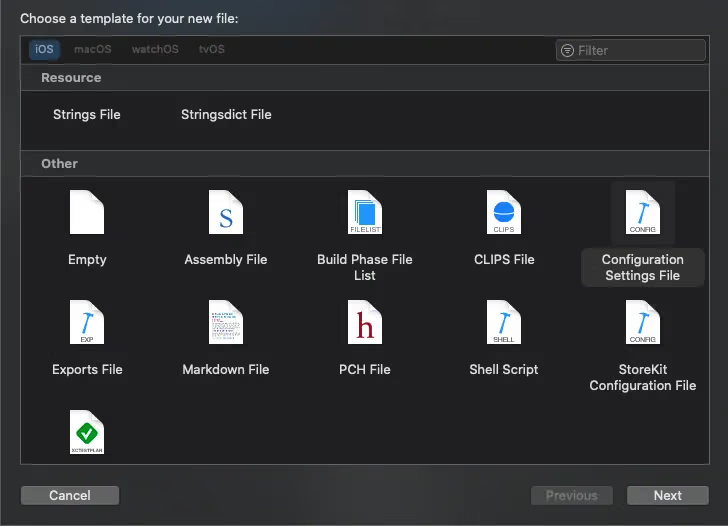
Creating
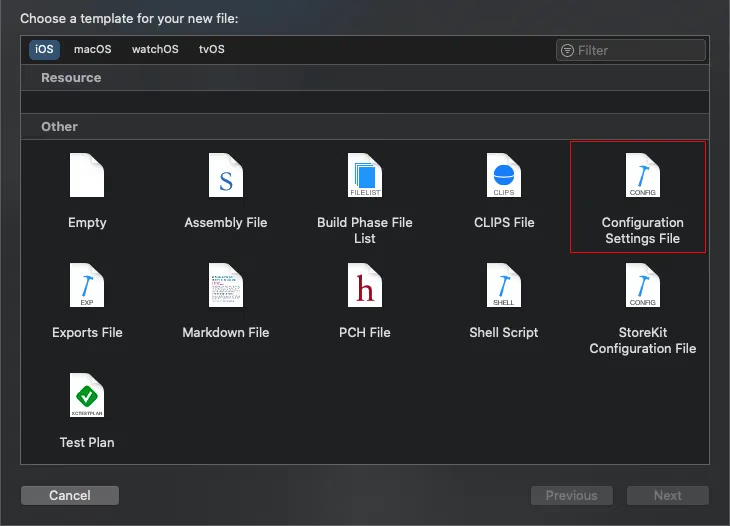
By default the target is checked here (Xcode doesn’t check it by default). 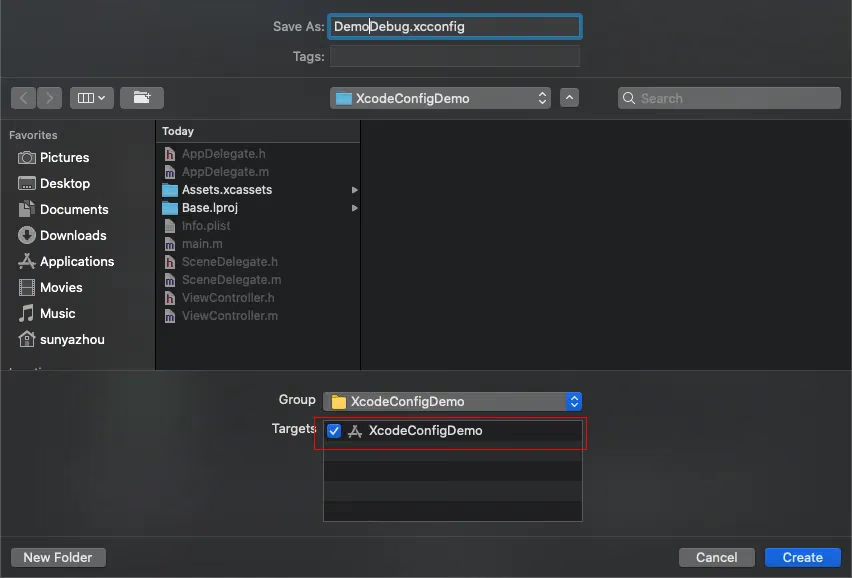
Once created, select our own configuration. 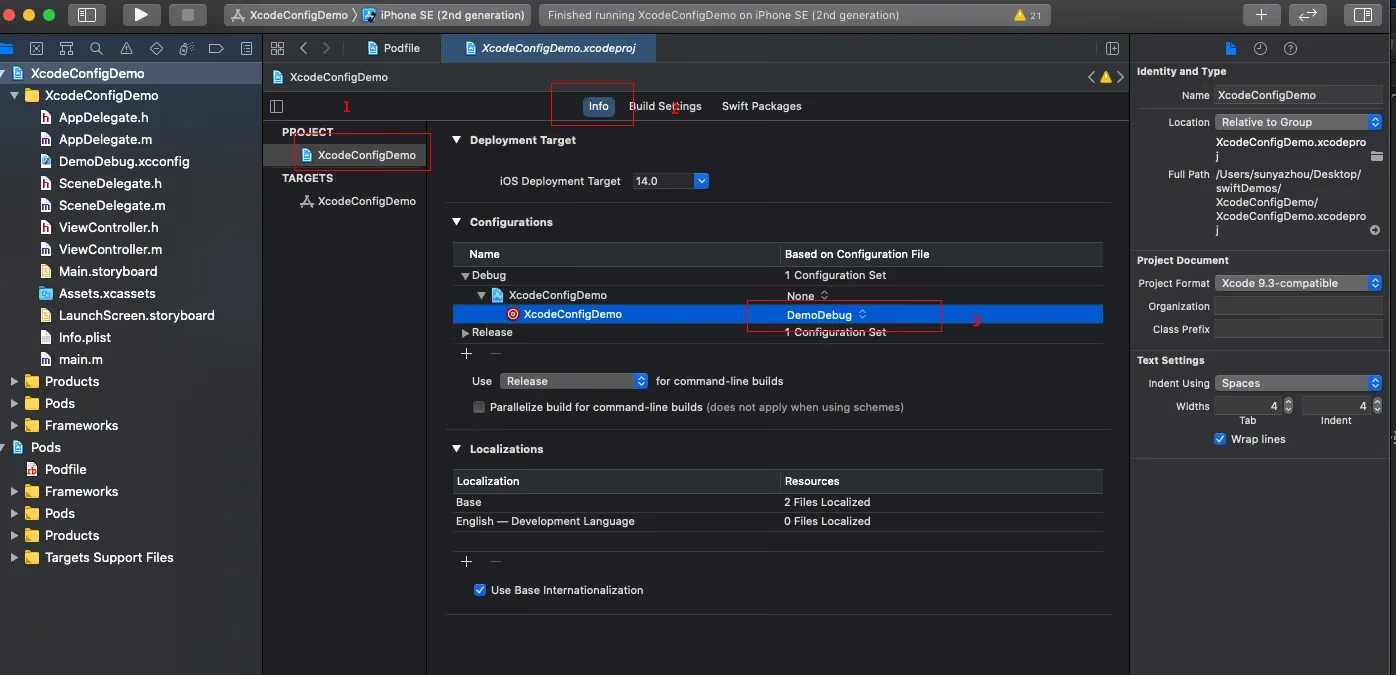
First, the Warning Issue
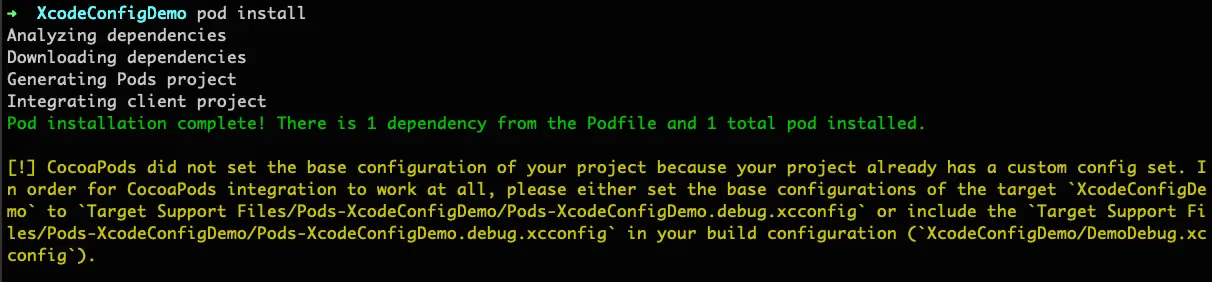
After we’re done, let’s look at the warning that appears after pod install.
1
2
3
[!] CocoaPods did not set the base configuration of your project because your project already has a custom config set. In order for CocoaPods integration to work at all, please either set the base configurations of the target `XcodeConfigDemo` to `Target Support Files/Pods-XcodeConfigDemo/Pods-XcodeConfigDemo.debug.xcconfig` or include the `Target Support Files/Pods-XcodeConfigDemo/Pods-XcodeConfigDemo.debug.xcconfig` in your build configuration (`XcodeConfigDemo/DemoDebug.xcconfig`).

[!] CocoaPods did not set the base configuration of your project because your project already has a custom config set. In order for CocoaPods integration to work at all, please either set the base configurations of the target `XcodeConfigDemo` to `Target Support Files/Pods-XcodeConfigDemo/Pods-XcodeConfigDemo.release.xcconfig` or include the `Target Support Files/Pods-XcodeConfigDemo/Pods-XcodeConfigDemo.release.xcconfig` in your build configuration (`XcodeConfigDemo/DemoRelease.xcconfig`).
Let me first explain how to solve it. After generating our own .xcconfig file, the CocoaPods configuration is the default. We changed it to our own but didn’t manage CocoaPods, so CocoaPods’ build settings might not take effect in the project because of our changes. To solve this, we need to import CocoaPods’ xcconfig into our own xcconfig.
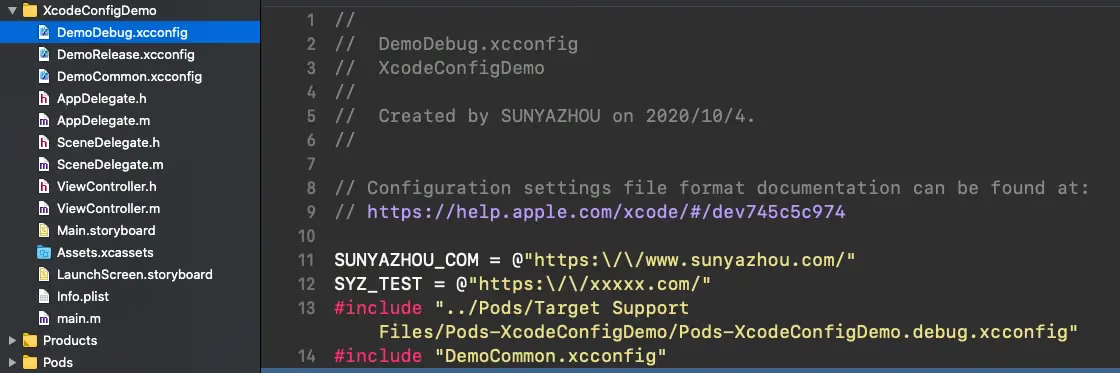
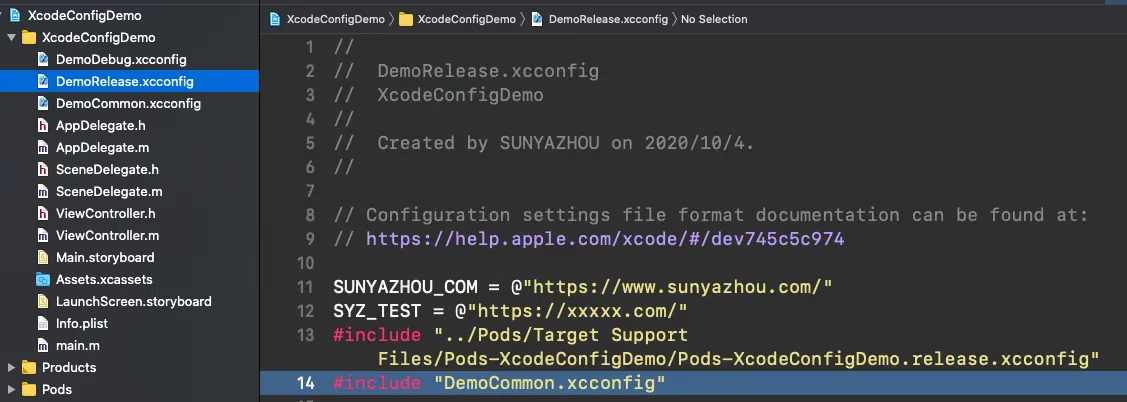
Here I also declared 2 variables in the debug and release configurations, for testing variable usage in the project below.
1
2
3
4
5
6
7
8
9
10
11
// debug
SUNYAZHOU_COM = @"https://www.sunyazhou.com/"
SYZ_TEST = @"https://xxxxx.com/"
#include "../Pods/Target Support Files/Pods-XcodeConfigDemo/Pods-XcodeConfigDemo.release.xcconfig"
#include "DemoCommon.xcconfig"

//release
SUNYAZHOU_COM = @"https://www.sunyazhou.com/"
SYZ_TEST = @"https://xxxxx.com/"
#include "../Pods/Target Support Files/Pods-XcodeConfigDemo/Pods-XcodeConfigDemo.debug.xcconfig"
#include "DemoCommon.xcconfig"
OK. After pod install, the warning is gone.
Points to Note About xcconfig Inheritance
Here I added a common DemoCommon.xcconfig configuration, to export common macro variables.
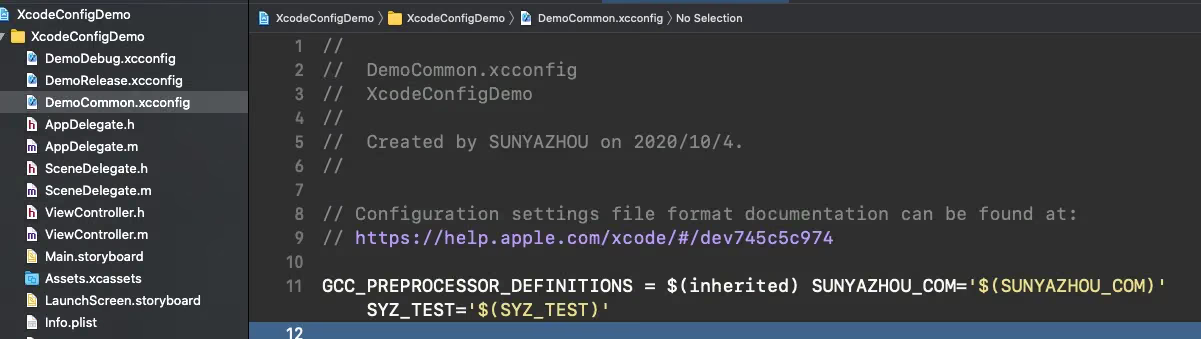
GCC_PREPROCESSOR_DEFINITIONS means inheriting the common environment variables and adding them to preprocessing — that is, adding this line so that the related macro definitions can be referenced in code.
1
GCC_PREPROCESSOR_DEFINITIONS = $(inherited) SUNYAZHOU_COM='$(SUNYAZHOU_COM)' SYZ_TEST='$(SYZ_TEST)'
Note the format when there are multiple variables:
1
 GCC_PREPROCESSOR_DEFINITIONS = $(inherited)空格(不能加换行)+SUNYAZHOU_COM='$(SUNYAZHOU_COM)'+空格(不能加换行)SYZ_TEST='$(SYZ_TEST)'
The pitfall I hit here was adding 20+ variables and writing a big pile of them. In the end, unless the format matched the above, the build failed and the variables couldn’t be found.
After Resolving the Warning, Compile-and-Print Issues
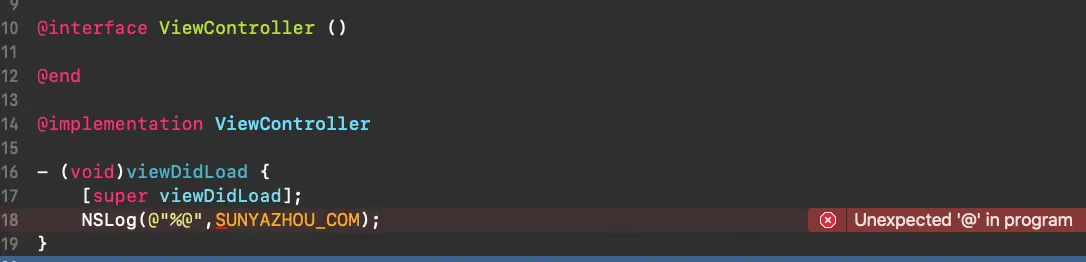
1
Unexpected '@' in program
This problem occurs because the macro variables aren’t escaped.
The following variables must be converted:
1
2
3
4
5
6
7
8
//Before conversion
SUNYAZHOU_COM = @"https://www.sunyazhou.com/"
SYZ_TEST = @"https://xxxxx.com/"

//After conversion
SUNYAZHOU_COM = @"https:\/\/www.sunyazhou.com/"
SYZ_TEST = @"https:\/\/xxxxx.com/"
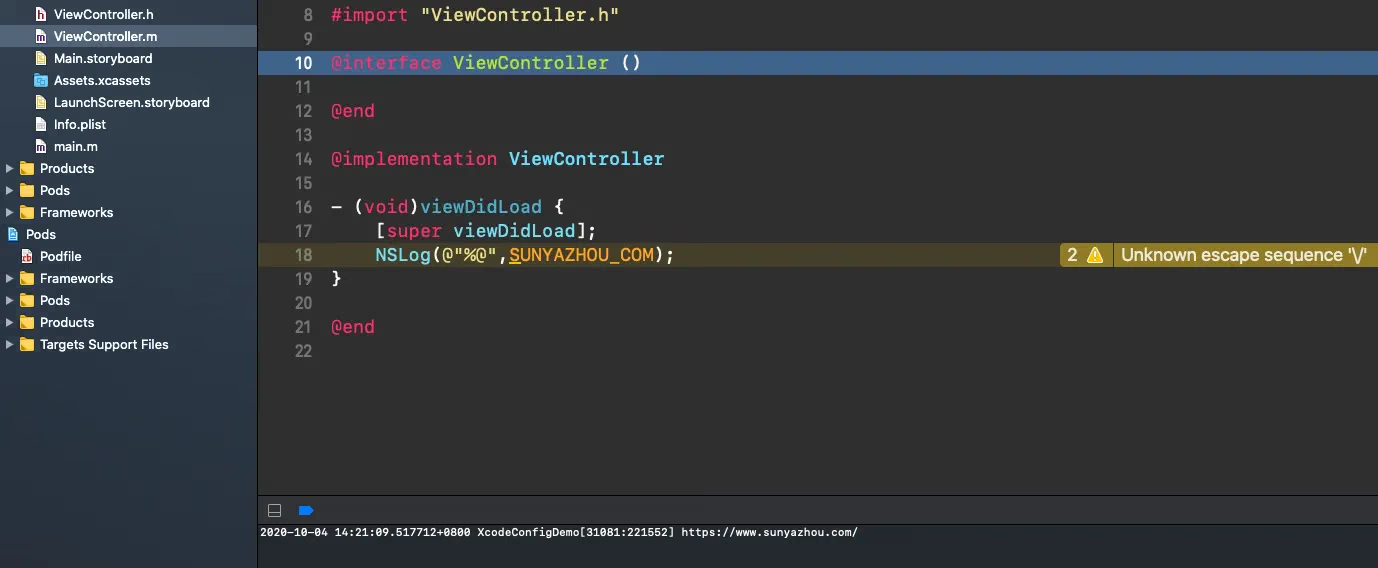
After the conversion it compiles, but there’s still a warning. It’s probably not escaped correctly, but the output works. If any expert knows the answer, please leave a comment — thanks!
Summary
Some knowledge is easily forgotten when you don’t use it often — xcconfig is exactly like that. The project demo is attached below; interested readers can download it.
Refer to Mattt’s Xcode Build Configuration Files
Using Xcode Configuration (.xcconfig) to Manage Different Build Settings