

Preface
This post carries strong personal sentiment; if you feel uncomfortable reading it, please close it as soon as possible. This post is only a personal learning record. Reposting or sharing within the license terms is welcome; please respect copyright and keep the original link. Thank you for your understanding and cooperation. If you find this site helpful, you can subscribe via RSS. Thanks for your support!
Recently in development, when integrating third-party projects into my project using CocoaPods, I keep forgetting how to link third-party libraries and how to write podspec. So I’m recording this easily forgotten content.
Creating a podspec
In the test project directory, create a directory called demoframeworks, then run the following inside it:
1
pod spec create spec名称
Give the
speca name of your own.
A spec template will be generated locally. Then edit the spec file with a text editor. Here we’ll use Agora’s SDK as an example.
1
2
3
4
5
6
7
8
9
10
11
12
13
14
15
16
17
18
19
20
Pod::Spec.new do |spec|
  spec.name         = "specdemo"
  spec.version      = "0.0.1"
  spec.summary      = "test pod spec"
  spec.description  = "demo test测试"

  spec.homepage     = "https://www.sunyazhou.com/"
  spec.license      = "MIT"
  spec.author             = { "東引甌越" => "https://www.sunyazhou.com/" }
  spec.source       = { :git => "git@gitee.com:sunyazhou/sunyazhou13.github.io-images.git"}
  #How to load third-party frameworks
  spec.vendored_frameworks = 'AgoraRtcCryptoLoader.framework','AgoraRtcEngineKit.framework','AgoraRtmKit.framework','AgoraSigKit.framework'
  #How to load third-party .a libraries
  #spec.vendored_libraries = 'libProj4.a', 'libJavaScriptCore.a'
  #Dependencies on system built-in dynamic frameworks
  spec.frameworks = 'Photos','PhotosUI','CoreMedia','Foundation','CoreGraphics','CoreMotion','QuartzCore','MobileCoreServices','Security','CoreText','VideoToolbox','CoreTelephony','AudioToolbox','SystemConfiguration','AVFoundation', 'CoreLocation','AdSupport','OpenGLES','CoreML'
  #Dependencies on built-in static libraries
  spec.libraries = "iconv", "c++", "z.1.1.3" ,"z","resolv" ,"sqlite3","icucore","z.1.2.5"
end
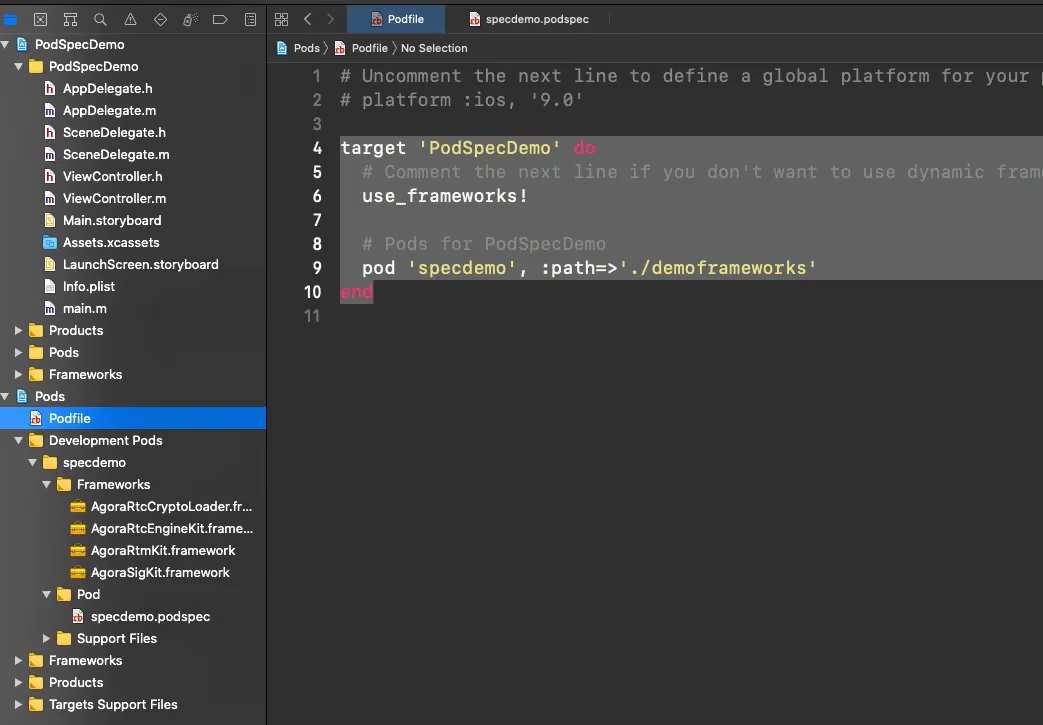
Then add this to the Podfile content:
1
2
3
4
5
6
7
target 'PodSpecDemo' do
  # Comment the next line if you don't want to use dynamic frameworks
  use_frameworks!

  # Add this line
  pod 'specdemo', :path=>'./demoframeworks'
end
Note: specdemo here is the name we give the local pod being integrated; it’s best to keep it consistent with the name of the created spec.
Then run pod install.
Finally the project becomes exactly what we want.
Summary
A record of knowledge points I often forget, to avoid scrambling around when in a hurry. For more podspec syntax, see the official API.
Download the demo project here
The framework was removed from the project because GitHub doesn’t allow uploading files over 100 MB. It’s quite annoying — just download it and take a look at how it’s written.