
Preface
This article carries strong personal feelings. If you feel uncomfortable reading it, please close it as soon as possible. This article is only for personal learning records. Reposting or sharing within the scope of the license is welcome. Please respect the copyright and keep the original link. Thank you for your understanding and cooperation. If you think this site can help you, you can subscribe to this site via RSS. Thanks for your support!
Crash Types
A crash usually refers to the operating system sending a signal to a running program, so when looking at crash logs, we often see error summaries like: Application received signal SIGSEGV. Here are the common crash types:
1.EXC_BAD_ACCESS
A crash caused by a wild pointer, accessing memory that has already been released. When accessing an already-released object or sending messages to it, EXC_BAD_ACCESS occurs. The most common cause of EXC_BAD_ACCESS is using the wrong ownership modifier when initializing a variable in an init method, which causes the object to be released prematurely. For example, creating an NSArray with elements for a UIViewController in the viewDidLoad method, but setting the array’s ownership modifier to assign instead of strong. Now, when accessing the already-released object in viewWillAppear, you’ll get a crash named EXC_BAD_ACCESS.
When this crash occurs, looking at the crash log often doesn’t give you useful stack information. Fortunately, there’s a method to solve this problem: NSZombieEnabled.
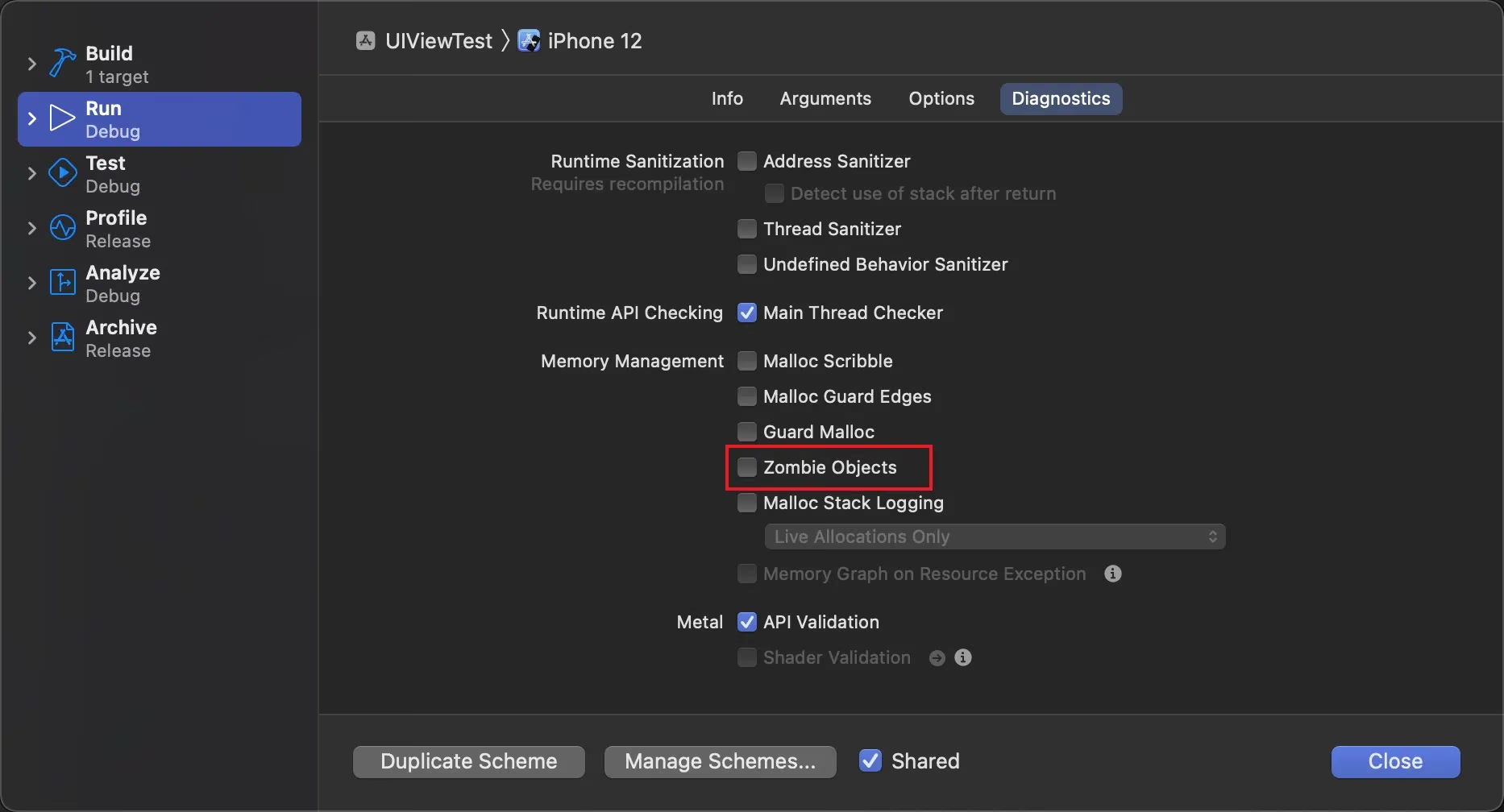
This is an environment variable used to debug memory-related issues by tracking the deallocation process of objects. If NSZombieEnabled is enabled, it replaces your default dealloc implementation with a zombie implementation. When the reference count drops to 0, the zombie implementation converts the object into a zombie object. The purpose of a zombie object is to display a log and automatically jump into the debugger when you send a message to it.
So, when NSZombie is enabled in the app instead of letting it crash directly, an erroneous memory access becomes an unrecognized message sent to the zombie object. The zombie object displays the received message and then jumps into the debugger, so you can see exactly where the problem is. You can set the NSZombieEnabled environment variable in the Xcode scheme page. Click Product -> Edit Scheme to open that page, then check the Enable Zombie Objects checkbox, as shown:
Zombies were very useful before RAC came along. But ever since ARC, if you’re careful about object ownership, you usually won’t run into memory-related crashes.
2.SIGSEGV
A segmentation fault (SIGSEGV) is a more serious problem generated by the operating system. This error occurs when hardware fails, when accessing an unreadable memory address, or when writing data to a protected memory address.
The hardware failure case is not common. When you want to read data stored in RAM and the RAM hardware at that location is faulty, you’ll receive SIGSEGV. SIGSEGV more often appears in the latter two cases. By default, code pages don’t allow write operations. When a pointer in your app points to a code page and tries to modify the value at the pointed location, you’ll receive SIGSEGV. You’ll also receive SIGSEGV when reading the value of a pointer that was initialized to a garbage value pointing to an invalid memory address.
SIGSEGV errors are more difficult to debug, and the most common cause of SIGSEGV is incorrect type casting. Avoid overusing pointers or trying to manually modify pointers to read private data structures. If you do that and don’t pay attention to memory alignment and padding when modifying pointers, you’ll receive SIGSEGV.
3.SIGBUS
The bus error signal (SIGBUS) represents invalid memory access, i.e. accessing a memory address that is invalid. That is, the location the address points to is not actually a physical memory address at all (it could be the address of some hardware chip).
4.SIGTRAP
SIGTRAP represents the trap signal. It’s not a real crash signal. It’s sent when the processor executes a trap instruction. The LLDB debugger usually handles this signal and stops at the specified breakpoint. If you receive an unexplained SIGTRAP, clear the previous output first, then rebuild — this usually solves the problem.
5.EXC_ARITHETIC
When dividing by zero, the app receives the EXC_ARITHMETIC signal. This error should be easy to solve.
1
int result = 10/0;  //0不能作为除数 否则crash
6.SIGILL
SIGILL stands for signal illegal instruction (illegal instruction signal). It occurs when an illegal instruction is executed on the processor. Executing an illegal instruction means that when assigning a function pointer to another function, the function pointer is bad for some reason, pointing to an already-released memory segment or a data segment. Sometimes you receive EXC_BAD_INSTRUCTION instead of SIGILL. Although they’re the same thing, the EXC_* variant means the signal isn’t architecture-dependent.
7. SIGABRT
SIGABRT stands for SIGNAL ABORT (abort signal). When the operating system detects an unsafe situation, it can have more control over it; if necessary, it can ask the process to do cleanup work. There’s no magic trick for debugging the underlying error that causes this signal. Frameworks like Cocos2d or UIKit usually call the C function abort (which sends this signal) when certain preconditions aren’t met or some bad situation occurs. When SIGABRT appears, the console usually outputs a lot of information explaining exactly what went wrong. Since it’s a controlled crash, you can type the bt command in the LLDB console to print the backtrace.
8.Watchdog Timeout
This kind of crash is usually easy to identify because the error code is fixed at 0x8badf00d. On iOS, it often appears when a synchronous network call blocks the main thread. Therefore, never make synchronous network calls.
Summary
Crash log types are not limited to the ones above; combined with actual tracking, you’ll find the crash information that matters. Take it as a rough guide. If you want more details, please refer to the GNU source code
Reference
Understanding iOS exception types
A Brief Discussion on Crash Capture and Protection in iOS