

Preface
This article is highly personal in tone. If you find it uncomfortable to read, please close it as soon as possible. This article is only a personal learning record. Reposts and sharing are welcome within the scope of the license agreement. Please respect the copyright and keep the original link. Thank you for your understanding and cooperation. If you find this site helpful, you can subscribe via RSS. Thanks for your support!
Discussion
If a large block of memory is allocated but never released, that’s a memory leak — it isn’t holding caused by memory contention; the root cause is simply not releasing it properly. In normal flows (proper use of alloc/release, malloc/free, or new/delete), the main cause of memory leaks is mutual holding caused by resource contention. That’s the trigger for resources not being released normally. This tool is good at solving problems where objects hold each other and never release memory; it pinpoints the instance type and memory address, and lets you visually find the related objects.
Memory Detection Tool — Introduction
- FBMemoryProfiler
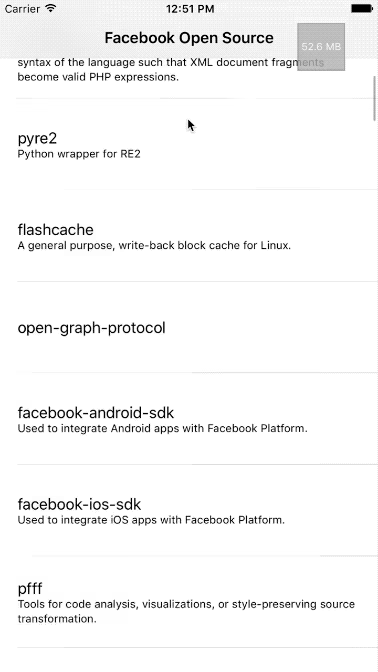
FBMemoryProfiler is a combination of several components, including FBAllocationTracker and FBRetainCycleDetector. A visualization tool that’s embedded directly into the app. It lets you view memory usage directly inside the app and filter for potentially leaking objects.
- FBAllocationTracker
Mainly used to quickly detect potentially leaking objects and hand them to FBRetainCycleDetector for detection. This is a tool that proactively tracks allocation and deallocation of all NSObject subclasses.
FBAllocationTracker detects the allocation of all instances during app runtime. Its principle is to use method swizzling to replace the original alloc method, so all instance allocations can be recorded.
When needed, call the currentAllocationSummary method to get the current overall instance allocation summary (provided it was initialized in main, as described below):
objc NSArray<FBAllocationTrackerSummary *> *summaries = [[FBAllocationTrackerManager sharedManager] currentAllocationSummary]; - FBRetainCycleDetector
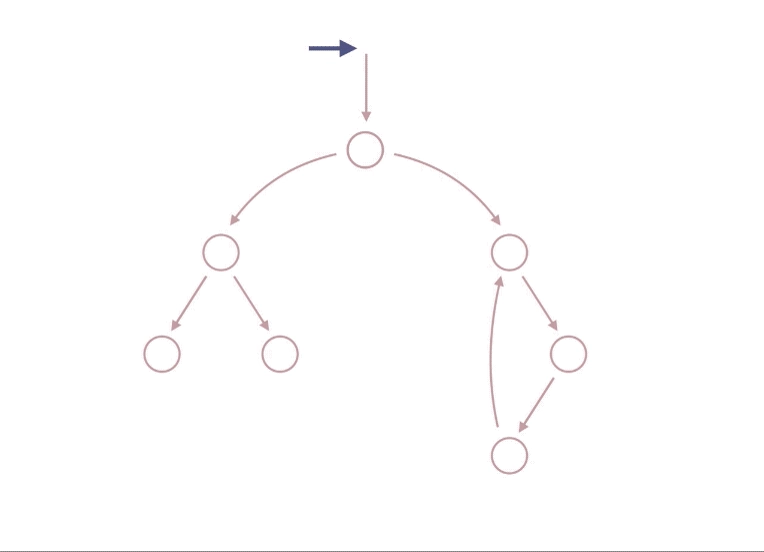
FBRetainCycleDetector takes a runtime instance, then traverses all of its properties recursively, level by level. If it encounters a repeated instance during traversal, a retain cycle exists and a report is produced.
1
2
3
4
5
  FBRetainCycleDetector *detector = [FBRetainCycleDetector new];
 [detector addCandidate:myObject];
 NSSet *retainCycles = [detector findRetainCycles];
 NSLog(@"%@", retainCycles);
Principle of Detecting Retain Cycles in Code
Detecting an object’s memory layout and instance address at runtime.
1
2
const char *class_getIvarLayout(Class cls);
const char *class_getWeakIvarLayout(Class cls);
support for Objective-C++
Used in code like this:
1
2
3
4
FBRetainCycleDetector *detector = [[FBRetainCycleDetector alloc] initWithConfiguration:nil];
[detector addCandiate:myObject];
NSSet<NSArray<FBObjectiveCGraphElement *> *> *retainCycles = [detector findRetainCycles];
NSLog(@"%@", retainCycles);
Here,
myObjectis the instance variable we suspect.
FBObjectiveCGraphElement is the base class for all object-finding types. All finders are implemented based on it. This class doesn’t need to be called externally; it’s mainly used internally for queries. Its main features are:
- Provides an initializer that wraps an
object(i.e., theobjectpassed toaddCandiate). - Gets all objects held by this object:
- (NSSet *)allRetainedObjects;. The object types obtained by the base classFBObjectiveCGraphElementare objects held viaassociated objects. Associated objects are tracked for holding by Facebook’s ownfishhook, which hooks the originalobjc_setAssociatedObjectandobjc_removeAssociatedObjects. - Provides a filter interface
- (NSSet *)filterObjects:(nullable NSArray *)objects;, which is used in combination withFBObjectGraphConfiguration(described below).
FBObjectGraphConfiguration is a class that provides the whitelist-related filtering configuration.
I won’t go into the rest in detail here.
How findRetainCycles works — DFS, depth-first search
The search here uses depth-first traversal.
How to Use
Example scenario analysis
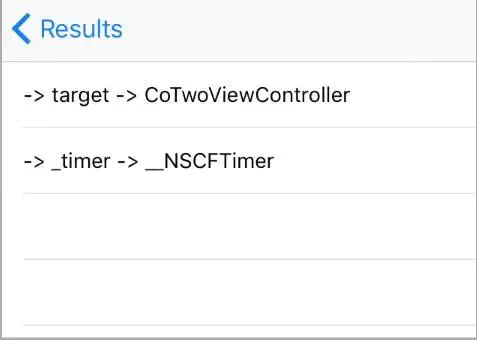
Example code
1
2
3
4
5
6
7
8
9
10
11
12
13
@property (nonatomic, strong) NSTimer *timer;
@property(copy,nonatomic)NSString *name;

 self.timer = [NSTimer scheduledTimerWithTimeInterval:0.1
                                              target:self
                                            selector:@selector(handleTimer)
                                            userInfo:nil
                                             repeats:YES];

- (void)handleTimer
{
     self.name = @"123";
}
References
FBRetainCycleDetector Analysis
automatic-memory-leak-detection-on-ios