
Preface
In AV Foundation, using the AVAudioRecorder class to add audio recording is just as simple as using AVAudioPlayer. Both are built on top of the Audio Queue Server, and both support the macOS and iOS platforms. You can record from the built-in microphone, as well as from a digital audio interface or an external USB microphone.
Main topics of this post:
1
2
3
4
5
6
7
8
How to create AVAudioRecorder
    1. Audio format
    2. Sample rate
    3. Number of channels
Create a demo
    1. Configure the audio session
    2. Implement recording
    3. Visualize the sound wave with Audio Metering
Before creating an AVAudioRecorder, let’s first take a look at its methods and member variables.
1
2
3
4
5
@property (readonly, getter=isRecording) BOOL recording;//是否正在录音
@property (readonly) NSDictionary<NSString *, id> *settings;//录音配置:采样率、音频格式、通道数...
@property (readonly) NSURL *url;//录音文件存放URL
@property (readonly) NSTimeInterval currentTime;//录音时长
@property (getter=isMeteringEnabled) BOOL meteringEnabled;//是否监控声波
Instance methods of AVAudioRecorder:
1
2
3
4
5
6
7
8
9
- (BOOL)prepareToRecord;//为录音准备缓冲区
- (BOOL)record;//录音开始,暂停后调用会恢复录音
- (BOOL)recordAtTime:(NSTimeInterval)time;//在指定时间后开始录音
- (BOOL)recordForDuration:(NSTimeInterval) duration;//按指定时长录音
- (BOOL)recordAtTime:(NSTimeInterval)time
         forDuration:(NSTimeInterval)duration;//上面2个的合体
- (void)pause; //暂停录音
- (void)stop; //停止录音
- (BOOL)deleteRecording;//删除录音,必须先停止录音再删除
Delegate methods of AVAudioRecorder:
1
2
3
4
5
6
//Called when recording finishes
- (void)audioRecorderDidFinishRecording:(AVAudioRecorder *)recorder
                           successfully:(BOOL)flag;
//Called when a recording encoding error occurs
- (void)audioRecorderEncodeErrorDidOccur:(AVAudioRecorder *)recorder
                                   error:(NSError *)error;
How to create an AVAudioRecorder
Here are the parameters required to create an AVAudioRecorder object:
- The path URL on the local disk where the audio stream is written during recording
settingsrecording configuration: a dictionary of key-value parameters such as sample rate, audio format, number of channels, etc.- An
NSErrorpointer for error reporting
Like this:
1
2
3
4
5
6
7
8
9
10
11
12
13
14
15
16
17
18
19
20
21
/**
 Create a recorder
 */
- (void)createRecorder {
    NSString *directory = NSTemporaryDirectory();
    NSString *filePath = [directory stringByAppendingPathComponent:@"voice1.m4a"];
    NSURL *url = [NSURL fileURLWithPath:filePath];

    NSDictionary *setting = @{AVFormatIDKey : @(kAudioFormatMPEG4AAC),
                              AVSampleRateKey: @22050.0f,
                              AVNumberOfChannelsKey: @1};
    NSError *error;
    self.recorder = [[AVAudioRecorder alloc] initWithURL:url
                                                settings:setting
                                                   error:&error];
    if (self.recorder) {
        [self.recorder prepareToRecord];
    } else {
        NSLog(@"Recorder Create Error: %@", [error localizedDescription]);
    }
}
Here it is recommended to call the [self.recorder prepareToRecord] method to pre-configure the recording instance, similar to creating an AVAudioPlayer in the previous chapter. Both are necessary steps to run the low-level Audio Queue initialization. This prepareToRecord method also creates a file at the location specified by the given URL parameter, which reduces the latency when recording starts.
Audio Format
The AVFormatIDKey key specifies the recording format. Besides kAudioFormatMPEG4AAC, the following formats are also available:
1
2
3
4
5
6
7
8
9
10
11
12
13
14
15
16
17
18
19
20
21
22
23
24
25
26
27
28
29
30
31
32
33
34
35
36
37
38
39
40
41
CF_ENUM(AudioFormatID)
{
    kAudioFormatLinearPCM               = 'lpcm',
    kAudioFormatAC3                     = 'ac-3',
    kAudioFormat60958AC3                = 'cac3',
    kAudioFormatAppleIMA4               = 'ima4',
    kAudioFormatMPEG4AAC                = 'aac ',
    kAudioFormatMPEG4CELP               = 'celp',
    kAudioFormatMPEG4HVXC               = 'hvxc',
    kAudioFormatMPEG4TwinVQ             = 'twvq',
    kAudioFormatMACE3                   = 'MAC3',
    kAudioFormatMACE6                   = 'MAC6',
    kAudioFormatULaw                    = 'ulaw',
    kAudioFormatALaw                    = 'alaw',
    kAudioFormatQDesign                 = 'QDMC',
    kAudioFormatQDesign2                = 'QDM2',
    kAudioFormatQUALCOMM                = 'Qclp',
    kAudioFormatMPEGLayer1              = '.mp1',
    kAudioFormatMPEGLayer2              = '.mp2',
    kAudioFormatMPEGLayer3              = '.mp3',
    kAudioFormatTimeCode                = 'time',
    kAudioFormatMIDIStream              = 'midi',
    kAudioFormatParameterValueStream    = 'apvs',
    kAudioFormatAppleLossless           = 'alac',
    kAudioFormatMPEG4AAC_HE             = 'aach',
    kAudioFormatMPEG4AAC_LD             = 'aacl',
    kAudioFormatMPEG4AAC_ELD            = 'aace',
    kAudioFormatMPEG4AAC_ELD_SBR        = 'aacf',
    kAudioFormatMPEG4AAC_ELD_V2         = 'aacg',
    kAudioFormatMPEG4AAC_HE_V2          = 'aacp',
    kAudioFormatMPEG4AAC_Spatial        = 'aacs',
    kAudioFormatAMR                     = 'samr',
    kAudioFormatAMR_WB                  = 'sawb',
    kAudioFormatAudible                 = 'AUDB',
    kAudioFormatiLBC                    = 'ilbc',
    kAudioFormatDVIIntelIMA             = 0x6D730011,
    kAudioFormatMicrosoftGSM            = 0x6D730031,
    kAudioFormatAES3                    = 'aes3',
    kAudioFormatEnhancedAC3             = 'ec-3'
};
Here kAudioFormatLinearPCM writes the uncompressed audio stream to the file. This is the raw data, offering the highest fidelity but also the largest file size. Choosing formats like ACCkAudioFormatMPEG4AAC or AppleIMA4kAudioFormatAppleLossless will significantly reduce the file size while still maintaining audio quality.
Note: The specified audio format must match the file type of the URL you write to. If you record a xxx.wav file, it must follow the Waveform Audio File Format (WAVE) requirements, i.e., little-endian LinearPCM. If the value specified for
AVFormatIDKeyis notkAudioFormatLinearPCM, an error will occur. NSError will return an error like the following: The operation couldn’t be completed. (OSStatus error 1718449215.)
Sample Rate
In the code above, AVSampleRateKey is used to define the sample rate of the recorder. The sample rate defines the number of samples taken per second of the input analog audio signal. Using a low sample rate, such as 8kHz, results in a coarse, AM radio-like recording quality, though the file size is smaller; using a 44.1kHz sample rate (CD-quality sample rate) yields very high quality content, but the file is larger. There are no strict rules about which sample rate to use, but developers should try to stick to standard sample rates, such as 8000Hz, 16000Hz (16kHz), 22050Hz (22.05kHz), or 44100Hz (44.1kHz), and of course 48000Hz and 96000Hz (kHz stands for kilohertz). Sample rates above 48000 or 96000 are meaningless to the human ear. Ultimately, it’s our ears that do the judging. (The previous chapter mentioned that the audible frequency range of the human ear starts from a low of 20Hz up to a high of 20kHz, so recording is best done at 2x that frequency.)
Number of Channels
AVNumberOfChannelsKey is used to define the number of channels for the recorded audio content. Setting the default value 1 means recording in mono, while setting 2 means recording in stereo. Unless you are recording with external hardware, you should generally create mono recordings. The number of channels here refers to the number of inputs on the recording device, which can be understood as the built-in microphone or an external microphone, such as the one on an Apple headset.
The above covers the basic concepts of
AVAudioRecorder.AVAudioRecordersupports unlimited recording duration, and you can also start recording from a specific point in the future or record for a specified duration.
Network Streaming
The AVAudioPlayer audio player can only play local files and loads all audio data at once. But what if we sometimes need to download while listening? AVAudioPlayer does not support playing network streaming audio in this form. To play such network streams, we need to use the audio queue service Audio Queue Services from the AudioToolbox framework.
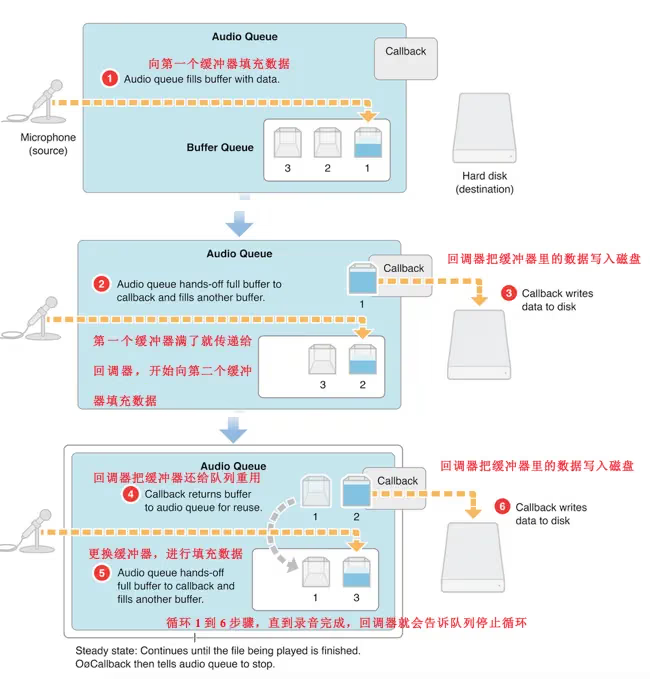
The audio queue service consists of 3 parts:
- 3 buffers
- 1 buffer queue
- 1 callback
1. Below is how the audio queue service works for recording:
2. Below is how the audio queue service works for playback:
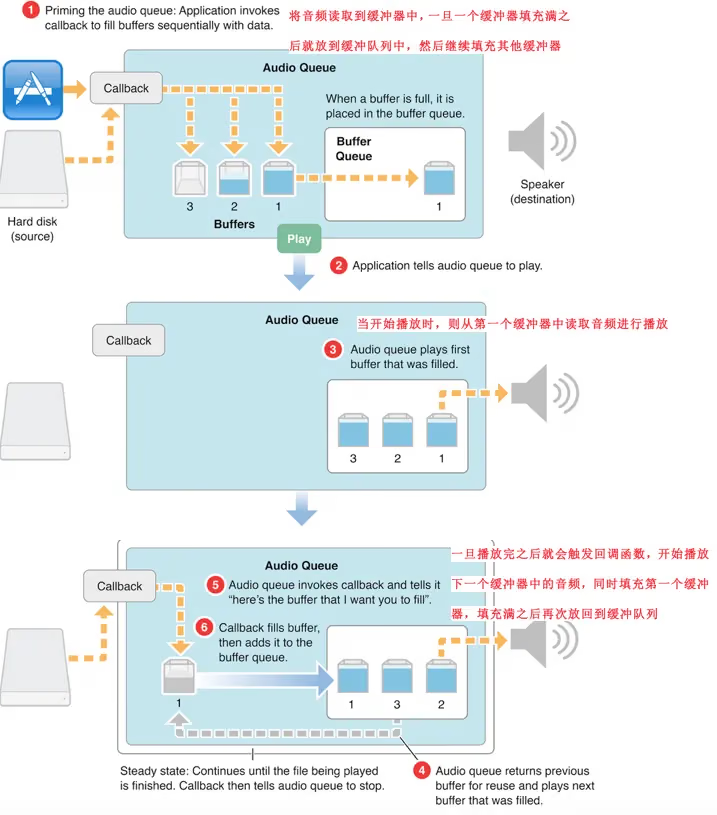
Of course, we don’t need to implement this ourselves in C functions. There’s an open-source library FreeStreamer.
Using FreeStreamer
1
2
3
4
5
6
7
8
9
10
11
12
13
14
15
16
17
18
19
20
21
22
23
24
#import <FreeStreamer/FreeStreamer.h>

- (void)viewDidLoad {
    [super viewDidLoad];
    [self initAudioStream];
    //Play network streaming audio
    [self.audioStream play];
}
/* Initialize the network streaming object */
- (void)initAudioStream{
    NSString *urlStr = @"http://sc1.111ttt.com/2016/1/02/24/195242042236.mp3";
    NSURL *url = [NSURL URLWithString:urlStr];
    //Create an FSAudioStream object
    self.audioStream = [[FSAudioStream alloc] initWithUrl:url];
    //Set the playback error callback block
    self.audioStream.onFailure = ^(FSAudioStreamError error, NSString *description){
          NSLog(@"播放过程中发生错误,错误信息:%@",description);
    };
    //Set the completion callback block
    self.audioStream.onCompletion = ^(){
          NSLog(@"播放完成!");
    };
    [self.audioStream setVolume:0.5];//Set the volume
}
That’s drifting a bit off topic. Let’s get back to the main subject. This chapter won’t include this in the demo, I hope you’ll understand.
Now let’s write an AVAudioRecorder demo to implement the above features
Configuring the Audio Session
First, create an AVAudioRecorderDemo project for the iOS platform — I’m sure everyone is very familiar with this.
In AppDelegate, import #import <AVFoundation/AVFoundation.h> and add the following configuration code:
1
2
3
4
5
6
7
8
9
10
11
12
13
14
15
- (BOOL)application:(UIApplication *)application didFinishLaunchingWithOptions:(NSDictionary *)launchOptions {

    AVAudioSession *session = [AVAudioSession sharedInstance];
    NSError *error;
    if (![session setCategory:AVAudioSessionCategoryPlayAndRecord error:&error]) {
        NSLog(@"Category Error: %@",[error localizedDescription]);
    }

    //Activate the session
    if (![session setActive:YES error:&error]) {
        NSLog(@"Activation Error: %@",[error localizedDescription]);
    }

    return YES;
}
This AVAudioSessionCategoryPlayAndRecord is one of those categories described in the previous chapter. We need the record + play functionality.
Next, configure the permission information in the plist file. You can refer to the article Access privacy-sensitive data and fill in the required access permission information.
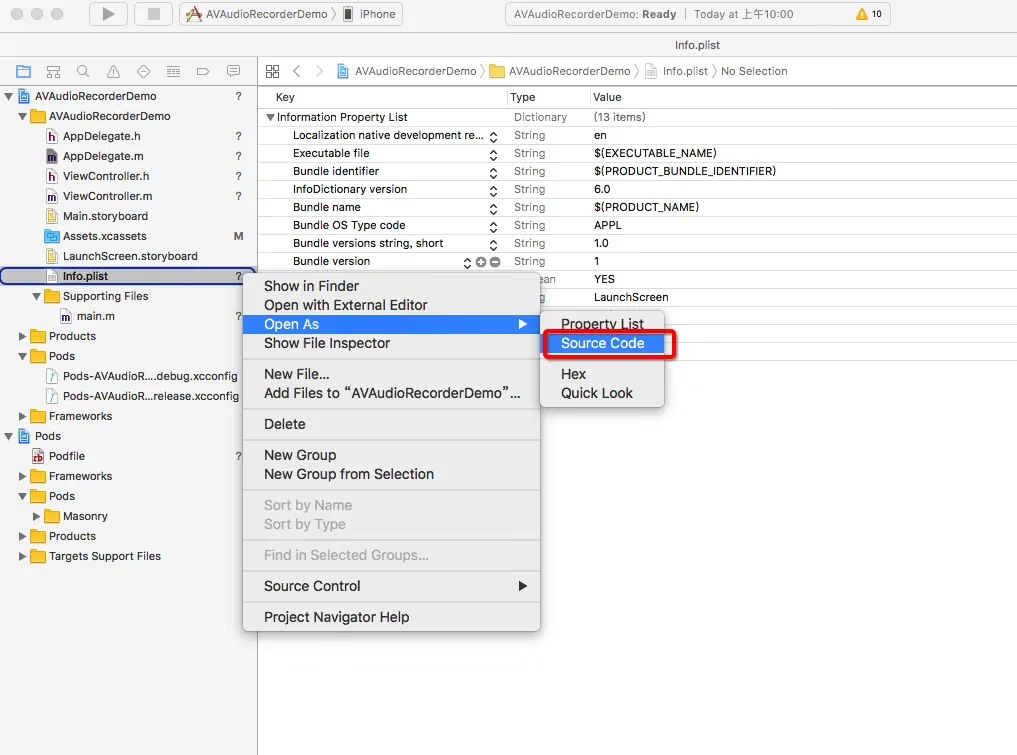
Then choose SourceCode 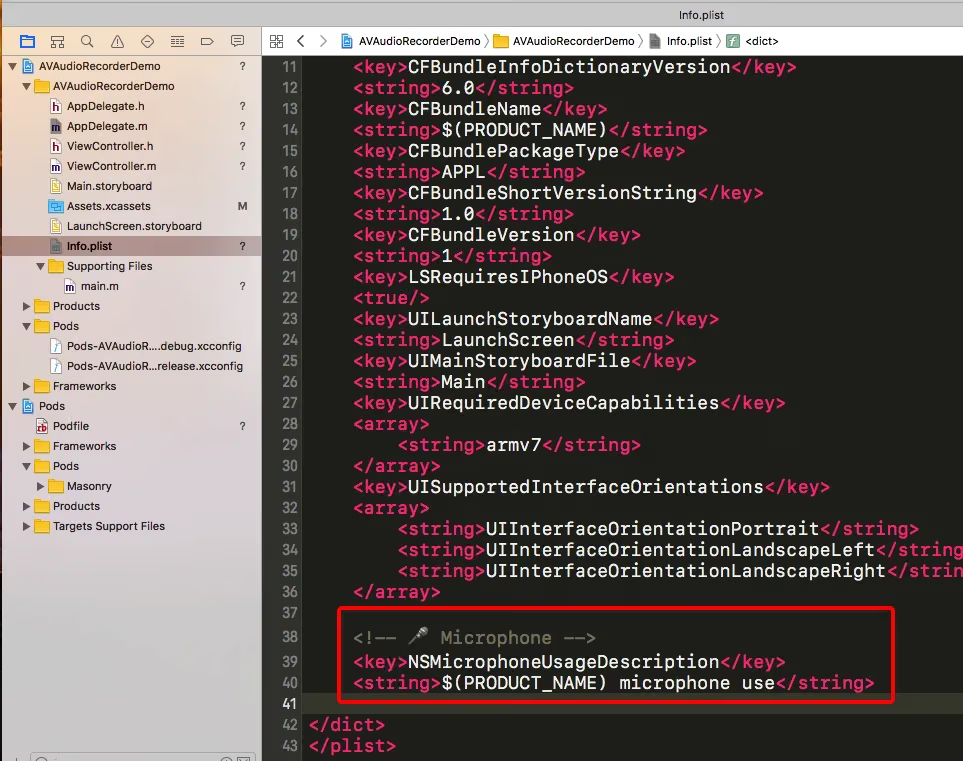
And fill in:
1
2
3
<!-- 🎤 Microphone -->
<key>NSMicrophoneUsageDescription</key>
<string>$(PRODUCT_NAME) microphone use</string>
All the above is for local authorization access. Remember that if the authorization is denied on the first attempt, the user must manually go to General - Settings to configure it, otherwise it will never work. If you don’t add this local authorization, the app will crash.
Recording Implementation
First, let’s wrap a class called BDRecoder. This class is responsible for all audio recording, pausing, saving recorded files, etc., and exposes callbacks via blocks. BDRecoder.h looks like this. In the future, when refining it, we could add a delegate to handle logic such as unexpected interruptions during recording or route switching.
1
2
3
4
5
6
7
8
9
10
11
12
13
14
15
16
17
18
19
20
21
22
23
24
25
26
27
28
29
30
31
32
33
34
35
36
37
38
39
40
41
42
43
//
//  BDRecorder.h
//  AVAudioRecorderDemo
//
//  Created by sunyazhou on 2017/3/29.
//  Copyright © 2017 Baidu, Inc. All rights reserved.
//

#import <Foundation/Foundation.h>
#import <AVFoundation/AVFoundation.h>

@class MemoModel;
//Callback when recording stops
typedef void (^BDRecordingStopCompletionHanlder)(BOOL);
//Callback when saving the recording finishes
typedef void (^BDRecordingSaveCompletionHanlder)(BOOL, id);

@interface BDRecorder : NSObject

/**
 * Get the current recording time externally
 * hours:minutes:seconds  Of course, microseconds and milliseconds can be added later, just a format string like 00:03:02
 */
@property (nonatomic, readonly) NSString *formattedCurrentTime;

- (BOOL)record; //开始录音

- (void)pause;  //暂停录音

- (void)stopWithCompletionHandler:(BDRecordingStopCompletionHanlder)handler;

- (void)saveRecordingWithName:(NSString *)name
            completionHandler:(BDRecordingSaveCompletionHanlder)handler;

/**
 Playback of the recorded file

 @param memo the memo model of the file currently being played
 @return whether playback started successfully
 */
- (BOOL)playbackURL:(MemoModel *)memo;
@end
BDRecoder.m
1
2
3
4
5
6
7
8
9
10
11
12
13
14
15
16
17
18
19
20
21
22
23
24
25
26
27
28
29
30
31
32
33
34
35
36
37
38
39
40
41
42
43
44
45
46
47
48
49
50
51
52
53
54
55
56
57
58
59
60
61
62
63
64
65
66
67
68
69
70
71
72
73
74
75
76
77
78
79
80
81
82
83
84
85
86
87
88
89
90
//
//  BDRecorder.m
//  AVAudioRecorderDemo
//
//  Created by sunyazhou on 2017/3/29.
//  Copyright © 2017 Baidu, Inc. All rights reserved.
//

#import "BDRecorder.h"

#import "MemoModel.h"

@interface BDRecorder () <AVAudioRecorderDelegate>

@property (nonatomic, strong) AVAudioPlayer *player;
@property (nonatomic, strong) AVAudioRecorder *recorder;
@property (nonatomic, strong) BDRecordingStopCompletionHanlder completionHandler;

@end

@implementation BDRecorder

- (instancetype)init {
    self = [super init];
    if (self) {
        NSString *temDir = NSTemporaryDirectory();
        NSString *filePath = [temDir stringByAppendingPathComponent:@"test1.caf"];
        NSURL *fileURL = [NSURL fileURLWithPath:filePath];

        NSDictionary *setting = @{AVFormatIDKey: @(kAudioFormatAppleIMA4),
                                  AVSampleRateKey: @44100.0f,
                                  AVNumberOfChannelsKey: @1,
                                  AVEncoderBitDepthHintKey: @16,
                                  AVEncoderAudioQualityKey: @(AVAudioQualityMedium)
                                  };
        NSError *error;
        self.recorder = [[AVAudioRecorder alloc] initWithURL:fileURL settings:setting error:&error];
        if (self.recorder) {
            self.recorder.delegate = self;
            [self.recorder prepareToRecord];
        } else {
            NSLog(@"Create Recorder Error: %@",[error localizedDescription]);
        }
    }
    return self;
}

- (BOOL)record {
    return [self.recorder record];
}

- (void)pause {
    [self.recorder pause];
}

- (void)stopWithCompletionHandler:(BDRecordingStopCompletionHanlder)handler {
    self.completionHandler = handler;
    [self.recorder stop];
}

- (void)saveRecordingWithName:(NSString *)name
            completionHandler:(BDRecordingSaveCompletionHanlder)handler {
    NSTimeInterval timestamp = [NSDate timeIntervalSinceReferenceDate];
    NSString *filename = [NSString stringWithFormat:@"%@-%f.caf", name, timestamp];
    NSString *docDir = [self documentsDirectory];
    NSString *destPath = [docDir stringByAppendingPathComponent:filename];
    NSURL *srcURL = self.recorder.url;
    NSURL *destURL = [NSURL fileURLWithPath:destPath];
    NSError *error;
    BOOL success = [[NSFileManager defaultManager] copyItemAtURL:srcURL toURL:destURL error:&error];
    if (success) {
        MemoModel *model = [MemoModel memoWithTitle:name url:destURL];
        handler(YES, model);
    }


}

- (NSString *)documentsDirectory {
    NSArray *paths = NSSearchPathForDirectoriesInDomains(NSDocumentDirectory, NSUserDomainMask, YES);
    return [paths objectAtIndex:0];
}

- (void)audioRecorderDidFinishRecording:(AVAudioRecorder *)recorder
                           successfully:(BOOL)flag {
    if (self.completionHandler) { self.completionHandler(flag); }
}

@end
Here, self.completionHandler temporarily stores the block when stopWithCompletionHandler is called externally, so that we can notify the outside when recording finishes, allowing a UIAlertView to be shown for saving, etc.
When recording stops and the recording enters the naming stage, let the outside call saveRecordingWithName:completionHandler with the file name. We then get the URL from self.recorder.url and copy it to the documents directory with the given name.
Next we need to implement playbackURL:, which takes a MemoModel parameter. This MemoModel is a model object holding the file name, url, etc.
1
2
3
4
5
6
7
8
9
10
11
12
13
#import <Foundation/Foundation.h>

@interface MemoModel : NSObject <NSCopying>
@property (copy, nonatomic, readonly) NSString *title;
@property (strong, nonatomic, readonly) NSURL *url;
@property (copy, nonatomic, readonly) NSString *dateString;
@property (copy, nonatomic, readonly) NSString *timeString;

+ (instancetype)memoWithTitle:(NSString *)title url:(NSURL *)url;

- (BOOL)deleteMemo;
@end
//For the concrete implementation, please refer to my final demo
To implement the playback part we need to create a player. Here we simply create an AVAudioPlayer.
1
2
3
4
5
6
7
8
9
10
11
12
13
14
15
/**
 Playback of the recorded file

 @param memo the memo model of the file currently being played
 @return whether playback started successfully
 */
- (BOOL)playbackURL:(MemoModel *)memo {
    [self.player stop];
    self.player = [[AVAudioPlayer alloc] initWithContentsOfURL:memo.url error:nil];
    if (self.player) {
        [self.player prepareToPlay];
        return YES;
    }
    return NO;
}
Here we pass memo.url to the current player for playback. This is a simple implementation; if you need something more complex, please refer to the AVAudioPlayer chapter I explained previously.
Finally, let’s add the code for the time display part.
1
2
3
4
5
6
/**
 * Get the current recording time externally
 * hours:minutes:seconds  Of course, microseconds and milliseconds can be added later, just a format string like 00:03:02
 */
@property (nonatomic, readonly) NSString *formattedCurrentTime;
Here we need to override the formattedCurrentTime getter to obtain a time format such as 00:00:00.
1
2
3
4
5
6
7
8
9
10
11
12
13
14
/**
 Return the current recording time formatted as HH:mm:ss

 @return the assembled string
 */
- (NSString *)formattedCurrentTime {
    NSUInteger time = (NSUInteger)self.recorder.currentTime;
    NSInteger hours = (time / 3600);
    NSInteger minutes = (time / 60) % 60;
    NSInteger seconds = time % 60;

    NSString *format = @"%02i:%02i:%02i";
    return [NSString stringWithFormat:format, hours, minutes, seconds];
}
That roughly covers the process of wrapping BDRecorder.
Below is the UI setup for ViewController. After setting up the time format, we need to create a timer in ViewController to update the recording time on the UI, because self.recorder.currentTime is a read-only property and provides no setter, so we can’t observe the recorder’s property changes via KVO.
Here’s the code:
1
2
3
4
5
6
7
8
9
10
11
12
13
14
15
16
17
18
19
20
21
22
23
24
25
26
27
28
29
30
31
32
33
34
35
36
37
38
39
40
41
42
43
44
45
46
47
48
49
50
51
52
53
54
55
56
57
58
59
60
61
62
63
64
65
66
67
68
69
70
71
72
73
74
75
76
77
78
79
80
81
82
83
84
85
86
87
88
89
90
91
92
93
94
95
96
97
98
99
100
101
102
103
104
105
106
107
108
109
110
111
112
113
114
115
116
117
118
119
120
121
122
123
124
125
126
127
128
129
130
131
132
133
134
135
136
137
138
139
140
141
142
143
144
145
146
147
148
149
150
151
152
153
154
155
156
157
158
159
160
161
162
163
164
165
166
167
168
169
170
171
172
173
174
175
176
177
178
179
180
181
182
183
184
185
186
187
188
189
190
191
192
193
194
195
196
197
198
199
200
201
202
203
204
205
206
207
208
209
210
211
212
213
214
215
216
217
218
219
220
221
222
223
224
225
226
227
228
229
230
231
232
233
234
235
236
237
238
239
240
241
242
243
244
245
246
247
248
249
250
251
252
253
254
255
256
257
258
259
260
261
262
263
264
265
266
267
268
269
270
271
272
273
//
//  ViewController.m
//  AVAudioRecorderDemo
//
//  Created by sunyazhou on 2017/3/28.
//  Copyright © 2017 Baidu, Inc. All rights reserved.
//

#import "ViewController.h"

#import <Masonry/Masonry.h>
#import <AVFoundation/AVFoundation.h>

#import "BDRecorder.h"
#import "LevelMeterView.h"
#import "MemoModel.h"
#import "MemoCell.h"
#import "LevelPair.h"

#define MEMOS_ARCHIVE    @"memos.archive"

@interface ViewController () <UITableViewDelegate, UITableViewDataSource>

@property (nonatomic, strong) NSMutableArray <MemoModel *>*memos;
@property (nonatomic, strong) BDRecorder *recorder;

@property (nonatomic, strong) NSTimer *timer;
@property (nonatomic, strong) CADisplayLink *levelTimer;


@property (weak, nonatomic) IBOutlet UIView *containerView;
@property (weak, nonatomic) IBOutlet UIButton *recordButton;
@property (weak, nonatomic) IBOutlet UIButton *stopButton;
@property (weak, nonatomic) IBOutlet UILabel *timeLabel;
@property (weak, nonatomic) IBOutlet LevelMeterView *levelMeterView;
@property (weak, nonatomic) IBOutlet UITableView *tableview;


@end

@implementation ViewController

- (void)viewDidLoad {
    [super viewDidLoad];

    self.recorder = [[BDRecorder alloc] init];
    self.memos = [NSMutableArray array];
    self.stopButton.enabled = NO;

    UIImage *recordImage = [[UIImage imageNamed:@"record"] imageWithRenderingMode:UIImageRenderingModeAlwaysOriginal];
    UIImage *pauseImage = [[UIImage imageNamed:@"pause"] imageWithRenderingMode:UIImageRenderingModeAlwaysOriginal];
    UIImage *stopImage = [[UIImage imageNamed:@"stop"] imageWithRenderingMode:UIImageRenderingModeAlwaysOriginal];
    [self.recordButton setImage:recordImage forState:UIControlStateNormal];
    [self.recordButton setImage:pauseImage forState:UIControlStateSelected];
    [self.stopButton setImage:stopImage forState:UIControlStateNormal];

    NSData *data = [NSData dataWithContentsOfURL:[self archiveURL]];
    if (!data) {
        _memos = [NSMutableArray array];
    } else {
        _memos = [NSKeyedUnarchiver unarchiveObjectWithData:data];
    }


    [self.tableview registerNib:[UINib nibWithNibName:@"MemoCell" bundle:[NSBundle mainBundle]] forCellReuseIdentifier:@"MemoCell"];


    [self layoutSubveiws];
}

- (void)layoutSubveiws{
    [self.containerView mas_makeConstraints:^(MASConstraintMaker *make) {
        make.top.equalTo(self.view.mas_top).offset(30);
        make.left.equalTo(self.view.mas_left).offset(20);
        make.right.equalTo(self.view.mas_right).offset(-20);
        make.centerX.equalTo(self.view.mas_centerX);
        make.bottom.equalTo(self.tableview.mas_top).offset(-50);
    }];

    [self.tableview mas_makeConstraints:^(MASConstraintMaker *make) {
        make.left.right.bottom.equalTo(self.view);
        make.top.equalTo(self.view.mas_top).offset(200);
    }];


    [self.timeLabel mas_makeConstraints:^(MASConstraintMaker *make) {
        make.top.left.right.equalTo(self.containerView);
        make.centerX.equalTo(self.containerView.mas_centerX);
        make.height.equalTo(@25);
    }];

    [self.recordButton mas_makeConstraints:^(MASConstraintMaker *make) {
        make.left.equalTo(self.containerView.mas_left);
        make.bottom.equalTo(self.containerView.mas_bottom);
        make.width.height.equalTo(@71);
    }];

    [self.stopButton mas_makeConstraints:^(MASConstraintMaker *make) {
        make.right.equalTo(self.containerView.mas_right);
        make.bottom.equalTo(self.containerView.mas_bottom);
        make.width.height.equalTo(@71);
    }];

    [self.levelMeterView mas_makeConstraints:^(MASConstraintMaker *make) {
        make.left.right.equalTo(self.view);
        make.height.equalTo(@30);
        make.bottom.equalTo(self.tableview.mas_top);
    }];
}


- (void)startTimer {
    [self.timer invalidate];
    self.timer = [NSTimer timerWithTimeInterval:0.5
                                         target:self
                                       selector:@selector(updateTimeDisplay)
                                       userInfo:nil
                                        repeats:YES];
    [[NSRunLoop mainRunLoop] addTimer:self.timer forMode:NSRunLoopCommonModes];
}

- (void)stopTimer {
    [self.timer invalidate];
    self.timer = nil;
}

- (void)updateTimeDisplay {
    self.timeLabel.text = self.recorder.formattedCurrentTime;
}

- (void)startMeterTimer {
    [self.levelTimer invalidate];
    self.levelTimer = [CADisplayLink displayLinkWithTarget:self selector:@selector(updateMeter)];
//    if ([self.levelTimer respondsToSelector:@selector(setPreferredFramesPerSecond:)]) {
//        self.levelTimer.preferredFramesPerSecond = 5;
//    } else {
    self.levelTimer.frameInterval = 5;
//    }
    [self.levelTimer addToRunLoop:[NSRunLoop currentRunLoop]
                          forMode:NSRunLoopCommonModes];

}


- (void)stopMeterTimer {
    [self.levelTimer invalidate];
    self.levelTimer = nil;
    [self.levelMeterView resetLevelMeter];
}

- (void)updateMeter {
    LevelPair *levels = [self.recorder levels];
    self.levelMeterView.level = levels.level;
    self.levelMeterView.peakLevel = levels.peakLevel;
    [self.levelMeterView setNeedsDisplay];

}

#pragma mark -
#pragma mark - UITableViewDelegate
- (NSInteger)tableView:(UITableView *)tableView numberOfRowsInSection:(NSInteger)section {
    return self.memos.count;
}


- (UITableViewCell *)tableView:(UITableView *)tableView cellForRowAtIndexPath:(NSIndexPath *)indexPath {
    MemoCell *cell = [tableView dequeueReusableCellWithIdentifier:@"MemoCell"];
    cell.model = self.memos[indexPath.row];
    return cell;
}

- (void)tableView:(UITableView *)tableView didSelectRowAtIndexPath:(NSIndexPath *)indexPath{
    MemoModel *model = self.memos[indexPath.row];
    [self.recorder playbackURL:model];
}

- (BOOL)tableView:(UITableView *)tableView canEditRowAtIndexPath:(NSIndexPath *)indexPath {
    return YES;
}

- (void)tableView:(UITableView *)tableView commitEditingStyle:(UITableViewCellEditingStyle)editingStyle forRowAtIndexPath:(NSIndexPath *)indexPath {
    if (editingStyle == UITableViewCellEditingStyleDelete) {
        MemoModel *memo = self.memos[indexPath.row];
        [memo deleteMemo];
        [self.memos removeObjectAtIndex:indexPath.row];
        [self saveMemos];
        [tableView deleteRowsAtIndexPaths:@[indexPath] withRowAnimation:UITableViewRowAnimationAutomatic];
    }
}

- (CGFloat)tableView:(UITableView *)tableView heightForRowAtIndexPath:(NSIndexPath *)indexPath {
    return 80;
}
#pragma mark - event response 所有触发的事件响应 按钮、通知、分段控件等
- (IBAction)record:(UIButton *)sender {
    self.stopButton.enabled = YES;
    if ([sender isSelected]) {
        [self stopMeterTimer];
        [self stopTimer];
        [self.recorder pause];
    } else {
        [self startMeterTimer];
        [self startTimer];
        [self.recorder record];
    }
    [sender setSelected:![sender isSelected]];
}

- (IBAction)stopRecording:(UIButton *)sender {
    [self stopMeterTimer];
    self.recordButton.selected = NO;
    self.stopButton.enabled = NO;
    [self.recorder stopWithCompletionHandler:^(BOOL result) {
        double delayInSeconds = 0.01;
        dispatch_time_t popTime = dispatch_time(DISPATCH_TIME_NOW, (int64_t) (delayInSeconds * NSEC_PER_SEC));
        dispatch_after(popTime, dispatch_get_main_queue(), ^{
            [self showSaveDialog];
        });
    }];
}


- (void)showSaveDialog {
    UIAlertController *alertController = [UIAlertController alertControllerWithTitle:@"保存录音" message:@"输入名称" preferredStyle:UIAlertControllerStyleAlert];
    [alertController addTextFieldWithConfigurationHandler:^(UITextField * _Nonnull textField) {
       textField.placeholder = @"我的录音";
    }];
    UIAlertAction *cancelAction = [UIAlertAction actionWithTitle:@"Cancel" style:UIAlertActionStyleCancel handler:nil];
    UIAlertAction *okAction = [UIAlertAction actionWithTitle:@"OK" style:UIAlertActionStyleDefault handler:^(UIAlertAction * _Nonnull action) {
        NSString *filename = [alertController.textFields.firstObject text];
        [self.recorder saveRecordingWithName:filename completionHandler:^(BOOL success, id object) {
            if (success) {
                [self.memos insertObject:object atIndex:0];
                [self saveMemos];
                [self.tableview reloadData];
            } else {
                NSLog(@"Error saving file: %@", [object localizedDescription]);
            }
        }];
    }];
    [alertController addAction:cancelAction];
    [alertController addAction:okAction];

    [self presentViewController:alertController animated:YES completion:nil];
}

#pragma mark - Memo Archiving
//Save the memo model, here simply stored via archiving

- (void)saveMemos {
    NSData *fileData = [NSKeyedArchiver archivedDataWithRootObject:self.memos];
    [fileData writeToURL:[self archiveURL] atomically:YES];
}

//The path where the archive is stored
- (NSURL *)archiveURL {
    NSArray *paths = NSSearchPathForDirectoriesInDomains(NSDocumentDirectory, NSUserDomainMask, YES);
    NSString *docsDir = [paths objectAtIndex:0];
    NSString *archivePath = [docsDir stringByAppendingPathComponent:MEMOS_ARCHIVE];
    return [NSURL fileURLWithPath:archivePath];
}


- (void)didReceiveMemoryWarning {
    [super didReceiveMemoryWarning];
    // Dispose of any resources that can be recreated.
}


@end
The code is a bit long, so let me briefly explain it. You can refer to the final demo.
1
2
3
@property (nonatomic, strong) NSMutableArray <MemoModel *>*memos;
@property (nonatomic, strong) BDRecorder *recorder;
Declare an array to hold the model objects to be played, including name, file URL, date, etc.
1
2
@property (nonatomic, strong) NSTimer *timer;
@property (nonatomic, strong) CADisplayLink *levelTimer;
One timer is used to refresh the recording time. levelTimer is used to refresh the waveform display, also known as Audio Metering, to meter the audio.
In BDRecorder, we added:
1
2
3
4
5
6
7
8
- (LevelPair *)levels {
    [self.recorder updateMeters];
    float avgPower = [self.recorder averagePowerForChannel:0];
    float peakPower = [self.recorder peakPowerForChannel:0];
    float linearLevel = [self.meterTable valueForPower:avgPower];
    float linearPeak = [self.meterTable valueForPower:peakPower];
    return [LevelPair levelsWithLevel:linearLevel peakLevel:linearPeak];
}
These two methods 1. averagePowerForChannel retrieves the average trough value 2. peakPowerForChannel retrieves the peak value Both methods return a floating-point value representing the sound level in decibels (dB). The range of this value is 0dB(fullscale) ~ -160dB, where 0dB is the maximum and -160dB is the minimum.
Enabling audio metering (need to enable it in BDRecorder, as shown below) brings some extra overhead, but I think it’s worth it, since showing visual effects is what matters most. If meteringEnabled is enabled, the audio recorder will compute decibel values for the captured audio samples.
How to enable Audio Metering:
1
self.recorder.meteringEnabled = YES;
Before updating, we call the following code:
1
2
3
4
- (LevelPair *)levels {
    [self.recorder updateMeters];
    ...
}
Each time before reading values, you need to call [self.recorder updateMeters] to get the latest values; otherwise the values may not be accurate enough.
Then, using the valueForPower: method declared by the MeterTable class, we convert the two thresholds above into linear values.
That is, the decibel values are converted from the logarithmic range of -160 ~ 0 to a linear range of 0 to 1.
1
2
3
4
5
6
7
8
9
10
11
12
13
14
15
16
17
18
19
20
21
22
23
24
25
26
27
28
29
30
31
32
33
34
35
36
37
38
39
40
41
42
43
44
45
46
47
48
49
50
51
52
53
54
55
56
57
58
//
//  MeterTable.m
//  AVAudioRecorderDemo
//
//  Created by sunyazhou on 2017/4/5.
//  Copyright © 2017 Baidu, Inc. All rights reserved.
//

#import "MeterTable.h"


#define MIN_DB -60.0f
#define TABLE_SIZE 300

@implementation MeterTable {
    float _scaleFactor;
    NSMutableArray *_meterTable;
}

- (id)init {
    self = [super init];
    if (self) {
        float dbResolution = MIN_DB / (TABLE_SIZE - 1);

        _meterTable = [NSMutableArray arrayWithCapacity:TABLE_SIZE];
        _scaleFactor = 1.0f / dbResolution;

        float minAmp = dbToAmp(MIN_DB);
        float ampRange = 1.0 - minAmp;
        float invAmpRange = 1.0 / ampRange;

        for (int i = 0; i < TABLE_SIZE; i++) {
            float decibels = i * dbResolution;
            float amp = dbToAmp(decibels);
            float adjAmp = (amp - minAmp) * invAmpRange;
            _meterTable[i] = @(adjAmp);
        }
    }
    return self;
}

float dbToAmp(float dB) {
    return powf(10.0f, 0.05f * dB);
}

- (float)valueForPower:(float)power {
    if (power < MIN_DB) {
        return 0.0f;
    } else if (power >= 0.0f) {
        return 1.0f;
    } else {
        int index = (int) (power * _scaleFactor);
        return [_meterTable[index] floatValue];
    }
}

@end
This class creates an array
_meterTablethat stores the conversion results from the decibel values before calculation to those resolved at a certain decibel resolution. The resolution used here is-0.2dB. The resolution level can be modified via the two macrosMIN_DBandTABLE_SIZE. Each decibel value is converted to a linear-range value by callingdbToAmp:, placing it within the range0(-60dB) ~ 1(). These range values then form a parallel curve, computed with square root and stored in an internal lookup table. Later, if needed externally, you can retrieve it by callingvalueForPower:.
Then it is saved to an instance of LevelPair and returned. This instance is very simple — it stores two values, one level and one peakLevel.
1
2
3
4
5
6
7
8
9
@interface LevelPair : NSObject
@property (nonatomic, readonly) float level;
@property (nonatomic, readonly) float peakLevel;

+ (instancetype)levelsWithLevel:(float)level peakLevel:(float)peakLevel;

- (instancetype)initWithLevel:(float)level peakLevel:(float)peakLevel;

@end
In ViewController, the related UI is displayed:
1
2
3
4
5
6
7
8
9
10
11
12
13
14
15
16
17
18
19
20
21
22
23
24
25
26
27
28
29
30
31
32
33
34
35
36
37
38
39
40
41
42
43
44
45
46
47
- (void)startTimer {
    [self.timer invalidate];
    self.timer = [NSTimer timerWithTimeInterval:0.5
                                         target:self
                                       selector:@selector(updateTimeDisplay)
                                       userInfo:nil
                                        repeats:YES];
    [[NSRunLoop mainRunLoop] addTimer:self.timer forMode:NSRunLoopCommonModes];
}

- (void)stopTimer {
    [self.timer invalidate];
    self.timer = nil;
}

- (void)updateTimeDisplay {
    self.timeLabel.text = self.recorder.formattedCurrentTime;
}

- (void)startMeterTimer {
    [self.levelTimer invalidate];
    self.levelTimer = [CADisplayLink displayLinkWithTarget:self selector:@selector(updateMeter)];
//    if ([self.levelTimer respondsToSelector:@selector(setPreferredFramesPerSecond:)]) {
//        self.levelTimer.preferredFramesPerSecond = 5;
//    } else {
    self.levelTimer.frameInterval = 5;
//    }
    [self.levelTimer addToRunLoop:[NSRunLoop currentRunLoop]
                          forMode:NSRunLoopCommonModes];

}


- (void)stopMeterTimer {
    [self.levelTimer invalidate];
    self.levelTimer = nil;
    [self.levelMeterView resetLevelMeter];
}

- (void)updateMeter {
    LevelPair *levels = [self.recorder levels];
    self.levelMeterView.level = levels.level;
    self.levelMeterView.peakLevel = levels.peakLevel;
    [self.levelMeterView setNeedsDisplay];

}
This handles the timers.
Event handling:
1
2
3
4
5
6
7
8
9
10
11
12
13
14
15
16
17
18
19
20
21
22
23
24
25
26
27
28
#pragma mark - event response 所有触发的事件响应 按钮、通知、分段控件等
- (IBAction)record:(UIButton *)sender {
    self.stopButton.enabled = YES;
    if ([sender isSelected]) {
        [self stopMeterTimer];
        [self stopTimer];
        [self.recorder pause];
    } else {
        [self startMeterTimer];
        [self startTimer];
        [self.recorder record];
    }
    [sender setSelected:![sender isSelected]];
}

- (IBAction)stopRecording:(UIButton *)sender {
    [self stopMeterTimer];
    self.recordButton.selected = NO;
    self.stopButton.enabled = NO;
    [self.recorder stopWithCompletionHandler:^(BOOL result) {
        double delayInSeconds = 0.01;
        dispatch_time_t popTime = dispatch_time(DISPATCH_TIME_NOW, (int64_t) (delayInSeconds * NSEC_PER_SEC));
        dispatch_after(popTime, dispatch_get_main_queue(), ^{
            [self showSaveDialog];
        });
    }];
}
Here the data is saved using archiving.
BDRecorder doesn’t handle unexpected interruptions, such as external microphones or unexpected incoming calls. If you need to handle these, you can declare a few delegates in BDRecorder to listen to the audio session notifications. Since this is for learning purposes, I’ll stop here. If there’s strong demand, I’ll follow up and make it open source.
Many people struggle with how to draw a better waveform. I used the demo from the book’s author to implement the waveform rendering view.
1
2
3
4
5
6
7
8
9
10
11
12
13
14
15
16
17
18
19
20
21
22
23
24
25
26
27
28
29
30
31
32
33
34
35
36
37
38
39
40
41
42
43
44
45
46
47
48
49
50
51
52
53
54
55
56
57
58
59
60
61
62
63
64
65
66
67
68
69
70
71
72
73
74
75
76
77
78
79
80
81
82
83
84
85
86
87
88
89
90
91
92
93
94
95
96
97
98
99
100
101
102
103
104
105
106
107
108
109
110
111
112
113
114
115
116
117
118
119
120
121
122
123
124
125
126
127
128
129
130
131
132
133
134
135
136
137
138
139
140
141
142
#import "LevelMeterView.h"

#import "LevelMeterColorThreshold.h"

@interface LevelMeterView ()

@property (nonatomic) NSUInteger ledCount;
@property (strong, nonatomic) UIColor *ledBackgroundColor;
@property (strong, nonatomic) UIColor *ledBorderColor;
@property (nonatomic, strong) NSArray *colorThresholds;

@end

@implementation LevelMeterView

- (id)initWithFrame:(CGRect)frame {
    self = [super initWithFrame:frame];
    if (self) {
        [self setupView];
    }
    return self;
}

- (id)initWithCoder:(NSCoder *)coder {
    self = [super initWithCoder:coder];
    if (self) {
        [self setupView];
    }
    return self;
}

- (void)setupView {

    self.backgroundColor = [UIColor clearColor];

    _ledCount = 20;

    _ledBackgroundColor = [UIColor colorWithWhite:0.0f alpha:0.35f];
    _ledBorderColor = [UIColor blackColor];

    UIColor *greenColor = [UIColor colorWithRed:0.458 green:1.000 blue:0.396 alpha:1.000];
    UIColor *yellowColor = [UIColor colorWithRed:1.000 green:0.930 blue:0.315 alpha:1.000];
    UIColor *redColor = [UIColor colorWithRed:1.000 green:0.325 blue:0.329 alpha:1.000];

    _colorThresholds = @[[LevelMeterColorThreshold colorThresholdWithMaxValue:0.5 color:greenColor name:@"green"],
                         [LevelMeterColorThreshold colorThresholdWithMaxValue:0.8 color:yellowColor name:@"yellow"],
                         [LevelMeterColorThreshold colorThresholdWithMaxValue:1.0 color:redColor name:@"red"]];
}

- (void)drawRect:(CGRect)rect {

    CGContextRef context = UIGraphicsGetCurrentContext();

    CGContextTranslateCTM(context, 0, CGRectGetHeight(self.bounds));
    CGContextRotateCTM(context, (CGFloat) -M_PI_2);
    CGRect bounds = CGRectMake(0., 0., [self bounds].size.height, [self bounds].size.width);


    CGFloat lightMinValue = 0.0f;

    NSInteger peakLED = -1;

    if (self.peakLevel > 0.0f) {
        peakLED = self.peakLevel * self.ledCount;
        if (peakLED >= self.ledCount) {
            peakLED = self.ledCount - 1;
        }
    }

    for (int ledIndex = 0; ledIndex < self.ledCount; ledIndex++) {

        UIColor *ledColor = [self.colorThresholds[0] color];

        CGFloat ledMaxValue = (CGFloat) (ledIndex + 1) / self.ledCount;

        for (int colorIndex = 0; colorIndex < self.colorThresholds.count - 1; colorIndex++) {
            LevelMeterColorThreshold *currThreshold = self.colorThresholds[colorIndex];
            LevelMeterColorThreshold *nextThreshold = self.colorThresholds[colorIndex + 1];
            if (currThreshold.maxValue <= ledMaxValue) {
                ledColor = nextThreshold.color;
            }
        }

        CGFloat height = CGRectGetHeight(bounds);
        CGFloat width = CGRectGetWidth(bounds);

        CGRect ledRect = CGRectMake(0.0f, height * ((CGFloat) ledIndex / self.ledCount), width, height * (1.0f / self.ledCount));

        // Fill background color
        CGContextSetFillColorWithColor(context, self.ledBackgroundColor.CGColor);
        CGContextFillRect(context, ledRect);

        // Draw Light
        CGFloat lightIntensity;
        if (ledIndex == peakLED) {
            lightIntensity = 1.0f;
        } else {
            lightIntensity = clamp((self.level - lightMinValue) / (ledMaxValue - lightMinValue));
        }

        UIColor *fillColor = nil;
        if (lightIntensity == 1.0f) {
            fillColor = ledColor;
        } else if (lightIntensity > 0.0f) {
            CGColorRef color = CGColorCreateCopyWithAlpha([ledColor CGColor], lightIntensity);
            fillColor = [UIColor colorWithCGColor:color];
            CGColorRelease(color);
        }

        CGContextSetFillColorWithColor(context, fillColor.CGColor);
        UIBezierPath *fillPath = [UIBezierPath bezierPathWithRoundedRect:ledRect cornerRadius:2.0f];
        CGContextAddPath(context, fillPath.CGPath);

        // Stroke border
        CGContextSetStrokeColorWithColor(context, self.ledBorderColor.CGColor);
        UIBezierPath *strokePath = [UIBezierPath bezierPathWithRoundedRect:CGRectInset(ledRect, 0.5, 0.5) cornerRadius:2.0f];
        CGContextAddPath(context, strokePath.CGPath);

        CGContextDrawPath(context, kCGPathFillStroke);

        lightMinValue = ledMaxValue;
    }
}

CGFloat clamp(CGFloat intensity) {
    if (intensity < 0.0f) {
        return 0.0f;
    } else if (intensity >= 1.0) {
        return 1.0f;
    } else {
        return intensity;
    }
}

- (void)resetLevelMeter {
    self.level = 0.0f;
    self.peakLevel = 0.0f;
    [self setNeedsDisplay];
}


@end
Here we’ve given the thresholds for level and peak. There are many open-source views from third parties you can research on your own. It’s quite simple — it’s just the process of quantifying the relevant thresholds.
Summary
The learning of AVAudioRecorder is now fairly complete. I’ll keep recording my learning notes and technical knowledge as I go.
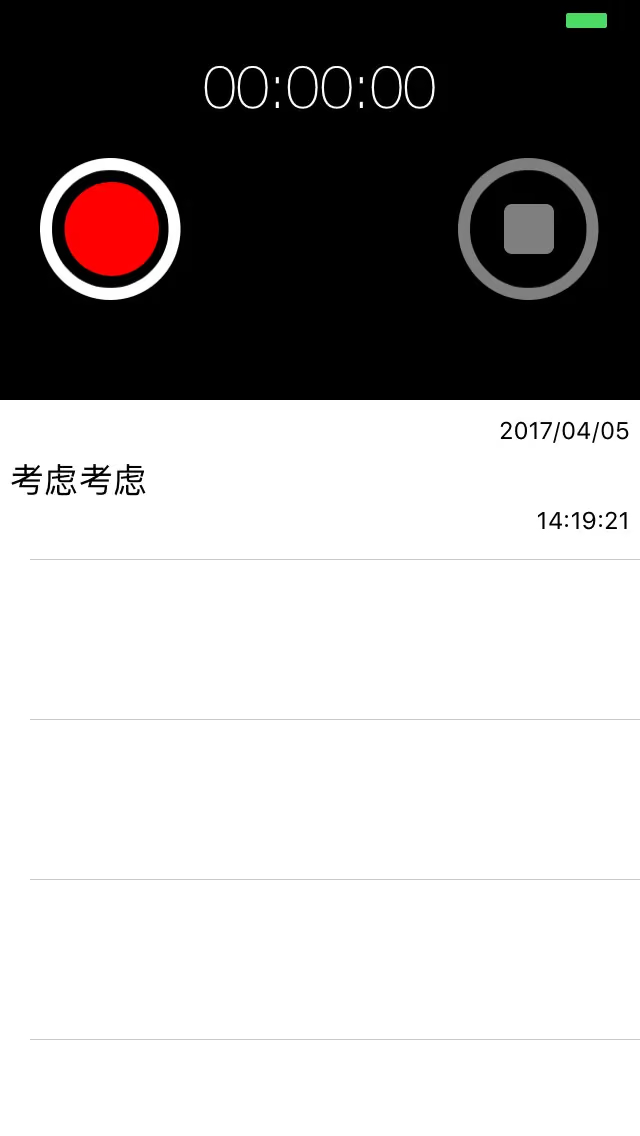
Final Demo
Your corrections are welcome. End of article.