
Preface
This article carries strong personal feelings. If you feel uncomfortable reading it, please close it as soon as possible. This article is only for personal learning records. Reposting or sharing within the scope of the license is welcome. Please respect the copyright and keep the original link. Thank you for your understanding and cooperation. If you think this site can help you, you can subscribe to this site via RSS. Thanks for your support!
Drawing a Circular Slider with SwiftUI
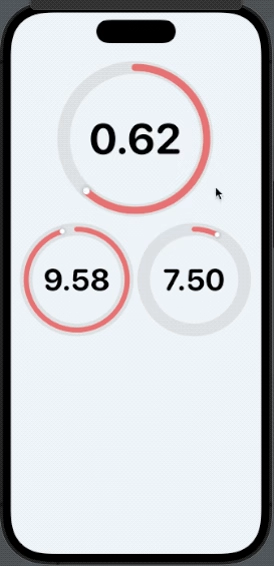
Recently I came across an article about drawing a circular Slider simply with SwiftUI. After hands-on practice, it turned out to be really simple. Let me record the code implementation and the effect.
1
2
3
4
5
6
7
8
9
10
11
12
13
14
15
16
17
18
19
20
21
22
23
24
25
26
27
28
29
30
31
32
33
34
35
36
37
38
39
40
41
42
43
44
45
46
47
48
49
50
51
52
53
54
55
56
57
58
59
60
61
62
63
64
65
66
67
68
69
70
71
72
73
74
75
76
77
78
79
80
81
82
83
84
85
86
87
88
//
//  CircularSliderView.swift
//  CircleSliderDemo
//
//  Created by sunyazhou on 2023/3/16.
//

import Foundation
import SwiftUI

struct CircularSliderView: View
{
    @Binding var progress: Double
    @State private var rotationAngle = Angle(degrees: 0)

    private var minValue = 0.0
    private var maxValue = 1.0

    init(value progress: Binding<Double>, in bounds: ClosedRange<Int> = 0...1) {
        self._progress = progress
        self.minValue = Double(bounds.first ?? 0)
        self.maxValue = Double(bounds.last ?? 1)
        self.rotationAngle = Angle(degrees: progressFraction * 360.0)

    }

    private var progressFraction: Double {
        return ((progress - minValue) / (maxValue - minValue))
    }

    private func changeAngle(location: CGPoint) {
        // Create a vector for the location (inverting the y-coordinate system on iOS)
        let vector = CGVector(dx: location.x, dy: -location.y)

        // Calculate the angle of the vector
        let angleRadians = atan2(vector.dx, vector.dy)

        // Convert the angle to a 0-to-360 range (instead of negative angles)
        let positiveAngle = angleRadians < 0.0 ? angleRadians + (2.0 * .pi) : angleRadians

        // Update the slider progress value based on the angle
        progress = ((positiveAngle / (2.0 * .pi)) * (maxValue - minValue )) + minValue
        rotationAngle = Angle(radians: positiveAngle)
    }

    var body: some View {
        GeometryReader { gr in
            let radius = (min(gr.size.width, gr.size.height) / 2.0) * 0.9
            let sliderWidth = radius * 0.1

            VStack(spacing: 0) {
                ZStack {
                    Circle() //外圆
                        .stroke(Color(hue: 0.0, saturation: 0.0, brightness: 0.9), lineWidth: 20.0)
                        .overlay() {
                            Text("\(progress, specifier: "%.2f")")
                                .font(.system(size: radius * 0.6, weight: .bold, design: .rounded))
                        }
                    Circle() //进度条
                        .trim(from: 0, to: progressFraction)
                        .stroke(Color(hue: 0.0, saturation: 0.5, brightness: 0.9),
                                style: StrokeStyle(lineWidth: sliderWidth, lineCap: .round))
                        .rotationEffect(Angle(degrees: -90))
                    Circle() //旋钮
                        .fill(Color.white)
                        .shadow(radius: sliderWidth * 0.3)
                        .frame(width: sliderWidth, height: sliderWidth)
                        .offset(y: -radius)
                        .rotationEffect(rotationAngle)
                        .gesture(
                            DragGesture(minimumDistance: 0.0)
                                .onChanged() { value in
                                    changeAngle(location: value.location)
                                }
                        )
                }
                .frame(width: radius * 2.0, height: radius * 2.0, alignment: .center)
                .padding(radius * 0.1)
            }

            .onAppear {
                self.rotationAngle = Angle(degrees: progressFraction * 360.0)
            }

        }
    }
}
Summary
Writing code in SwiftUI is fast, and there are many APIs. It’s much more portable and simpler than UIKit. My habit is to digest and absorb others’ work while also producing a demo.