

Preface
This post carries a strong personal flavor — if it makes you uncomfortable, please close it quickly. This article is only for personal study notes, but you’re welcome to repost or share it within the scope of the license agreement. Please respect the copyright and keep the original link. Thank you for your understanding and cooperation. If you find this site helpful, you can subscribe via RSS. Thanks for your support!
Flutter’s Lifecycle
I’ve recently been working on Boduoyinyue (Bodo Music) related development. Since Boduoyinyue is written in Flutter, I had to spend my weekends doing some Flutter development homework to fill the gaps in my mobile tech stack.
Flutter’s lifecycle mainly involves the cooperation between StatefulWidget and State.
Let’s start with the time-honored hello world:
1
2
3
4
5
6
7
8
9
10
11
12
13
14
15
16
17
18
19
20
21
22
23
24
25
26
27
28
29
30
31
32
33
34
35
36
37
38
39
40
41
42
43
44
45
46
47
48
49
50
51
52
53
54
55
56
57
58
59
60
61
62
63
64
65
66
67
68
69
70
71
72
73
74
75
76
77
78
79
80
import 'package:flutter/material.dart';

///create
void main () {
  runApp(MyApp());
}

class MyApp extends StatelessWidget  {
  @override
  Widget build(BuildContext context) {
    return MaterialApp(
      title: "hello flutter",
      home: Scaffold(
        appBar: AppBar(
          title: Text("sunyazhou.com"),
        ),
        body: ContentWidget(),
      ),
    );
  }
}

class ContentWidget extends StatefulWidget
{
  ContentWidget(){
    print("ContentWidget构造函数被调用");
  }
   @override
  State<StatefulWidget> createState() {
     print("createState被调用");
    return ContentWidgetState();
  }
}

class ContentWidgetState extends State<ContentWidget>
{
  int counter = 0;
  ContentWidgetState()
  {
    print("ContentWidgetState构造函数被调用");
  }

  @override
  void initState() {
    // TODO: implement initState
    super.initState();
    print("ContentWidgetState的 initState被调用");
  }

  @override
  void didChangeDependencies() {
    super.didChangeDependencies();
    print("ContentWidgetState的 didChangeDependencies被调用");
  }

  @override
  void didUpdateWidget(covariant ContentWidget oldWidget) {
    super.didUpdateWidget(oldWidget);
    print("ContentWidgetState的 didUpdateWidget被调用");
  }

  @override
  Widget build(BuildContext context) {
    print("ContentWidgetState的 build被调用");
    return Center(
        child: Column (
        mainAxisAlignment: MainAxisAlignment.center,
        children: [
          ElevatedButton(onPressed: (){
             setState(() {
               counter++;
             });
          }, child: Text("计数+1")),
          Text("hello world $counter", style: TextStyle(fontSize: 30),),
        ],
      ),
    );
  }
}
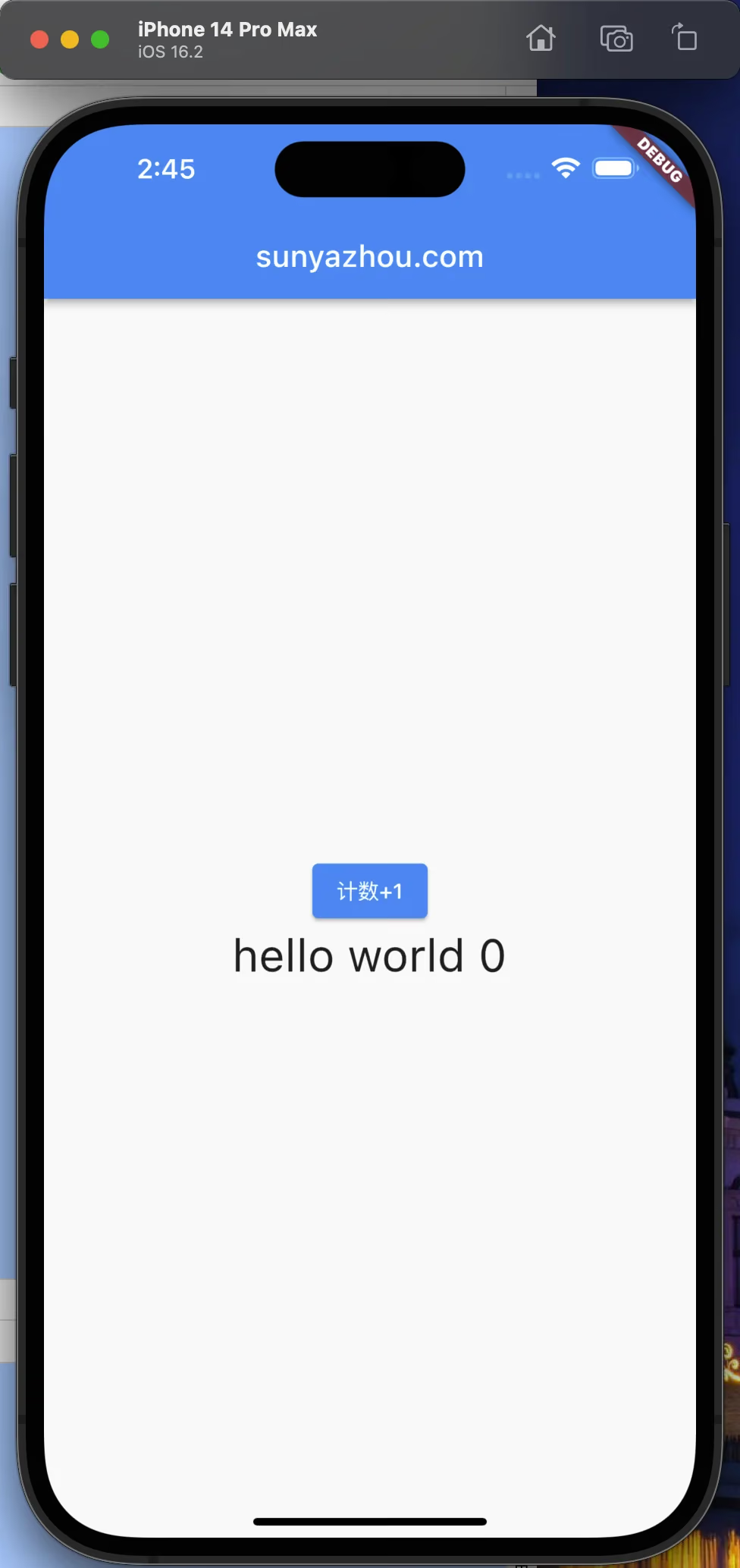
Here’s the output:
1
2
3
4
5
6
7
8
9
flutter: ContentWidget构造函数被调用
flutter: createState被调用
flutter: ContentWidgetState构造函数被调用
flutter: ContentWidgetState的 initState被调用
flutter: ContentWidgetState的 didChangeDependencies被调用
flutter: ContentWidgetState的 build被调用
flutter: ContentWidget构造函数被调用
flutter: ContentWidgetState的 didUpdateWidget被调用
flutter: ContentWidgetState的 build被调用
didUpdateWidget
The didUpdateWidget() method is only called when the parent widget updates.
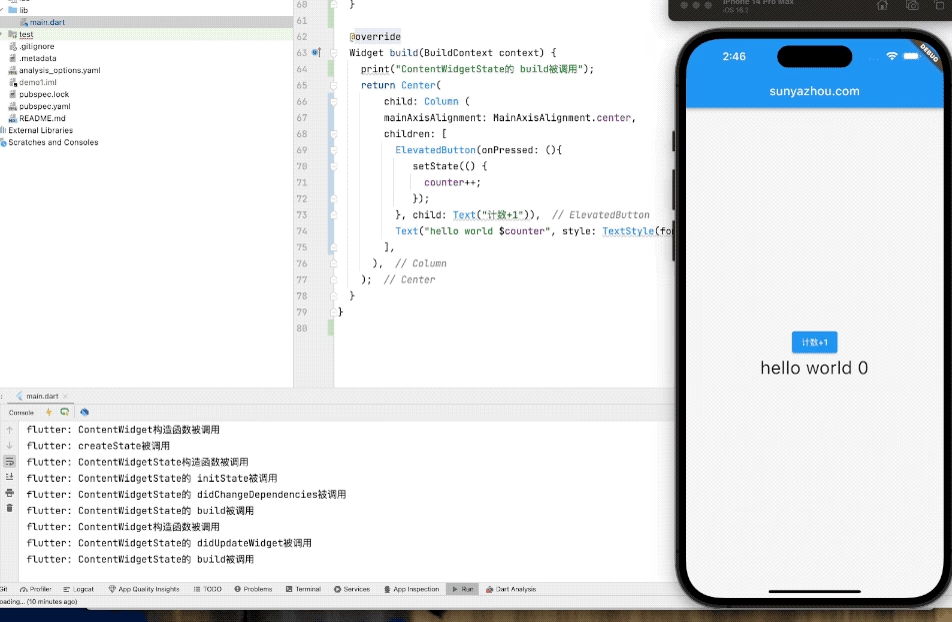
What Happens After Clicking
Each click triggers build to be called every time.
1
2
3
4
5
6
7
8
flutter: ContentWidgetState的 build被调用
flutter: ContentWidgetState的 build被调用
flutter: ContentWidgetState的 build被调用
flutter: ContentWidgetState的 build被调用
flutter: ContentWidgetState的 build被调用
flutter: ContentWidgetState的 build被调用
flutter: ContentWidgetState的 build被调用
flutter: ContentWidgetState的 build被调用
Here is a diagram of Flutter’s lifecycle methods:
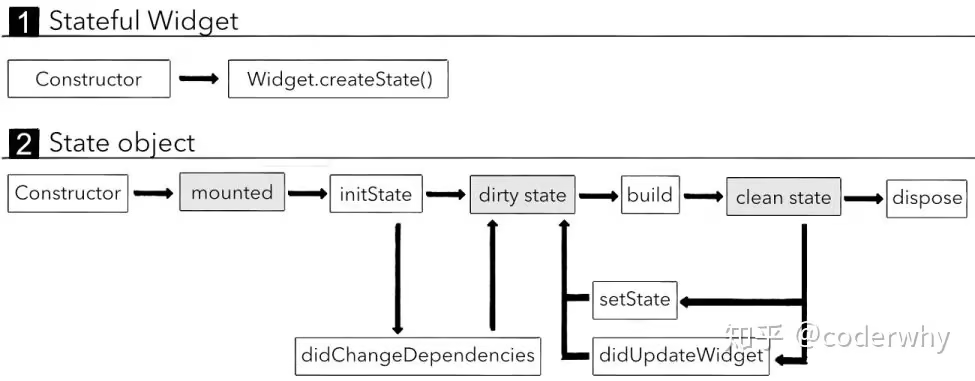
The image is from Flutter (7) Stateful widgets. If there are any copyright issues, please contact me.
Summary
This lifecycle is very similar to UIViewController in iOS. I use my weekends to learn new technologies, maintaining an attitude of learning while fighting.