
Preface
This post carries strong personal sentiment; if you feel uncomfortable reading it, please close it as soon as possible. This post is only a personal learning record. Reposting or sharing within the license terms is welcome; please respect copyright and keep the original link. Thank you for your understanding and cooperation. If you find this site helpful, you can subscribe via RSS. Thanks for your support!
The problem encountered in development

Recently in development, a QA teammate filed a bug: the bubble on the home page’s bottom tab flashed and disappeared instantly. After tracing through the code carefully, I found that the backend had issued -1 in the configuration, and a client-side colleague replaced this -1 with NSIntegerMax.
The following code is the implementation that controls a bubble from showing to disappearing.
1
2
3
4
5
NSInteger delaySeconds = NSIntegerMax;
NSLog(@"%@,展示前,%zd",[NSDate date],delaySeconds);
dispatch_after(dispatch_time(DISPATCH_TIME_NOW, (int64_t)(delaySeconds * NSEC_PER_SEC)), dispatch_get_main_queue(), ^{
    NSLog(@"%@,展示后,%zd",[NSDate date],delaySeconds);
});
Suppose the code to hide the bubble is called 10 seconds after it shows, but this code executes immediately.
1
2
2024-08-19 02:03:16 +0000,展示前,9223372036854775807
2024-08-19 02:03:16 +0000,展示后,9223372036854775807
Why does it execute immediately?
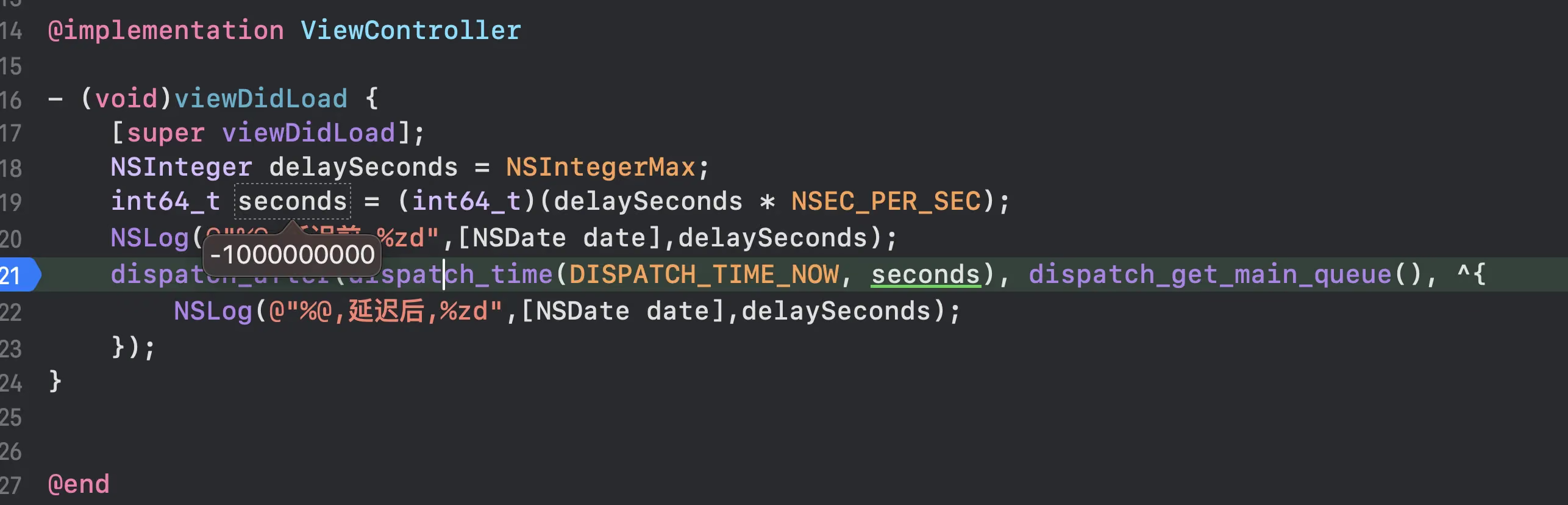
NSIntegerMax * NSEC_PER_SEC = -1 billion
A negative number naturally triggers dispatch_after() to execute immediately.
When you encounter a case where NSIntegerMax * NSEC_PER_SEC results in a negative number, it usually means an integer overflow has occurred. NSIntegerMax represents the maximum value of the NSInteger type. When multiplied by NSEC_PER_SEC (the number of nanoseconds per second, equal to 1,000,000,000), the result can exceed the range representable by NSInteger.
On 32-bit systems, NSInteger is a 32-bit integer whose maximum value is 2,147,483,647. NSEC_PER_SEC is a very large number, so when multiplied together, the result exceeds the maximum value of a 32-bit integer, causing overflow.
On 64-bit systems, NSInteger is a 64-bit integer whose maximum value is 9,223,372,036,854,775,807. Although a 64-bit integer has a much larger range, when multiplied by NSEC_PER_SEC, the result can still exceed the range of NSInteger, because NSInteger is actually a signed integer with a maximum value of 9,223,372,036,854,775,807, and NSEC_PER_SEC times NSIntegerMax yields a number larger than this value.
Integer overflow usually occurs in two cases:
- Unsigned integer overflow: When an unsigned integer reaches its maximum value and keeps increasing, it wraps around to 0 and starts counting again from 0.
- Signed integer overflow: When a signed integer reaches its maximum value and keeps increasing, it becomes a negative number.
In this case, since NSInteger is signed, when the result of multiplying it by NSEC_PER_SEC exceeds its representable range, the result becomes negative.
To avoid this, you should use a larger data type, such as uint64_t or int64_t, which can safely store much larger values. For example:
1
uint64_t delayInNanoseconds = (uint64_t)NSIntegerMax * NSEC_PER_SEC;
Using uint64_t ensures the multiplication doesn’t produce a negative number, because uint64_t is an unsigned 64-bit integer.
Solution
- Define macros for the maximum length of two time units to replace the maximum value
1
2
3
4
#define SECONDS_IN_A_YEAR 31536000LL // 非闰年
#define SECONDS_IN_A_LEAP_YEAR 31622400LL // 闰年
#define SECONDS_IN_A_MONTH 2629746LL  //一个月最大秒数
#define SECONDS_IN_A_DAY 86400  //一天最大秒数
In Objective-C, there’s no standard macro that directly represents the maximum number of seconds in a day. However, you can use some basic time-unit macros to calculate the total number of seconds in a day.
A day has 24 hours, each hour has 60 minutes, and each minute has 60 seconds. So the total number of seconds in a day can be calculated with the following formula:
[ \text{total seconds in a day} = 24 \times 60 \times 60 ]
The total seconds in a day = 24 * 60 * 60
That equals 86,400 seconds.
If you need to use this value in Objective-C code, you can define a macro or constant to represent it:
1
#define SECONDS_IN_A_DAY 86400
Or use a const constant:
1
const int64_t SecondsInADay = 86400LL;
Using the int64_t type ensures this constant is large enough to correctly represent the total seconds in a day even on 32-bit systems. The LL suffix ensures the number is interpreted as a long long integer (long long) constant.
In actual programming, you can use this value as needed for time calculations.
The number of days in a month and a year isn’t fixed, because it depends on specific calendar rules. However, we can give some approximate values and calculation methods.
Seconds in a month
For a month, we usually use an average value for approximation. A month has about 30.44 days on average (taking into account the varying days in different months and the effect of leap years). Therefore, the total seconds in a month can be approximated as:
[ \text{total seconds in a month} \approx 30.44 \times 24 \times 60 \times 60 ]
The result is approximately:
[ 2,629,746 \text{ seconds} ]
In Objective-C, you can define the seconds in a month like this:
1
#define SECONDS_IN_A_MONTH 2629746LL
Seconds in a year
For a year, we usually assume it has 365 days, except in leap years, when it has 366 days. Therefore, the total seconds in a year can be calculated as:
- Non-leap year: [ \text{total seconds in a year} = 365 \times 24 \times 60 \times 60 ]
- Leap year: [ \text{total seconds in a year} = 366 \times 24 \times 60 \times 60 ]
Non-leap year:
Total seconds in a year = 365 × 24 × 60 × 60
Leap year:
Total seconds in a year = 366 × 24 × 60 × 60
The results are approximately:
- Non-leap year: 31,536,000 seconds
- Leap year: 31,622,400 seconds
In Objective-C, you can define the seconds in a year like this:
1
2
#define SECONDS_IN_A_YEAR 31536000LL // 非闰年
#define SECONDS_IN_A_LEAP_YEAR 31622400LL // 闰年
Please note that these values are based on approximate calculations; actual month and year lengths may vary. When dealing with specific date and time calculations, you usually need to consider more complex calendar rules. In Objective-C, you can use the NSCalendar class and the NSDate class to handle dates and times more accurately.
Summary
The core issue here is: don’t multiply NSIntegerMax by a value and get a result that exceeds the maximum range NSInteger can represent. Be sure to watch out for this in development.