
Preface
Recently my development work needed to use Bezier curves to produce smooth animations, and I read a paper on Catmull-Rom splines. Recording this article here.
Interpolating Points in iOS with UIBezierPath

Recently, I have been working on a mobile application that contains a visualization component consisting of smooth curves passing through an arbitrary, varying set of 2D points. The most straightforward way to implement this in iOS is with a sequence of smooth curves defined by UIBezierPath, but the developer needs to construct the cubic Bezier curves in the path in such a way that they are smooth and pass exactly through the data points.
In this article, I will describe two simple and commonly used methods for interpolating points with cubic Bezier curves (without going too deeply into the mathematics behind them), and link to the git repo I wrote that contains implementations of both interpolation methods.
UIBezierPath and Bezier Curves
In iOS, we use UIBezierPath to draw line segments and curve segments. Adding linear segments via addLineToPoint: is very simple, but how do we draw curved shapes?
Curved segments can be drawn by adding cubic Bezier curves to the path. A cubic Bezier curve is defined by four control points — the positions of these four points define the shape of the curve. In the image below, each point is a 2D (x,y) point in Euclidean space.
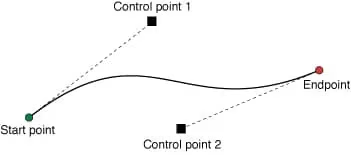
Adding a Bezier curve to a UIBezierPath is simple:
1
2
3
4
UIBezierPath* bezierPath = [UIBezierPath bezierPath];
[bezierPath moveToPoint: CGPointMake(77.5, 36.5)];
[bezierPath addCurveToPoint: CGPointMake(101.5, 72.5) controlPoint1: CGPointMake(67.78, 56.83) controlPoint2: CGPointMake(75.76, 76.01)];
[bezierPath addCurveToPoint: CGPointMake(157.5, 66.5) controlPoint1: CGPointMake(127.24, 68.99) controlPoint2: CGPointMake(127.69, 97.13)];
In the code above, the UIBezierPath starts at (77.5, 36.5) and uses addCurveToPoint:controlPoint1:controlPoint2 to add two cubic Bezier curves. The two curves look like this: 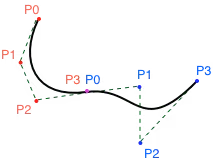
I have marked the four control points of the first curve (C1) in red and those of the second curve (C2) in blue. The two curves share a control point (C1’s P3 and C2’s P0). The first control point of C1 corresponds to the start point of the UIBezierPath, P0=(77.5, 36.5), and its first control point (67.78, 56.83) corresponds to P1, and so on for the remaining points.
A trivial choice of the two curve endpoints (P0 and P3) simply forces the curve to pass through exactly two interpolation points. Therefore, for a set of N points, we can create N-1 curves that pass through every point. In order for the transition between two adjacent curves to be smooth, the adjacent control points (P2 in the first curve and P1 in the second curve) must be at least collinear, and ideally we would also like them to have the same length. If they are not collinear, the UIBezierPath will have cusps. The question is, how do we position these internal control points?
Smooth Interpolation with Hermite and Catmull-Rom Splines
The two most commonly used interpolation curves are the Hermite and Catmull-Rom splines. These curves are defined by a set of interpolation points, and both can be easily converted into a set of piecewise cubic Bezier curves — meaning that given N fitting points, we can create the control points of N-1 cubic Bezier curves to match a Hermite or Catmull-Rom spline. These cubic Bezier curves are then added to a UIBezierPath.
Perhaps the simplest method of interpolation is to use a cubic Hermite spline. Computing the cubic Bezier control points corresponding to a Hermite curve is very simple (see the code linked in the example project below), but when points are irregularly distributed, they exhibit problems such as “kinks” and loops of extremely high curvature:
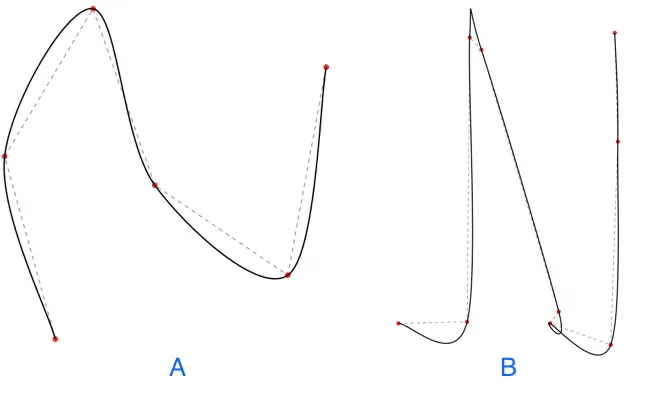
Curves A and B are both created via Hermite interpolation. Curve A looks good — the points are roughly evenly distributed. However, curve B exhibits kinks and self-intersections due to the irregular distribution of its points.
Another option for fitting a curve through points is to use a Catmull-Rom spline. Like Hermite curves, Catmull-Rom curves pass through the interpolation points and produce smooth results, but they also provide additional control — a scalar alpha value (between 0.0 and 1.0) that controls the magnitude of the tangents. For details, see this excellent paper titled On the Parameterization of Catmull-Rom Curves, which discusses the effect of alpha.
Common alpha values are 0.0, 0.5 and 1.0, corresponding to the uniform, centripetal and chordal parameterizations of the curve respectively. 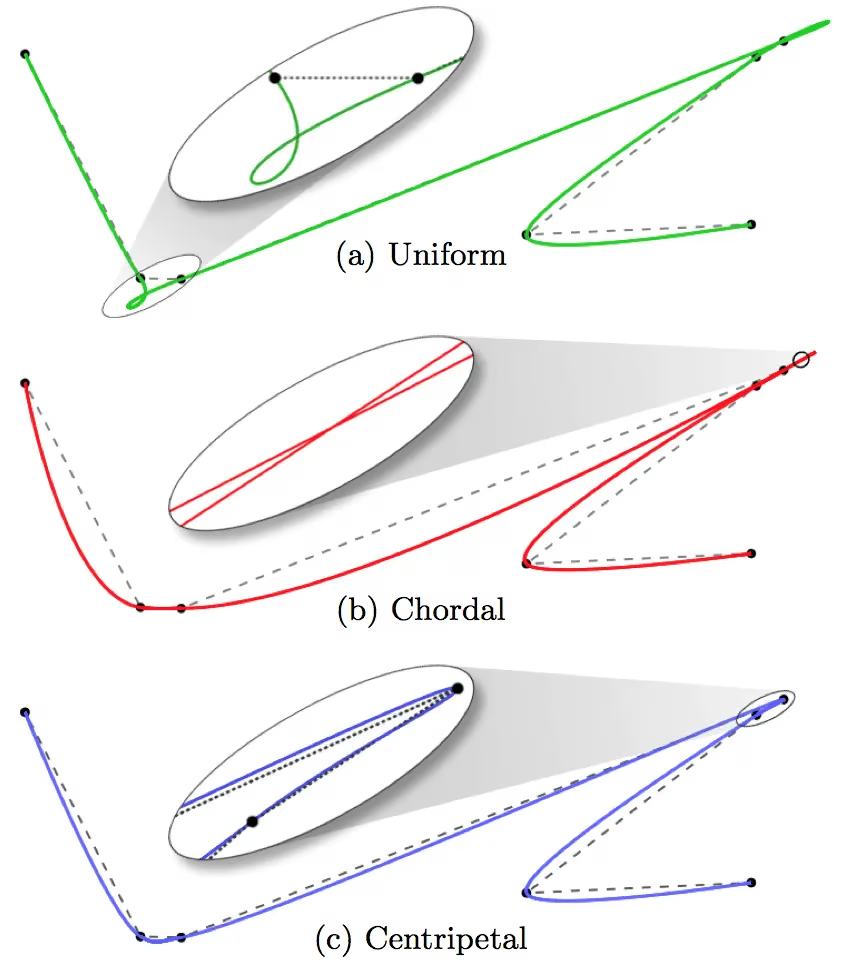
Changing the alpha value has a significant effect on the shape of the curve, especially in high-curvature regions. It should be noted that the piecewise cubic Bezier curves representing a Catmull-Rom curve are computed at a given interpolation point Pn by considering points Pn-1, Pn, Pn+1 and Pn+2, so the resulting cubic Bezier curves will not pass through the first and last fitting points. Extra points can be added, or the curve can be created as a closed loop.
We can revisit the earlier curve B and see what it looks like as a Catmull-Rom curve with alpha=0.5: 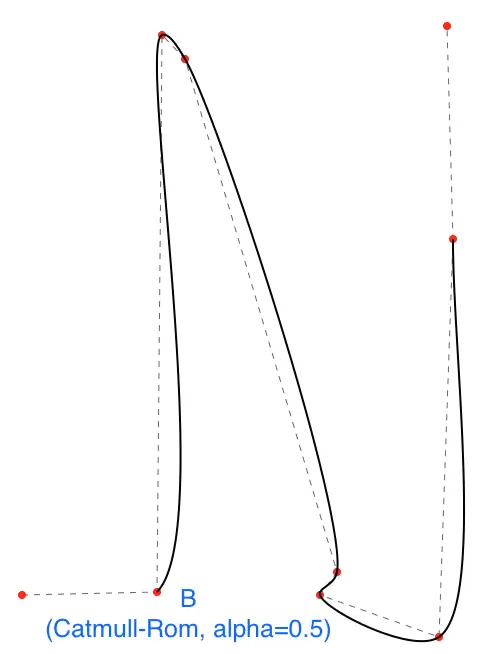 Much better (but note it doesn’t pass through the first and last points)!
Code and Example Project
I have created a category on UIBezierPath, UIBezierPath+Interpolation, which adds methods for interpolating points with UIBezierPath using the Hermite or Catmull-Rom techniques:
1
2
3
4
5
6
7
// pointsAsNSValues must be an array of NSValue objects containing CGPoint.
//
// Example:
//     const char *encoding = @encode(CGPoint);
//     NSValue *pointAsValue = [NSValue valueWithBytes:&cgPoint objCType:encoding];
+(UIBezierPath *)interpolateCGPointsWithCatmullRom:(NSArray *)pointsAsNSValues closed:(BOOL)closed alpha:(float)alpha;
+(UIBezierPath *)interpolateCGPointsWithHermite:(NSArray *)pointsAsNSValues closed:(BOOL)closed;
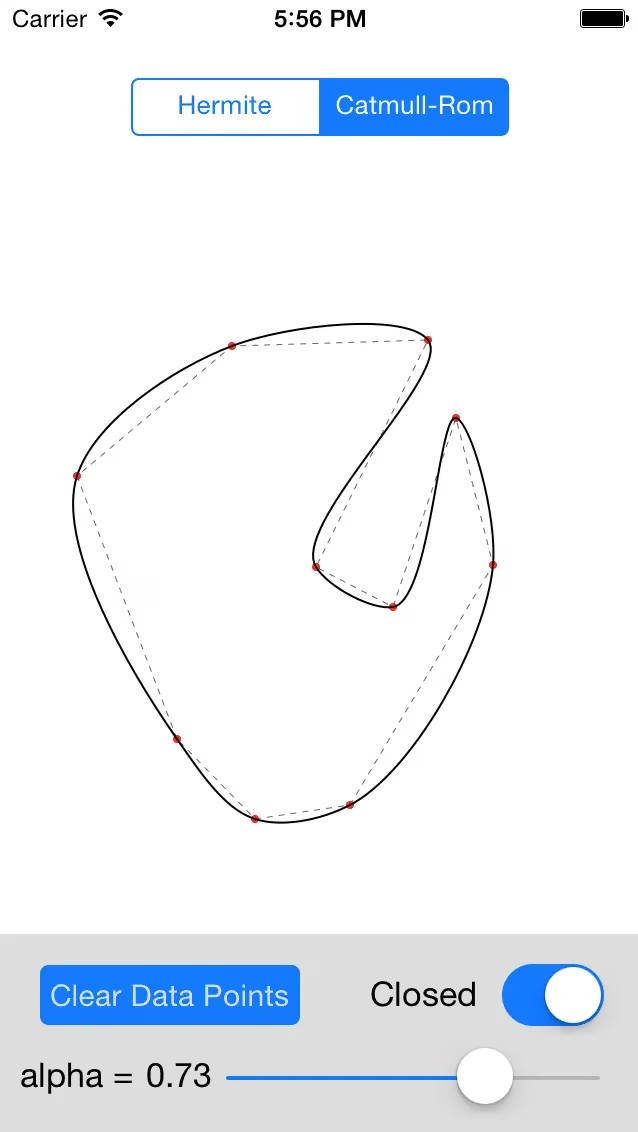
Both methods accept a flag closed that determines whether the curve is closed or open at its endpoints. In addition, the Catmull-Rom method accepts an alpha value between 0.0 and 1.0. The Hermite interpolation method computes tangents using finite differences.
Alongside the category, I’ve also built a small iOS application that supports adding points, fitting them with either method, and changing the alpha value of the Catmull-Rom curve. You can tweak the values dynamically and see the effects right away.
Both the category code and the iOS application can be found in the following public git repository: iOS Curve Interpolation. Ultimately, choosing a fitting technique is more art than science, as the quality of the result is often subjective. I have found the Catmull-Rom results to be reasonable for large datasets.