
Preface
This post reflects strong personal opinions. If you feel uncomfortable while reading, please close it immediately. This article is for personal learning records only. You are welcome to repost or share it under the license terms — please respect the copyright and keep the original link. Thank you for your understanding and cooperation. If you find this site helpful, consider subscribing via RSS. Thanks for your support!
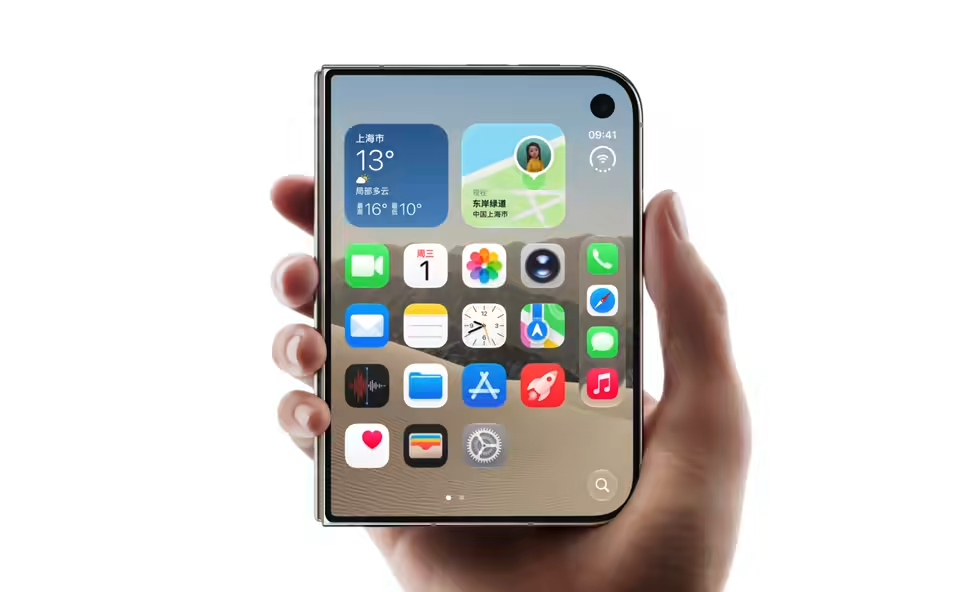
That animation came from a 4.3-second screen recording — 571 KB, looping forever. The footage is Apple’s official iPhone Duo fold demo.
The whole thing
1
2
3
4
ffmpeg -y -i in.mov -an \
  -vf "fps=15,scale=1296:-2:flags=lanczos" \
  -c:v libsvtav1 -crf 32 -preset 8 -g 1 \
  -pix_fmt yuv420p -loop 0 out.avif
That’s it. The source was 19.9 MB; the output is 571 KB (a higher-quality version came out at 1.48 MB). Encoding took a second or two.
Prerequisite: your ffmpeg needs the avif muxer and an AV1 encoder. Check first:
1
2
ffmpeg -hide_banner -h muxer=avif            # you should see "Muxer avif [AVIF]"
ffmpeg -hide_banner -encoders | grep -i av1  # you need libsvtav1 or libaom-av1
I used homebrew’s ffmpeg 9.0.1; both checks pass, and it ships libsvtav1. You do not need to install avifenc or ImageMagick.
Why not GIF
GIF dates to 1987: 256 colors, LZW lossless compression, no inter-frame prediction at all. A few seconds of screen capture turns into three to five megabytes, complete with banding across every gradient.
Animated AVIF takes a different route: it’s an AV1-encoded frame sequence packed into an image container. AV1 is one of the most efficient general-purpose codecs available, so the same content typically lands at a fraction of the GIF’s size — in 24-bit true color with a full alpha channel.
Two costs come with it, both covered below: encoding is slower (though still fast), and the compatibility bar is higher than for still AVIF.
The four stages

What ffmpeg actually does is refreshingly plain: split the video into frames, compress each frame as an AV1 image on its own, then bundle them into one image file.
1. Decode
Read the .mov (H.264 + AAC) and produce raw frames. Identical to any ordinary transcode.
2. Resample and scale
-vf "fps=15,scale=1296:-2" does two things:
fps=15— the source is 60fps, so keep one frame in four. That drops the count from 260 to 65 and cuts the file size to a quarter — the single most effective lever, and the animation barely looks different.scale=1296:-2— fix the width at 1296 and let the height follow.-2, not-1:-2rounds the computed value to an even number. Since we’re about to use 4:2:0 chroma subsampling, both dimensions must be even;-1can hand you an odd number and fail outright.
3. AV1 encode
-c:v libsvtav1 selects SVT-AV1 (the Intel/Netflix open-source encoder) rather than the slower libaom-av1 ffmpeg might otherwise use.
The critical flag here is -g 1: a keyframe interval of 1, meaning every frame is encoded as an independent keyframe. Why that’s mandatory is the next section.
4. Mux
Finally the avif muxer writes the file, and -loop 0 means loop forever.
What’s inside the file
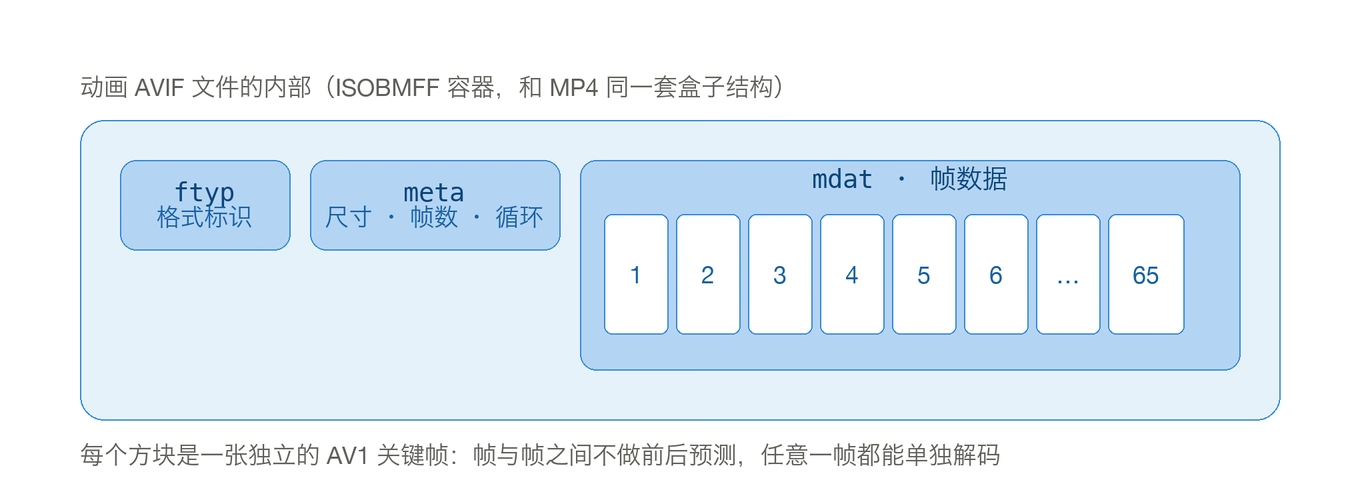
AVIF uses an ISOBMFF container — the same box structure as MP4, which is exactly why ffprobe reports it as mov,mp4.
ftyp: format identifiermeta: dimensions, frame count, loop countmdat: the actual frame data — a row of AV1 frames
Every frame is a complete intra frame; nothing is predicted from its neighbors.
That’s the reason -g 1 exists. Video compression earns its keep through inter-frame prediction — a P frame stores only the difference from the previous one. An image sequence can’t do that:
- A player must be able to seek to any frame (a user may want frame 30)
- Looping back to frame 1 can’t depend on the state of the last frame
- Image decoders simply don’t maintain reference-frame state across frames
So the spec requires every frame to stand alone.
That’s the built-in cost of animated AVIF: it gives up inter-frame compression, so at equal quality it’s larger than an MP4. What you get in return is that it remains an image — usable in <img>, addressable from CSS, processable by image CDNs — and AV1’s intra-frame efficiency is high enough that the result is still far smaller than GIF.
Every flag, one by one
| Flag | What it does | Note |
|---|---|---|
-an | Drop the audio track | AVIF stores no sound; keeping it just wastes space |
fps=15 | Resample | The biggest single lever on file size |
scale=1296:-2 | Scale width | -2 = round height to even, required by 4:2:0 |
-c:v libsvtav1 | AV1 encoder | Much faster than libaom-av1 |
-crf 32 | Quality | 0–63, higher is smaller and blurrier. Keep under 40 for screen text |
-preset 8 | Speed preset | 0–13, higher is faster at slightly lower quality |
-g 1 | Keyframe every frame | A requirement of AVIF sequences, not an optimization |
-pix_fmt yuv420p | 8-bit 4:2:0 | Best compatibility; 10-bit defeats many decoders |
-loop 0 | Loop count | 0 = infinite |
The three size dials
Size is roughly frame count × resolution × per-frame bitrate, so there are exactly three dials, in order of impact:
| Dial | Impact | Cost |
|---|---|---|
fps | Largest | Lower frame rates look choppy; 12–15 is the comfort zone |
scale | Large | Lower resolution means blur; 960–1300 wide suits body text |
-crf | Medium | More compression artifacts; text edges crack first |
Measured (source: 4.34 s / 2592×1596 / 60fps screen recording, 19.9 MB):
| Version | Parameters | Size |
|---|---|---|
| Large | 1296×798 · 15fps · 65 frames · crf 32 | 1.48 MB |
| Small | 960×592 · 12fps · 52 frames · crf 40 | 571 KB |
Encoding finished in under two seconds either way. SVT-AV1 is tuned for many cores, and because intra frames have no dependencies they parallelize completely — unlike transcoding regular video, where frame dependencies stall the pipeline.
Verifying it’s actually animated
This is easy to get wrong: a successfully written file does not prove it contains multiple frames.
Pillow is the most direct:
1
2
python -c "from PIL import Image; print(Image.open('out.avif').n_frames)"
# 65
ffprobe works too, with a catch: it reports two streams. The first, nb_frames=1, is a cover thumbnail; the second is the real sequence. Don’t stop at the first one and conclude you only got a single frame.
1
2
3
ffprobe -v error -show_entries stream=nb_frames,width,height -of default=noprint_wrappers=1 out.avif
# nb_frames=1     <- cover thumbnail
# nb_frames=65    <- the real sequence
Putting it on a web page
Browser support as of 2026 — note that animation needs more than stills:
| Browser | Still AVIF | Animated AVIF |
|---|---|---|
| Chrome | 85+ | 93+ |
| Firefox | 93+ | 113+ |
| Safari | 16.1+ | 16.4+ |
| Edge | 121+ | 121+ |
That’s roughly 93–95% global coverage. An unsupported browser doesn’t show a broken image — it shows the first frame. The degradation is a still, not a red X.
If that’s not acceptable, two fallback routes:
- Add an animated WebP inside
<picture>(WebP animation has broader support) - Use
<video autoplay loop muted playsinline>with an MP4 and let the video tag handle the motion
One practical trap: keep filenames ASCII. On macOS, CJK filenames are stored in NFD-normalized form, and Jekyll can crash in URL handling during the build (I’ve hit this on this very blog). Hence demo-screenrec.avif rather than a Chinese filename.
References
- ffmpeg documentation · AVIF muxer
- SVT-AV1 encoder
- Can I use · AVIF
- ezgif · What is AVIF? How to Create Animated AVIF Images
One last thing: every number and command in this post was actually run on this machine (macOS + homebrew ffmpeg 9.0.1). The sizes and timings are real output, not estimates.