
Preface
This post reflects strong personal opinions. If you feel uncomfortable while reading, please close it immediately. This article is for personal learning records only. You are welcome to repost or share it under the license terms — please respect the copyright and keep the original link. Thank you for your understanding and cooperation. If you find this site helpful, consider subscribing via RSS. Thanks for your support!
This is my companion note for lecture 3 of 14 Lectures on Visual SLAM.
Eigen deserves a standalone post because every later chapter depends on it. Lecture 4’s Sophus is a wrapper around SO(3) / SE(3), and underneath it is still Eigen matrices. From lecture 6 onward, g2o and Ceres take Eigen types for vertices, edges, error terms and Jacobians. If I don’t nail down the API here, I’ll be flipping back to the book on every single line later.
So I ran both sample programs — ch3/useEigen and ch3/useGeometry — end to end, and wrote down the code, the console output, and every trap I hit. It’s meant to be my own lookup table. Next time I forget whether coeffs() returns (x,y,z,w) or (w,x,y,z), I’ll just search this page.
1. Getting Eigen installed (macOS)
The book assumes Ubuntu plus sudo apt install libeigen3-dev, which drops headers into /usr/include/eigen3. That path doesn’t exist on macOS, so we have to wire it up ourselves.
1. Which version to install
Homebrew’s default eigen is now 5.0.1. That’s a full major version ahead of the book, and ahead of Sophus / g2o / Ceres too. Eigen 5 marks eulerAngles() as deprecated (pointing at canonicalEulerAngles()), while the book’s code calls eulerAngles all over the place.
So skip the default and install the versioned formula:
1
brew install eigen@3
That gives you 3.4.1 — the same generation as the book’s 3.3/3.4 and the 3.4.0 on my Radxa board (RK3576 / Debian), so behavior matches.
eigen@3 is keg-only, meaning it isn’t symlinked into /opt/homebrew/include (to avoid clashing with Eigen 5). Headers live at:
1
/opt/homebrew/opt/eigen@3/include/eigen3
Both versions coexist happily.
2. Why a plain compile says Eigen/Core file not found
Right after installing, I typed what the video does:
1
c++ eigenGeometry.cpp -o eigenGeometry
And got:
1
eigenGeometry.cpp:5:10: fatal error: 'Eigen/Core' file not found
The reason is simple: the command carries no -I at all. #include <Eigen/Core> makes the compiler look for Eigen/Core in its default search paths, and /opt/homebrew/opt/eigen@3/include/eigen3 isn’t one of them. It works on Linux because many distros treat /usr/include as a default path and libeigen3-dev happens to place Eigen under /usr/include/eigen3 — it still needs -I in principle. The book just uses CMake, where the path already sits in CMakeLists.txt, so you never notice.
3. Three ways to fix it
Option 1: add -I per command. The most direct:
1
c++ -I/opt/homebrew/opt/eigen@3/include/eigen3 eigenGeometry.cpp -o eigenGeometry
Option 2: set a zsh environment variable. This is what I use. The compiler reads CPLUS_INCLUDE_PATH, so set it once and every plain compile anywhere finds Eigen:
1
2
# append to ~/.zshrc
export CPLUS_INCLUDE_PATH="/opt/homebrew/opt/eigen@3/include/eigen3${CPLUS_INCLUDE_PATH:+:$CPLUS_INCLUDE_PATH}"
Then source ~/.zshrc or open a new terminal tab. Verify:
1
2
echo $CPLUS_INCLUDE_PATH
# /opt/homebrew/opt/eigen@3/include/eigen3
After that, c++ eigenGeometry.cpp -o eigenGeometry just works, no -I needed.
Note the ${CPLUS_INCLUDE_PATH:+:$CPLUS_INCLUDE_PATH} form. Writing "...:$CPLUS_INCLUDE_PATH" directly leaves a dangling colon when the variable was empty, and some compilers treat an empty entry as “current directory” — not what we want.
Option 3: use CMake, which is the book’s approach. The two key lines in ch3/useEigen/CMakeLists.txt:
1
2
3
4
5
6
7
8
# CMake 4.x no longer accepts cmake_minimum_required(VERSION 2.8); the book used 2.8
cmake_minimum_required( VERSION 3.10 )
project( useEigen )

# point at the keg-only eigen@3
include_directories( "/opt/homebrew/opt/eigen@3/include/eigen3" )

add_executable( eigenMatrix eigenMatrix.cpp )
Then:
1
2
3
4
cd ch3/useEigen
mkdir -p build && cd build
cmake .. && make -j8
./eigenMatrix
4. Setting this up in CLion
CLion is what I actually use day to day, so it gets its own section — it follows completely different rules from the command line, and skipping this is a good way to waste an afternoon.
Why the environment variable does nothing here. CPLUS_INCLUDE_PATH in ~/.zshrc only applies to processes started from a terminal. When you launch CLion from the Dock or Finder, it inherits the launchd environment and never reads ~/.zshrc. That’s why c++ eigenGeometry.cpp compiles fine in your shell while CLion still paints the whole file red.
Step one: open the right directory. The slambook root has no CMakeLists.txt — the book is dozens of independent CMake projects, not one big one. Drop the repo root into CLion and it will tell you it can’t find a CMake project. You need to open the specific lecture’s folder:
1
2
3
slambook/ch3/useEigen        has CMakeLists.txt, opens fine
slambook/ch3/useGeometry     has one, opens fine
slambook/                    none, won't open
File → Open down to the useEigen level and CLion picks it up as a CMake project automatically.
Step two: make CMake find Eigen. Two options, pick either.
Hardcode the path, matching the book:
1
include_directories( "/opt/homebrew/opt/eigen@3/include/eigen3" )
Or use find_package, which is the tidier form:
1
2
3
4
find_package( Eigen3 3.4 REQUIRED )

add_executable( eigenMatrix eigenMatrix.cpp )
target_link_libraries( eigenMatrix PRIVATE Eigen3::Eigen )
The second one has a precondition: eigen@3 is keg-only, so it isn’t on CMake’s default search path and a bare find_package fails. You have to point CLion at it under:
1
Settings → Build, Execution, Deployment → CMake → CMake options
with a single line:
1
-DCMAKE_PREFIX_PATH=/opt/homebrew/opt/eigen@3
My CMakeLists.txt uses the first form, so opening useEigen just works with no settings changes. The second is for when you want the project to look properly configured and plan to pull in more libraries later.
There’s a real trap here, and I tested it: without a version pin, you silently get Eigen 5.
Leave the version off find_package(Eigen3 REQUIRED) and CMake finds Homebrew’s Eigen 5.0.1 on the default path and happily takes it — no error, no warning. Then eulerAngles() in your code starts emitting deprecation warnings and the behaviour may no longer match the book. Measured:
| CMakeLists form | Version actually picked |
|---|---|
find_package(Eigen3 REQUIRED), no prefix path | 5.0.1 |
find_package(Eigen3 3.4 REQUIRED) + prefix at eigen@3 | 3.4.1 |
So that 3.4 is load-bearing, not decoration.
Step three: the everyday CLion habits.
- Reload after editing
CMakeLists.txt:Tools → CMake → Reload CMake Project, or click theReload changesbanner above the editor. Skip it and both code insight and the build keep using the old configuration — usually the reason a change “does nothing”. - The build directory is
cmake-build-debug/, not thebuild/you create by hand. Having both is harmless, but don’t expect CLion’s artifacts to show up inbuild/. - No terminal needed to run: CLion generates a run configuration per
add_executable. PickeigenMatrixfrom the dropdown at the top right, hit the green triangle, output lands in the Run pane. #include <Eigen/Core>underlined but compiles fine: that’s code insight missing the include path, not a bug in your code. Reload the CMake project first; if it’s still red,File → Invalidate Cachesand restart.- Don’t bring in a second compiler: keep the toolchain on
Xcode/AppleClang(Settings → Toolchains). Lecture 4 has a1e-4dliteral that clang rejects withinvalid suffix 'd'while gcc swallows it — with two compilers in play, that kind of difference is enough to make you doubt your own code.
One more: the CMake 4.x failure looks identical inside CLion.
cmake_minimum_required(VERSION 2.8)throwsCompatibility with CMake < 3.5 has been removedand the project won’t even load. Every example in the book needs3.10.
Part One: Eigen Basics
Source: ch3/useEigen/eigenMatrix.cpp. The book’s comments are thorough; here I’ve reordered them around the why.
The complete source and one full run’s output are below. When I break it down section by section afterwards, I only pull out the relevant lines — come back here to see them in context.
Complete source
All 103 lines of ch3/useEigen/eigenMatrix.cpp:
1
2
3
4
5
6
7
8
9
10
11
12
13
14
15
16
17
18
19
20
21
22
23
24
25
26
27
28
29
30
31
32
33
34
35
36
37
38
39
40
41
42
43
44
45
46
47
48
49
50
51
52
53
54
55
56
57
58
59
60
61
62
63
64
65
66
67
68
69
70
71
72
73
74
75
76
77
78
79
80
81
82
83
84
85
86
87
88
89
90
91
92
93
94
95
96
97
98
99
100
101
102
103
#include <iostream>
using namespace std;
#include <ctime>
// Eigen 部分
#include <Eigen/Core>
// 稠密矩阵的代数运算(逆,特征值等)
#include <Eigen/Dense>

#define MATRIX_SIZE 50

/****************************
* 本程序演示了 Eigen 基本类型的使用
****************************/

int main( int argc, char** argv )
{
    // Eigen 中所有向量和矩阵都是Eigen::Matrix,它是一个模板类。它的前三个参数为:数据类型,行,列
    // 声明一个2*3的float矩阵
    Eigen::Matrix<float, 2, 3> matrix_23;

    // 同时,Eigen 通过 typedef 提供了许多内置类型,不过底层仍是Eigen::Matrix
    // 例如 Vector3d 实质上是 Eigen::Matrix<double, 3, 1>,即三维向量
    Eigen::Vector3d v_3d;
	// 这是一样的
    Eigen::Matrix<float,3,1> vd_3d;

    // Matrix3d 实质上是 Eigen::Matrix<double, 3, 3>
    Eigen::Matrix3d matrix_33 = Eigen::Matrix3d::Zero(); //初始化为零
    // 如果不确定矩阵大小,可以使用动态大小的矩阵
    Eigen::Matrix< double, Eigen::Dynamic, Eigen::Dynamic > matrix_dynamic;
    // 更简单的
    Eigen::MatrixXd matrix_x;
    // 这种类型还有很多,我们不一一列举

    // 下面是对Eigen阵的操作
    // 输入数据(初始化)
    matrix_23 << 1, 2, 3, 4, 5, 6;
    // 输出
    cout << matrix_23 << endl;

    // 用()访问矩阵中的元素
    for (int i=0; i<2; i++) {
        for (int j=0; j<3; j++)
            cout<<matrix_23(i,j)<<"\t";
        cout<<endl;
    }

    // 矩阵和向量相乘(实际上仍是矩阵和矩阵)
    v_3d << 3, 2, 1;
    vd_3d << 4,5,6;
    // 但是在Eigen里你不能混合两种不同类型的矩阵,像这样是错的
    // Eigen::Matrix<double, 2, 1> result_wrong_type = matrix_23 * v_3d;
    // 应该显式转换
    Eigen::Matrix<double, 2, 1> result = matrix_23.cast<double>() * v_3d;
    cout << result << endl;

    Eigen::Matrix<float, 2, 1> result2 = matrix_23 * vd_3d;
    cout << result2 << endl;

    // 同样你不能搞错矩阵的维度
    // 试着取消下面的注释,看看Eigen会报什么错
    // Eigen::Matrix<double, 2, 3> result_wrong_dimension = matrix_23.cast<double>() * v_3d;

    // 一些矩阵运算
    // 四则运算就不演示了,直接用+-*/即可。
    matrix_33 = Eigen::Matrix3d::Random();      // 随机数矩阵
    cout << matrix_33 << endl << endl;

    cout << matrix_33.transpose() << endl;      // 转置
    cout << matrix_33.sum() << endl;            // 各元素和
    cout << matrix_33.trace() << endl;          // 迹
    cout << 10*matrix_33 << endl;               // 数乘
    cout << matrix_33.inverse() << endl;        // 逆
    cout << matrix_33.determinant() << endl;    // 行列式

    // 特征值
    // 实对称矩阵可以保证对角化成功
    Eigen::SelfAdjointEigenSolver<Eigen::Matrix3d> eigen_solver ( matrix_33.transpose()*matrix_33 );
    cout << "Eigen values = \n" << eigen_solver.eigenvalues() << endl;
    cout << "Eigen vectors = \n" << eigen_solver.eigenvectors() << endl;

    // 解方程
    // 我们求解 matrix_NN * x = v_Nd 这个方程
    // N的大小在前边的宏里定义,它由随机数生成
    // 直接求逆自然是最直接的,但是求逆运算量大

    Eigen::Matrix< double, MATRIX_SIZE, MATRIX_SIZE > matrix_NN;
    matrix_NN = Eigen::MatrixXd::Random( MATRIX_SIZE, MATRIX_SIZE );
    Eigen::Matrix< double, MATRIX_SIZE,  1> v_Nd;
    v_Nd = Eigen::MatrixXd::Random( MATRIX_SIZE,1 );

    clock_t time_stt = clock(); // 计时
    // 直接求逆
    Eigen::Matrix<double,MATRIX_SIZE,1> x = matrix_NN.inverse()*v_Nd;
    cout <<"time use in normal inverse is " << 1000* (clock() - time_stt)/(double)CLOCKS_PER_SEC << "ms"<< endl;

	// 通常用矩阵分解来求,例如QR分解,速度会快很多
    time_stt = clock();
    x = matrix_NN.colPivHouseholderQr().solve(v_Nd);
    cout <<"time use in Qr decomposition is " <<1000*  (clock() - time_stt)/(double)CLOCKS_PER_SEC <<"ms" << endl;

    return 0;
}
Complete output
One run of ./eigenMatrix prints the following 34 lines (the last two, the timings, drift between runs):
1
2
3
4
5
6
7
8
9
10
11
12
13
14
15
16
17
18
19
20
21
22
23
24
25
26
27
28
29
30
31
32
33
34
1 2 3
4 5 6
1	2	3
4	5	6
10
28
32
77
 -0.999984 -0.0826997  -0.905911
 -0.736924  0.0655345   0.357729
  0.511211  -0.562082   0.358593

 -0.999984  -0.736924   0.511211
-0.0826997  0.0655345  -0.562082
 -0.905911   0.357729   0.358593
-1.99453
-0.575857
 -9.99984 -0.826997  -9.05911
 -7.36924  0.655345   3.57729
  5.11211  -5.62082   3.58593
 -0.370316  -0.888554 -0.0491136
 -0.737309  -0.172358   -1.69072
 -0.627782   0.996559   0.208558
-0.606436
Eigen values =
0.281738
0.548924
   2.378
Eigen vectors =
 0.213003 -0.511493  0.832469
 0.972431  0.193748  -0.12977
-0.094913   0.83716   0.53866
time use in normal inverse is 0.061ms
time use in Qr decomposition is 0.022ms
1. Everything is Matrix<type, rows, cols>
Eigen has no separate “vector” type — a vector is just a matrix with one column.
1
2
3
4
5
6
7
8
9
// 2 rows, 3 columns, float
Eigen::Matrix<float, 2, 3> matrix_23;

// Vector3d is literally Eigen::Matrix<double, 3, 1>, just a friendlier name
Eigen::Vector3d v_3d;
Eigen::Matrix<float, 3, 1> vd_3d;   // similar, but float elements

// Matrix3d is Eigen::Matrix<double, 3, 3>
Eigen::Matrix3d matrix_33 = Eigen::Matrix3d::Zero();
A few aliases worth memorizing:
| Spelling | Actual type |
|---|---|
Vector3d | Matrix<double, 3, 1> |
Matrix3d | Matrix<double, 3, 3> |
MatrixXd | dynamic-size double matrix |
Matrix<float, Eigen::Dynamic, Eigen::Dynamic> | dynamic-size float matrix |
Use Dynamic when sizes aren’t known at compile time — bundle adjustment with a variable number of points, for example.
2. Initialization and element access
<< fills row by row, matching the intuition you get from std::cin:
1
2
matrix_23 << 1, 2, 3, 4, 5, 6;
cout << matrix_23 << endl;
Access uses parentheses (i, j), not brackets:
1
2
3
4
5
for (int i = 0; i < 2; i++) {
    for (int j = 0; j < 3; j++)
        cout << matrix_23(i, j) << "\t";
    cout << endl;
}
Output:
1
2
3
4
1 2 3
4 5 6
1	2	3
4	5	6
3. Types must match, dimensions must match
This is Eigen’s most annoying — and most valuable — trait: it pushes errors to compile time.
1
2
3
4
5
6
7
8
9
10
11
12
v_3d << 3, 2, 1;
vd_3d << 4, 5, 6;

// Won't compile: float matrix times double vector; Eigen refuses implicit conversion
// Eigen::Matrix<double, 2, 1> result_wrong_type = matrix_23 * v_3d;

// Correct: cast explicitly
Eigen::Matrix<double, 2, 1> result = matrix_23.cast<double>() * v_3d;
cout << result << endl;          // 10  28

Eigen::Matrix<float, 2, 1> result2 = matrix_23 * vd_3d;
cout << result2 << endl;         // 32  77
Quick sanity check: (1,2,3)·(3,2,1) = 3+4+3 = 10 and (4,5,6)·(3,2,1) = 12+10+6 = 28. Matches. For vd_3d = (4,5,6): 4+10+18=32 and 16+25+36=77.
Wrong dimensions blow up at compile time too:
1
2
// 2x3 times 3x1 yields 2x1; declaring 2x3 is wrong
// Eigen::Matrix<double, 2, 3> result_wrong_dimension = matrix_23.cast<double>() * v_3d;
The book deliberately asks you to uncomment these — the error message is worth seeing once. Eigen’s template errors are long, but the key line tells you the dimensions don’t line up.
4. Basic operations
1
2
3
4
5
6
7
8
matrix_33 = Eigen::Matrix3d::Random();   // random matrix (sequence is fixed unless seeded)

cout << matrix_33.transpose() << endl;   // transpose
cout << matrix_33.sum() << endl;         // sum of all elements
cout << matrix_33.trace() << endl;       // trace (sum of diagonal)
cout << 10 * matrix_33 << endl;          // scalar multiply
cout << matrix_33.inverse() << endl;     // inverse
cout << matrix_33.determinant() << endl; // determinant
One of my runs:
1
2
3
4
5
6
7
8
9
10
11
12
13
14
15
16
 -0.999984 -0.0826997  -0.905911
 -0.736924  0.0655345   0.357729
  0.511211  -0.562082   0.358593

 -0.999984  -0.736924   0.511211
-0.0826997  0.0655345  -0.562082
 -0.905911   0.357729   0.358593
-1.99453      ← sum
-0.575857     ← trace
 -9.99984 -0.826997  -9.05911
 -7.36924  0.655345   3.57729
  5.11211  -5.62082   3.58593
 -0.370316  -0.888554 -0.0491136
 -0.737309  -0.172358   -1.69072
 -0.627782   0.996559   0.208558
-0.606436     ← determinant
trace = -0.999984 + 0.0655345 + 0.358593 = -0.575857, which matches the output.
I have to correct a misunderstanding I started with.
Random()sounds like it should differ each time, but underneath it’sstd::rand()— without asrand()seed the sequence is fixed. I ran the program twice and compared: of the 34 lines, only the last two timings differed; the matrix values were identical. So getting the same numbers as above isn’t coincidence. To change them, seed it yourself withsrand().
5. Eigenvalues: why multiply by A^T A
1
2
3
Eigen::SelfAdjointEigenSolver<Eigen::Matrix3d> eigen_solver ( matrix_33.transpose() * matrix_33 );
cout << "Eigen values = \n" << eigen_solver.eigenvalues() << endl;
cout << "Eigen vectors = \n" << eigen_solver.eigenvectors() << endl;
Notice it multiplies matrix_33.transpose() * matrix_33, not matrix_33 itself.
Reason: SelfAdjointEigenSolver only handles self-adjoint (real symmetric) matrices, and a random matrix_33 generally isn’t symmetric — feeding it in directly is invalid. A^T A is always positive semi-definite and symmetric, so you convert to symmetric form first. This is the standard move in least squares, PCA, and covariance matrices.
Output:
1
2
3
4
5
6
7
8
Eigen values =
0.281738
0.548924
   2.378
Eigen vectors =
 0.213003 -0.511493  0.832469
 0.972431  0.193748  -0.12977
-0.094913   0.83716   0.53866
Eigenvectors are arranged by column: column i corresponds to eigenvalue i.
6. Solving equations: don’t invert
This is the most practically valuable part of the chapter. To solve matrix_NN * x = v_Nd, intuition says x = A^{-1} b:
1
2
3
4
5
6
7
8
9
10
11
12
13
14
Eigen::Matrix<double, MATRIX_SIZE, MATRIX_SIZE> matrix_NN;
matrix_NN = Eigen::MatrixXd::Random(MATRIX_SIZE, MATRIX_SIZE);   // MATRIX_SIZE = 50
Eigen::Matrix<double, MATRIX_SIZE, 1> v_Nd = Eigen::MatrixXd::Random(MATRIX_SIZE, 1);

clock_t time_stt = clock();
Eigen::Matrix<double, MATRIX_SIZE, 1> x = matrix_NN.inverse() * v_Nd;
cout << "time use in normal inverse is "
     << 1000 * (clock() - time_stt) / (double)CLOCKS_PER_SEC << "ms" << endl;

// Now with QR decomposition
time_stt = clock();
x = matrix_NN.colPivHouseholderQr().solve(v_Nd);
cout << "time use in Qr decomposition is "
     << 1000 * (clock() - time_stt) / (double)CLOCKS_PER_SEC << "ms" << endl;
On my machine (M4):
1
2
time use in normal inverse is 0.061ms
time use in Qr decomposition is 0.022ms
Nearly 3× faster. That number does drift between runs (another run gave me 0.058 / 0.022) — read it as an order of magnitude, not a benchmark. And at 50×50 the difference is barely visible; as matrices grow, the constant factor on the O(n^3) inversion gets ugly, and numerical stability is worse. Normal equations in SLAM run into the hundreds or thousands of dimensions — never invert.
Remember the rule: solve linear systems with .solve(), never .inverse() *. Eigen offers several decompositions:
1
2
3
4
x = A.lu().solve(b);                    // general square
x = A.colPivHouseholderQr().solve(b);   // general, stable
x = A.llt().solve(b);                   // positive definite symmetric
x = A.ldlt().solve(b);                  // semi-definite
Part Two: The Geometry Module
Source: ch3/useGeometry/eigenGeometry.cpp. This part lays the foundation for SLAM — all four representations of rigid-body transforms live here.
The summary table first:
| Representation | Type | Parameters | Main use |
|---|---|---|---|
| Rotation matrix | Matrix3d | 9 (3 DoF) | arithmetic, easy inversion |
| Rotation vector | AngleAxisd | 4 (axis 3 + angle 1) | intuitive construction, no redundancy |
| Euler angles | Vector3d | 3 | for humans to read |
| Quaternion | Quaterniond | 4 | storage, interpolation, optimization |
Same treatment for the geometry example — it’s short, 60 lines of code and 24 lines of output.
Complete source
All of ch3/useGeometry/eigenGeometry.cpp (comments stay in Chinese, as the book ships them):
1
2
3
4
5
6
7
8
9
10
11
12
13
14
15
16
17
18
19
20
21
22
23
24
25
26
27
28
29
30
31
32
33
34
35
36
37
38
39
40
41
42
43
44
45
46
47
48
49
50
51
52
53
54
55
56
57
58
59
60
#include <iostream>
#include <cmath>
using namespace std;

#include <Eigen/Core>
// Eigen 几何模块
#include <Eigen/Geometry>

/****************************
* 本程序演示了 Eigen 几何模块的使用方法
****************************/

int main ( int argc, char** argv )
{
    // Eigen/Geometry 模块提供了各种旋转和平移的表示
    // 3D 旋转矩阵直接使用 Matrix3d 或 Matrix3f
    Eigen::Matrix3d rotation_matrix = Eigen::Matrix3d::Identity();
    // 旋转向量使用 AngleAxis, 它底层不直接是Matrix,但运算可以当作矩阵(因为重载了运算符)
    Eigen::AngleAxisd rotation_vector ( M_PI/4, Eigen::Vector3d ( 0,0,1 ) );     //沿 Z 轴旋转 45 度
    cout .precision(3);
    cout<<"rotation matrix =\n"<<rotation_vector.matrix() <<endl;                //用matrix()转换成矩阵
    // 也可以直接赋值
    rotation_matrix = rotation_vector.toRotationMatrix();
    // 用 AngleAxis 可以进行坐标变换
    Eigen::Vector3d v ( 1,0,0 );
    Eigen::Vector3d v_rotated = rotation_vector * v;
    cout<<"(1,0,0) after rotation = "<<v_rotated.transpose()<<endl;
    // 或者用旋转矩阵
    v_rotated = rotation_matrix * v;
    cout<<"(1,0,0) after rotation = "<<v_rotated.transpose()<<endl;

    // 欧拉角: 可以将旋转矩阵直接转换成欧拉角
    Eigen::Vector3d euler_angles = rotation_matrix.eulerAngles ( 2,1,0 ); // ZYX顺序,即roll pitch yaw顺序
    cout<<"yaw pitch roll = "<<euler_angles.transpose()<<endl;

    // 欧氏变换矩阵使用 Eigen::Isometry
    Eigen::Isometry3d T=Eigen::Isometry3d::Identity();                // 虽然称为3d,实质上是4*4的矩阵
    T.rotate ( rotation_vector );                                     // 按照rotation_vector进行旋转
    T.pretranslate ( Eigen::Vector3d ( 1,3,4 ) );                     // 把平移向量设成(1,3,4)
    cout << "Transform matrix = \n" << T.matrix() <<endl;

    // 用变换矩阵进行坐标变换
    Eigen::Vector3d v_transformed = T*v;                              // 相当于R*v+t
    cout<<"v tranformed = "<<v_transformed.transpose()<<endl;

    // 对于仿射和射影变换,使用 Eigen::Affine3d 和 Eigen::Projective3d 即可,略

    // 四元数
    // 可以直接把AngleAxis赋值给四元数,反之亦然
    Eigen::Quaterniond q = Eigen::Quaterniond ( rotation_vector );
    cout<<"quaternion = \n"<<q.coeffs() <<endl;   // 请注意coeffs的顺序是(x,y,z,w),w为实部,前三者为虚部
    // 也可以把旋转矩阵赋给它
    q = Eigen::Quaterniond ( rotation_matrix );
    cout<<"quaternion = \n"<<q.coeffs() <<endl;
    // 使用四元数旋转一个向量,使用重载的乘法即可
    v_rotated = q*v; // 注意数学上是qvq^{-1}
    cout<<"(1,0,0) after rotation = "<<v_rotated.transpose()<<endl;

    return 0;
}
Complete output
1
2
3
4
5
6
7
8
9
10
11
12
13
14
15
16
17
18
19
20
21
22
23
24
rotation matrix =
 0.707 -0.707      0
 0.707  0.707      0
     0      0      1
(1,0,0) after rotation = 0.707 0.707     0
(1,0,0) after rotation = 0.707 0.707     0
yaw pitch roll = 0.785    -0     0
Transform matrix =
 0.707 -0.707      0      1
 0.707  0.707      0      3
     0      0      1      4
     0      0      0      1
v tranformed = 1.71 3.71    4
quaternion =
    0
    0
0.383
0.924
quaternion =
    0
    0
0.383
0.924
(1,0,0) after rotation = 0.707 0.707     0
1. Rotation vector: axis + angle
1
2
3
4
5
6
7
8
9
Eigen::Matrix3d rotation_matrix = Eigen::Matrix3d::Identity();

// rotate 45 degrees about the Z axis
Eigen::AngleAxisd rotation_vector(M_PI / 4, Eigen::Vector3d(0, 0, 1));

cout.precision(3);
cout << "rotation matrix =\n" << rotation_vector.matrix() << endl;   // convert via matrix()

rotation_matrix = rotation_vector.toRotationMatrix();   // or assign directly
cout.precision(3) affects display only, not computation. Output:
1
2
3
4
rotation matrix =
 0.707 -0.707      0
 0.707  0.707      0
     0      0      1
0.707 is √2/2 — the cosine and sine of 45°.
AngleAxisd isn’t backed by a Matrix, but it overloads operators and behaves like one in most contexts.
2. Rotating a vector with the rotation vector
1
2
3
4
5
6
7
Eigen::Vector3d v(1, 0, 0);

Eigen::Vector3d v_rotated = rotation_vector * v;      // direct multiply, AngleAxis supports it
cout << "(1,0,0) after rotation = " << v_rotated.transpose() << endl;

v_rotated = rotation_matrix * v;                      // or via the matrix
cout << "(1,0,0) after rotation = " << v_rotated.transpose() << endl;
Both print the same:
1
(1,0,0) after rotation = 0.707 0.707     0
Rotating (1,0,0) by 45° about Z should indeed land on (0.707, 0.707, 0). Sketch it and it’s obvious:
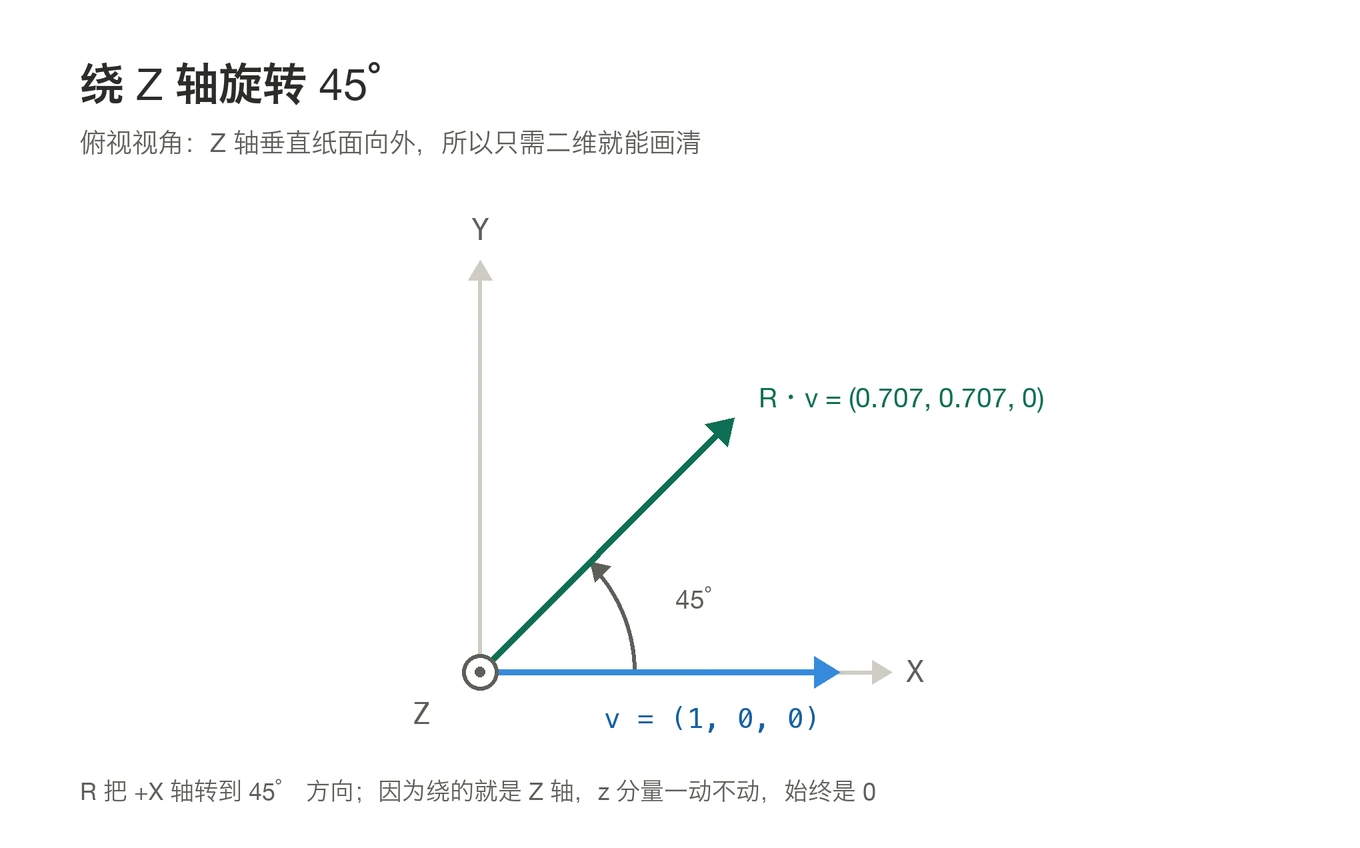
transpose()is there so the vector prints horizontally. Eigen vectors are column vectors by default, socout << vprints one number per line.
3. Euler angles: mind the order, and the trap
1
2
Eigen::Vector3d euler_angles = rotation_matrix.eulerAngles(2, 1, 0);  // ZYX
cout << "yaw pitch roll = " << euler_angles.transpose() << endl;
The 2, 1, 0 in eulerAngles is the axis enum order: 0=X, 1=Y, 2=Z. So 2,1,0 means “rotate about Z first, then Y, then X” — the yaw-pitch-roll convention from navigation. The returned Vector3d is ordered accordingly.
Output:
1
yaw pitch roll = 0.785    -0  0
0.785 = π/4, matching the 45° we set. That -0 in the middle is the floating-point sign bit on a zero — don’t let it alarm you.
Two traps here.
First, Euler angles come in 12 orderings (permutations of the six arguments). Aviation favors ZYX, robotics sometimes ZYZ. Get the order wrong and the result is completely different — and nothing errors out; you just get a wrong number that looks plausible.
Second, gimbal lock. When pitch approaches ±90°, yaw and roll collapse into the same degree of freedom and the solution stops being unique. So Euler angles are for human display only — never for storing state, never inside an optimizer.
Worth noting: Eigen 5 deprecates eulerAngles() precisely because its returned range isn’t unique. It still works on 3.4.x, but upgrades will warn.
4. Euclidean transform: Isometry3d
1
2
3
4
Eigen::Isometry3d T = Eigen::Isometry3d::Identity();   // called 3d, actually 4x4
T.rotate(rotation_vector);                             // set rotation
T.pretranslate(Eigen::Vector3d(1, 3, 4));              // set translation
cout << "Transform matrix = \n" << T.matrix() << endl;
Output:
1
2
3
4
5
Transform matrix =
 0.707 -0.707      0      1
 0.707  0.707      0      3
     0      0      1      4
     0      0      0      1
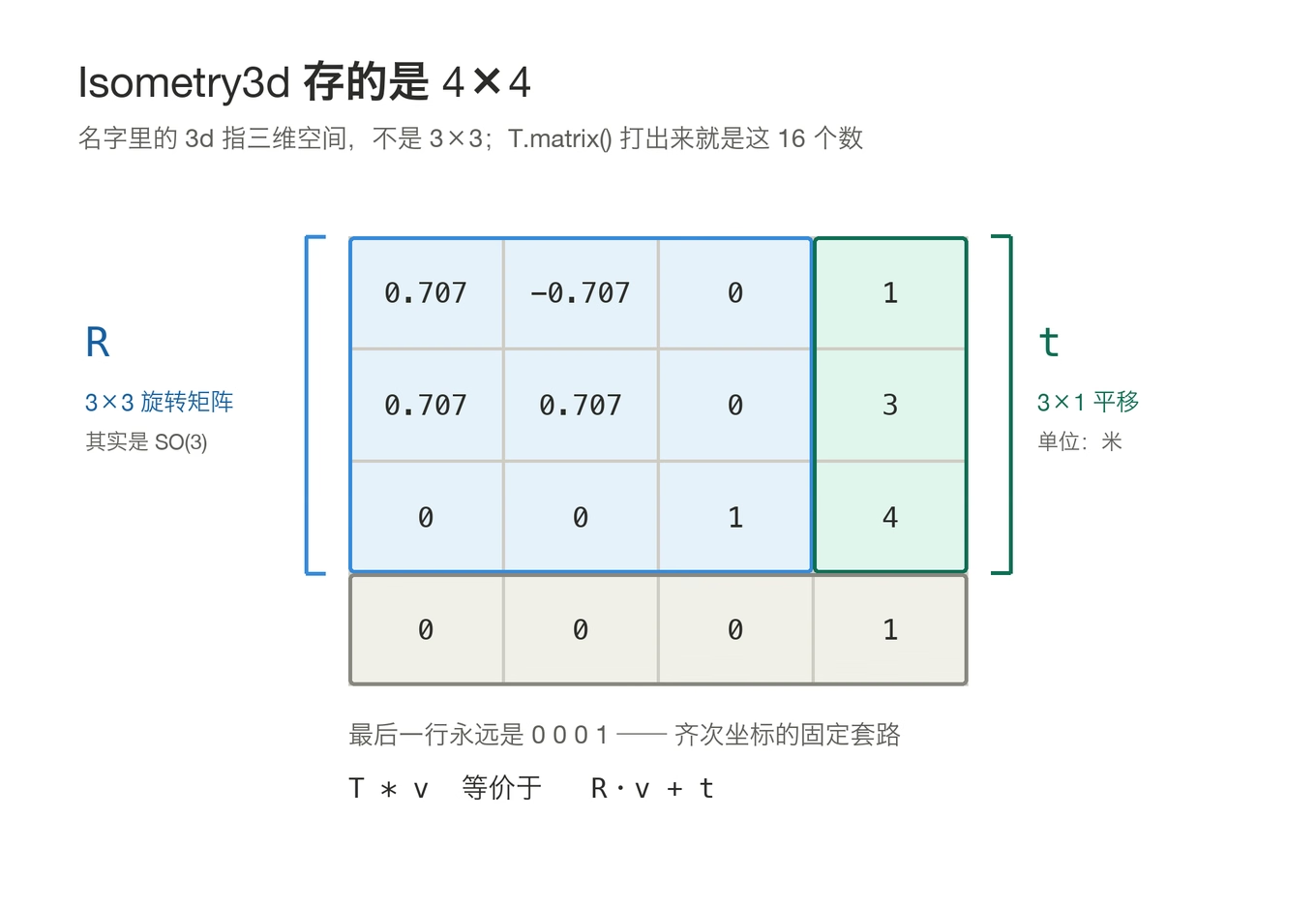
Despite the “3d” in the name, Isometry3d stores a 4×4 matrix — homogeneous coordinates need the extra dimension. It’s a misleading name and catches everyone once. The actual 3×3 rotation sits top-left, translation in the fourth column, last row is 0 0 0 1.
The pretranslate vs translate distinction deserves attention:
translate(t)multiplies on the right,T = T * Translation(t)— the translation is interpreted in the current framepretranslate(t)multiplies on the left,T = Translation(t) * T— the translation is interpreted in the world frame
The book uses pretranslate starting from identity, so the two behave identically and the difference is invisible. But rotate first and then pretranslate, and your translation gets added in world coordinates — one of the easiest mistakes to make here.
Applying the transform:
1
2
Eigen::Vector3d v_transformed = T * v;   // equivalent to R*v + t
cout << "v tranformed = " << v_transformed.transpose() << endl;
1
v tranformed = 1.71 3.71    4
Check: R*v = (0.707, 0.707, 0), plus t = (1, 3, 4) gives (1.707, 3.707, 4). Correct.
(The book misspells “transformed” as “tranformed” in that string — the output really does read that way; I’m not the one typoing.)
Affine and projective transforms use Eigen::Affine3d and Eigen::Projective3d; the book skips them.
5. Quaternions: coeffs() order is a real trap
1
2
3
4
5
Eigen::Quaterniond q = Eigen::Quaterniond(rotation_vector);
cout << "quaternion = \n" << q.coeffs() << endl;

q = Eigen::Quaterniond(rotation_matrix);   // also constructible from a rotation matrix
cout << "quaternion = \n" << q.coeffs() << endl;
Both print the same:
1
2
3
4
5
quaternion =
    0
    0
0.383
0.924
coeffs() stores (x, y, z, w) — the real part w comes last. That’s the reverse of the textbook convention q = w + xi + yj + zk (real part first), and different from plenty of papers and libraries. Seeing 0.924 in the final slot, it’s easy to think something went wrong.
Verify: rotating 45° about Z gives (cos22.5°, 0, 0, sin22.5°) in (w,x,y,z) order, i.e. w=0.924, z=0.383. And coeffs() returns (0, 0, 0.383, 0.924) — x=y=0, z=0.383, w=0.924. Correct.
If you need the textbook ordering, read q.w(), q.x(), q.y(), q.z() individually rather than copying the memory behind coeffs().
Rotating a vector:
1
2
v_rotated = q * v;   // mathematically q v q^{-1}
cout << "(1,0,0) after rotation = " << v_rotated.transpose() << endl;
1
(1,0,0) after rotation = 0.707 0.707     0
Eigen overloads * and handles q v q^{-1} internally. But only unit quaternions represent pure rotation, so q.normalize() beforehand is wise (those built from AngleAxis or a rotation matrix are already unit).
6. Converting between the four representations
Worth copying out:
1
2
3
4
5
6
7
8
9
10
11
12
13
14
15
// rotation vector -> rotation matrix
Matrix3d R = angle_axis.toRotationMatrix();
Matrix3d R2 = angle_axis.matrix();

// rotation matrix -> rotation vector / quaternion / euler angles
AngleAxisd aa(R);
Quaterniond q(R);
Vector3d euler = R.eulerAngles(2, 1, 0);

// rotation matrix <-> quaternion
Matrix3d R3 = q.toRotationMatrix();
Quaterniond q2(R3);

// quaternion -> rotation vector
AngleAxisd aa2(q2);
Eigen’s constructors accept nearly any representation, which makes conversion painless. Every conversion costs precision and carries singularity risk — Euler angles especially. Avoid them where you can.
Traps, collected
After writing both parts, here’s my checklist:
| Trap | Symptom | Fix |
|---|---|---|
Mixing float / double | a wall of template errors | .cast<double>() |
A.inverse() * b for a linear system | slow and numerically unstable | A.xxx().solve(b) |
Passing a non-symmetric matrix to SelfAdjointEigenSolver | meaningless results (may not even error) | pass A^T A or a covariance matrix |
coeffs() ordering | assuming w comes first | order is (x,y,z,w), w last |
Isometry3d size | assuming a 3×3 | it’s a 4×4 homogeneous matrix |
pretranslate vs translate | translation goes the wrong way | pre is left-multiply (world frame), the other is right (current frame) |
| Wrong Euler order | plausible-looking but wrong numbers | state eulerAngles(2,1,0) and comment the convention |
cout << on a vector | prints one number per line | .transpose() |
Thinking Random() differs each run | two runs match, so you assume it didn’t rebuild | the sequence is fixed without a seed; only the timings move |
| Compiles in the shell, red in CLion | you think the code is wrong | the env var only reaches terminal processes; in an IDE use CMake’s include_directories |
Three more that are macOS-specific:
- CMake 4.x dropped
cmake_minimum_required(VERSION 2.8), so everyCMakeLists.txtin the book must become3.10, otherwise you getCompatibility with CMake < 3.5 has been removed - AppleClang rejects literals like
1e-4d(thedsuffix is a GCC extension). Lecture 4’suseSophus.cpphas one and fails withinvalid suffix 'd' on floating constant; change it to1e-4 find_package(Eigen3)without a version silently resolves to Homebrew’s Eigen 5.0.1 — no error, buteulerAngles()turns deprecated immediately. Writefind_package(Eigen3 3.4 REQUIRED)and setCMAKE_PREFIX_PATHaccordingly
How this connects to SLAM
Only after running both examples did I understand why the book starts here.
Lecture 3 looks like API practice, but it’s really laying out the vocabulary for everything that follows:
- Lecture 4 brings in Sophus.
Sophus::SO3d/SE3dwrapEigen::Matrix3dandEigen::Quaterniond;log()/exp()map to Lie algebra vectors (Eigen::Matrix<double,6,1>) - Lecture 6 on nonlinear optimization: error terms, Jacobians, the normal equations
H Δx = b—Handbare Eigen matrices, solved with the.ldlt().solve()we just saw - Lectures 7, 8 and 13 — feature-based methods, direct methods, dense mapping — all revolve around
SE3transforms and Eigen arithmetic - g2o and Ceres take Eigen types for parameter blocks, vertex estimates, and information matrices
So I treat this page as a dictionary. When I forget an API mid-code, I search here.
My environment, for the record
| Component | Version | Note |
|---|---|---|
| Eigen | 3.4.1 | brew install eigen@3, keg-only |
| OS | macOS (Apple Silicon, M4) | AppleClang |
| Compiler | AppleClang 21.0 | bundled with Xcode |
| CMake | 4.4.4 | note: no more 2.8 support |
Later lectures need Sophus, OpenCV, g2o, Ceres, PCL and Pangolin, where the version-matching traps multiply. That deserves its own post.
Where the code lives
1
2
slambook/ch3/useEigen/eigenMatrix.cpp       ← part one
slambook/ch3/useGeometry/eigenGeometry.cpp  ← part two
To run:
1
2
cd slambook/ch3/useEigen && mkdir -p build && cd build && cmake .. && make -j8 && ./eigenMatrix
cd slambook/ch3/useGeometry && mkdir -p build && cd build && cmake .. && make -j8 && ./eigenGeometry
In CLion you type none of that. File → Open the folder, pick the target in the top-right dropdown, click the green triangle.
Closing
There isn’t much material in this lecture, but it’s dense. Watching the video I felt like I understood it; typing it out revealed that details like the position of pretranslate and the ordering of coeffs() are all traps.
Which is exactly why writing it down is worth the effort — not to teach anyone, but so that three months from now I can still make sense of it.
Next up: lecture 4, Sophus and Lie algebras. That’s where it starts to hurt.