
Preface
In iOS 11, Apple made a change that drew the attention of many developers
Unique identifiers such as UDID stored in the system keychain are deleted when the app is uninstalled
This issue has been debated on Weibo for days
DCDevice: the new device identifier in iOS 11
Introducing the API
Let’s first take a look at what the DCDevice class offers
1
2
3
4
5
6
7
8
9
10
11
12
13
14
15
16
17
18
19
#import <DeviceCheck/DeviceCheck.h>

NS_ASSUME_NONNULL_BEGIN

API_AVAILABLE(ios(11.0), tvos(11.0)) API_UNAVAILABLE(watchos, macos)
@interface DCDevice : NSObject
// The current device
@property (class, readonly) DCDevice *currentDevice;

// Whether it is supported
@property (getter=isSupported, readonly) BOOL supported;

// Generate a unique token. Note: a new token is generated on every call (different from the previous one)
- (void)generateTokenWithCompletionHandler:(void(^)(NSData * _Nullable token, NSError * _Nullable error))completion;

@end

NS_ASSUME_NONNULL_END
The interface couldn’t be simpler: create an instance and call the method
Using the API
Let’s look at how to use DCDevice
Import the header file
1
#import <DeviceCheck/DeviceCheck.h>
Check whether it is supported. If supported, a token (NSData) will be returned in the completion handler
1
2
3
4
5
6
7
8
9
10
11
- (void)viewDidLoad {
    [super viewDidLoad];

    // The code below is the invocation
    if([DCDevice currentDevice].supported){
        [[DCDevice currentDevice] generateTokenWithCompletionHandler:^(NSData * _Nullable token, NSError * _Nullable error) {
            NSLog(@"%@",token);
        }];
    }
}
The token is a 2188-byte (a bit over 2 KB) binary stream — quite small
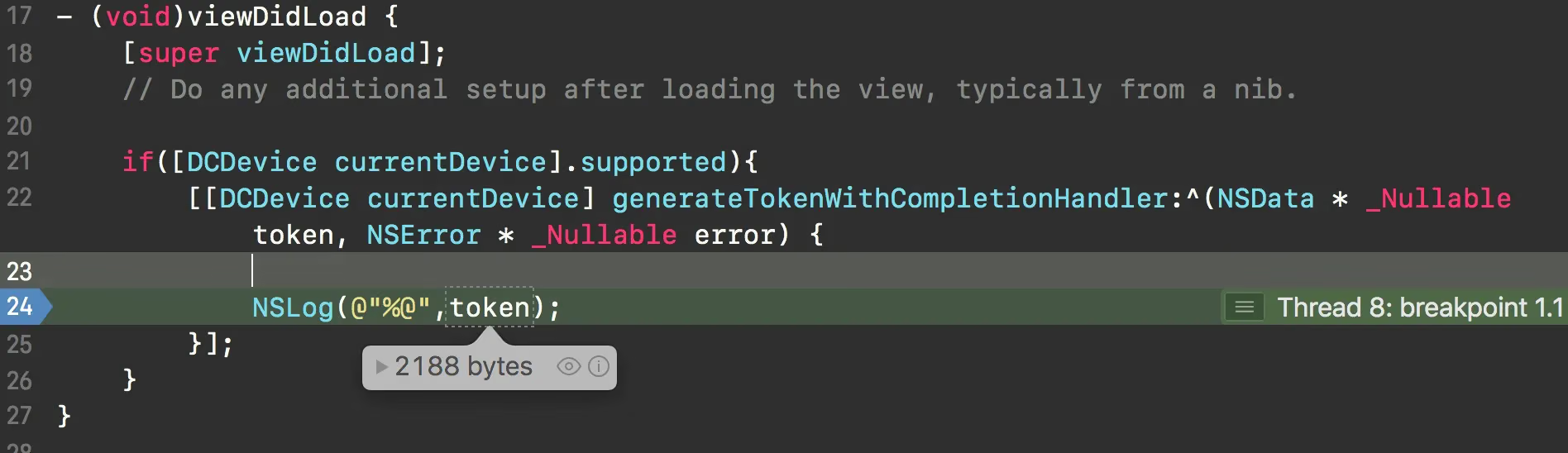
I tried various string encodings and still couldn’t figure out what’s inside, nor print it out successfully
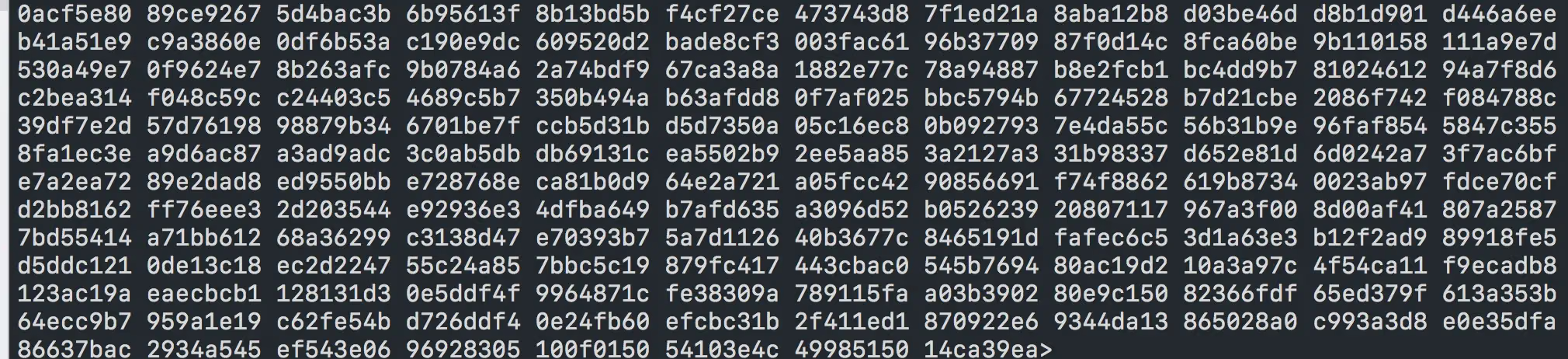
If anyone manages to print it out, please share
What about deleting/reinstalling the app
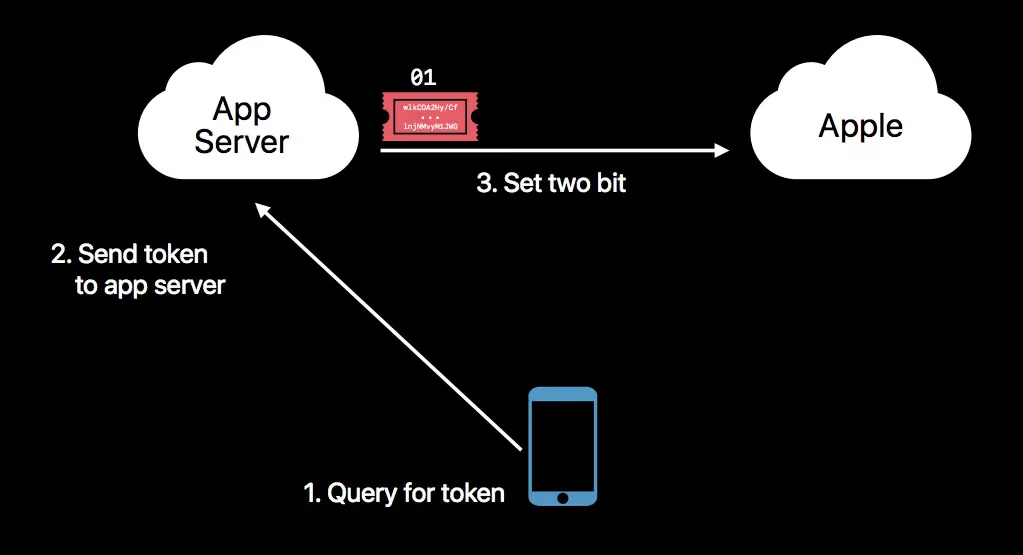
DeviceCheck allows you to communicate with Apple’s servers through your own server, and store about 2 KB of data for a single device. On the device, use the DeviceCheck API to generate a 2-bit token (00, 01, 10, 11), then send this token to your own server, which communicates with Apple’s API to update or query the device’s value. These two bits of data are used to track users. For example, with these two bits of data, you can tell how long the user has actually used the app. This API can be applied in areas such as anti-fraud: 7-day trial period Preventing Uber or Didi drivers who were banned from re-registering an account to accept orders Whether the user has already claimed the first-registration red packet bonus Preventing multiple instances of an app Because it transmits flag-level data and does not pinpoint the user of the device, it is relatively safe.
However, for scenarios where users buy second-hand phones, there may be some edge cases that also need to be considered in your business.
Quoted from Practical iOS 11 development tips
First, we need to understand who our token should be sent to
- The token needs to be sent to our own company’s
serverfor record-keeping - Our company’s
serverqueriesApple’sserverto check whether thetokenis valid, in order to update or query the device’s value. - The
~2 KB tokenwill not be deleted when the app is uninstalled from the device; it will persist on Apple’s server. (Actually, I think it’s just the device’s unique identifier that Apple obtains on its own.)
So, how do we query and update it?
Query interface
https://api.development.devicecheck.apple.com/v1/query_two_bits
You can simulate it in the terminal yourself, treating your terminal as your own server accessing Apple’s server
1
2
3
4
curl -i --verbose -H "Authorization: Bearer <GeneratedJWT>" \
-X POST --data-binary @ValidQueryRequest.json \
https://api.development.devicecheck.apple.com/v1/query_two_bits
Here’s the JSON definition:
| Field Key | Type | Description | Required |
|---|---|---|---|
| device_token | String | Device unique identifier token | Yes |
| transaction_id | String | An ID generated by the server | Yes |
| timestamp | Long | UTC timestamp generated by the server | Yes |
It returns the following format
1
2
3
4
5
{
   "device_token" : "wlkCDA2Hy/CfrMqVAShs1BAR/0sAiuRIUm5jQg0a..."
   "transaction_id" : "5b737ca6-a4c7-488e-b928-8452960c4be9",
   "timestamp" : 1487716472000
}
Update interface
https://api.development.devicecheck.apple.com/v1/update_two_bits
1
2
3
curl -i --verbose -H "Authorization: Bearer <GeneratedJWT>" \
-X POST --data-binary @ValidUpdateRequest.json \
https://api.development.devicecheck.apple.com/v1/update_two_bits
Here’s the JSON definition:
| Field Key | Type | Description | Required |
|---|---|---|---|
| device_token | String | Device unique identifier token | Yes |
| transaction_id | String | An ID generated by the server | Yes |
| timestamp | Long | UTC timestamp generated by the server | Yes |
| bit0 | Boolean | New boolean value 1 | No |
| bit1 | Boolean | New boolean value 2 | No |
JSON example:
1
2
3
4
5
6
7
{
   "device_token" : "wlkCDA2Hy/CfrMqVAShs1BAR/0sAiuRIUm5jQg0a..."
   "transaction_id" : "5b737ca6-a4c7-488e-b928-8452960c4be9",
   "timestamp" : 1487716472000,
   "bit0" : true,
   "bit1" : false
}
Final solution
- For versions before iOS 11, temporarily keep using approaches like UUID stored in the keychain
- For iOS 11, try to adopt the new API to adapt and solve the problem
For the server, you can treat the token as a new associated field — for example, how many devices are logged in under one account
Then, under one UID, you would attach the iOS version + token
I believe that before long, a mature token-based solution will stand out
If there are any mistakes in this article, please feel free to point them out
The End