

Preface
This post carries strong personal opinions; if reading it makes you uncomfortable, please close it right away. This article is only for my personal study notes. You’re welcome to repost or share it within the scope of the license — please respect the copyright and keep the original link. Thank you for your understanding and cooperation. If you find this site helpful, you can subscribe via RSS. Thanks for your support!
Background
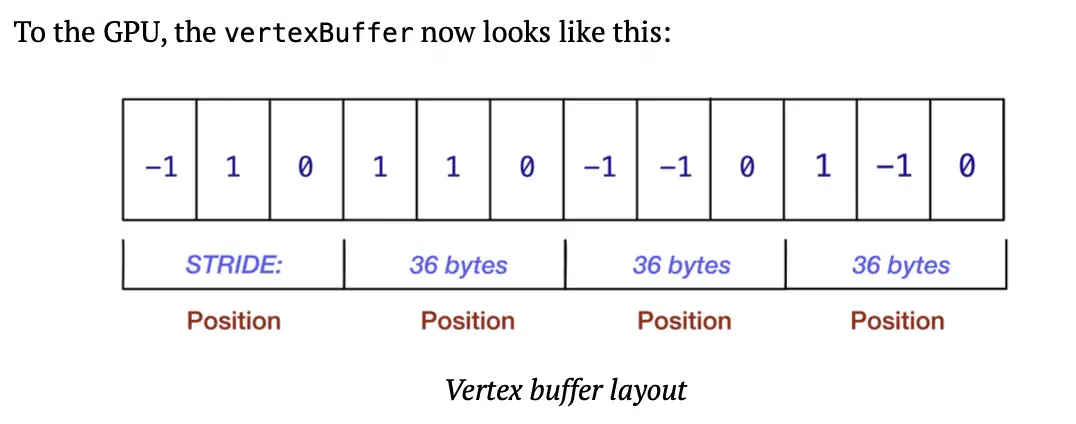
While studying “Metal.by.Tutorials.4th.2023.12” in 2024, the book mentioned the memory layout of Swift struct instances, so I put these notes together.
Size, Stride, Alignment
The basics of the memory layout of Swift struct instances
March 12, 2018 ∙ Swift Internals ∙ By Greg Heo
When working with Swift types in memory, there are three properties to consider: size, stride, and alignment.
Size
Let’s illustrate with two structs:
1
2
3
4
5
6
7
8
struct Year {
  let year: Int
}

struct YearWithMonth {
  let year: Int
  let month: Int
}
My intuition says an instance of YearWithMonth is bigger than an instance of Year — it takes up more space in memory. But we’re scientists; how do we verify intuition with hard data?
Memory Layout
We can use the MemoryLayout type to inspect some properties of our types in memory.
To find the size of a struct, use the size property with a generic parameter:
1
let size = MemoryLayout<Year>.size
If you have an instance of a type, use the size(ofValue:) static function:
1
2
let instance = Year(year: 1984)
let size = MemoryLayout.size(ofValue: instance)
In both cases, the size is reported as 8 bytes.
Unsurprisingly, the size of our struct YearWithMonth is 16 bytes.
Back to Size
The size of a struct seems straightforward — add up the size of each property. For a struct like this:
1
2
3
4
struct Puppy {
  let age: Int
  let isTrained: Bool
}
the size of the struct should match the sizes of its properties:
1
2
3
4
5
MemoryLayout<Int>.size + MemoryLayout<Bool>.size
// returns 9, from 8 + 1

MemoryLayout<Puppy>.size
// returns 9
Looks fine! [Aside: is it really? 😈]
Stride
Stride becomes important when you’re working with multiple instances in a single buffer, like an array.
If we had a contiguous array of puppies, each 9 bytes in size, what would that look like in memory?
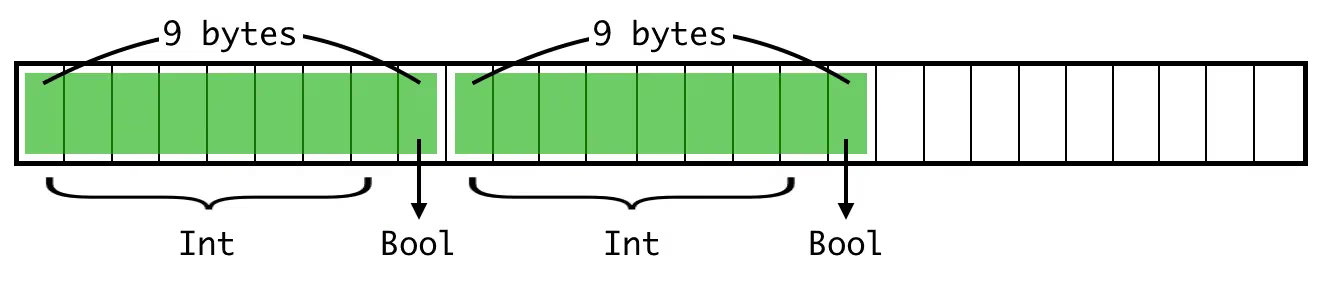
Turns out, not like that. ❌
The stride determines the distance between two elements, and it’s usually greater than or equal to the size.
1
2
3
4
5
MemoryLayout<Puppy>.size
// returns 9

MemoryLayout<Puppy>.stride
// returns 16
So the actual layout looks like this:
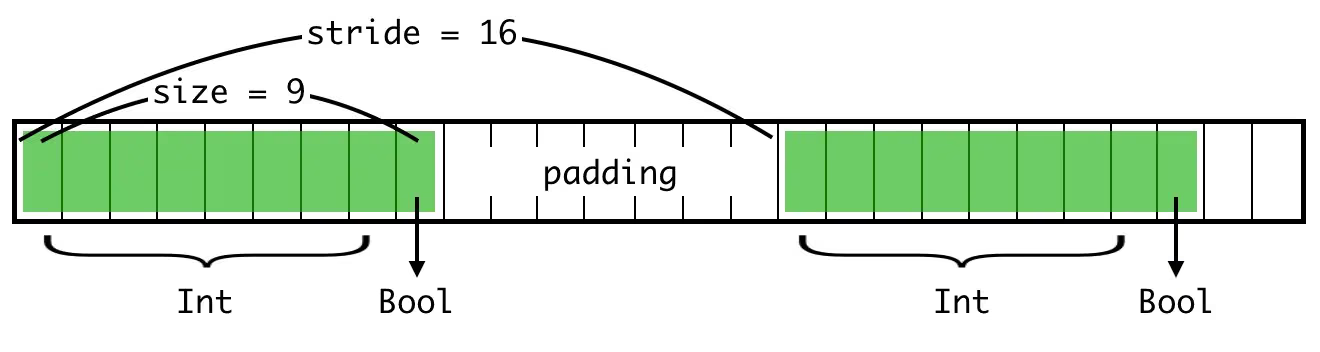
In other words, if you have a byte pointer to the first element and want to move to the second, the stride is how many bytes you need to advance the pointer.
Why would the size and stride differ? That brings us to the last magic number of memory layout.
Alignment
Imagine a computer that fetches memory 8 bits (that is, 1 byte) at a time. Fetching byte 1 or byte 7 takes the same amount of time.
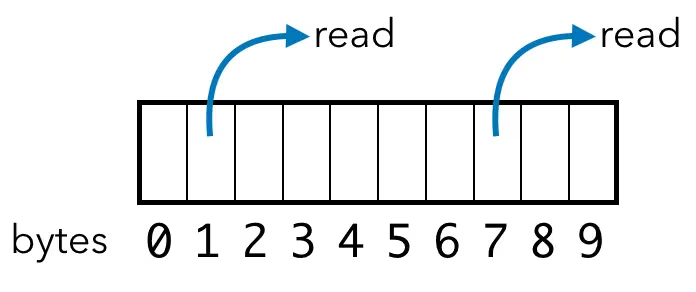
Then you upgrade to a 16-bit computer that accesses data in 16-bit words. You still have some old software that wants to access data byte-by-byte, but imagine the magic that could happen here: if the software asks for byte 0 and byte 1, the computer can now access word 0 in one go, then split the 16-bit result.
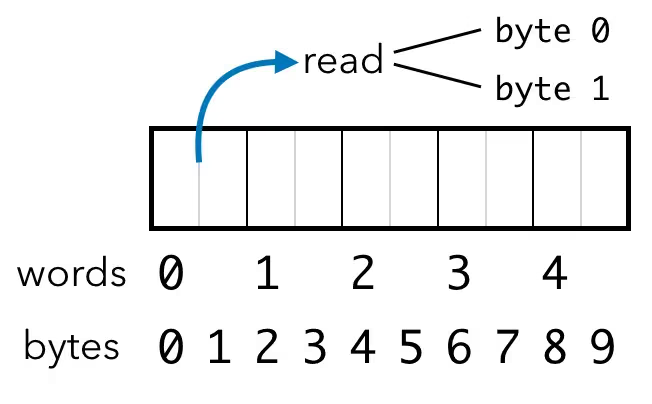
In this ideal world, byte-wise memory access is twice as fast! 🎉
Now imagine a misbehaving program puts a 16-bit value in like this:
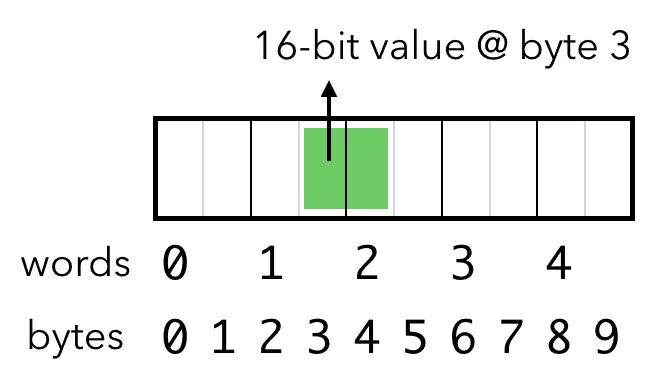
Then you ask the computer to read a 16-bit word starting at byte position 3. The problem is, this value is misaligned. To read it, the computer has to read the word at position 1, cut it in half, read the word at position 2, cut that in half, and stitch the halves together. That means accessing one 16-bit value takes two separate 16-bit memory reads — twice as slow as it should be! 😭
On some systems, misaligned access isn’t just slow — it’s outright not allowed, and it will crash your program.
Simple Swift Types
In Swift, the alignment of simple types like Int and Double is the same as their size. A 32-bit (4-byte) integer has a size of 4 bytes and needs to be aligned to 4 bytes.
1
2
3
4
5
6
MemoryLayout<Int32>.size
// returns 4
MemoryLayout<Int32>.alignment
// returns 4
MemoryLayout<Int32>.stride
// returns 4
The stride is also 4, which means values in a contiguous buffer are 4 bytes apart. No padding needed.
Compound Types
Now back to our Puppy struct, which has an Int property and a Bool property. Consider again the case where values sit right next to each other in a buffer:
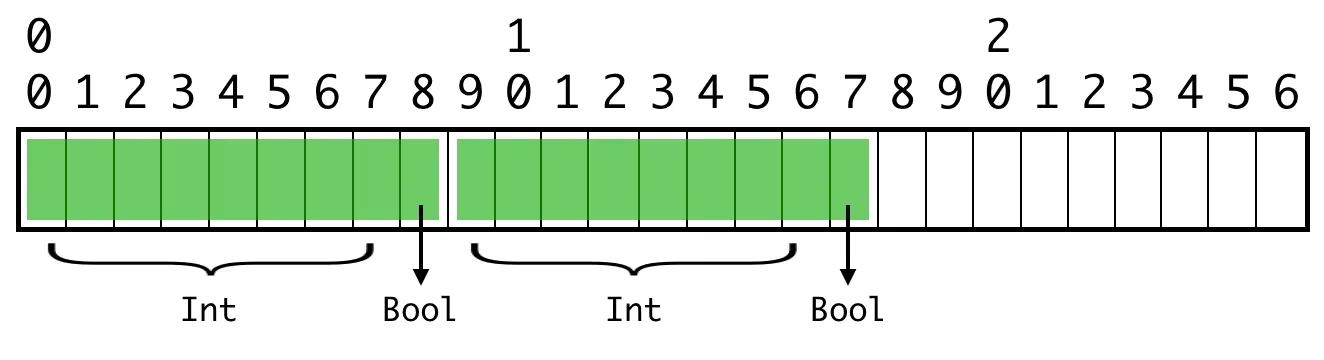
The position of the Bool values is no problem, since their alignment is 1 (alignment=1). But the second integer is misaligned. It’s a 64-bit (8-byte) value with an alignment of 8 (alignment=8), and its byte position isn’t a multiple of 8. ❌
Remember, the stride of this type is 16, so the buffer actually looks like this:
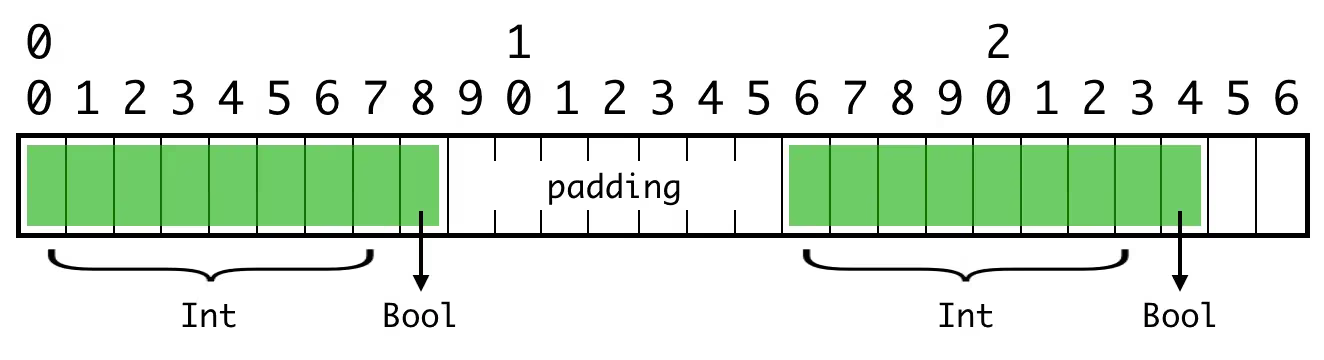
We preserve the alignment requirements of all the values inside the struct: the second integer sits at byte 16, a multiple of 8.
That’s why a struct’s stride can be larger than its size: enough padding is added to satisfy alignment requirements.
Computing Alignment
So, at the end of our journey, what’s the alignment of the Puppy struct type?
1
2
MemoryLayout<Puppy>.alignment
// returns 8
The alignment of a struct type is the largest alignment among all its properties. Between Int and Bool, Int has the larger alignment of 8, so the struct uses that.
The stride, then, is the size rounded up to the next multiple of the alignment. In our case:
- The size is 9
- 9 is not a multiple of 8
- The next multiple of 8 after 9 is 16
- So the stride is 16
One Last Complication
Consider our original Puppy and compare it with AlternatePuppy:
1
2
3
4
5
6
7
8
9
10
struct Puppy {
  let age: Int
  let isTrained: Bool
} // Int, Bool

struct AlternatePuppy {
  let isTrained: Bool
  let age: Int
} // Bool, Int
The AlternatePuppy struct still has an alignment of 8 and a stride of 16, but:
1
2
MemoryLayout<AlternatePuppy>.size
// returns 16
What?! We only changed the order of the properties. Why is the size different now? It should still be 9, right? A boolean followed by an integer, like this:
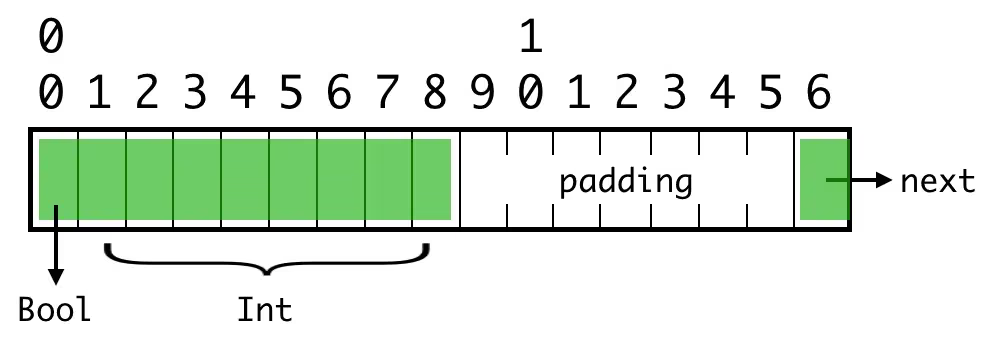
Maybe you can see the problem: the 8-byte integer is no longer aligned! It actually looks like this in memory:
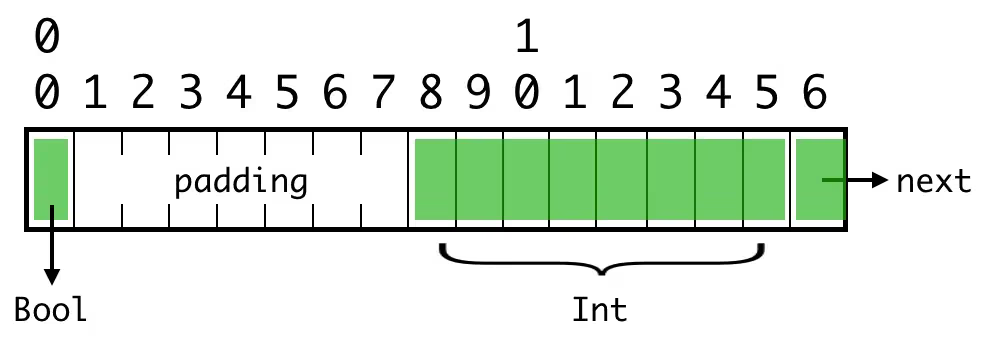
The struct itself must be aligned, and the properties inside the struct must also stay aligned. Padding bytes get inserted between elements, and the overall size of the struct grows accordingly.
In this case the stride is still 16, so the real change from Puppy to AlternatePuppy is the position of the padding bytes. What about these structs?
1
2
3
4
5
6
7
8
9
10
11
struct CertifiedPuppy1 {
  let age: Int
  let isTrained: Bool
  let isCertified: Bool
} // Int, Bool, Bool

struct CertifiedPuppy2 {
  let isTrained: Bool
  let age: Int
  let isCertified: Bool
} // Bool, Int, Bool
What are the size, stride, and alignment of these two structs? 🤔 (Hint.)
Closing Brace
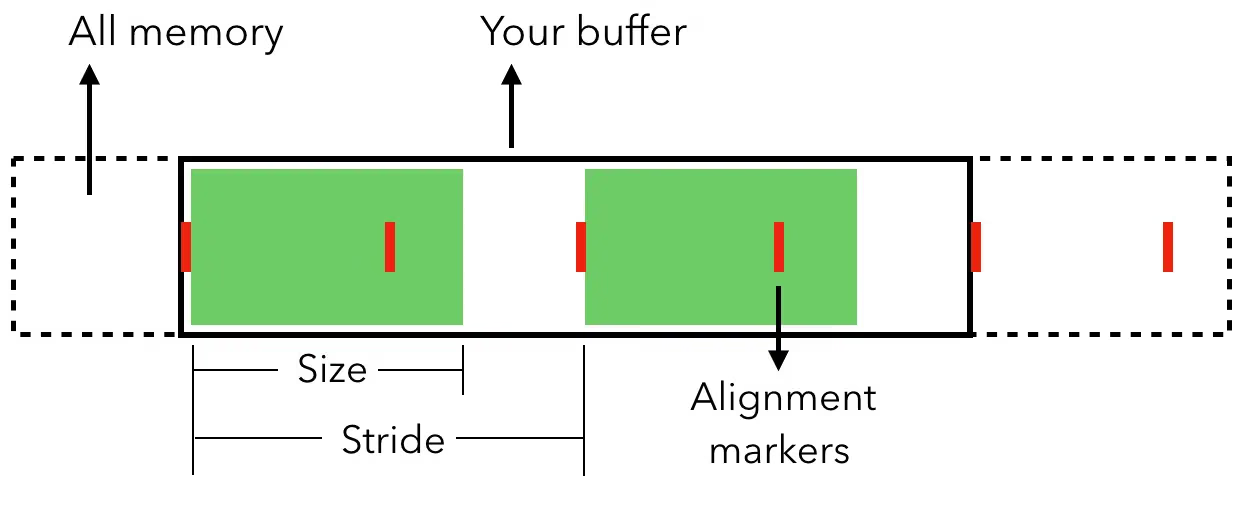
Say you have an UnsafeRawPointer (the equivalent of void * in C). You know the type it points to. What role do size, stride, and alignment play here?
- Size: the number of bytes to read from the pointer to get all the data.
- Stride: the number of bytes to move forward to get to the next item in the buffer.
- Alignment: the “divisible by” number that each instance must sit at. If you’re allocating memory to copy data into, you need to specify the correct alignment (for example:
allocate(byteCount: 100, alignment: 4)).
For most of us, most of the time, we work with high-level collections like arrays and sets and don’t need to think about the memory layout underneath.
In other cases, you might need to use low-level APIs on the platform, or interoperate with C code. If you have an array of Swift structs and need C code to read it (or vice versa), then you need to worry about allocating buffers with the correct alignment, ensuring the padding bytes inside the structs line up, and making sure you have the right stride values so the data is interpreted correctly.
As we’ve seen, even computing the size isn’t as simple as it looks — there’s an interplay between the sizes and alignments of each property that determines the overall size of the struct. So understanding all three means you’re on your way to becoming a master of memory management.
Interested in going deeper?
- “Data structure alignment” on Wikipedia
- The “Type Layout” article in the Swift docs, which explains how the size, stride, and alignment of a struct are computed.
- The
getAlignOfsource in LLVM - Swift’s
UnsafeMutableRawPointer.allocate(byteCount:alignment:), which takes size and alignment parameters)
Summary
When getting started with Metal, you need to manipulate memory with Swift types. My understanding of type memory layout and alignment in Swift wasn’t very clear, so I put this article together — hope it helps you too.
Original article: The basics on the memory layout of Swift struct instances.