
Preface
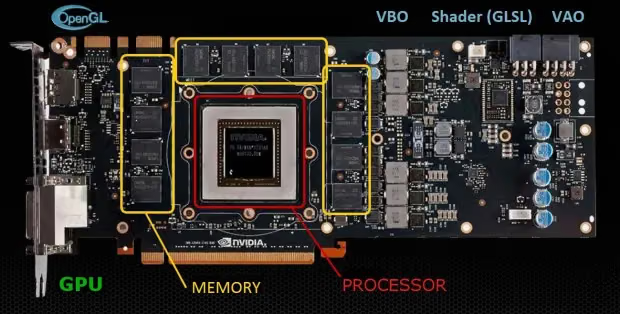
I’ve been studying OpenGL recently and got battered by all kinds of unfamiliar terminology, so I’m recording some learning points for reference and study.
What is GLSL?
GLSL (OpenGL Shading Language) is OpenGL’s shader language — a pure computer language that deals directly with the GPU. It can be understood as a variant of C specifically designed for OpenGL programming, without support for pointers and some other C features. (Terminology: Shader)
GPU is a multi-threaded parallel processor, and GLSL is directly oriented towards the Single Instruction, Multiple Data (SIMD) model of multi-threaded computation. Shader functions written in GLSL are executed simultaneously on each piece of data. Each vertex is processed by the algorithm in the vertex shader, and each pixel is processed by the algorithm in the fragment shader (also called fragment shader). When beginners write their own shaders, they need to consider the concurrent nature of SIMD and think in terms of parallel computation. This is GLSL.
The most common usage pattern is to generate the needed values in the vertex shader, then pass them to the fragment shader for use.
What GLSL Can Do
- Increasingly realistic materials — metal, rock, wood, paint, etc.
- Increasingly realistic lighting effects — area lights and soft shadows
- Non-photorealistic materials — artistic effects, pen and ink, ink wash, and simulation of illustration techniques
- New uses for texture memory
- Fewer texture accesses
- Image processing — selection, edge sharpening masking and complex blending
- Animation effects — keyframe interpolation, particle systems
- User-programmable anti-aliasing methods
GLSL Notes
- GLSL supports function overloading (i.e., a parent class defines a method, and a subclass overrides it — this is called overloading)
- GLSL does not have automatic type promotion (i.e., no automatic type upcasting, e.g., float to double). Types must strictly match.
- GLSL does not support pointers, strings, or characters. It is fundamentally a language for processing numeric data
**GLSL does not support unions (union), enumerated types (enum), struct bit fields (» or « left/right shift), or bitwise operators ( or & bitwise AND)** (this removes troublesome C operations, making it more purely for processing graphics data)
GLSL Data Types
GLSL has three basic data types:
- float
- int
- double
- Arrays[] or structs composed of float, int, double
1
2
3
4
42   // Decimal
042  // Octal
0x2A // Hexadecimal
**Note: GLSL does not support pointers. GLSL treats vectors and matrices as basic data types**
Vector (vector): a line segment with a starting position and direction, also called a vector (don’t be intimidated by these terms — I remember learning about vectors in high school math).
Vectors
Vectors can perform addition, subtraction, multiplication, and division with scalars and even matrices (must follow certain rules, otherwise it will cause errors)
1
2
3
vec2,  vec3,  vec4  // Vectors containing 2/3/4 floats (float type)
ivec2, ivec3, ivec4 // Vectors containing 2/3/4 integers (integer type, the 'i' prefix stands for integer)
bvec2, bvec3, bvec4 // Vectors containing 2/3/4 booleans (bool, self-explanatory)
Those are the GLSL data types. Simply put, vec+number represents an array with that many elements (they’re all between vec2~vec4; I’ve never seen vec5 or above, or anything below vec2 — this probably represents the number of coordinate dimensions). The default element type is float; the i prefix means integer, and b means bool.
How to declare and use vec?
1
2
3
4
5
6
vec3 v; 	 // Declare a 3-dimensional float vector v
v[1] = 3.0;  // Assign a value to the second element of vector v (arrays are 0-indexed, so index 1 is the second element)

// The following two are equivalent
vec3 v = vec3(0.6); // The array is contiguous memory, equivalent to all other elements being filled with 0.6
vec3 v = vec3(0.6,0.6,0.6);
Note: In addition to indexing, you can also use the swizzle operator to access vector components. The swizzle operator uses conventional lowercase Latin letter names for each element of the vector (up to 4). Depending on what the vector represents, you can use the following swizzle operators:
- For vertices: (x, y, z, w) (coordinate system)
- For colors: (r, g, b, a) (color values with alpha)
- For texture coordinates: (s, t, p, q)
Any of the three can be used interchangeably — they all have the same effect. So ifvis a vector, then: v[0]v.xv.rv.s
all refer to the first element of vector v.
For example:
1
2
3
4
5
6
// Declare and initialize a 4-dimensional float vector using a constructor
vec4 v1 = vec4(1.0, 2.0, 3.0, 4.0);
vec4 v2;
v2.xy=v1.yz;  // Copy the second and third elements of v1 to the first and second elements of v2
v2.z=2.0;  	  // Assign a value to the third element of v2
v2.xy=v1.yx;  // Swap the first two elements of v1, then copy to the first two elements of v2
Matrix
The following types for matrices all start with mat
mat2represents a 2x2 matrixmat3represents a 3x3 matrixmat4represents a 4x4 matrix
Note: Matrices are organized in column-major order, columns first
As in the following code:
1
2
3
4
5
6
7
mat4 m;		 // Declare a 4-dimensional float square matrix m
m[2][3]=2.0; // Assign a value to the element at column 3, row 4 of the matrix

// The following two are equivalent, initializing the matrix diagonal
mat2 m = mat2(1.0)
mat2 m = mat2(1.0, 0.0, 0.0, 1.0);
Sampler
Texture lookup requires specifying which texture or texture unit to use for the lookup.
1
2
3
4
5
6
sampler1D        // Access a 1D texture
sampler2D        // Access a 2D texture
sampler3D        // Access a 3D texture
samplerCube      // Access a cube map texture
sampler1DShadow  // Access a 1D depth texture with comparison
sampler2DShadow  // Access a 2D depth texture with comparison
1
2
3
4
uniform sampler2D grass;

vcc2 coord = vec2(100, 100);
vec4 color = texture2D(grass, coord);
If a shader uses multiple textures in a program, you can use a sampler array.
1
2
3
4
5
6
7
const int tex_nums = 4;
uniform sampler2D textures[tex_nums];

for(int i = 0; i < tex_nums; ++i) {
    sampler2D tex = textures[i];
    // todo ...
}
Struct
This is the only user-defined type available
1
2
3
4
5
6
7
struct light
{
    vec3 position;
    vec3 color;
};

light ceiling_light;
Array
Array indices start from 0, and there is no pointer concept
1
2
3
4
5
6
7
8
// Create an array with 10 elements
vec4 points[10];

// Create an array without specifying size
vec4 points[];
points[2] = vec4(1.0);  // points now has size 3
points[7] = vec4(2.0);  // points now has size 8
void
Can only be used to declare function return types
Type Conversion
Type conversion must be done explicitly; there is no automatic type promotion
1
2
float f = 2.3;
bool b = bool(f); // b is true
Qualifiers
GLSL has 4 variable qualifiers that can be used. They define the “scope” in which the marked variable cannot be changed.
constattributeuniformvarying
const: Similar to C++, defines immutable constants. Means the qualified variable cannot be modified at compile time.
attribute: Used by the application to pass values to the vertex shader. Initialization at declaration is not allowed.
The attribute qualifier marks a type of global variable that is read-only in the vertex shader. This variable is used to pass parameters from the OpenGL application to the vertex shader, so this qualifier can only be used in vertex shaders.
1
2
3
4
5
6
7
8
9
10
11
12
13
14
15
16
17
attribute variables can only be used in the vertex shader
They cannot be declared as attribute variables in the fragment shader,
nor can they be used in the fragment shader)
In the application, the function glBindAttribLocation() is generally used to bind
the location of each attribute variable, then the function
glVertexAttribPointer() is used to assign values to each attribute variable.
Here is an example:
uniform mat4 u_matViewProjection;
attribute vec4 a_position;
attribute vec2 a_texCoord0;
varying vec2 v_texCoord;
void main(void)
{
  gl_Position = u_matViewProjection * a_position;
  v_texCoord = a_texCoord0;
}
uniform: Generally used by the application to set initialization values related to the vertex shader and fragment shader. Initialization at declaration is not allowed. The uniform qualifier marks a type of global variable that cannot be changed for a given primitive (primitive). It can receive parameters passed from the OpenGL application.
1
2
3
4
5
6
7
8
9
uniform variables are passed from external programs to the shader.
They are assigned using the glUniform**() function.
They are read-only variables in the shader and cannot be modified by the shader.
uniform variables are generally used to represent: transformation matrices, materials,
lighting parameters, colors, and other information.
uniform mat4 viewProjMatrix; // Projection + view matrix
uniform mat4 viewMatrix;        // View matrix
uniform vec3 lightPosition;     // Light source position
varying: Used to pass values from the vertex shader to the fragment shader. It provides a way to pass data from the vertex shader to the fragment shader. The varying qualifier allows you to define a variable in the vertex shader, then pass it to the rasterizer. The rasterizer interpolates the data and then passes the interpolated value for each fragment to the fragment shader.
1
2
3
4
5
6
7
8
9
10
11
12
13
14
15
16
17
18
19
20
21
22
23
24
25
26
27
28
29
30
31
varying variables are used for data transfer between vertex and fragment shaders.
Generally, the vertex shader modifies the varying variable's value,
then the fragment shader uses that varying variable's value.
Therefore, the declaration of varying variables must be consistent
between the vertex and fragment shaders.
The application cannot use this variable.
Here is an example:
// Vertex shaderuniform
mat4 u_matViewProjection;
attribute vec4 a_position;
attribute vec2 a_texCoord0;
varying vec2 v_texCoord; // Varying in vertex shader
void main(void)
{
  gl_Position = u_matViewProjection * a_position;
  v_texCoord = a_texCoord0;
}
// Fragment shaderprecision
mediump float;
varying vec2 v_texCoord; // Varying in fragment shader
uniform sampler2D s_baseMap;
uniform sampler2D s_lightMap;
void main()
{
  vec4 baseColor;
  vec4 lightColor;
  baseColor = texture2D(s_baseMap, v_texCoord);
  lightColor = texture2D(s_lightMap, v_texCoord);
  gl_FragColor = baseColor * (lightColor + 0.25);
}
Note: These qualifiers are very important
Restrictions
- Variables cannot be declared inside if-else statements
- Conditions used for branching must be of bool type (if, while, for…)
- The two arguments after the (?:) operator must be of the same type
- switch statements are not supported
1
2
3
4
5
6
vec4 toonify(in float intensify)
{
    vec4 color;
    color = vec4(0.8,0.8,0.8,0.8)
    return color;
}
discard
The discard keyword can prevent a fragment from updating the frame buffer. When flow control encounters this keyword, the fragment being processed is marked as discarded.
If you don’t understand what “marked as discarded” means, you can refer to UIView’s drawing process
Functions
- Function names can be overloaded by parameter type, but this is unrelated to return type
- All parameters must match exactly; parameters are not automatically converted
- Functions cannot be called recursively
- Function return values cannot be arrays
Function parameter qualifiers:
in: Parameter copied into the function but not returned (default)out: Parameter not copied into the function but returnedinout: Copied into the function and returned
Swizzle Operations
By listing component names after the selector (.), you can select these components
1
2
3
4
5
6
7
8
9
vec4 v4;
v4.rgba;    // Gets vec4
v4.rgb;     // Gets vec3
v4.b;       // Gets float
v4.xy;      // Gets vec2
v4.xgba;    // Error! Component names are not from the same set

v4.wxyz;    // Scrambles the original component order
v4.xxyy;    // Duplicates components
Finally, I recommend a GLSL editing and debugging tool: OpenGL Shader Builder (Graphics Tools.dmg)
Summary:
Since my memory isn’t great and I sometimes can’t find things, I’ve collected some terminology and concepts with explanations to make it easier for future learners to study.
References:
GLSL基础
End of article