

Preface
This article has a strong personal flavor; if it makes you uncomfortable, please close it right away. This article is only for personal study notes. You’re welcome to repost or share it within the scope of the license agreement, but please respect the copyright and keep the original link. Thank you for your understanding and cooperation. If you find this site helpful, you can subscribe via RSS. Thanks for the support!
In my technical understanding, Cocoapods has become one of the essential skills for every iOS developer. Yet, after all these years, just when I thought it had gone out of style, I found that some people still haven’t fully mastered it. Today I’m going to share the high-level experience I’ve accumulated over the years with peers who aren’t familiar with this tool.
For most software development teams, a dependency management tool is essential. It installs and manages open-source and private dependencies, thereby improving development efficiency and reducing maintenance costs. Different languages and platforms have their own dependency management tools, such as npm for JavaScript, Gradle, Maven for Jar packages, pip for Python packages, Bundler, RubyGems, and more. This article focuses on iOS and explains the usage and some of the principles behind CocoaPods.
CocoaPods — Simple and Easy to Use
For iOS developers, CocoaPods is no stranger — almost every iOS project has it. CocoaPods is built with Ruby and is the dependency management tool for Swift and Objective-C Cocoa projects. On macOS, it’s recommended to install it using the default Ruby (all operations below were done with CocoaPods 1.10.1 and Ruby 2.7.2):
1
sudo gem install cocoapods
If the installation succeeds, you can use the pod commands. For a simple project, you only need three steps to introduce other dependencies:
- Create a Podfile (CocoaPods provides the
pod initcommand to create it)
- Create a Podfile (CocoaPods provides the
- Edit the Podfile, adding the dependency libraries, versions, and other info.
- Run the
pod installcommand in the terminal
- Run the
If all goes well, the following files will appear in the project directory:
- .xcworkspace: CocoaPods splits the project into the main project and the dependency project (Pods). Compared with .xcodeproj, .xcworkspace is more capable of managing multiple projects. You can also convert a large, complex app into multiple sibling projects built with .xcworkspace, making it easier to maintain and share functionality.
- Podfile.lock: records and tracks dependency library versions, locking each dependency to a specific version.
- Pods folder: stores the dependency library code.
- Pods/Manifest.lock: a copy of
Podfile.lockcreated on everypod install, used to compare the two files. Generally, Podfile.lock is checked into version control, while the Pods folder is not; this means Podfile.lock represents the library version info the project should depend on, while Manifest.lock represents the dependency library version info of the local Pods. Afterpod install, a script named[CP] Check Pods Manifest.lockis inserted into Build Phases, ensuring developers update Pods before running the app so the code is up to date.
pod install vs. pod update
pod install: use it every time you edit the Podfile to add, update, or remove a pod. It downloads and installs the new pod and writes its version info into Podfile.lock.pod outdated: lists all pods that have versionsnewerthan those currently recorded in Podfile.lock.pod update [PODNAME]: CocoaPods looks up thenewerversions of PODNAME and updates the pod to the newest possible version (subject to Podfile constraints). Without PODNAME, it updates every pod to the newest possible version.
In general, use pod install every time you edit the Podfile, and use pod update only when you need to update a particular pod’s version (or all versions). Also, commit the Podfile.lock file instead of the Pods folder to keep all pod versions in sync.
“newer” means a more recent version; it sounds a bit awkward when interpreted in Chinese.
Podfile Syntax Specification
A Podfile describes the target dependencies of one or more Xcode projects. It’s a DSL, and understanding it is an essential step to using CocoaPods well. Below are its relevant syntax specifications:
Root Options
install!: specifies the installation method and options CocoaPods uses when installing the Podfile. For example:
1
2
3
install! 'cocoapods',
         :deterministic_uuids => false,
         :integrate_targets => false
:clean: cleans all files not used by the pod, according to the podspec and the project’s supported platforms. Defaults to true.:deduplicate_targets: whether to deduplicate pod targets. Defaults to true.:deterministic_uuids: whether to generate deterministic UUIDs when creating the pod project. Defaults to true.:integrate_targets: whether to integrate into the user’s project. If false, the Pod is downloaded and installed to theproject_path/Podsdirectory. Defaults to true.:lock_pos_sources: whether to lock the pod’s source files — when Xcode tries to modify them, it prompts to unlock the files. Defaults to true.:warn_for_multiple_pod_sources: whether to warn when multiple sources contain a pod with the same name and version. Defaults to true.:warn_for_unused_master_specs_repo: whether to warn if the master specs repo’s git isn’t explicitly specified. Defaults to true.:share_schemes_for_development_pods: whether to share schemes for pods in development. Defaults to false.:disable_input_output_paths: whether to disable the input/output paths of CocoaPods’ script phases (Copy Frameworks and Copy Resources). Defaults to false.:preserve_pod_file_structure: whether to preserve the file structure of all pods. Defaults to false.:generate_multiple_pod_projects: whether to generate a project for each pod target, generated in thePods/Podsfolder. Defaults to false.:incremental_installation: regenerates only the changed parts of the target and its associated project since the last install. Defaults to false.:skip_pods_project_generation: whether to skip generating Pods.xcodeproj and only perform dependency resolution and downloading. Defaults to false.ensure_bundler!: warns when the bundler version doesn’t match.
1
ensure_bundler! '~> 2.0.0'
Dependencies
pod: specifies the project’s dependency
- Dependency version control:
=,>,>=,<,<=have their literal meanings;~> 0.1.2means the newest version satisfying0.1.2 <= currVersion < 0.2. - Build configurations: by default the dependency is installed in all build configurations, but it can be enabled only in specified build configurations.
- Modular Headers: used to convert a pod into a module to support modules. In Swift, you can then import it directly without relying on a
bridging-header, simplifying how Swift references Objective-C; you can also useuse_modular_headers!to apply this globally. - Source: specifies a source with dependencies, while ignoring the global source.
- Subspecs: all subspecs are installed by default, but you can install only certain subspecs.
- Test Specs: test specs are not installed by default, but they can be installed selectively.
- Local path: to use a pod under development together with its client, you can use path.
- Specify a special or more advanced pod version
1
2
3
4
5
6
7
8
9
10
11
12
13
14
15
16
17
18
19
20
21
# Dependency version control
pod 'Objection', '~> 0.9'
# Build configurations
pod 'PonyDebugger', :configurations => ['Debug', 'Beta']
# Modular Headers
pod 'SSZipArchive', :modular_headers => true
# Source
pod 'PonyDebugger', :source => 'https://github.com/CocoaPods/Specs.git'
# Subspecs
pod 'QueryKit', :subspecs => ['Attribute', 'QuerySet']
# Test Specs
pod 'AFNetworking', :testspecs => ['UnitTests', 'SomeOtherTests']
# Local path
pod 'AFNetworking', :path => '~/Documents/AFNetworking'
# Specify a special or more advanced Pod version
pod 'AFNetworking', :git => 'https://github.com/gowalla/AFNetworking.git', :branch => 'dev'
pod 'AFNetworking', :git => 'https://github.com/gowalla/AFNetworking.git', :tag => '0.7.0'
pod 'AFNetworking', :git => 'https://github.com/gowalla/AFNetworking.git', :commit => '082f8319af'
# Specify a particular podspec
pod 'JSONKit', :podspec => 'https://example.com/JSONKit.podspec'
inherit: sets the current target’s inheritance mode.
:complete inherits all behaviors of the parent target, :none inherits nothing from the parent target, :search_paths inherits only the parent’s search paths.
1
2
3
4
5
target 'App' do
  target 'AppTests' do
    inherit! :search_paths
  end
end
target: corresponds to the target in Xcode; the block contains the target’s dependencies.
By default, a target includes the dependencies defined in the parent target, i.e., inherit! is :complete. Regarding :complete and :search_paths: :complete copies the parent target’s pod copies, while :search_paths only copies the relevant FRAMEWORK_SEARCH_PATHS and HEADER_SEARCH_PATHS. You can verify this by comparing the relevant files under Pods/Target Support Files. It’s generally used in UnitTests to reduce redundant install_framework processes.
1
2
3
4
5
6
7
8
9
10
11
12
13
14
15
target 'ShowsApp' do
  pod 'ShowsKit'
  # Has copies of ShowsKit and ShowTVAuth
  target 'ShowsTV' do
    pod 'ShowTVAuth'
  end
  # Has copies of Specta and Expecta
  # And can access ShowsKit through ShowsApp, which acts as the host app for ShowsTests
  target 'ShowsTests' do
    inherit! :search_paths
    pod 'Specta'
    pod 'Expecta'
  end
end
abstract_target: defines an abstract_target to make dependency inheritance convenient for targets. Before CocoaPods 1.0, this was link_with.
1
2
3
4
5
abstract_target 'Networking' do
  pod 'AlamoFire'
  target 'Networking App 1'
  target 'Networking App 2'
end
abstract: indicates the current target is abstract and won’t be linked to an Xcode target.
script_phase: adds a script phase
After pod install finishes, CocoaPods adds the script to the corresponding target build phases.
1
2
3
4
5
6
7
8
9
10
11
target 'App' do
script_phase {
:name => 'scriptName' # 脚本名称,
        :script => 'echo "nihao"' # 脚本内容,
        :execution_position => :before_compile / :after_compile
        :shell_path => '/usr/bin/ruby' # 脚本路径
        :input_files => ['/input/filePath'], # 输入文件
        :output_files => ['/outpput/filePath'] # 输出文件
}
end
Target configuration
platform: specifies the build platform.
The defaults are iOS 4.3, OSX 10.6, tvOS 9.0 and watchOS 2.0. Before CocoaPods 1.0, this was xcodeproj.
1
2
platform :ios, '4.0'
project: specifies the Xcode project that contains the target. This is generally used when a workspace contains multiple Xcode projects:
1
2
3
4
5
# A target named MyGPSApp can be found in the FastGPS Project
target 'MyGPSApp' do
  project 'FastGPS'
  ...
end
inhibit_all_warnings!: inhibits all warnings. For a single pod, you can use:
1
2
pod 'SSZipArchive', :inhibit_warnings => true
pod 'SSZipArchive', :inhibit_warnings => true
user_modular_headers!: modularizes all pods. For a single pod, you can use:
1
2
3
pod 'SSZipArchive', :modular_headers => true
pod 'SSZipArchive', :modular_headers => false
user_frameworks!: uses frameworks instead of .a static libraries. You can use :linkage to specify whether to use static or dynamic libraries:
1
use_frameworks!:linkage => :dynamic / :static
supports_swift_versions: specifies the Swift version requirements supported by the target definition
1
supports_swift_versions '>= 3.0', '< 4.0'
Workspace
workspace: specifies the Xcode workspace that contains all projects.
Sources
sources: the Podfile searches the specified list of sources. Sources are stored in ~/.cocoapods/repos by default, globally rather than per target definition. When multiple sources contain the same pod, the first source in the search order is preferred. Therefore, when specifying another source, you must explicitly specify the CocoaPods source.
1
2
source 'https://github.com/artsy/Specs.git'
source 'https://github.com/CocoaPods/Specs.git'
Hooks
plugin: specifies the plugins used during installation.
1
2
plugin 'cocoapods-keys', :keyring => 'Eidolon'
plugin 'slather'
pre_install: makes changes after downloading and before installing the Pods.
1
2
3
pre_install do |installer|
  # Do something fancy!
end
pre_integrate: makes changes before the project is written to disk.
1
2
3
pre_integrate do |installer|
  # perform some changes on dependencies
end
post_install: makes final modifications before the generated project is written to disk.
1
2
3
4
5
6
7
8
9
10
post_install do |installer|
    installer.generated_projects.each do |project|
        project.targets.each do |target|
            target.build_configurations.each do |config|
                config.build_settings['IPHONEOS_DEPLOYMENT_TARGET'] = '11.0'
            end
        end
    end
end
post_integrate: makes final changes after the project is written to disk.
1
2
3
post_integrate do |installer|
  # some change after project write to disk
end
podspec Syntax Specification
podspec = pod Specification, meaning pod specification. It’s a Ruby file containing detailed info about a pod’s library versions, such as where to get the source, which files to use, which build settings to apply. It can also be seen as the index file for the entire repository. Understanding it helps a lot in knowing how pod libraries are organized and how they work. The podspec DSL offers great flexibility, and a file can be created with pod spec create.
Root
| Name | Usage | Required |
|---|---|---|
name | The pod name | required |
version | The pod version, following semantic versioning | required |
swift_version | The supported Swift version | |
cocoapods_version | The supported CocoaPods version | |
authors | The name and email of the pod maintainers, separated by “, “ | required |
license | The pod’s license | required |
homepage | The URL of the pod’s homepage | required |
source | The source address, i.e. where the source files are stored, supporting multiple forms of sources | required |
summary | A short description of the pod | required |
prepare_command | A bash script executed after downloading the pod | |
static_framework | Whether to distribute as a static framework | |
deprecated | Whether the library has been deprecated | |
deprecated_in_favor_of | The library name that this one has been deprecated in favor of |
1
2
3
4
5
6
7
8
9
10
11
12
13
14
15
16
17
18
19
20
21
Pod::Spec.new do |s|
  s.name             = 'CustomPod'
  s.version          = '0.1.0'
  s.summary          = 'A short description of CustomPod.'
  s.swift_versions   = ['3.0', '4.0', '4.2']
  s.cocoapods_version  =  '>= 0.36'
  s.author           = { 'nihao' => 'XXXX@qq.com' }
  s.license          = { :type => 'MIT', :file => 'LICENSE' }
  s.homepage         = 'https://github.com/XXX/CustomPod'
# Supported Key
# :git=> :tag, :branch, :commit,:submodules
# :svn=> :folder, :tag,:revision
# :hg=>:revision
# :http=> :flatten, :type, :sha256, :sha1,:headers
  s.source           = { :git => 'https://github.com/XX/CustomPod.git', :tag => s.version.to_s }
  s.prepare_command  =  'ruby build_files.rb'
  s.static_framework = true
  s.deprecated       = true
  s.deprecated_in_favor_of  =  'NewMoreAwesomePod'
end
Platform
platform: the platform supported by the pod. Leaving it empty means the pod supports all platforms. When supporting multiple platforms, deployment_target should be used instead.
1
spec.platform = :osx, '10.8'
deployment_target: allows specifying multiple platforms supported by this pod, with a different deployment target for each platform.
1
2
spec.ios.deployment_target = '6.0'
spec.osx.deployment_target = '10.8'
Build settings
dependency: a dependency on other pods or subspecs
1
spec.dependency 'AFNetworking', '~> 1.0', :configurations => ['Debug']
info_plist: key-value pairs added to the generated Info.plist, overriding the default values CocoaPods generates. It only affects frameworks, not static libraries. For app specs, these values are merged into the app host’s Info.plist; for test specs, they’re merged into the test bundle’s Info.plist.
1
2
3
4
spec.info_plist = {
  'CFBundleIdentifier' => 'com.myorg.MyLib',
  'MY_VAR' => 'SOME_VALUE'
}
requires_arc: allows specifying which source_files use ARC. Files that don’t use ARC will get the -fno-objc-arc compiler flag.
1
2
3
spec.requires_arc = false
spec.requires_arc = 'Classes/Arc'
spec.requires_arc = ['Classes/*ARC.m', 'Classes/ARC.mm']
frameworks: the list of system frameworks that the consumer’s target needs to link
1
2
spec.ios.framework = 'CFNetwork'
spec.frameworks = 'QuartzCore', 'CoreData'
weak_frameworks: the list of frameworks the consumer’s target needs to weak-link
1
2
spec.weak_framework = 'Twitter'
spec.weak_frameworks = 'Twitter', 'SafariServices'
libraries: the list of system libraries the consumer’s target needs to link
1
2
spec.ios.library = 'xml2'
spec.libraries = 'xml2', 'z'
compiler_flags: the flags that should be passed to the compiler
1
2
spec.compiler_flags = '-DOS_OBJECT_USE_OBJC=0', '-Wno-format'
pod_target_xcconfig: adds the specified flags to the final pod’s xcconfig file
1
spec.pod_target_xcconfig = { 'OTHER_LDFLAGS' => '-lObjC' }
user_target_xcconfig: 🙅 adds the specified flags to the final aggregate target’s xcconfig. This attribute is not recommended because it pollutes the user’s build settings and may cause conflicts.
1
spec.user_target_xcconfig = { 'MY_SUBSPEC' => 'YES' }
prefix_header_contents: 🙅 the precompiled content injected into the Pod. This attribute is not recommended because it pollutes the precompiled headers of the user or other libraries.
1
spec.prefix_header_contents = '#import <UIKit/UIKit.h>', '#import <Foundation/Foundation.h>'
prefix_header_file: the precompiled header file. false means not generating the default CocoaPods precompiled header file. 🙅 The path form is not recommended because it pollutes the precompiled headers of the user or other libraries.
1
2
spec.prefix_header_file = 'iphone/include/prefix.pch'
spec.prefix_header_file = false
module_name: the name used by the generated framework / clang module, instead of the default name.
1
2
spec.module_name = 'Three20'
header_dir: the directory where headers are stored, so they aren’t flattened.
1
spec.header_dir = 'Three20Core'
header_mappings_dir: a directory used to preserve header folders. If not provided, headers will be flattened.
1
spec.header_mappings_dir = 'src/include'
script_phases: this attribute allows defining scripts to execute when the pod is compiled. They run as part of the xcode build command, and can also take advantage of environment variables set during compilation.
1
2
3
4
spec.script_phases = [
    { :name => 'Hello World', :script => 'echo "Hello World"' },
    { :name => 'Hello Ruby World', :script => 'puts "Hello World"', :shell_path => '/usr/bin/ruby' },
  ]
File patterns
File patterns specify how all the library’s files are managed, such as source code, headers, frameworks, libraries, and various resources. For the wildcard forms of file patterns, refer to this link.
source_files: specifies the source files
1
spec.source_files = 'Classes/**/*.{h,m}', 'More_Classes/**/*.{h,m}'
public_header_files: specifies the public headers. These headers match the source files and generate documentation provided to users. If not specified, all headers in source_files are included and generated.
1
spec.public_header_files = 'Headers/Public/*.h'
project_header_files: specifies the project headers, as opposed to public headers, to exclude headers that shouldn’t be exposed to the user’s project or used for documentation generation, and that won’t appear in the build directory.
1
2
spec.project_header_files = 'Headers/Project/*.h'
private_header_files: private headers, as opposed to public headers, to exclude headers that shouldn’t be exposed to the user’s project or used for documentation generation. These headers appear in the PrivateHeader folder of the artifacts.
1
spec.private_header_files = 'Headers/Private/*.h'
vendored_frameworks: the paths of the frameworks attached to the pod
1
2
spec.ios.vendored_frameworks = 'Frameworks/MyFramework.framework'
spec.vendored_frameworks = 'MyFramework.framework', 'TheirFramework.xcframework'
vendored_libraries: the paths of the libraries attached to the pod
1
2
spec.ios.vendored_library = 'Libraries/libProj4.a'
spec.vendored_libraries = 'libProj4.a', 'libJavaScriptCore.a'
on_demand_resources: loads resources on demand according to Introducing On-Demand Resources. Sharing tags with the main project is not recommended. The default category is category => :download_on_demand.
1
2
3
4
5
6
7
s.on_demand_resources = {
  'Tag1' => { :paths => ['file1.png', 'file2.png'], :category => :download_on_demand }
}
s.on_demand_resources = {
  'Tag1' => { :paths => ['file1.png', 'file2.png'], :category => :initial_install }
}
resources: the names of the bundles built for the pod and the resource files; the key is the bundle name, and the value represents the file patterns they apply to.
1
2
3
4
spec.resource_bundles = {
'MapBox' => ['MapView/Map/Resources/*.png'],
    'MapBoxOtherResources' => ['MapView/Map/OtherResources/*.png']
}
exclude_files: the list of file patterns to exclude
1
2
spec.ios.exclude_files = 'Classes/osx'
spec.exclude_files = 'Classes/**/unused.{h,m}'
preserve_paths: files that shouldn’t be deleted after downloading. By default, CocoaPods deletes all files that don’t match other file patterns.
1
2
spec.preserve_path = 'IMPORTANT.txt'
spec.preserve_paths = 'Frameworks/*.framework'
module_map: the module map file used when the pod is integrated as a framework. Defaults to true — CocoaPods creates the module_map file based on the public headers.
1
2
spec.module_map = 'source/module.modulemap'
spec.module_map = false
Subspecs
subspec: a specification for a sub-module. It has double inheritance: the spec automatically inherits all subspecs as dependencies (unless the default spec is specified); subspecs inherit the parent’s attributes.
1
2
3
4
5
6
7
8
9
10
11
12
13
14
15
16
17
18
19
20
21
22
23
24
25
26
27
28
29
30
31
32
33
34
35
# Specs with different source files; CocoaPods handles duplicate references automatically
subspec 'Twitter' do |sp|
  sp.source_files = 'Classes/Twitter'
end

subspec 'Pinboard' do |sp|
  sp.source_files = 'Classes/Pinboard'
end

# Reference other subspecs
s.subspec "Core" do |ss|
    ss.source_files  = "Sources/Moya/", "Sources/Moya/Plugins/"
    ss.dependency "Alamofire", "~> 5.0"
    ss.framework  = "Foundation"
  end
  s.subspec "ReactiveSwift" do |ss|
    ss.source_files = "Sources/ReactiveMoya/"
    ss.dependency "Moya/Core"
    ss.dependency "ReactiveSwift", "~> 6.0"
  end
  s.subspec "RxSwift" do |ss|
    ss.source_files = "Sources/RxMoya/"
    ss.dependency "Moya/Core"
    ss.dependency "RxSwift", "~> 5.0"
  end
end

# Nested subspecs
Pod::Spec.new do |s|
  s.name = 'Root'
  s.subspec 'Level_1' do |sp|
    sp.subspec 'Level_2' do |ssp|
    end
  end
end
default_subspecs: the array of default subspec names. If not specified, all subspecs are the default ones; :none means no subspecs are needed.
1
2
3
spec.default_subspec = 'Core'
spec.default_subspecs = 'Core', 'UI'
spec.default_subspecs = :none
scheme: used to add extensions to the specified scheme configuration
1
2
spec.scheme = { :launch_arguments => ['Arg1'] }
spec.scheme = { :launch_arguments => ['Arg1', 'Arg2'], :environment_variables => { 'Key1' => 'Val1'} }
test_spec: the test spec, supported since version 1.8. For reference: CocoaPods 1.8 Beta
requires_app_host: whether an app host is needed to run the tests. Only applies to test specs.
app_host_name: the name of the app spec that acts as the app host when necessary
app_spec: the host app spec
1
2
3
4
5
6
7
8
9
10
11
12
13
14
15
16
17
18
Pod::Spec.new do |s|
  s.name         = 'CannonPodder'
  s.version      = '1.0.0'
  # ...rest of attributes here
  s.app_spec 'DemoApp' do |app_spec|
    app_spec.source_files = 'DemoApp/**/*.swift'
    # Dependency used only by this app spec.
    app_spec.dependency 'Alamofire'
  end
  s.test_spec 'Tests' do |test_spec|
    test_spec.requires_app_host = true
    # Use 'DemoApp' as the app host.
    test_spec.app_host_name = 'CannonPodder/DemoApp'
    # ...rest of attributes here
    # This is required since 'DemoApp' is specified as the app host.
    test_spec.dependency 'CannonPodder/DemoApp'
  end
end
Multi-Platform support
Stores values specific to a particular platform — ios, osx, macOS, tvos, watchos:
1
2
spec.resources = 'Resources/**/*.png'
spec.ios.resources = 'Resources_ios/**/*.png'
Pod Development Workflow
After understanding the Podfile and podspec specifications, developing your own pod should be a breeze.
Spec Repo
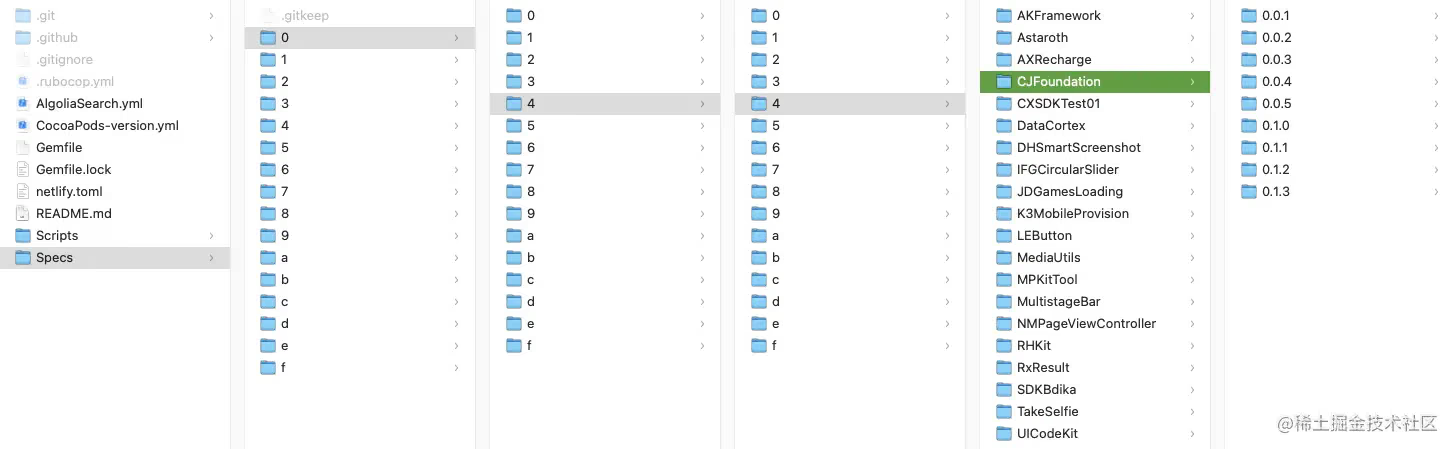
A Spec Repo is a repository of podspecs, i.e., a place that stores related podspec files. Local sources are stored in ~/.cocoapods/repos, pulled from git with the directory structure fully preserved. You may notice that the current directory structure of the Master Specs Repo is a bit special; in earlier versions, the Master Spec Repo had everything in the same directory, but having a large number of files in one directory caused the slow GitHub download problem. To solve this, a hash-table-style approach was adopted. Specifically, the name is MD5-hashed to obtain a hash value, and the first three characters are used as the directory prefix to distribute the files. In addition, CocoaPods later adopted CDN and trunk to further speed up downloads. If you’re interested, refer to CocoaPods Source management mechanism.
For example: md5("CJFoundation") => 044d913fdd5a52b303222c357521f744; CJFoundation is then in the /Specs/0/4/4 directory.
Create
You can quickly create your own pod with the pod lib create [PodName] command. After filling in info like the platform, language, whether to include a Demo, or the test framework, CocoaPods pulls a pod template from the default Git address. You can also specify a template address with --template-url=URL. After it finishes, the whole file structure looks like this:
1
2
3
4
5
6
7
8
9
10
11
12
13
14
15
16
17
18
tree CustomPod -L 2
CustomPod
├── CustomPod
│   ├── Assets // 存放资源文件
│   └── Classes
│       └── RemoveMe.[swift/m] // 单一文件以确保最初编译工作
├── CustomPod.podspec // Pod 的 spec 文件, 是一个 Pod 依赖的索引以及规范信息
├── Example // 用作演示/测试的示例项目
│   ├── CustomPod
│   ├── CustomPod.xcodeproj
│   ├── CustomPod.xcworkspace
│   ├── Podfile
│   ├── Podfile.lock
│   ├── Pods
│   └── Tests
├── _Pods.xcodeproj -> Example/Pods/Pods.xcodeproj // 指向 Pods 项目的以获得 Carthage 支持
├── LICENSE // 许可证
└── README.md  // 自述文件
Development
Put the source files and resources into the Classes / Assets folders respectively, or organize the files however you like, and edit the corresponding entries in the podspec file. For any configuration options you want to use, refer to the podspec syntax specification above. Generally, a pod under development is developed as a local pod that other projects depend on, whether using the project in the example folder or another project.
pod 'Name', :path => '~/CustomPod/'
Testing
Use pod lib lint to verify that the pod repository works properly.
Release
As mentioned earlier, a podspec can be seen as the index file for the whole repository, and with this file you can organize a Pod. Therefore, both the official source and private sources only need the podspec, while the other files should be pushed to the repository specified in the podspec’s source, which should be created by yourself. When preparing to release and push the source code, you need to update the version number and tag it on git, to make the version numbers match — because by default the podspec file has:
1
s.source = { :git => 'https://github.com/XXX/CustomPod.git', :tag => s.version.to_s }
Your workflow might look like this:
1
2
3
4
5
6
7
8
$ cd ~/code/Pods/NAME
$ edit NAME.podspec
# set the new version to 0.0.1
# set the new tag to 0.0.1
$ pod lib lint
$ git add -A && git commit -m "Release 0.0.1."
$ git tag '0.0.1'
$ git push --tags
There are several ways to push a podspec file:
- Push to the public repository, using the trunk subcommand. For more, see Getting setup with Trunk:
1
2
3
4
5
6
# Register via email
pod trunk register orta@cocoapods.org 'Orta Therox' --description='macbook air'
# Push the specified podspec file to the public repository
pod trunk push [NAME.podspec]
# Add others as collaborators
pod trunk add-owner ARAnalytics kyle@cocoapods.org
- Push to a private source, such as Artsy/Specs, using the repo subcommand. For more, see Private Pods:
1
2
3
4
5
6
7
# Add the private source URL locally
pod repo add REPO_NAME SOURCE_URL
# Check whether the private source is installed and ready
cd ~/.cocoapods/repos/REPO_NAME
pod repo lint .
# Add the pod's podspec to the specified REPO_NAME
pod repo push REPO_NAME SPEC_NAME.podspec
- Don’t push to any source. If the podspec file can be retrieved by URL, that URL can be used — usually the repository address, for example:
1
pod 'AFNetworking', :git => 'https://github.com/XXX/CustomPod.git'
Semantic Versioning
Semantic versioning, as the name implies, is a semantic form of version control. It doesn’t require strict compliance, but hopes developers will follow it as much as possible. If dependencies between libraries are too tight, there’s a risk of version control lock-in (you may need to bump every dependency to complete an upgrade); if dependencies are too loose, version chaos is unavoidable (a library’s compatibility may no longer support previous versions). Semantic versioning is one of the solutions to this problem. Both in CocoaPods and in Swift Package Manager, the official recommendation is that library developers follow this principle for version numbers:
For example, given a version number MAJOR.MINOR.PATCH:
MAJOR: change it when making incompatible API changes
MINOR: change it when adding features in a backward-compatible way
PATCH: change it when making backward-compatible bug fixes
Pre-release version numbers and build metadata can be appended after MAJOR.MINOR.PATCH as extensions.
A Brief Analysis of CocoaPods’ Principles
Core Components of CocoaPods
CocoaPods is managed by Ruby, and its core is also divided into individual components. Downloading the source code, you can see the Gemfile below — it depends on several gems. Interestingly, the cp_gem function uses SKIP_UNRELEASED_VERSIONS and path to control whether to use local gem paths, enabling switching between DEVELOPMENT and RELEASE environments.
1
2
3
4
5
6
7
8
9
10
11
12
13
14
15
16
17
18
19
20
21
22
23
24
25
26
27
28
29
30
31
32
33
SKIP_UNRELEASED_VERSIONS = false
# Declares a dependency to the git repo of CocoaPods gem. This declaration is
# compatible with the local git repos feature of Bundler.
def cp_gem(name, repo_name, branch = 'master', path: false)
  return gem name if SKIP_UNRELEASED_VERSIONS
  opts = if path
           { :path => "../#{repo_name}" }
         else
           url = "https://github.com/CocoaPods/#{repo_name}.git"
           { :git => url, :branch => branch }
         end
  gem name, opts
end

source 'https://rubygems.org'

gemspec

group :development do
  cp_gem 'claide',                'CLAide'
  cp_gem 'cocoapods-core',        'Core'
  cp_gem 'cocoapods-deintegrate', 'cocoapods-deintegrate'
  cp_gem 'cocoapods-downloader',  'cocoapods-downloader'
  cp_gem 'cocoapods-plugins',     'cocoapods-plugins'
  cp_gem 'cocoapods-search',      'cocoapods-search'
  cp_gem 'cocoapods-trunk',       'cocoapods-trunk'
  cp_gem 'cocoapods-try',         'cocoapods-try'
  cp_gem 'molinillo',             'Molinillo'
  cp_gem 'nanaimo',               'Nanaimo'
  cp_gem 'xcodeproj',             'Xcodeproj'
  gem 'cocoapods-dependencies', '~> 1.0.beta.1'
  ...
end
These components are relatively independent and split into separate Gem packages. In Core Components, you can find brief descriptions of these components. You can also check the detailed documentation in CocoaPods’ GitHub.
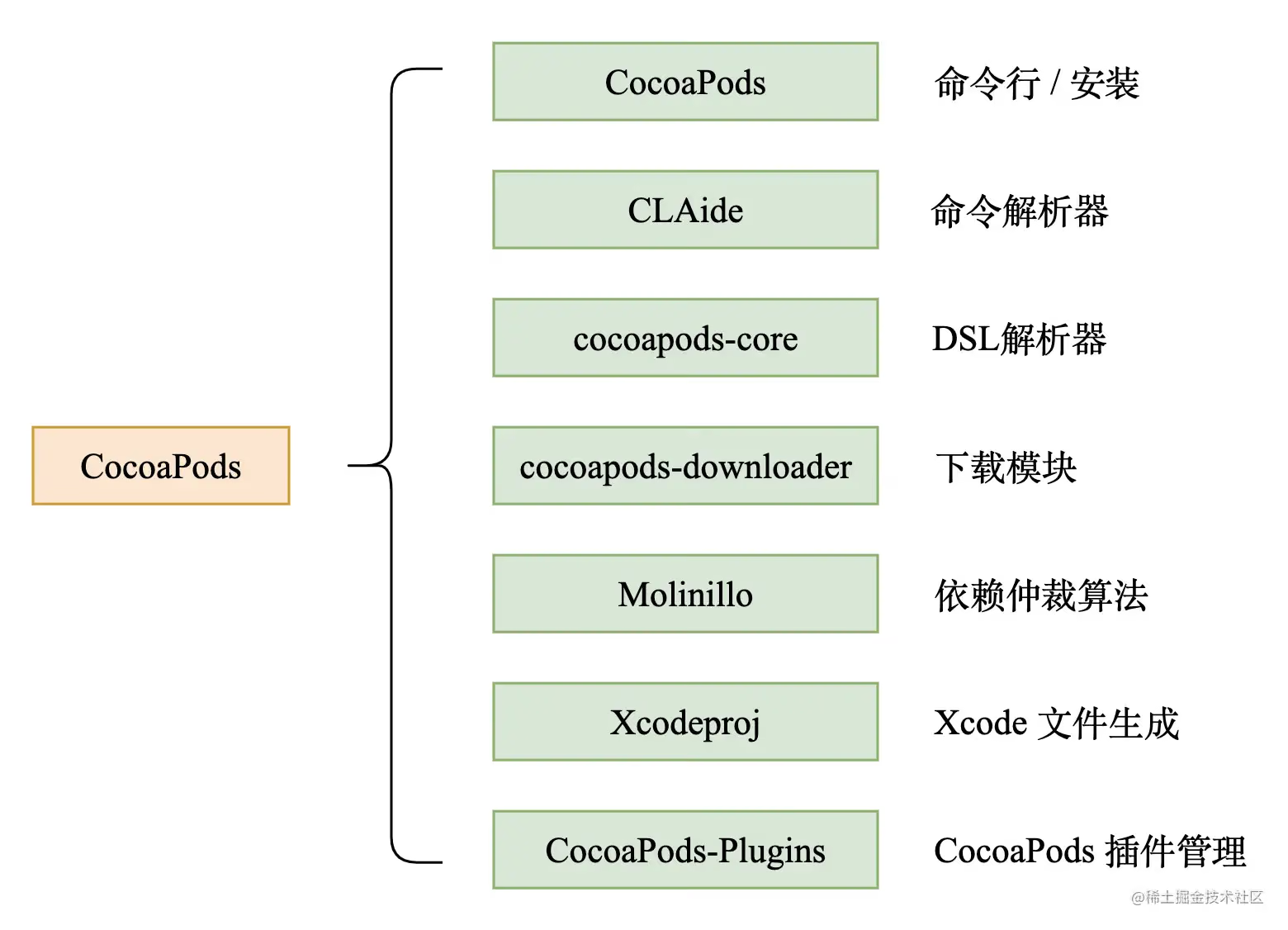
CocoaPods: command-line support and the installer; it also handles all user interactions with CocoaPods.cocoapods-core: parsing of template files such as Podfile, .podspec, etc.CLAide: a simple command-line parser that provides an API for quickly creating fully-featured command-line interfaces.cocoapods-downloader: used to download source code, providing downloaders for various types of source control (HTTP/SVN/Git/Mercurial). It supports downloading and extracting tags, commits, revisions, branches, and zip files.Molinillo: CocoaPods’ wrapper around the dependency resolution algorithm — a backtracking algorithm with forward checking. Not just in pods; Bundler and RubyGems also use this same resolution algorithm.Xcodeproj: creates and modifies Xcode projects through Ruby, e.g., script management, library building, Xcode workspace and configuration file management.cocoapods-plugins: plugin management. It includes thepod pluginscommand to help you get a list of available plugins and develop a new plugin. You can learn more withpod plugins --help.
What does pod install do
Running pod install --verbose shows more debugging info during the pod install process. The following mainly references Getting a holistic view of CocoaPods core components .
After message forwarding and CLAide command parsing, the install! function in CocoaPods/lib/cocoapods/installer.rb is finally called. Here’s the main flow:
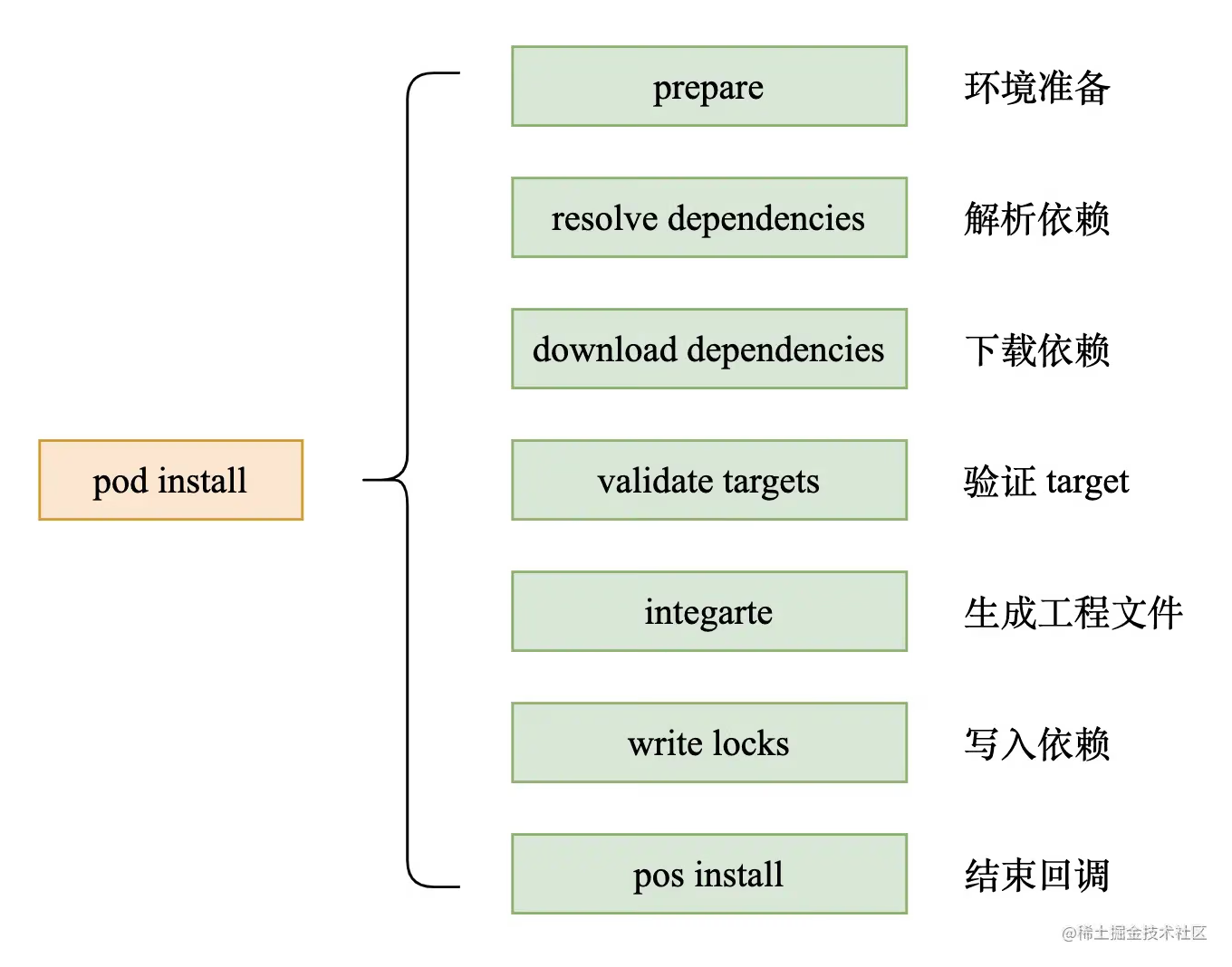
1
2
3
4
5
6
7
8
9
10
11
12
13
14
15
def install!
prepare
resolve_dependencies
download_dependencies
validate_targets
clean_sandbox
if installation_options.skip_pods_project_generation?
show_skip_pods_project_generation_message
run_podfile_post_install_hooks
else
integrate
end
write_lockfiles
perform_post_install_actions
end
1. Install environment preparation (prepare)
1
2
3
4
5
6
7
8
9
10
11
12
13
14
15
16
17
18
def prepare
  # If the current directory is detected as Pods, raise to terminate directly
  if Dir.pwd.start_with?(sandbox.root.to_path)
    message = 'Command should be run from a directory outside Pods directory.'
    message << "\n\n\tCurrent directory is #{UI.path(Pathname.pwd)}\n"
    raise Informative, message
  end
  UI.message 'Preparing' do
    # If the lock file's CocoaPods major version differs from the current one, update the xcodeproj project files with the new version's configuration
    deintegrate_if_different_major_version
    # Build the subdirectory structure for the sandbox (Pods) directory
    sandbox.prepare
    # Check whether PluginManager has any pre-install plugins
    ensure_plugins_are_installed!
    # Execute all pre-install hook methods in the plugins
    run_plugins_pre_install_hooks
  end
end
In the prepare phase, the pod install environment is prepared, including the directory structure, version consistency, and the pre_install hooks.
2. Resolving dependency conflicts (resolve dependencies)
1
2
3
4
5
6
7
8
9
10
11
12
13
14
15
16
17
18
19
20
21
22
23
def resolve_dependencies
    # Fetch the sources
    plugin_sources = run_source_provider_hooks
    # Create an Analyzer
    analyzer = create_analyzer(plugin_sources)
    # If the repo_update flag is set
    UI.section 'Updating local specs repositories' do
        # Perform the Analyzer's repo update operation
        analyzer.update_repositories
    end if repo_update?
    UI.section 'Analyzing dependencies' do
        # Take the latest analysis results from the analyzer: @analysis_result, @aggregate_targets, @pod_targets
        analyze(analyzer)
        # Misspelling fallback recognition, whitelist filtering
        validate_build_configurations
    end
    # If deployment? is true, verify whether the podfile & lockfile need to be updated
    UI.section 'Verifying no changes' do
        verify_no_podfile_changes!
        verify_no_lockfile_changes!
    end if deployment?
    analyzer
end
An Analyzer object is generated from the Podfile, Podfile.lock, and manifest.lock. Internally it uses the Molinillo algorithm to resolve a dependency relationship table and performs a series of analyses and dependency conflict resolutions.
3. Downloading dependency files (download dependencies)
1
2
3
4
5
6
7
8
9
10
def download_dependencies
  UI.section 'Downloading dependencies' do
    # Construct a Pod Source Installer
    install_pod_sources
    # Execute the pre-install hooks defined in the podfile
    run_podfile_pre_install_hooks
    # Clean up pod source info according to the configuration, mainly removing unused platform-related content
    clean_pod_sources
  end
end
After the analysis and dependency conflict resolution above, dependencies are downloaded. Whether a dependency is downloaded depends on info like whether it was newly added or modified. After downloading, a cache copy is also kept locally, in ~/Library/Caches/CocoaPods.
4. Validating targets (validate targets)
1
2
3
4
5
6
7
8
9
10
11
12
def validate_targets
    validator = Xcode::TargetValidator.new(aggregate_targets, pod_targets, installation_options)
    validator.validate!
end

def validate!
    verify_no_duplicate_framework_and_library_names
    verify_no_static_framework_transitive_dependencies
    verify_swift_pods_swift_version
    verify_swift_pods_have_module_dependencies
    verify_no_multiple_project_names if installation_options.generate_multiple_pod_projects?
end
verify_no_duplicate_framework_and_library_names: verifies there are no frameworks/libraries with duplicate namesverify_no_static_framework_transitive_dependencies: verifies that dynamic libraries don’t have static library dependencies. Personally, I think this check is unnecessary — at least it shouldn’t be an error.verify_swift_pods_swift_version: verifies that the Swift pod’s Swift version configuration is set and mutually compatibleverify_swift_pods_have_module_dependencies: verifies whether the Swift pod supports modulesverify_no_multiple_project_names: verifies there are no project names that are duplicates
5. Generating the project (Integrate)
1
2
3
4
5
6
7
8
9
10
11
12
13
14
15
16
17
18
19
20
21
22
23
24
25
26
27
28
29
def integrate
    generate_pods_project
    if installation_options.integrate_targets?
        # Integrate user configuration, read dependencies, and configure with xcconfig
        integrate_user_project
    else
        UI.section 'Skipping User Project Integration'
    end
end

def generate_pods_project
    # Create a stage sandbox to save the pre-install sandbox state, to support incremental build comparison
    stage_sandbox(sandbox, pod_targets)
    # Check whether incremental builds are supported; if so, return the cache result
    cache_analysis_result = analyze_project_cache
    # Targets that need to be regenerated
    pod_targets_to_generate = cache_analysis_result.pod_targets_to_generate
    # Aggregate targets that need to be regenerated
    aggregate_targets_to_generate = cache_analysis_result.aggregate_targets_to_generate
    # Clean up the headers and pod folders of targets that need to be regenerated
    clean_sandbox(pod_targets_to_generate)
    # Generate the Pod Project, assembling the paths, build settings, source file references, static library files, resource files, etc. of all Pods in the sandbox
    create_and_save_projects(pod_targets_to_generate, aggregate_targets_to_generate,
                                cache_analysis_result.build_configurations, cache_analysis_result.project_object_version)
    # SandboxDirCleaner is used to clean up unused headers and target support files directories in incremental pod installs
    SandboxDirCleaner.new(sandbox, pod_targets, aggregate_targets).clean!
    # Update the cache result after installation to the `Pods/.project_cache` directory
    update_project_cache(cache_analysis_result, target_installation_results)
end
All the components from the earlier version arbitration are organized through project files, and some user-specified configurations are applied to the project.
6. Writing dependencies (write lockfiles)
1
2
3
4
5
6
7
8
9
10
11
12
13
def write_lockfiles
  @lockfile = generate_lockfile
  UI.message "- Writing Lockfile in #{UI.path config.lockfile_path}" do
    # No need to invoke Sandbox#update_changed_file here since this logic already handles checking if the
    # contents of the file are the same.
    @lockfile.write_to_disk(config.lockfile_path)
  end
  UI.message "- Writing Manifest in #{UI.path sandbox.manifest_path}" do
    # No need to invoke Sandbox#update_changed_file here since this logic already handles checking if the
    # contents of the file are the same.
    @lockfile.write_to_disk(sandbox.manifest_path)
  end
end
Writes the dependency updates into Podfile.lock and Manifest.lock.
7. Completion callbacks (perform post install action)
1
2
3
4
5
6
7
8
9
10
11
12
def perform_post_install_actions
  # Call HooksManager to execute each plugin's post_install method
  run_plugins_post_install_hooks
  # Print deprecated pod target warnings
  warn_for_deprecations
  # If the pod is configured with script phases, proactively print a hint message
  warn_for_installed_script_phases
  # Warn about specs removed from the master specs repo
  warn_for_removing_git_master_specs_repo
  # Print the finish message `Pod installation complete!`
  print_post_install_message
end
Finally, the finishing work: executing the post install action hooks and printing some warnings.
CocoaPods + Plugins
As early as 2013, CocoaPods added plugin support, mainly to add features that don’t fit into dependency management and ecosystem growth. CocoaPods Plugins can: add hooks before and after install, add new commands to pod, and use Ruby’s dynamic nature to do almost anything. Below are some common plugins:
- cocoapods-binary: a relatively early binary plugin library and the inspiration for many binary solutions
- cocoapods-repo-update: automates
pod repo update - cocoapods-integrate-flutter: integrates Flutter with existing iOS apps
- cocoapods-uploader: uploads files/directories to a remote repository
Many plugins may have been unmaintained for a long time — readers should weigh this carefully before using them.
Less Common Concepts
CocoaPods’ configuration covers almost every aspect of Xcode Build, so there are many less common concepts. Here’s an aggregation of links for reference.
Clang Module / module_map / umbrella header: Clang Module is a concept introduced in Clang 16.0.0 to solve problems caused by
#include/#importheader inclusion; module_map describes the relationship between clang modules and headers; umbrella header is a syntax rule in module_map, indicating that all headers in a specified directory should be included in the module.- Modules
- Clang Module
- Module in LLVM
- Hmap / Xcode Header / CocoaPods Headers
A Header Map is a set of header info mapping tables, indicated by the .hmap suffix, stored overall in Key-Value form; the Key is the header file name, and the Value is the header file’s physical address.
Xcode Phases - Headers are divided into public, private, and project in the build configuration, to associate with targets; among them, public and private headers are copied to the header and PrivateHeaders of the final artifacts, while project headers aren’t used externally and won’t be placed in the final artifacts.
- A tool that can speed up the compilation of large iOS projects by 50%
- What are build phases?
- Xcconfig: a configuration file used to declare and manage build settings, e.g., to distinguish between different development environments.
- On-Demand Resources: a concept introduced at WWDC 2015 for loading resource files on demand.
Summary
Cocoapods has been around for so many years and is still serving existing iOS projects — that’s enough to show the importance of package management. Many SDK vendors use it to manage SDK artifact projects, and many business teams use it for modular compilation of projects. All of this is enough to show that this tool is an essential professional tool for iOS developers. I hope everyone digs into the many details carefully.
Reference list:
Cocoapods.org official website
In-depth understanding of CocoaPods
Systematically understanding iOS libraries and frameworks Cocoapods script phases CocoaPods Podfile parsing principles
Semantic Versioning 2.0.0
A tool that can speed up the compilation of large iOS projects by 50%
CocoaPods Source management mechanism
Version management tools and the Ruby toolchain environment
Getting a holistic view of CocoaPods core components
Engineering efficiency optimization: CocoaPods optimization
Common commands for the pod repository
How to use XCAssets in a podspec in pod
Work log: integrating third-party frameworks and .a into Pod spec